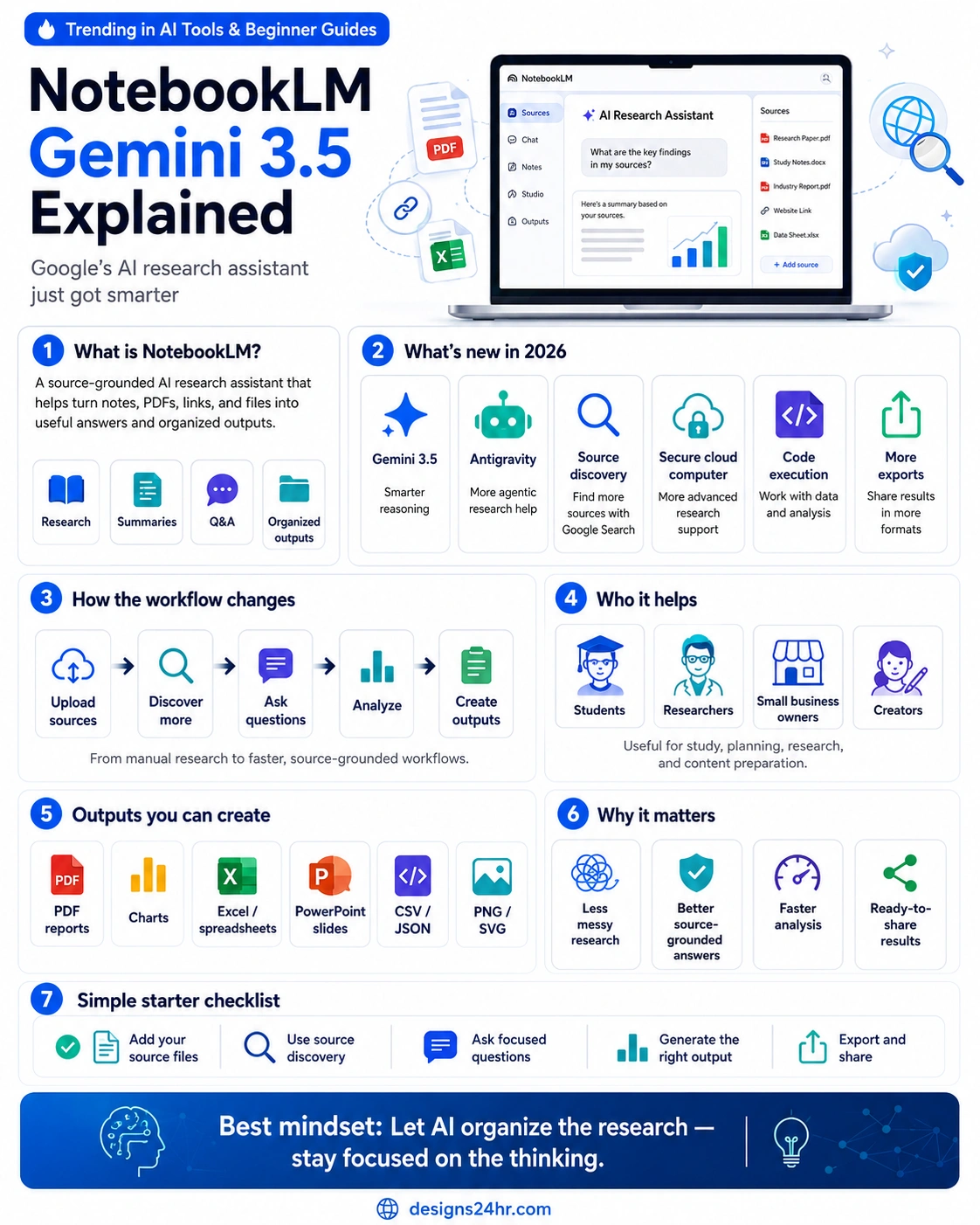
NotebookLM Gemini 3.5 is one of Google’s biggest research-tool updates, turning NotebookLM from a source-grounded note assistant into a more capable AI research workspace for students, researchers, creators, and professionals.
The latest Google NotebookLM update 2026 brings Gemini 3.5, Antigravity-powered capabilities, source discovery, code execution support, secure cloud computer features, and more export options. In simple terms, NotebookLM is becoming better at helping users move from messy research to organized insights, reports, charts, spreadsheets, and presentations.
For everyday users, the most important idea is simple: NotebookLM is no longer just a place to upload documents and ask questions. It is becoming a more active research assistant that can help discover sources, analyze information, generate structured outputs, and support deeper thinking.
Quick answer: NotebookLM Gemini 3.5 is Google’s upgraded AI research assistant experience. It helps users work with trusted sources, discover new information, ask better questions, analyze files, run deeper research workflows, and export useful outputs like reports, charts, spreadsheets, slide decks, and more.
Key takeaways:
- Focus keyword: NotebookLM Gemini 3.5.
- Main update: NotebookLM is upgraded with Gemini 3.5 and Antigravity-powered research capabilities.
- Big benefit: Users can move from source files to organized insights and export-ready outputs faster.
- Best for: Students, researchers, small business owners, content creators, educators, and teams working with complex information.
What Is NotebookLM?
NotebookLM is Google’s AI research assistant and thinking partner. It is designed to help users understand and work with trusted sources, including documents, notes, links, PDFs, reports, and other research materials.
Unlike a general chatbot that may answer from broad model knowledge, NotebookLM is built around the sources you provide. That makes it especially useful when you want source-grounded summaries, explanations, comparisons, study guides, research notes, and organized outputs based on specific materials.
That source-grounded approach is why NotebookLM has become popular with students, researchers, writers, marketers, educators, analysts, and business owners who need to understand complex information without losing track of the original sources.
NotebookLM Gemini 3.5 Explained
NotebookLM Gemini 3.5 means NotebookLM is now powered by Google’s newer Gemini 3.5 model capabilities. This matters because stronger reasoning, better agentic workflows, and improved code-related abilities can make research tasks more useful and more structured.
Instead of only summarizing a source, NotebookLM can now support more advanced workflows: finding relevant sources, asking focused research questions, organizing insights, creating outputs, and helping users move from information overload to clearer understanding.
This is why the update is important. NotebookLM is becoming more than a note assistant. It is moving closer to a full AI research workspace.
What’s New in the Google NotebookLM Update 2026?
The new update focuses on making NotebookLM more capable, more agentic, and more useful for real research workflows. The biggest upgrades include Gemini 3.5, Antigravity support, source discovery, secure cloud computer features, code execution, and more export formats.
| New Feature | What It Means | Why It Matters |
|---|---|---|
| Gemini 3.5 | NotebookLM uses newer Gemini model capabilities for stronger research support. | Users can get more useful analysis, better reasoning, and more reliable source-grounded help. |
| Antigravity | NotebookLM connects with Google’s agentic coding platform capabilities. | It can support more advanced workflows, including code-assisted research and analysis. |
| Source discovery | NotebookLM can help users find relevant sources through Google Search-based discovery. | Users can start research faster instead of manually searching across many tabs. |
| Secure cloud computer | Each notebook can support more advanced computing-style research tasks. | This opens the door to deeper analysis and more powerful output creation. |
| More exports | NotebookLM can create more output types, including reports, charts, spreadsheets, slides, and visual files. | Users can turn research into shareable files faster. |
NotebookLM AI Research Assistant: Why It Matters
The phrase NotebookLM AI research assistant matters because research is usually messy. People collect PDFs, articles, spreadsheets, links, meeting notes, reports, and screenshots, then spend hours trying to organize everything into something useful.
NotebookLM helps reduce that friction. It can summarize sources, answer questions, compare ideas, create structured notes, and help users understand what the source material is actually saying.
With Gemini 3.5 and the latest updates, the tool becomes more useful for people who do not just want an answer. They want a research workflow: collect, understand, analyze, create, export, and share.
How NotebookLM Source Discovery Works
NotebookLM source discovery is one of the most useful parts of the update for beginners. Instead of starting with a blank notebook and manually uploading every source, users can begin with a research question and let NotebookLM help discover relevant sources.
This is helpful for students starting a paper, creators building a content brief, small business owners researching a market, or professionals preparing a report. The research process can begin with a question, then move into source discovery, source review, and source-grounded analysis.
The important rule is still the same: users should review sources carefully. AI can help find and organize research, but human judgment is still needed to check quality, relevance, and accuracy.
NotebookLM Antigravity Explained
NotebookLM Antigravity explained simply: Antigravity is Google’s agentic coding platform, and its capabilities can help NotebookLM perform more advanced research and analysis tasks.
This matters because many research tasks are not just reading tasks. Sometimes you need to analyze data, generate charts, work with files, organize information, or create structured outputs. Antigravity-powered capabilities can help NotebookLM move beyond simple Q&A into more action-oriented research workflows.
For non-technical users, the main takeaway is not “coding.” The main takeaway is that NotebookLM can become more capable at doing behind-the-scenes work that supports research, analysis, and output creation.
What Is the NotebookLM Cloud Computer?
NotebookLM cloud computer refers to the secure computing support connected to NotebookLM’s upgraded workflows. This can help NotebookLM handle more advanced tasks, including code execution, data analysis, and output generation.
For users, this means NotebookLM may be able to do more than read your files. It can help process information, generate structured outputs, and support deeper research tasks inside the notebook experience.
Availability can depend on rollout, plan, account type, and Google’s current product limits, so users should check the latest official NotebookLM and Google account details before expecting every feature to appear immediately.
How the NotebookLM Research Workflow Changes
The new workflow is much more powerful than traditional manual research. Instead of opening 20 tabs, saving random links, copying notes into a document, and then trying to write a report from scratch, NotebookLM can help organize the process.
| Old Research Workflow | NotebookLM Gemini 3.5 Workflow |
|---|---|
| Manually search for sources across the web. | Use source discovery to help find relevant materials. |
| Read every file from start to finish before organizing notes. | Ask source-grounded questions and get summaries, comparisons, and key points. |
| Build reports, charts, and slides manually. | Create export-ready outputs from organized research. |
| Lose track of where information came from. | Keep work grounded in selected source materials. |
NotebookLM Export Formats: What Can You Create?
NotebookLM export formats are a major reason this update matters. Research is only valuable when you can turn it into something useful: a report, chart, spreadsheet, presentation, visual, or structured file.
With the upgraded NotebookLM experience, users can create and export more types of outputs, including:
- PDF reports for summaries, briefs, and research documents.
- Charts and visualizations for explaining data and insights.
- Excel files for spreadsheets and structured analysis.
- PowerPoint files for presentations and team sharing.
- CSV and JSON files for structured data workflows.
- PNG and SVG files for visuals, charts, and shareable graphics.
This turns NotebookLM into a more practical AI research assistant for work, not just a place to ask questions about documents.
Who Should Use NotebookLM Gemini 3.5?
NotebookLM Gemini 3.5 can help many different users, but it is especially useful for people who work with lots of source material.
Students
Students can use NotebookLM as an AI research tool for students to summarize readings, create study guides, ask questions about uploaded notes, compare sources, and prepare for exams. The key is to use it for understanding, not copying.
Researchers
Researchers can use NotebookLM to organize papers, compare findings, explore source material, and turn complex reading into structured notes or reports.
Small business owners
Business owners can use NotebookLM to analyze market reports, customer research, competitor pages, meeting notes, product documents, and strategy materials.
Creators and marketers
Creators can use NotebookLM to turn messy research into outlines, briefs, topic clusters, scripts, blog structures, and content ideas grounded in source material.
Teams and professionals
Teams can use NotebookLM to create internal briefs, meeting summaries, project research hubs, training materials, and export-ready reports.
Best Ways to Use NotebookLM for Research
The best results come from using NotebookLM with a clear workflow. Do not just upload files and ask broad questions. Ask focused questions that match the output you need.
- Add your core sources. Upload or connect the materials you actually trust.
- Use source discovery carefully. Let NotebookLM help find more sources, then review them for quality.
- Ask focused questions. Better questions create better answers.
- Compare sources. Ask where sources agree, disagree, or leave gaps.
- Create the right output. Choose a report, table, chart, study guide, spreadsheet, or slide deck depending on your goal.
- Review before sharing. Always check important outputs before publishing, submitting, or presenting them.
Best mindset: Let AI organize the research, but stay focused on the thinking. NotebookLM can help you move faster, but your judgment still decides what is useful, accurate, and worth sharing.
Best Prompt Starters for NotebookLM Gemini 3.5
Here are simple prompt starters you can use inside NotebookLM to get better source-grounded results:
- “Summarize the key findings from these sources.”
- “What do these sources agree on?”
- “What are the biggest gaps or unanswered questions?”
- “Create a beginner-friendly study guide from these notes.”
- “Turn this research into a one-page executive brief.”
- “Create a comparison table using only my sources.”
- “Find the strongest evidence for each major point.”
- “Create a slide outline from this research.”
- “Generate chart ideas based on the data in these files.”
- “Turn this source material into a content brief for a blog post.”
NotebookLM vs a Regular AI Chatbot
NotebookLM is different from a regular AI chatbot because it is designed around your sources. A normal chatbot is useful for brainstorming, general explanations, and open-ended help. NotebookLM is better when you want the answer grounded in documents, notes, reports, or links you trust.
| Regular AI Chatbot | NotebookLM AI Research Assistant |
|---|---|
| Good for general brainstorming and quick answers. | Better for working with specific sources and research files. |
| May answer broadly from model knowledge. | Designed to ground responses in your uploaded or selected materials. |
| Useful for creative ideas and general explanations. | Useful for summaries, comparisons, reports, study guides, and research workflows. |
| Can be fast but less tied to your documents. | Can help keep research organized around trusted sources. |
Important Limits to Remember
NotebookLM can be powerful, but it should not replace careful reading, fact-checking, or expert judgment. AI tools can misunderstand context, miss nuance, or create outputs that still need review.
Users should also remember that feature access may vary by account type, rollout status, region, plan, or Workspace availability. If a feature is announced but not visible in your account yet, it may still be rolling out or limited to specific plans.
For sensitive work, confidential documents, legal research, medical content, financial decisions, or academic submissions, review the output carefully and follow the privacy, citation, and originality rules that apply to your situation.
NotebookLM Gemini 3.5 Explained in One Sentence
NotebookLM Gemini 3.5 is Google’s upgraded AI research assistant experience that helps users discover sources, analyze trusted materials, create organized insights, and export research into useful formats like reports, charts, spreadsheets, and presentations.
The main takeaway is clear: NotebookLM is becoming a stronger tool for turning information overload into structured, source-grounded work.
Sources and Further Reading
This article is based on Google’s official NotebookLM and Gemini updates. Read more from Google here: Google: Do better research with NotebookLM, NotebookLM official page, and Google: Gemini 3.5.
For more beginner-friendly AI explainers, visit The AI Edge by Designs24hr. You can also try the Explain This For Me tool, Plain Language Translator, and AI Prompt Generator.
FAQs About NotebookLM Gemini 3.5
What is NotebookLM Gemini 3.5?
NotebookLM Gemini 3.5 is Google’s upgraded NotebookLM experience powered by Gemini 3.5 capabilities. It helps users work with trusted sources, discover information, analyze files, and create export-ready research outputs.
What is NotebookLM used for?
NotebookLM is used for source-grounded research, document summaries, study guides, Q&A, source comparison, content planning, report creation, and organizing complex information.
What is new in the Google NotebookLM update 2026?
The 2026 update adds Gemini 3.5, Antigravity-powered capabilities, source discovery, secure cloud computer support, code execution features, and more export formats.
What is NotebookLM source discovery?
NotebookLM source discovery helps users find relevant sources through Google Search-based research support, making it easier to start a research project without manually searching across many tabs.
What does NotebookLM Antigravity mean?
NotebookLM Antigravity refers to the use of Google’s agentic coding platform capabilities inside NotebookLM workflows, helping support more advanced research, analysis, and output creation.
What export formats can NotebookLM create?
NotebookLM can support more output types such as PDF reports, charts, Excel files, PowerPoint presentations, CSV, JSON, PNG, SVG, and other structured or visual formats depending on feature availability.
Is NotebookLM good for students?
Yes. NotebookLM can be useful for students who want to summarize readings, create study guides, ask questions about notes, compare sources, and prepare for exams. Students should use it to understand material, not to copy work.
Is NotebookLM better than a regular chatbot?
NotebookLM is better for source-grounded research because it works around documents and materials you provide or select. A regular chatbot is often better for general brainstorming and open-ended conversations.
AI research tools are getting more powerful, but the goal is still clarity. Designs24hr helps you understand the latest AI updates in a simple, practical way. Share your thoughts in the comments, tell us how you use NotebookLM for research, and come back to Designs24hr whenever you want to learn something new about AI and design.