An AI flashcard generator can turn an hour of formatting into a few minutes of work—but it can also turn one incorrect detail into something you repeatedly memorize. Before you study any AI-generated deck, check that the questions are clear, the answers match your original material, and every card is actually worth learning.
This practical AI flashcard generator checklist helps you turn notes, lecture slides, PDFs, readings, and study guides into more reliable flashcards. You will learn how to prepare your material, generate source-grounded cards, remove weak questions, protect private information, and use active recall without letting AI replace your understanding.
Quick takeaway
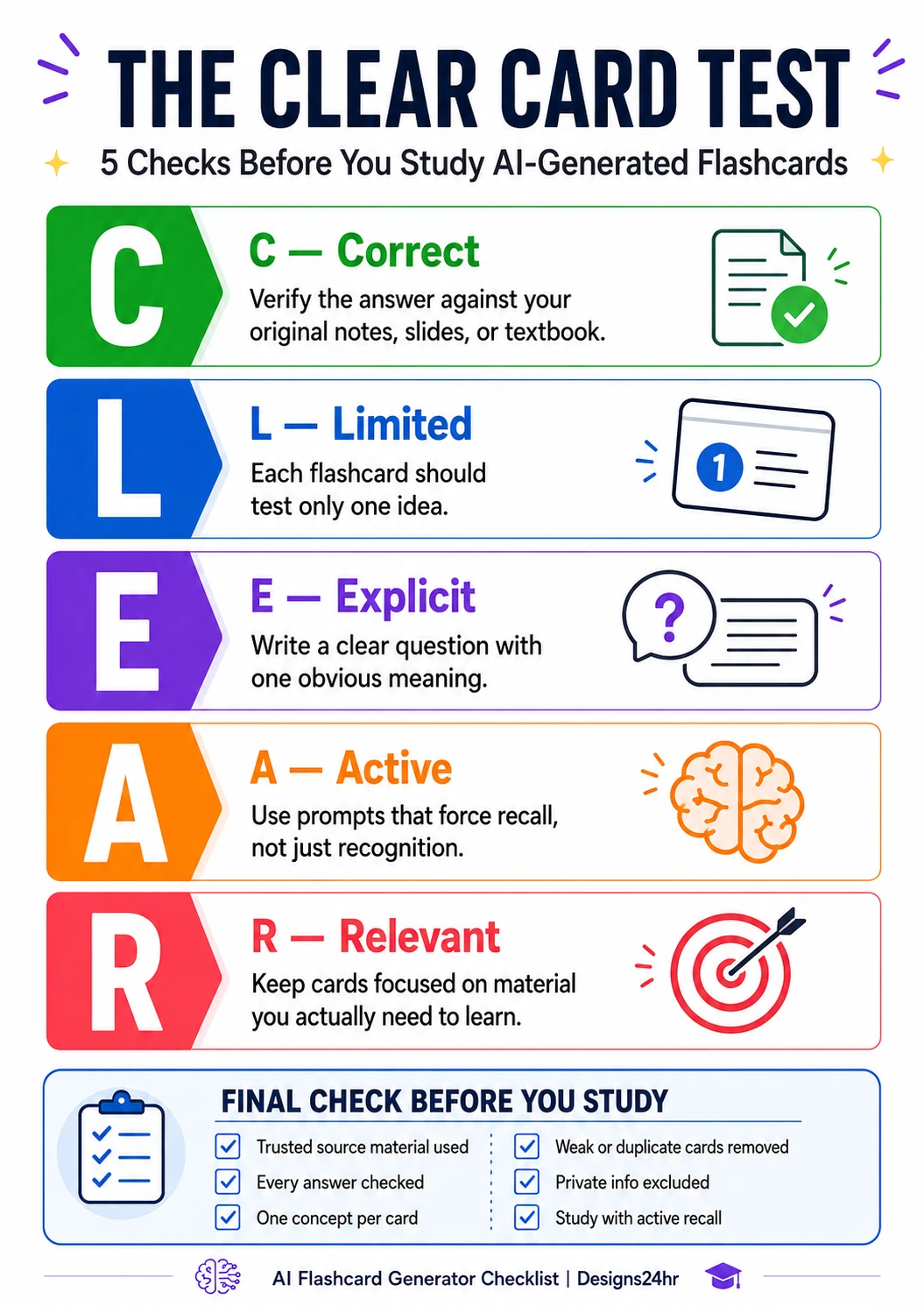
Generate, check, then study. Never begin memorizing an AI-created deck until you have compared important answers with your notes, removed weak cards, and tested every card with the CLEAR method: Correct, Limited, Explicit, Active, and Relevant.
Why You Should Check AI-Generated Flashcards
Current study tools can generate flashcards from uploaded notes, lecture slides, documents, and PDFs. For example, Quizlet promotes an AI flashcard generator that transforms study material into editable cards, while Google’s NotebookLM can create flashcards and quizzes from the sources added to a notebook.
That convenience is useful, but generation is only the first step. An AI system may misunderstand a sentence, remove an important condition, combine unrelated ideas, choose low-value facts, or produce an answer that sounds clearer than the original material while changing its meaning.
Fast does not mean verified
A deck can be generated in seconds while still containing unclear, incomplete, or incorrect cards.
More cards are not always better
A large deck filled with trivia and duplicates can waste time and hide the ideas you genuinely need to learn.
Memorization can reinforce errors
Repeatedly reviewing a mistaken answer can make the mistake feel familiar and therefore more believable.
Your goal is not to prove that every card was written perfectly by AI. Your goal is to create a useful study deck that you understand, can verify, and can confidently correct when necessary.
The most important rule
Do not memorize a card simply because its answer sounds confident. Compare important answers with the original source, especially definitions, formulas, dates, names, quotations, processes, and technical terms.
Prepare Better Source Material Before You Generate Cards
An AI flashcard generator usually produces better results when the source material is focused, complete, and clearly organized. A confusing mixture of unfinished notes, copied web text, old assignments, and unrelated chapters makes it harder for the system to identify what matters.
Use trustworthy study sources
- Teacher-provided notes, slides, handouts, rubrics, and revision guides
- Your assigned textbook or reading material
- Corrected homework and worked examples
- Official course objectives, syllabus topics, or exam specifications
- Your own notes after you have corrected unclear sections
- Reliable academic or institutional sources approved for the course
Clean the material before uploading it
Remove duplicate pages, unrelated chapters, incomplete sentences, navigation menus, advertisements, and answer keys you do not want included. Add headings where possible so each definition, process, example, or topic has a clear place in the document.
Better input example
Instead of uploading an entire 300-page textbook, begin with the chapter, lecture, or topic included in your next assessment. A smaller source set is easier to inspect and makes irrelevant cards less likely.
When a difficult paragraph is stopping you from understanding the source, use the free Explain This For Me tool to clarify the language. Then return to the original material before creating the final card.
Follow This 10-Step AI Flashcard Generator Checklist
Use these checks whenever you create flashcards from notes, PDFs, slides, readings, or pasted text. The sequence is designed to reduce weak cards before they enter your regular study routine.
1 Start With a Clear Learning Goal
Decide what the deck should help you do. “Review Chapter 4” is broad. “Explain the stages of cellular respiration and compare aerobic with anaerobic respiration” gives the generator a clearer target.
Use your syllabus, lesson objectives, exam guide, or teacher’s instructions to identify the knowledge and skills that matter most.
2 Tell the AI to Use Only Your Sources
State that the answers must be based only on the supplied material. Ask the system to mark missing or unclear information instead of filling gaps with unsupported details.
Source grounding reduces unnecessary additions, but it does not remove the need for human checking. The source itself may be incomplete, and the system may still interpret it incorrectly.
3 Keep Most Cards Focused on One Idea
A flashcard becomes difficult to judge when it asks for five facts, three explanations, and two examples at once. Break broad questions into smaller cards that each have a clear purpose.
Compare-and-contrast cards can intentionally include two related ideas, but the comparison should still be specific. For example, “How do mitosis and meiosis differ in number of divisions and resulting cells?” is clearer than “Explain mitosis and meiosis.”
4 Ask Questions With One Clear Meaning
Avoid vague prompts such as “What is important about this?” or “Explain the theory.” A good question tells you exactly what must be recalled.
Name the concept, scope, or relationship. “What are the three conditions required for natural selection?” is easier to answer and score honestly.
5 Require Active Recall
A useful card makes you retrieve an answer before seeing it. Questions such as “Which option looks familiar?” may support recognition, but they do not always show whether you can produce the answer independently.
Use direct questions, fill-in prompts, short explanations, comparisons, sequences, worked steps, and application scenarios that require you to think before revealing the back.
6 Keep Answers Concise but Complete
A one-word answer may be too shallow, while an entire paragraph can be difficult to review. Keep the core answer short enough to evaluate quickly, then add a brief explanation or example only when it improves understanding.
Do not remove qualifications that change the meaning. A shorter answer is not better when it leaves out a condition, exception, unit, sign, date range, or cause-and-effect relationship.
7 Request a Source Reference
Ask for the chapter, page, slide, heading, timestamp, or source name beside each answer when that information is available. A source reference makes checking faster and helps you return to the surrounding explanation.
Treat the reference as a navigation aid, not automatic proof. Open the source and confirm that it actually supports the wording on the card.
8 Mix Recall With Explanation and Application
Definitions and key facts can provide a foundation, but a complete deck should not stop there. Add cards that ask you to explain why something happens, compare two ideas, choose a method, interpret an example, or apply a rule.
For a formula, include one card for the formula, one for the meaning of each variable, and another that asks when or how the formula should be used.
9 Remove Duplicates and Low-Value Trivia
AI may create several cards that test the same fact using slightly different wording. Keep the clearest version unless repeating the concept serves a deliberate purpose.
Delete facts that are interesting but unrelated to the course objectives. Every extra card competes for your review time.
10 Test the Deck Before Repeated Study
Complete one practice pass before adding the deck to your regular schedule. Mark cards that feel ambiguous, impossible to score, overly easy, unexpectedly difficult, or inconsistent with the source.
Rewrite the card immediately when you discover a problem. Do not keep practicing a misleading question while planning to fix it later.
Use the CLEAR Card Test Before You Study
The CLEAR Card Test gives you five quick questions for reviewing every AI-generated flashcard.
C — Correct
Does the answer accurately match your original notes, slides, textbook, or approved source?
L — Limited
Does the card test one manageable idea or one clearly defined comparison?
E — Explicit
Is the question clear enough that you know exactly what kind of answer is expected?
A — Active
Does the card make you retrieve, explain, compare, calculate, or apply knowledge?
R — Relevant
Does the card support a real lesson objective, assignment, skill, or assessment need?
A Card That Fails CLEAR Needs Editing
Do not keep a weak card because it is already in the deck. Correct the answer, narrow the question, make the wording explicit, require genuine recall, or remove the card when it does not support your learning goal.
Weak AI Flashcards Versus Better Study Cards
Use the following examples when editing your generated deck. The better version is not always longer. It is more specific, answerable, and useful for learning.
Use This Prompt to Generate Source-Grounded Flashcards
Paste the prompt below before adding your notes or document. Replace the bracketed details with your subject, level, learning objectives, and preferred number of cards.
You can also use the free AI Prompt Generator to adapt this instruction for a particular subject, tool, age group, learning objective, or output format.
Useful follow-up prompt for improving a weak deck
Verify AI Flashcards With a Three-Pass Review
Checking every word with equal intensity can feel overwhelming. Use three review passes so you can correct the highest-risk problems first.
Pass 1
Check High-Risk Facts
Verify formulas, units, dates, names, quotations, definitions, legal or scientific terms, causes, steps, and anything your teacher expects to be exact.
Pass 2
Check Question Quality
Find vague questions, cards with several unrelated answers, obvious clues, yes-or-no prompts, duplicated ideas, and cards that cannot be scored fairly.
Pass 3
Check Learning Value
Confirm that the deck reflects your learning objectives and includes explanation, comparison, process, or application cards where appropriate.
Verify against the original source—not another AI summary
When checking a card, return to the teacher’s slide, textbook page, course document, worked example, or approved academic source. Asking another AI system whether the first AI system is correct may repeat the same misunderstanding without giving you independent confirmation.
Read the surrounding paragraph
A single sentence may depend on context from the paragraph before it. Read enough of the original material to confirm the conditions, exceptions, examples, and relationships that belong in the answer.
Keep an uncertainty label
When you cannot verify a card immediately, label it “Needs verification” and remove it from active study. An unresolved card should not appear beside confirmed cards as though they have the same reliability.
Do not invent a citation to complete the deck
When a source reference is missing, locate the original evidence or remove the unsupported claim. A realistic-looking page number, quotation, or source title is not useful unless it can be opened and checked.
Study the Finished Deck With Active Recall
Flashcards are most useful when you attempt to retrieve the answer before revealing it. The Education Endowment Foundation describes retrieval practice as recalling previously learned material and notes that effective retrieval can take forms beyond simple factual quizzes.
- Pause before revealing the answer. Give yourself enough time to retrieve it.
- Say or write the answer. A vague feeling of familiarity is not the same as producing the response.
- Score yourself honestly. A partially correct answer should not automatically count as complete.
- Explain difficult answers. Add a sentence about why the answer is correct or how the process works.
- Review errors quickly. Correct a mistaken card before practicing it again.
- Mix old and new material. Do not review only the most recently created cards.
- Use application cards. Practice choosing, comparing, calculating, explaining, and applying knowledge.
- Return to the source. Re-read the lesson when repeated mistakes reveal a gap in understanding.
Use three confidence labels
Know: You can answer accurately and explain the idea.
Almost: You remember part of the answer but miss an important detail.
Relearn: You cannot answer reliably or do not understand why the answer is correct.
Use the free AI Daily Task Planner when you need to divide a large deck into realistic study sessions. Avoid planning hundreds of new cards for one day without time for checking, retrieval, correction, and rest.
Complete the Privacy, School, and Copyright Checks
Before uploading a document to an AI flashcard generator, inspect the material for information that should remain private or should not be shared with an outside service.
Remove personal details
Delete student names, identification numbers, email addresses, grades, private feedback, contact information, and account details.
Follow school rules
Check whether your school, teacher, university, employer, or training provider allows the material to be uploaded to an AI service.
Check the tool settings
Review the service’s current privacy, retention, account, sharing, and data-use controls before adding sensitive material.
Respect source permissions
Do not upload, publish, or redistribute textbooks, paid course files, exams, answer keys, or other material unless you are allowed to use them that way.
Generating flashcards for your own permitted study use is different from publicly sharing a deck containing copied course material. Check the applicable course rules, license, and tool terms before distributing generated cards to a class, group, website, or marketplace.
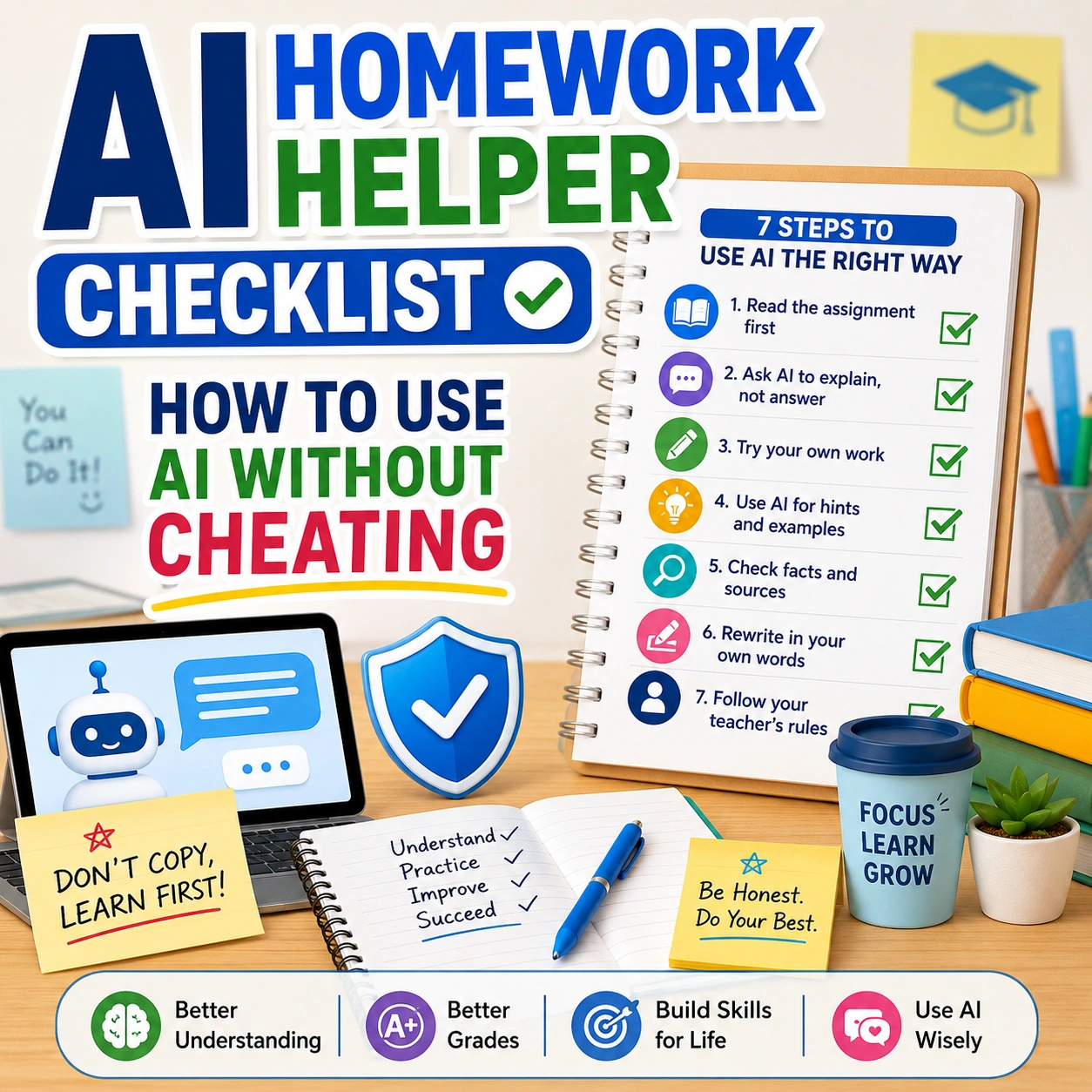
For broader guidance on responsible school use, read the AI Homework Helper Checklist. It explains how to use AI for guidance, explanations, quizzes, and feedback without allowing it to replace your own work.
Complete This Final Check Before You Start Studying
Run through this compact checklist after generating and editing the deck.
- The deck has a clear subject, chapter, objective, or assessment purpose.
- The source material is trustworthy, relevant, and permitted for use.
- Important definitions, formulas, units, dates, names, quotations, and processes have been checked.
- Every question has one clear meaning and can be scored fairly.
- Most cards focus on one concept or one clearly defined comparison.
- Answers are concise, complete, understandable, and supported by the source.
- The deck includes active recall, explanation, comparison, process, or application questions.
- Duplicate, trivial, misleading, overly broad, and unsupported cards have been removed.
- Unverified cards are clearly separated from the active study deck.
- Personal, confidential, restricted, or unnecessary information has been removed.
- You have completed one test session and corrected cards that caused confusion.
- You can explain the main ideas beyond simply repeating the words on the cards.
Let AI Handle the Formatting—not the Final Judgment
An AI flashcard generator can reduce repetitive setup work and help you find possible questions in a large set of notes. Its most useful role is to create a draft that you can inspect, improve, and personalize.
The quality of your study deck still depends on your decisions: which sources you trust, which facts you verify, which questions you keep, and whether the cards require real understanding. A smaller deck of accurate, focused questions is usually more valuable than a large deck you have never reviewed.
Before you memorize the answer, check whether the card deserves to be memorized. Generate the deck, apply the CLEAR Card Test, correct the weak cards, and then begin studying with confidence.
Build a Safer AI Study Workflow
Clarify difficult material, create a focused prompt, organize your study sessions, and follow responsible AI homework practices.
Explain Difficult Material Create a Study Prompt Plan Study Sessions Explore AI Learning Guides
Frequently Asked Questions
What is an AI flashcard generator?
An AI flashcard generator is a tool that analyzes notes, documents, slides, PDFs, or a written topic and creates suggested question-and-answer study cards. The generated cards should be reviewed before studying.
Can AI create flashcards from notes or PDFs?
Yes. Several current study tools can generate flashcards from uploaded notes, documents, lecture slides, or PDFs. Available formats, limits, and features depend on the tool and account.
Are AI-generated flashcards accurate?
They can be useful, but they are not guaranteed to be accurate. Compare important answers with your original notes, teacher materials, textbook, worked examples, or another approved source before memorizing them.
How do I check AI flashcards before studying?
Use the CLEAR Card Test. Confirm that each card is Correct, Limited to a manageable idea, Explicit, Active, and Relevant. Then verify high-risk facts and complete one practice session before regular review.
Should every flashcard contain only one concept?
One main concept per card is a helpful starting rule because it makes answers easier to retrieve and score. A clearly defined comparison card may include two related concepts when the relationship itself is what you need to learn.
Can AI flashcards help with active recall?
They can support active recall when the question makes you retrieve or explain an answer before revealing it. Cards that rely only on recognition, obvious clues, or yes-or-no responses may provide weaker recall practice.
Is using an AI flashcard generator cheating?
Using AI to create study aids is not automatically cheating, but rules vary by teacher, school, course, and assessment. Follow the applicable instructions and do not use generated cards to avoid work you are expected to complete yourself.
Can AI flashcards replace reading the original material?
No. Flashcards remove surrounding context and are best used for practice after you have read, discussed, or learned the material. Return to the original source whenever you cannot explain why an answer is correct.
What information should students avoid uploading?
Avoid uploading names, identification numbers, grades, private teacher feedback, contact details, confidential records, restricted exams, answer keys, or copyrighted material you are not permitted to upload.
How many AI-generated flashcards should I create?
Create a number you can realistically verify and review. Begin with the essential learning objectives, test the deck, and add more cards only when they cover a meaningful gap rather than duplicating existing questions.
Helpful Sources and Further Reading
- Google for Education: NotebookLM for learning
- Google NotebookLM Help: Generate flashcards or quizzes
- Quizlet: AI Flashcard Generator
- Education Endowment Foundation: Refining retrieval practice
- Designs24hr: AI Homework Helper Checklist
AI tool features, limits, privacy controls, and availability can change. Review the current information provided by the tool before uploading study material.