10 Daily AI Habits to Save Time, Stay Focused, and Get More Done
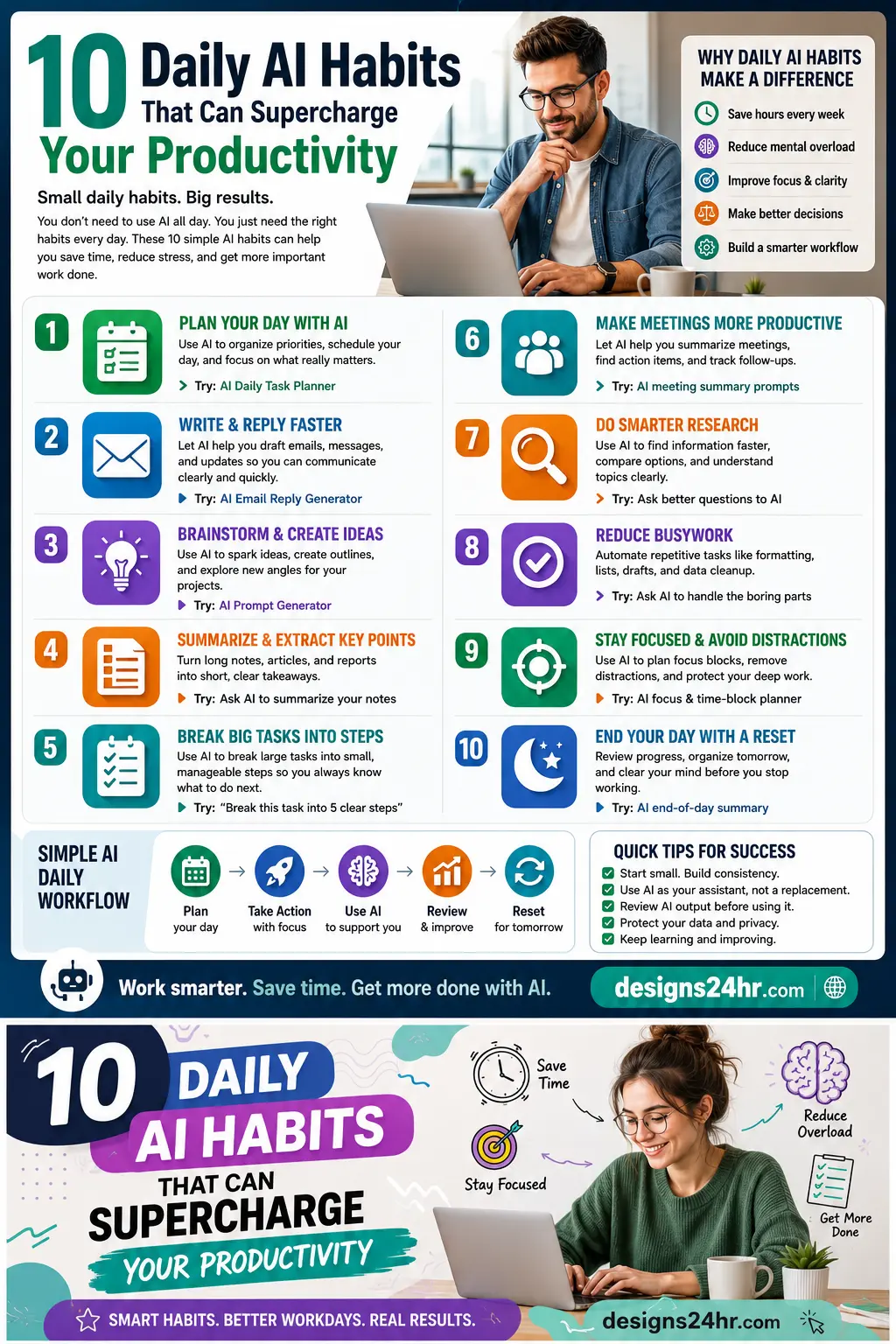
You do not need to use AI all day to get real results. The smarter approach is to build small daily AI habits that remove friction from the way you already work.
A good AI habit can help you plan faster, write clearer, summarize information, break big tasks into smaller steps, prepare for meetings, reduce busywork, and end the day with less mental clutter. These habits are simple enough for beginners, but powerful enough to improve how you work every day.
Why Daily AI Habits Matter
Productivity is not only about doing more. It is about spending less energy on repetitive work so you can focus on what matters. AI can help by turning messy information into clear action, but only when you use it with intention.
Instead of opening random tools and hoping they help, build a repeatable AI workflow. Start with one habit, use it daily, and add more as your work becomes easier.
If you want to begin with planning, use the AI Daily Task Planner to organize your top priorities before your day gets busy.
1. Plan Your Day With AI
The first useful AI habit is daily planning. Before jumping into messages, meetings, or tasks, ask AI to help organize your day.
You can use AI to sort priorities, estimate time, group related tasks, and create a simple order of action. This helps you avoid starting the day overwhelmed by a long to-do list.
Try this prompt: “Organize my tasks into top priorities, quick wins, deep work, and tasks I can do later.”
2. Write and Reply Faster
Emails, messages, updates, and short replies can take more time than expected. AI can help you create a first draft, improve tone, shorten long text, or make a message sound more professional.
This habit is useful for work emails, client replies, customer support, school communication, and everyday messages that need to be clear.
For faster responses, try the AI Email Reply Generator to create clear and polished replies without starting from a blank screen.
3. Brainstorm and Create Ideas
AI can help when you are stuck, tired, or staring at a blank page. Use it to brainstorm ideas for content, projects, presentations, social posts, business offers, study plans, or creative directions.
The goal is not to copy AI word for word. The goal is to get momentum. AI can give you options, angles, outlines, and starting points so you can choose the best direction.
If your prompts feel too basic, use the AI Prompt Generator to turn rough ideas into stronger AI prompts.
4. Summarize and Extract Key Points
Long notes, articles, reports, meeting transcripts, and research can quickly become overwhelming. A powerful daily AI habit is asking AI to summarize information into the main points.
You can ask for key takeaways, action items, deadlines, risks, unanswered questions, or a simple explanation. This helps you understand information faster and decide what deserves deeper attention.
Try this prompt: “Summarize this into key takeaways, action items, and anything I should not miss.”
5. Break Big Tasks Into Smaller Steps
Big tasks often feel difficult because they are not clear yet. AI can help you turn a large project into smaller, manageable steps.
This works well for reports, assignments, business plans, website updates, content creation, cleaning projects, research tasks, and anything that feels too big to start.
Try this prompt: “Break this task into 5 clear steps and tell me what to do first.”
6. Make Meetings More Productive
Meetings are useful only when they lead to clear next steps. AI can help you prepare before a meeting and organize what happened afterward.
You can use AI to create an agenda, summarize notes, list decisions, identify action items, and draft follow-up messages. This habit makes meetings feel less scattered and more useful.
Try this prompt after a meeting: “Turn these meeting notes into decisions, action items, owners, and deadlines.”
7. Do Smarter Research
AI can help you research faster by organizing questions, comparing ideas, explaining topics, and helping you understand unfamiliar information. This is useful for students, workers, creators, and small business owners.
The smart habit is to use AI to guide your research, not replace your judgment. Always check important facts, especially when the topic affects money, health, legal decisions, schoolwork, or business choices.
When you need help choosing between options, the Decision Helper can help you compare trade-offs more clearly.
8. Reduce Busywork
Busywork includes repetitive tasks that need to be done but do not require deep thinking. This may include formatting, rewriting, sorting notes, creating outlines, cleaning up text, or organizing simple information.
AI can handle the first pass so you can spend more energy on review, decisions, creativity, and execution. This is one of the fastest ways to feel the benefit of AI in daily work.
A useful prompt is: “Clean this up, organize it into sections, and make it easier to act on.”
9. Stay Focused and Avoid Distractions
AI can help you protect your focus by creating focus blocks, grouping tasks, estimating how long work may take, and reminding you what should come first.
This habit is especially helpful if you switch between emails, tabs, meetings, messages, and unfinished tasks all day. AI can give you a simple structure so your attention does not get pulled in too many directions.
Try this prompt: “Create a focused 2-hour work block for these tasks and tell me what to ignore until later.”
10. End Your Day With a Reset
A daily AI reset can help you finish the day with less mental clutter. Instead of carrying unfinished work in your head, use AI to organize what happened and prepare tomorrow.
Ask AI to review completed tasks, identify what is still open, create tomorrow’s top priorities, and suggest a simple first step for the next morning.
Try this prompt: “Review my day, organize unfinished tasks, and create a simple plan for tomorrow.”
A Simple Daily AI Workflow
Here is a beginner-friendly workflow you can use without overcomplicating your day:
- Plan: Use AI to choose your top priorities.
- Take action: Work on one focused task first.
- Use AI for support: Ask AI to draft, summarize, organize, or brainstorm.
- Review: Check the AI output and improve it with your own judgment.
- Reset: End the day by planning tomorrow.
This keeps AI useful and simple. You are not trying to automate your whole life. You are building small habits that make work feel lighter.
Quick Tips for Better AI Habits
- Start small: Choose one habit and repeat it for a week.
- Be specific: Clear prompts usually create better results.
- Review everything: AI can make mistakes, so always check important output.
- Protect your privacy: Avoid pasting sensitive personal, financial, or private business information into tools you do not fully trust.
- Improve gradually: Save the prompts that work best and reuse them.
Smart Takeaway
Daily AI habits can help you save time, reduce mental overload, improve focus, make better decisions, and build smarter workflows. The real power comes from consistency.
Use AI as your assistant, not your replacement. Let it help with drafts, summaries, structure, ideas, and repetitive work — then use your own judgment to decide what is right.
FAQ: Daily AI Habits for Productivity
What are daily AI habits?
Daily AI habits are small, repeatable ways to use AI in your routine, such as planning your day, writing faster, summarizing notes, organizing tasks, researching topics, and preparing tomorrow’s plan.
How can AI habits improve productivity?
AI habits can improve productivity by reducing repetitive work, helping you stay organized, turning messy information into clear steps, and saving time on writing, planning, research, and summaries.
What is the easiest AI habit to start with?
The easiest habit is daily planning. Ask AI to organize your tasks into top priorities, quick wins, deep work, and tasks you can do later.
Can beginners use AI habits without technical skills?
Yes. Most AI habits only require simple prompts. You can start by asking AI to help plan your day, write an email, summarize notes, or break a task into steps.
Should I trust AI output automatically?
No. AI can be helpful, but you should always review important output, check facts, protect private information, and use your own judgment before making decisions.