10 Free AI Tools to Work Smarter, Save Time, and Get More Done in 2026
The AI Edge by Designs24hr
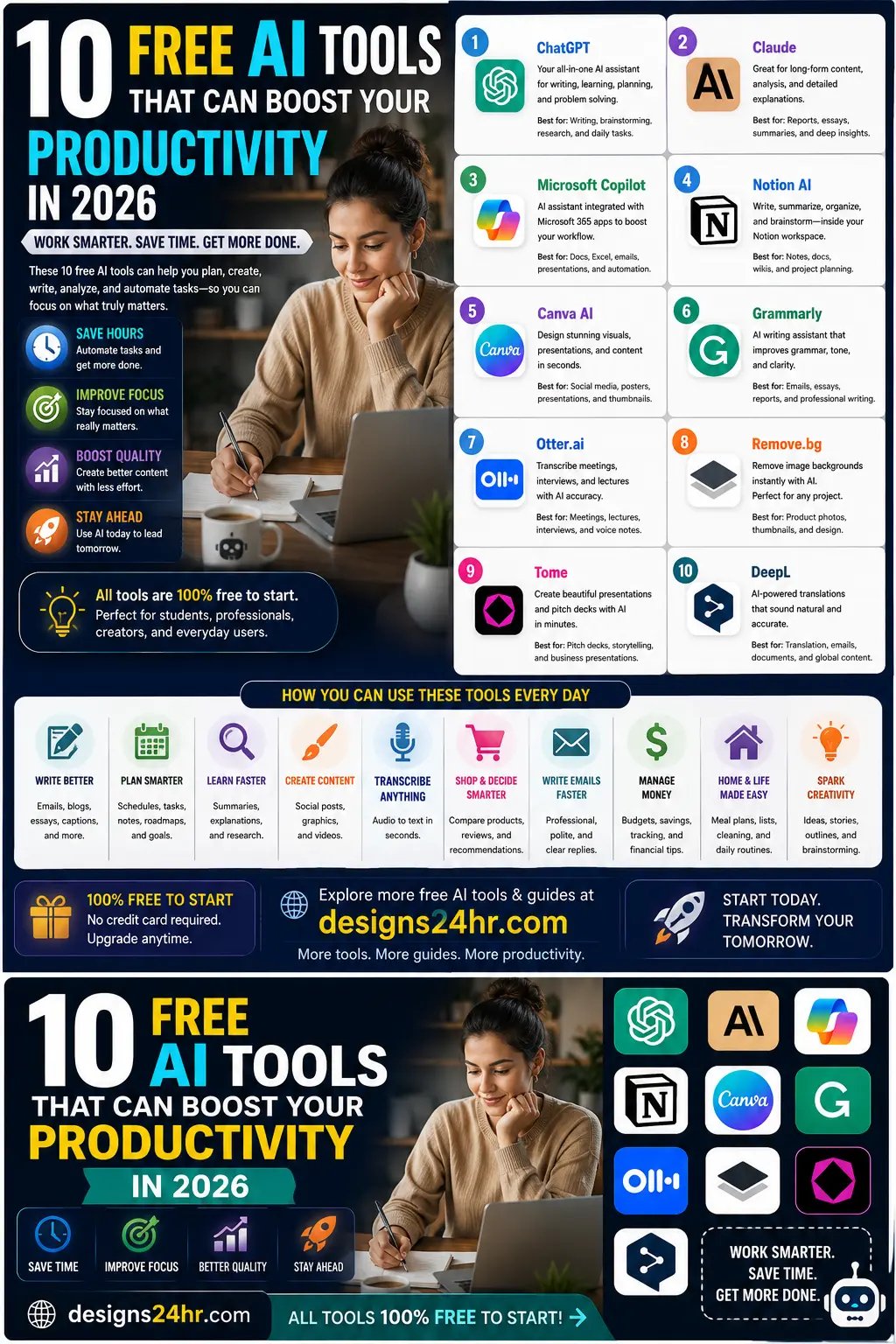
10 Free AI Tools That Can Boost Your Productivity in 2026
Free AI tools are no longer just fun experiments. In 2026, they can help everyday users write faster, plan better, organize information, create visual content, summarize long notes, remove repetitive tasks, and make daily work feel lighter.
The key is not to use every AI tool at once. The smarter move is to choose the right tool for the right job. This guide breaks down 10 free or free-to-start AI tools that can help students, creators, professionals, small business owners, and everyday users in the USA work smarter without making productivity complicated.
Why Free AI Tools Matter in 2026
Many people hear about AI but still do not know where to start. The easiest starting point is simple: use AI to solve one real problem you already have.
That could mean writing a better email, organizing your day, summarizing meeting notes, creating a presentation, cleaning up a product photo, translating a message, or planning your next project. Free AI tools make it easier to test what works before paying for advanced features.
If you want a simple daily starting point, try the free AI Daily Task Planner from Designs24hr to organize your priorities before you open more apps.
1. ChatGPT: Best for Everyday AI Help
ChatGPT is one of the most flexible AI tools for everyday productivity. You can use it to brainstorm ideas, summarize information, write drafts, explain confusing topics, create checklists, and plan projects.
It is especially useful when you need a general AI assistant that can help with many different tasks in one place. For beginners, start with simple prompts like: “Help me organize this task into clear steps.”
2. Claude: Best for Long Writing and Deep Explanations
Claude is useful for longer writing, careful explanations, content review, and turning messy information into clearer structure. It can help with reports, outlines, summaries, study notes, and thoughtful rewrites.
If you work with longer documents or need a calm, organized answer, Claude can be a strong option to test.
3. Microsoft Copilot: Best for Microsoft Users
Microsoft Copilot is helpful for people who already use Microsoft tools for work, school, or daily tasks. It can support writing, research, summaries, planning, and productivity inside the Microsoft ecosystem.
For users who spend time in Word, Excel, Outlook, Teams, or Windows, Copilot can feel natural because it is connected to tools many people already know.
4. Notion AI: Best for Notes, Docs, and Organization
Notion AI is useful for people who like organizing notes, projects, documents, and personal planning in one workspace. It can help summarize notes, draft documents, clean up messy ideas, and turn information into usable structure.
If your main problem is scattered information, Notion AI can help you build a cleaner system for notes, goals, projects, and daily planning.
5. Canva AI: Best for Fast Visual Content
Canva AI is useful for creating quick visuals, social media posts, presentations, simple graphics, and design ideas. It helps non-designers move faster when they need something polished without starting from a blank canvas.
This is especially helpful for creators, students, small business owners, bloggers, and anyone who needs clean visual content without learning complex design software.
6. Grammarly: Best for Clearer Writing
Grammarly helps improve grammar, clarity, tone, and readability. It is useful for emails, school writing, work documents, social posts, and professional messages.
If you often worry about how your writing sounds, Grammarly can help you catch mistakes and make your message easier to understand.
For faster replies, you can also use the AI Email Reply Generator to create polite, professional, or quick email responses.
7. Otter.ai: Best for Meeting Notes and Transcripts
Otter.ai helps record, transcribe, and summarize meetings, lectures, interviews, and conversations. This can be useful for students, professionals, creators, and teams that need accurate notes without writing everything manually.
Instead of trying to remember every detail, you can focus on the conversation and review the notes afterward.
8. Remove.bg: Best for Quick Background Removal
Remove.bg helps remove image backgrounds quickly. This can save time for product photos, profile pictures, thumbnails, social media graphics, and simple design projects.
It is useful for creators, online sellers, marketers, students, and anyone who needs a clean cutout image without manual editing.
9. Tome: Best for Presentations and Pitch Decks
Tome helps create presentation-style content faster. It can support pitch decks, visual stories, project overviews, and business presentations.
If you need to explain an idea clearly, presentation tools like Tome can help turn rough thoughts into a more structured visual story.
10. DeepL: Best for Translation and Clearer Global Communication
DeepL is useful for translating text and improving communication across languages. It can help with emails, documents, website copy, messages, and international communication.
For students, creators, businesses, and remote workers, translation tools can make communication faster and easier.
How to Choose the Right Free AI Tool
The best AI tool depends on what you want to improve first. Do not start by downloading everything. Start with your biggest daily friction point.
- Need better planning? Use an AI planner or task tool.
- Need faster writing? Try ChatGPT, Claude, Grammarly, or an email reply tool.
- Need better visuals? Try Canva AI or background removal tools.
- Need meeting notes? Try an AI transcription tool.
- Need better prompts? Use the AI Prompt Generator.
- Need help making a choice? Try the Decision Helper.
Simple AI Productivity Workflow for Beginners
Here is a simple way to use AI tools without feeling overwhelmed:
- Step 1: Plan your top priorities with the AI Daily Task Planner.
- Step 2: Draft emails faster with the AI Email Reply Generator.
- Step 3: Use ChatGPT or Claude to summarize notes and brainstorm ideas.
- Step 4: Use Canva AI or Remove.bg to speed up visual tasks.
- Step 5: Use the AI Prompt Generator when your AI results feel too generic.
This keeps your workflow simple. You are not chasing tools. You are using AI to remove friction from your day.
Final Takeaway
Free AI tools can help you save time, improve focus, write better, create faster, and stay organized in 2026. The most important step is choosing one tool that solves one real problem in your daily routine.
Start small. Test one tool. Build one useful habit. Then add more only when it makes your day easier.
FAQ: Free AI Tools for Productivity
What are the best free AI tools for productivity in 2026?
Some useful free or free-to-start AI tools include ChatGPT, Claude, Microsoft Copilot, Notion AI, Canva AI, Grammarly, Otter.ai, Remove.bg, Tome, and DeepL. The best choice depends on whether you need help with writing, planning, design, meetings, translation, or daily organization.
Are free AI tools really useful?
Yes. Free AI tools can be very useful for everyday tasks like writing emails, summarizing notes, planning a schedule, organizing ideas, creating visuals, and comparing options. Advanced features may require paid plans, but free versions are often enough to get started.
Which AI tool should beginners start with?
Beginners should start with one simple tool based on their biggest need. If you need general help, start with ChatGPT or Claude. If you need planning help, try the Designs24hr AI Daily Task Planner. If you need better prompts, try the Designs24hr AI Prompt Generator.
Can AI tools help students and workers?
Yes. AI tools can help students summarize notes, study concepts, organize assignments, and brainstorm ideas. Workers can use AI for emails, meetings, reports, planning, presentations, and task management.
Do free AI tools replace human judgment?
No. AI tools should support your thinking, not replace it. Always review important information, check accuracy, protect personal data, and make final decisions yourself.
Explore free tools for planning, writing, decisions, prompts, and everyday productivity at Designs24hr.