ChatGPT just became smarter by default. GPT-5.5 Instant is now the default model for ChatGPT users, which means many people will notice better answers without changing any settings or choosing a different model.
The update matters because ChatGPT is no longer only about fast replies. GPT-5.5 Instant is designed to give clearer, more accurate, more personalized, and more useful responses for everyday questions, school help, writing, planning, research, work tasks, and important decisions.
What Is GPT-5.5 Instant?
GPT-5.5 Instant is OpenAI’s updated default model for ChatGPT. It replaces GPT-5.3 Instant and is built to improve the everyday ChatGPT experience across accuracy, clarity, personalization, image understanding, STEM questions, and web-search decisions.
In simple terms, it is the model most users will interact with when they open ChatGPT and ask a normal question. That makes this update important for students, workers, creators, business owners, parents, researchers, and anyone who uses ChatGPT as a daily assistant.
If you want better answers from ChatGPT or any AI tool, start with clearer instructions using the AI Prompt Generator from Designs24hr.
Why GPT-5.5 Instant Matters
A default model update matters because most users do not manually switch models. They simply open ChatGPT and start typing. When the default model improves, the everyday experience improves for a much larger audience.
GPT-5.5 Instant is designed to make ChatGPT feel more dependable in normal use. That means better answers, clearer explanations, more natural conversations, and fewer moments where the response feels too long, too generic, or less connected to what the user actually needs.
1. Smarter Answers for Everyday Questions
One of the biggest improvements is smarter everyday answering. GPT-5.5 Instant is designed to understand questions better, follow context more clearly, and provide more useful responses across common tasks.
This can help when you ask ChatGPT to explain a topic, organize ideas, summarize information, plan a project, compare options, or help with writing.
For daily planning, you can also use the AI Daily Task Planner to turn your tasks into a more focused action plan.
2. More Accurate Responses With Fewer Hallucinations
OpenAI says GPT-5.5 Instant improves factuality and reduces hallucinated claims, especially in high-stakes areas such as medicine, law, and finance. This is important because AI answers can sound confident even when they are wrong.
For everyday users, fewer hallucinations means ChatGPT may be more reliable than before. But it does not mean every answer should be trusted automatically. Important information should still be checked, especially when health, money, legal, academic, or business decisions are involved.
The best habit is simple: use ChatGPT to understand, organize, and compare information — then verify important details before acting.
3. Clearer Writing, Summaries, and Explanations
GPT-5.5 Instant is also designed to improve readability. That means answers should feel clearer, better paced, and easier to follow in everyday conversations.
This can help users who rely on ChatGPT for email drafts, summaries, explanations, outlines, study help, content ideas, or rewriting unclear text.
For faster email replies, try the AI Email Reply Generator to create clear, polite, and useful responses.
4. Better Personalization for Your Style and Needs
Another important improvement is personalization. GPT-5.5 Instant is built to feel better tailored to the user, which can make answers feel less generic and more useful.
Personalization can help with tone, format, pacing, and how information is explained. For example, a beginner may need a simple explanation, while a professional may need a sharper summary or a more structured plan.
The more clearly you explain your goal, audience, and preferred style, the better ChatGPT can shape the response.
5. More Natural Conversations
ChatGPT release notes say GPT-5.5 Instant has improved response style and quality, with more natural everyday conversations and better pacing for practical help tasks.
This matters because many users do not want robotic answers. They want help that feels clear, useful, and easy to continue. Better pacing can reduce the need to ask repeated follow-up questions just to get a usable answer.
6. Better Help With Images and STEM Questions
OpenAI says GPT-5.5 Instant improves image understanding and STEM-related questions. This is useful for people who upload images, charts, screenshots, homework problems, diagrams, or visual information and want help understanding what they are seeing.
Students, teachers, researchers, creators, and professionals may benefit from better visual understanding and clearer technical explanations.
7. Smarter Decisions About When to Search the Web
GPT-5.5 Instant is also improved at deciding when web search can provide a more useful answer. This matters because many questions need fresh information, current prices, recent updates, product changes, or breaking news.
For users, this can make ChatGPT more helpful when the answer depends on current information. Still, it is always smart to check sources and compare important details.
GPT-5.5 Instant vs GPT-5.3 Instant: What Changed?
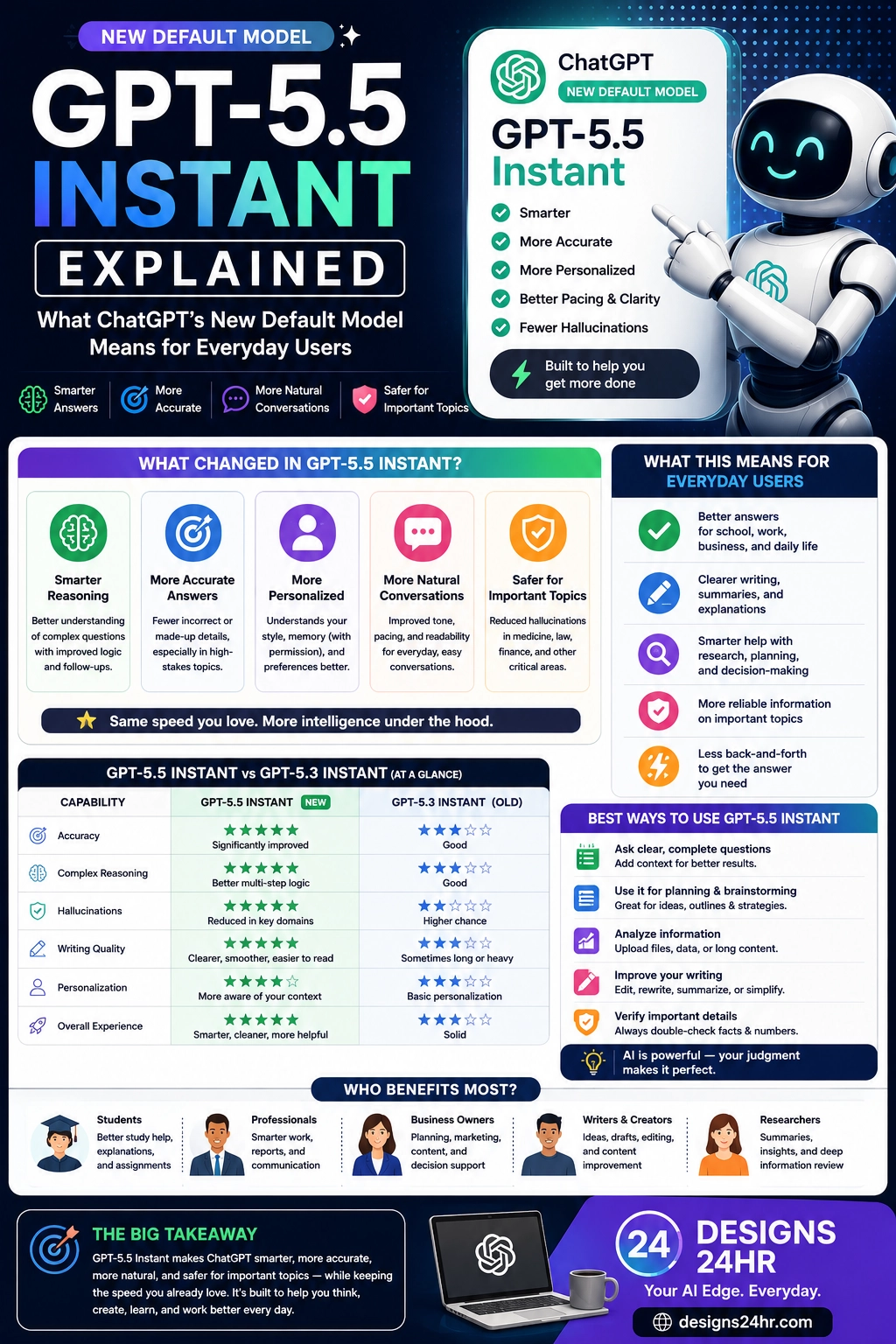
GPT-5.5 Instant replaces GPT-5.3 Instant as ChatGPT’s default model. The main improvements are not about making ChatGPT feel completely different. They are about making the normal experience better.
- Accuracy: Better factuality and fewer hallucinated claims.
- Clarity: More readable answers and smoother explanations.
- Personalization: Responses that feel better matched to the user’s needs.
- Conversation quality: More natural tone and better pacing.
- Image understanding: Better help with uploaded visual information.
- STEM support: Stronger answers for technical and learning-related questions.
- Web search decisions: Better judgment about when fresh information is needed.
Who Benefits Most From GPT-5.5 Instant?
Because GPT-5.5 Instant is the default ChatGPT model, it can benefit a wide range of everyday users.
- Students: clearer explanations, study help, summaries, and homework support.
- Professionals: better emails, reports, planning, and workplace writing.
- Business owners: stronger brainstorming, customer replies, strategy outlines, and decision support.
- Creators: clearer captions, content ideas, outlines, and editing help.
- Researchers: better summaries, analysis, and structured explanations.
- Everyday users: smarter help with planning, decisions, learning, and daily tasks.
How to Use GPT-5.5 Instant Better
Even with a smarter model, better prompts still matter. The more clearly you ask, the more useful the answer becomes.
- Be specific: Tell ChatGPT exactly what you want.
- Add context: Explain your goal, audience, limits, or situation.
- Choose a format: Ask for bullets, steps, a checklist, a table, or a short answer.
- Ask for trade-offs: Request pros, cons, risks, and next steps.
- Verify important claims: Check facts before using information in serious decisions.
When you are stuck between options, the Decision Helper can help you compare choices more clearly.
Simple GPT-5.5 Instant Workflow for Everyday Users
Here is a simple workflow you can use to get better results:
- Start with the task: Tell ChatGPT what you need help with.
- Add context: Share the audience, goal, deadline, or situation.
- Request the output style: Ask for a summary, plan, checklist, email, table, or explanation.
- Review the answer: Look for missing details, unclear points, or possible errors.
- Ask a follow-up: Request a shorter version, better tone, examples, or next steps.
- Verify before acting: Check important facts, numbers, claims, and recommendations.
What You Should Still Double-Check
GPT-5.5 Instant is more accurate, but no AI model is perfect. Users should still be careful with important topics.
- Health advice: Use AI for general understanding, not as a replacement for a medical professional.
- Legal questions: Verify with official sources or qualified legal help.
- Financial decisions: Double-check numbers, assumptions, and current rules.
- Schoolwork: Use AI to learn and organize, not to cheat or submit unreviewed work.
- Business content: Review accuracy, tone, brand fit, and customer impact before publishing.
Smart Takeaway
GPT-5.5 Instant makes ChatGPT smarter by default. The biggest improvements are better accuracy, clearer answers, improved personalization, more natural conversations, stronger image understanding, and fewer hallucinated claims.
The best way to use it is not to trust every response blindly. Use GPT-5.5 Instant as a thinking partner, writing assistant, planner, explainer, and research helper — then use your own judgment before making final decisions.
FAQ: GPT-5.5 Instant
What is GPT-5.5 Instant?
GPT-5.5 Instant is OpenAI’s updated default model for ChatGPT, designed to improve everyday answers across accuracy, clarity, personalization, image understanding, STEM questions, and web-search decisions.
Is GPT-5.5 Instant the new default ChatGPT model?
Yes. GPT-5.5 Instant is now ChatGPT’s default model, replacing GPT-5.3 Instant for users who open ChatGPT and ask normal everyday questions.
Is GPT-5.5 Instant more accurate?
OpenAI says GPT-5.5 Instant improves factuality and reduces hallucinated claims, especially in high-stakes areas such as medicine, law, and finance. Users should still verify important information.
How is GPT-5.5 Instant different from GPT-5.3 Instant?
GPT-5.5 Instant improves accuracy, clarity, conciseness, personalization, image understanding, STEM answers, everyday conversation quality, and decisions about when to use web search.
How can I get better results from GPT-5.5 Instant?
Give clear instructions, add context, request a specific format, ask for examples or trade-offs, and review important details before using the answer.
Explore simple AI tools, visual guides, and practical resources at Designs24hr.