How AI Helps You Work Smarter, Save Time, and Stay Focused Every Day
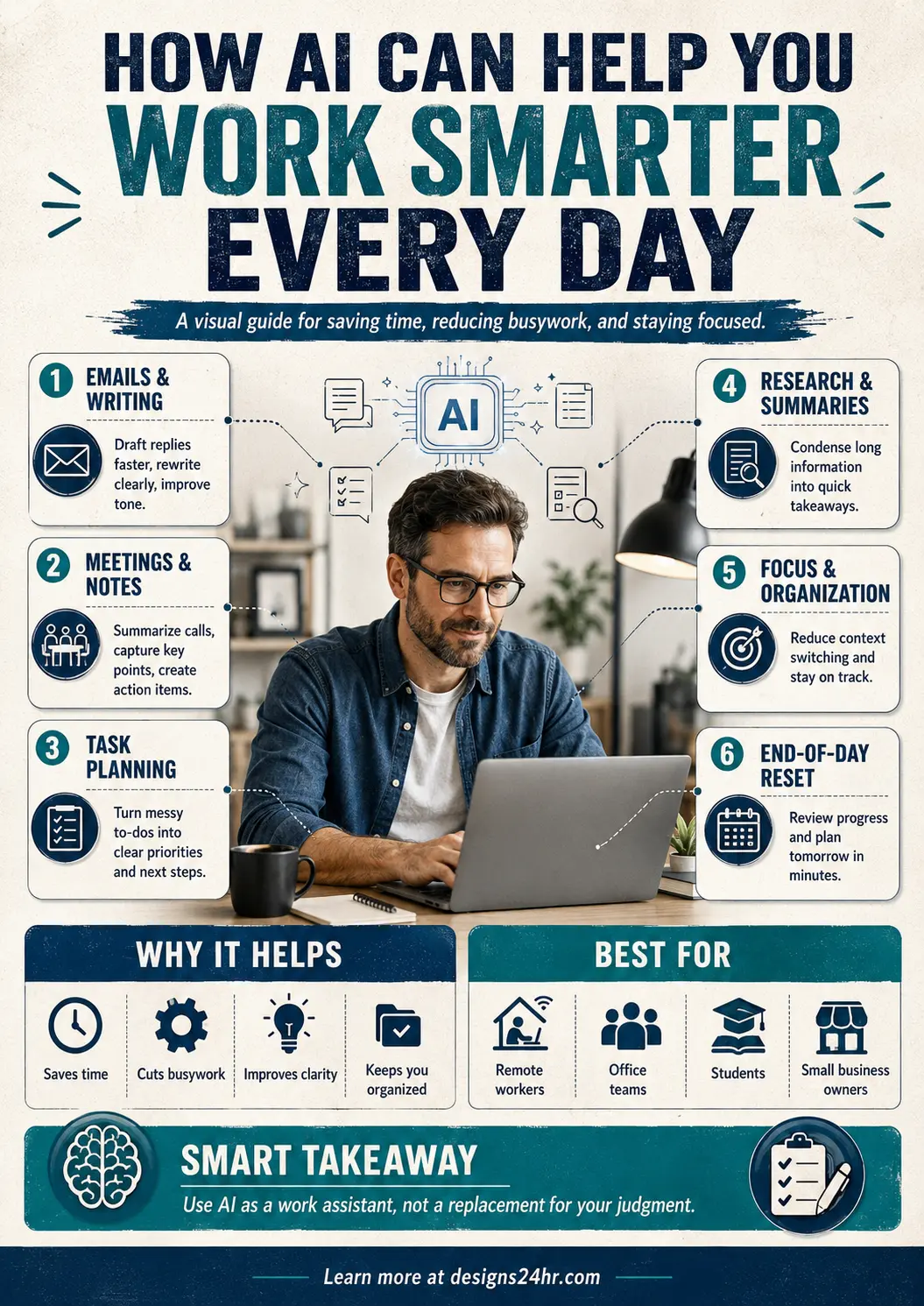
Working harder is not always the answer. For many people, the real problem is not effort — it is scattered tasks, long emails, too many notes, repeated decisions, and constant context switching.
AI can help you work smarter every day by turning messy work into clear steps. It can help you draft replies, summarize information, plan tasks, organize notes, reduce busywork, and protect your focus. The goal is simple: use AI as a work assistant, not a replacement for your judgment.
What Does It Mean to Work Smarter With AI?
Working smarter with AI means using AI tools to handle repetitive, time-consuming, or mentally draining parts of your day. Instead of starting from scratch every time, you use AI to create a first draft, summarize key points, organize priorities, or help you make a clearer decision.
This is useful for office workers, remote workers, students, freelancers, creators, small business owners, and anyone who wants to save time without lowering the quality of their work.
If your biggest challenge is knowing what to do first, start with the AI Daily Task Planner from Designs24hr to turn your day into a simple action plan.
1. Emails & Writing: Draft Faster and Improve Clarity
Email and written messages can take more time than expected. You may know what you want to say, but still spend several minutes trying to make it sound clear, professional, or polite.
AI can help you draft replies, rewrite unclear sentences, improve tone, shorten long messages, and create cleaner versions of your ideas. This is especially helpful when you need to respond quickly but still want your message to sound thoughtful.
For everyday replies, use the AI Email Reply Generator to create faster, clearer email responses.
2. Meetings & Notes: Capture Key Points Without Losing Focus
Meetings, lectures, calls, and conversations often create a lot of information. The hard part is not only listening — it is remembering what matters afterward.
AI can help summarize long notes, identify action items, organize meeting takeaways, and turn scattered points into a cleaner follow-up list. This helps you stay present during the conversation instead of trying to write everything down.
A simple AI prompt you can use is: “Summarize these notes into key takeaways, action items, and deadlines.”
3. Task Planning: Turn Messy To-Dos Into Clear Priorities
A long to-do list can create stress because everything feels important at the same time. AI can help you sort tasks by urgency, importance, time required, and next steps.
Instead of looking at a messy list, you can ask AI to organize your tasks into a simple plan for the day. This makes it easier to start, easier to focus, and easier to finish meaningful work.
Try this prompt: “Organize this task list into priorities, quick wins, deep work, and things I can do later.”
4. Research & Summaries: Turn Long Information Into Quick Takeaways
Reading long documents, articles, reports, or notes can slow down your day. AI can help summarize information into short, useful takeaways so you can understand the main idea faster.
This does not mean you should blindly trust every AI answer. It means AI can help you preview information, find patterns, and decide what deserves deeper attention.
For better AI results, use the AI Prompt Generator to turn simple questions into stronger, more useful prompts.
5. Focus & Organization: Reduce Context Switching
One of the biggest productivity killers is switching between too many tasks, tabs, apps, and messages. AI can help reduce that friction by keeping your work more organized.
You can ask AI to group related tasks, create a focus plan, suggest a work schedule, organize project notes, or break a large task into smaller steps. This helps your brain stay on one path instead of jumping between unfinished thoughts.
When you feel stuck between multiple choices, the Decision Helper can help you compare options and think through the next best step.
6. End-of-Day Reset: Review Progress and Prepare Tomorrow
Working smarter is not only about starting the day well. It is also about ending the day with less mental clutter.
AI can help you review what you completed, organize unfinished tasks, create tomorrow’s priority list, and turn loose notes into a cleaner plan. This makes the next morning easier because you are not starting from zero.
Try this prompt before you stop working: “Review my completed tasks, organize what is unfinished, and create a simple plan for tomorrow.”
Who Can Benefit From AI at Work?
AI productivity tools are useful for many types of users, especially when the goal is to save time, reduce busywork, and stay organized.
- Remote workers: organize tasks, messages, notes, and meetings.
- Office teams: summarize updates, draft emails, and plan projects.
- Students: organize study notes, research topics, and assignment steps.
- Freelancers: write proposals, plan projects, and manage client communication.
- Small business owners: create content, organize ideas, and make faster decisions.
A Simple AI Workflow to Work Smarter Every Day
Here is a simple beginner-friendly workflow you can use:
- Plan: Use the AI Daily Task Planner to choose your top priorities.
- Write: Use the AI Email Reply Generator to draft faster replies.
- Organize: Ask AI to turn messy notes into clear action items.
- Decide: Use the Decision Helper when you are stuck between options.
- Improve: Use the AI Prompt Generator to get better results from your AI tools.
- Reset: End the day by asking AI to summarize progress and plan tomorrow.
This workflow keeps AI practical. You are not using AI just because it is trending. You are using it to remove friction from real work.
Smart Takeaway
AI can help you work smarter every day by saving time, reducing busywork, improving clarity, and helping you stay organized. But the best results come when you stay in control.
Use AI to support your thinking, not replace it. Let AI handle the first draft, the summary, the structure, or the routine step — then use your judgment to make the final decision.
FAQ: How AI Helps You Work Smarter
How can AI help me work smarter every day?
AI can help you work smarter by drafting emails, summarizing notes, planning tasks, organizing information, researching faster, reducing repetitive work, and helping you prepare for the next day.
What is the best way to start using AI for productivity?
Start with one repeated task that wastes time. This could be writing emails, organizing your schedule, summarizing notes, or turning a messy to-do list into clear priorities.
Can AI help remote workers?
Yes. AI can help remote workers manage messages, summarize meetings, organize projects, plan the day, draft updates, and stay focused while working across different tools and tasks.
Does AI replace human judgment at work?
No. AI should support your judgment, not replace it. Always review AI-generated information, check accuracy, protect private data, and make final decisions yourself.
Which Designs24hr tools can help with daily productivity?
Designs24hr offers tools such as the AI Daily Task Planner, AI Email Reply Generator, Decision Helper, and AI Prompt Generator to help with planning, writing, decisions, and better AI prompts.