Gemini Spark is Google’s new 24/7 personal AI agent, and it shows where everyday AI is heading next. Instead of only answering questions, Spark is designed to help manage real tasks across your digital life while working in the background under your direction.
That matters because AI assistants are moving from simple chat to action. Gemini Spark can help with tasks across Google apps, organize information, keep work moving, and support productivity even when your phone or laptop is not open. But because it may connect with personal tools like Gmail, Calendar, Docs, Sheets, and Slides, users also need to understand privacy, permissions, and control before relying on it.
What Is Gemini Spark?
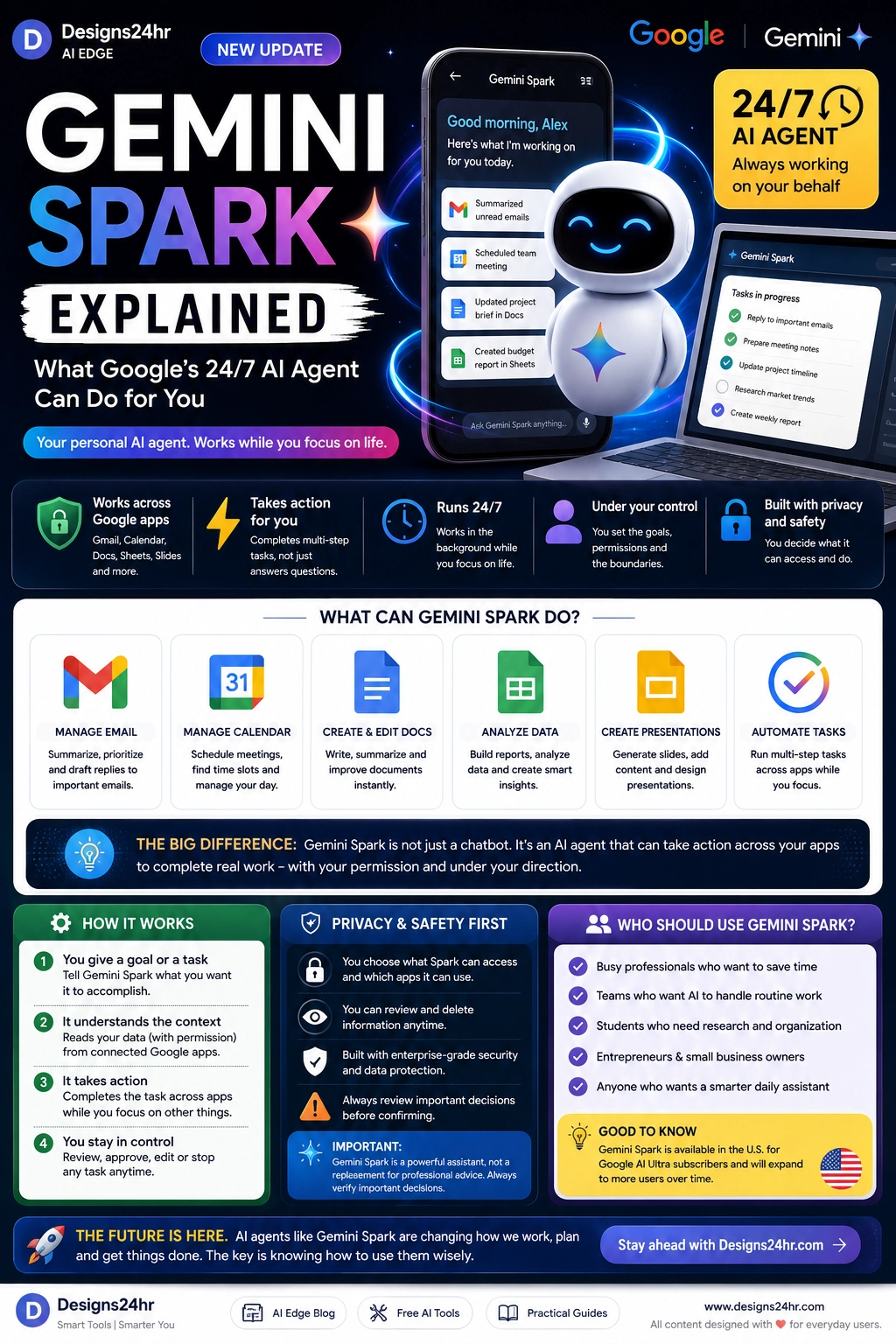
Gemini Spark is Google’s 24/7 personal AI agent. Google describes it as an agent that can help users navigate their digital life, work in the background, and take action under the user’s direction. Unlike a normal chatbot, Spark is designed to complete multi-step tasks instead of only giving one-time answers.
In simple terms, Gemini Spark is built to act more like a digital helper that can understand a goal, connect information across apps, and help move tasks forward. Google says Spark can keep working even when your phone or laptop is turned off, while checking with you before major actions. :contentReference[oaicite:0]{index=0}
If you are new to AI agents, think of Spark as a more active assistant. You give it a task, set the direction, choose permissions, and review important actions before they happen.
Why Gemini Spark Matters Right Now
Gemini Spark matters because it represents a major shift in AI. Many people are used to asking AI a question and getting an answer. Spark points toward a different future: AI tools that can plan, monitor, organize, and complete tasks across apps.
Google says Spark transforms Gemini from an assistant that answers questions into an active partner that can do real work on your behalf and under your direction. That shift is important for busy professionals, students, small business owners, families, and anyone trying to manage too many digital tasks. :contentReference[oaicite:1]{index=1}
1. Gemini Spark Can Work Across Google Apps
One of Gemini Spark’s biggest advantages is its connection to Google’s ecosystem. Google says Spark can work across Google products and help connect the dots between apps. This makes it especially relevant for people who already use Gmail, Calendar, Docs, Sheets, Slides, and Drive.
For example, Spark could help summarize important emails, prepare meeting notes, organize a calendar task, draft a document, update a project plan, or help create a presentation. This makes it different from an AI assistant that only responds inside one chat box.
If your day already revolves around Google Workspace, Gemini Spark could become a more useful productivity layer because it understands where your tasks actually live.
2. It Can Handle Multi-Step Tasks
The most important difference between an AI chatbot and an AI agent is action. A chatbot answers. An agent can help complete a task.
Gemini Spark is designed to help with multi-step work, such as planning, researching, organizing, drafting, scheduling, and preparing follow-ups. Google’s I/O announcement says Spark runs on dedicated virtual machines on Google Cloud and can perform longer tasks in the background. :contentReference[oaicite:2]{index=2}
That means users may be able to give Spark a goal instead of a tiny instruction. For example: “Help me prepare for next week’s client meeting,” or “Organize my unread emails and identify what needs a reply.”
3. It Works in the Background
Gemini Spark is designed to work in the background 24/7. Google says it can continue helping even when your phone or laptop is turned off. That is a major difference from most everyday AI tools, which only work while you are actively using them. :contentReference[oaicite:3]{index=3}
This could help users keep progress moving on research, planning, document preparation, scheduling, task tracking, and digital organization. For busy people, background work may be one of the biggest benefits of AI agents.
But background automation also increases the need for clear permissions and review. If an AI agent can keep working while you are away, you need to know exactly what it can access and what it is allowed to do.
4. It Is Designed to Stay Under Your Control
Google says Gemini Spark operates under the user’s direction and is designed to check before major actions. That control layer matters because personal AI agents may touch sensitive areas like email, documents, calendar events, work files, and private information. :contentReference[oaicite:4]{index=4}
A safe AI agent should not act like an uncontrolled autopilot. It should help you move faster while still letting you approve important steps. Users should pay close attention to permissions, connected apps, approval settings, and any task that involves sending messages, spending money, sharing files, or making commitments.
5. Privacy Is the Big Question
Gemini Spark’s power comes from access. If it can understand your email, calendar, documents, and tasks, it can help more intelligently. But that also creates privacy and security questions.
Wired tested Gemini Spark by giving it access to personal Gmail, Docs, and Calendar data. The test showed impressive automation potential, but it also highlighted problems such as context mistakes, awkward assumptions, incomplete task execution, and security concerns like prompt injection risks. :contentReference[oaicite:5]{index=5}
That does not mean users should avoid AI agents completely. It means they should use them carefully. The more personal data an AI tool can access, the more important it becomes to review permissions, check outputs, and understand what the tool is doing.
What Can Gemini Spark Help You Do?
Gemini Spark is still early, but the core idea is clear: it is built to help users manage digital tasks across apps.
- Email: summarize, prioritize, draft replies, and surface important messages.
- Calendar: schedule meetings, find time slots, and prepare for upcoming events.
- Docs: draft, summarize, edit, and improve written documents.
- Sheets: organize information, analyze data, and create useful summaries.
- Slides: help prepare presentations and organize visual ideas.
- Tasks: break goals into steps and track progress in the background.
If you want to organize your day before using an agent, the AI Daily Task Planner from Designs24hr can help turn scattered tasks into a clearer plan.
Who Should Use Gemini Spark?
Gemini Spark is most useful for people who already manage a lot of digital work and want help staying organized.
- Busy professionals: manage email, meetings, documents, and follow-ups.
- Students: organize research, deadlines, notes, and study plans.
- Small business owners: prepare reports, track tasks, and manage communication.
- Freelancers: organize client work, proposals, schedules, and deliverables.
- Teams: reduce repetitive coordination and keep projects moving.
- Everyday users: simplify digital life and reduce task overload.
Google’s subscription page says Gemini Spark is available as an advanced feature with Google AI Ultra in the U.S. and English only, while rollout coverage says it is available in the U.S. for Google AI Ultra subscribers. Availability may expand over time, but users should check Google’s current plan details before assuming access. :contentReference[oaicite:6]{index=6}
Gemini Spark vs ChatGPT: What Is the Difference?
Gemini Spark and ChatGPT are both AI tools, but they are not the same type of experience.
ChatGPT is commonly used as a conversational assistant for writing, reasoning, research, brainstorming, planning, images, coding, and daily questions. Gemini Spark is positioned more specifically as a personal AI agent that can work across Google apps and take action in the background under user direction.
The better question is not “Which one is better?” The better question is: “Do I need an AI assistant that answers questions, or an AI agent that can help manage tasks across apps?”
Gemini Spark Privacy: What Users Should Check
Before using Gemini Spark or any AI agent, users should review what the tool can access and what actions it can take.
- Connected apps: Which apps can Spark read or use?
- Permissions: What data can it access?
- Approval rules: What actions require your confirmation?
- Sensitive data: Are emails, files, calendars, or private documents involved?
- Security risks: Could outside content influence the agent’s behavior?
- Review process: Can you see what Spark is doing and stop it if needed?
The safest mindset is simple: use Gemini Spark as an assistant, not as an uncontrolled decision-maker.
How to Use Gemini Spark Safely
Gemini Spark may be powerful, but the safest users will be the ones who stay intentional.
- Start with low-risk tasks: Use Spark for summaries, drafts, planning, and organization first.
- Limit permissions: Only connect the apps and data needed for the task.
- Review before action: Check drafts, calendar changes, messages, and file edits before approval.
- Avoid sensitive tasks at first: Do not start with money, legal, medical, or private business decisions.
- Check context: Make sure Spark understands relationships, deadlines, and priorities correctly.
- Keep humans in control: You decide the final action, not the agent.
When you are unsure whether an AI suggestion makes sense, the Decision Helper can help you compare options before taking action.
Beginner Prompts for Gemini Spark
The best way to start with an AI agent is to give it clear, limited tasks.
- “Summarize my unread emails and list anything urgent.”
- “Find open time this week for a 30-minute planning session.”
- “Turn this project brief into a checklist with next steps.”
- “Prepare a meeting summary from these notes, but do not send anything yet.”
- “Review this document and suggest improvements before I approve edits.”
- “Help me organize my week, but ask before changing my calendar.”
For better instructions, use the AI Prompt Generator to turn a rough task into a clearer agent-ready prompt.
What This Means for the Future of AI
Gemini Spark shows the direction AI is moving: from passive answers to active assistance. AI agents may soon help people manage schedules, emails, documents, research, shopping, travel planning, customer communication, and business workflows.
That future can be useful, but it also requires better habits. Users will need to understand permissions, privacy, approvals, and verification. The winners will not be people who blindly automate everything. The winners will be people who know how to delegate safely.
Smart Takeaway
Gemini Spark is not just another chatbot. It is Google’s push toward a 24/7 personal AI agent that can help manage tasks across apps, work in the background, and take action under your direction.
The opportunity is clear: less busywork, better organization, and more help across your digital life. The caution is just as clear: the more an AI agent can access, the more carefully you need to manage privacy, permissions, and approvals.
FAQ: Gemini Spark
What is Gemini Spark?
Gemini Spark is Google’s 24/7 personal AI agent designed to help users manage digital tasks, work in the background, and take action across apps under the user’s direction.
What can Gemini Spark do?
Gemini Spark can help with tasks such as email summaries, scheduling, document work, spreadsheet analysis, presentation preparation, research, planning, and multi-step task automation across Google apps.
Is Gemini Spark the same as ChatGPT?
No. ChatGPT is widely used as a conversational AI assistant, while Gemini Spark is designed as an AI agent that can work across Google apps and take action in the background under user control.
Is Gemini Spark safe to use?
Gemini Spark can be useful, but users should review permissions, limit connected apps, check outputs carefully, and avoid giving AI agents unchecked access to sensitive personal or business information.
Who can use Gemini Spark?
Gemini Spark is rolling out to U.S. Google AI Ultra subscribers and selected users. Availability may change, so users should check Google’s current Gemini plan details.