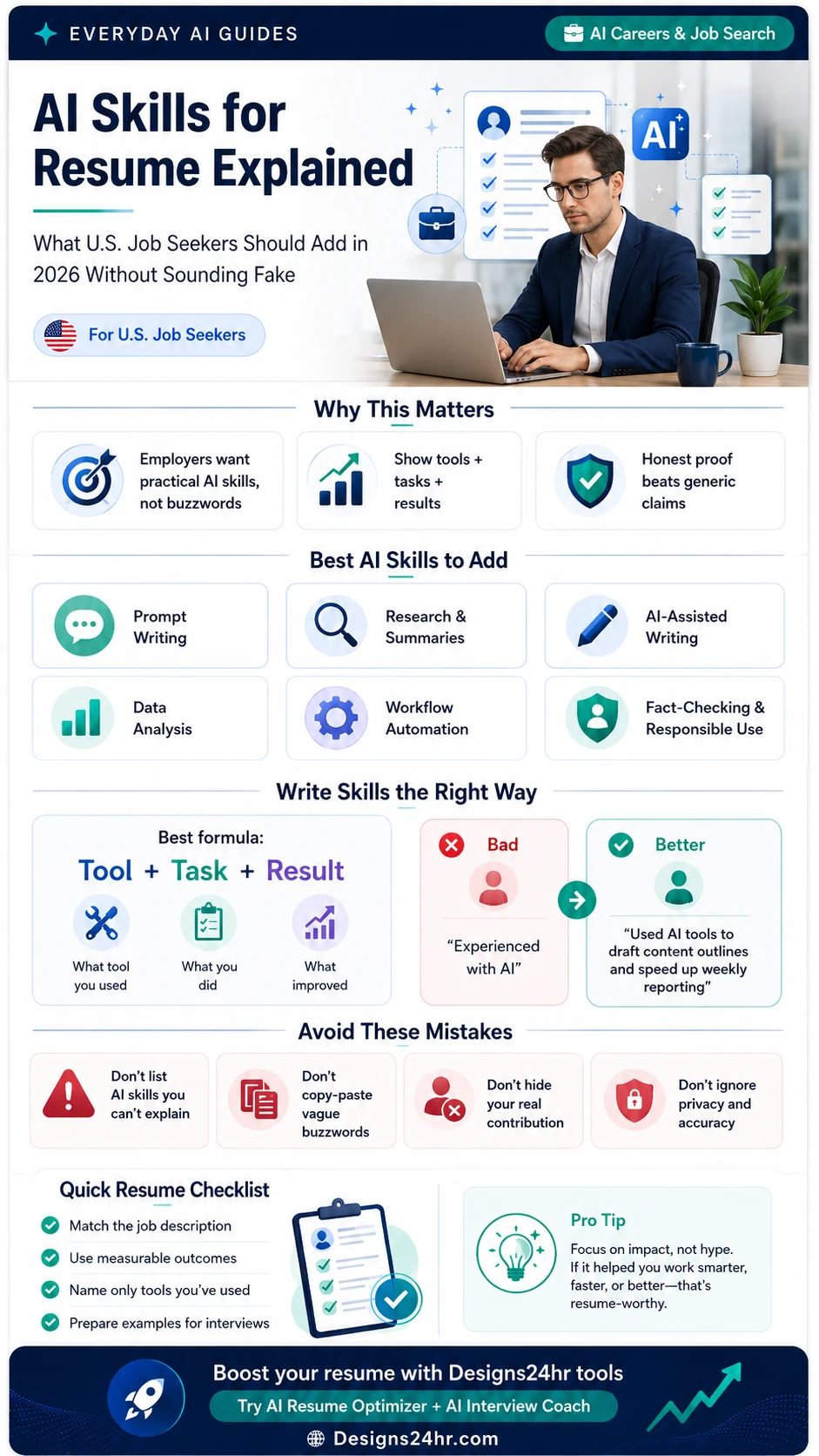
AI Skills for Resume Explained: What U.S. Job Seekers Should Add in 2026 Without Sounding Fake
AI skills can help your resume stand out, but only when they sound real. This simple guide shows which AI skills to add, how to write stronger resume bullets, and what to avoid so your application feels practical, honest, and interview-ready.
AI skills for resume is becoming a more important search topic because employers are increasingly seeing AI show up in work, job descriptions, and productivity expectations. Indeed Hiring Lab reported that its AI job-posting tracker reached a high of 4.2% in December 2025, with AI mentions much higher in some fields such as data and analytics, marketing, and human resources.
That does not mean every job seeker should pretend to be an AI expert. It means your resume should clearly show how you use AI tools in real tasks, with real judgment, and without exaggerating your experience.
What “AI Skills for Resume” Really Means
When people search for AI skills for resume, they often think they need to list advanced terms like machine learning, neural networks, prompt engineering, or generative AI. Some job seekers do need technical AI skills, especially for data, software, product, research, and automation roles.
But for most U.S. job seekers, AI skills on a resume simply means you know how to use AI tools responsibly to improve everyday work. That might include writing better first drafts, summarizing research, organizing notes, cleaning spreadsheet data, preparing reports, creating content outlines, automating repeat tasks, or practicing interview answers.
The strongest AI resume skills are not vague. They connect to the job you want.
Name the type of tool only when it helps: AI writing assistant, AI research tool, spreadsheet AI feature, automation tool, or chatbot.
Explain what you used it for: drafting, summarizing, organizing, checking, analyzing, planning, or improving a workflow.
Show what improved: faster turnaround, clearer reports, fewer errors, better organization, stronger customer responses, or more consistent output.
Why AI Skills Matter for U.S. Job Seekers in 2026
AI is no longer only a tech-company topic. Many office, creative, marketing, sales, education, customer support, operations, and administrative roles now involve some form of AI-assisted work. Employers may not always require “AI expert” experience, but they increasingly value people who can use AI tools carefully, review outputs, protect private information, and still make good human decisions.
OpenAI Academy’s job-seeker resource also makes an important point: AI can help with job search tasks such as explaining job descriptions, connecting experience to job requirements, drafting resume bullets, and practicing interview questions, but the person stays in charge of what is true, clear, and appropriate.
For 2026, the best approach is simple: use AI to communicate your real value better, not to pretend you have experience you do not have.
The Best AI Skills to Add to Your Resume
The best AI skills for your resume depend on your target role. A customer support resume should not look the same as a marketing resume, and an entry-level resume should not pretend to have senior automation experience. Use the skills below only when you can explain them with a real example.
Writing clear instructions for AI tools so the output is useful, specific, and aligned with the task.
Using AI to summarize notes, compare information, outline topics, or turn messy research into a clearer first draft.
Improving emails, reports, summaries, product descriptions, training notes, or internal documentation.
Using AI to understand spreadsheet trends, summarize data, identify patterns, or prepare simple insights.
Using AI or automation tools to reduce repetitive steps, organize tasks, create templates, or speed up routine processes.
Reviewing outputs, checking accuracy, protecting private information, and knowing when not to rely on AI.
Beginner AI skills that still sound useful
If you are new to AI, you can still list practical AI skills without overselling yourself. For example, you might mention AI-assisted writing, research summaries, spreadsheet cleanup, meeting-note organization, task planning, or interview practice.
A beginner-friendly resume line could say: “Used AI-assisted writing tools to organize rough notes into clearer internal summaries, then reviewed outputs for accuracy before sharing.”
How to Write AI Resume Bullets the Right Way
The biggest mistake is writing AI skills as a keyword list with no proof. A recruiter should be able to read your resume and understand how you used AI in a real work situation.
Best formula: What tool or AI method you used, what task you used it for, and what improved because of it.
Before you add AI skills to a resume, ask yourself three questions:
- Can I explain this skill in an interview?
- Can I connect it to a real task I completed?
- Can I show an outcome, even if the outcome is simple?
Outcomes do not always need exact numbers. Metrics are helpful, but clarity matters too. If you do not have a percentage, you can still mention clearer reporting, faster draft preparation, better organization, fewer manual steps, or improved consistency.
Need help rewriting your resume bullets?
Paste your rough resume bullets into the free Designs24hr AI Resume Optimizer to make them clearer, more professional, and easier to match to a target role. Always verify the final wording before using it.
Bad vs Better AI Resume Examples
Here are simple examples showing how to turn weak AI resume wording into stronger, more believable bullets.
Example 1: General office or admin role
Experienced with AI and office work.
Used AI-assisted writing tools to organize meeting notes, draft internal summaries, and improve clarity before manager review.
Example 2: Marketing role
Used ChatGPT for marketing.
Used AI tools to create first-draft content outlines, organize campaign research, and speed up weekly reporting preparation.
Example 3: Customer support role
AI customer service skills.
Used AI-assisted drafting to prepare clearer customer response templates while reviewing final messages for accuracy, tone, and policy fit.
Example 4: Data or operations role
Good with AI data analysis.
Used AI-assisted spreadsheet review to identify data inconsistencies, summarize patterns, and prepare cleaner weekly operations reports.
Example 5: Student or entry-level role
Prompt engineering expert.
Used AI tools to structure study notes, compare job description requirements, and practice interview answers while checking accuracy manually.
AI Skills by Job Type
The best AI resume keywords should match the kind of role you want. Use this table to choose language that sounds relevant instead of random.
| Target Role | AI Skills to Consider | Resume Bullet Angle |
|---|---|---|
| Administrative Assistant | AI-assisted writing, meeting summaries, task organization, document cleanup | Show how you used AI to organize notes, improve drafts, or reduce manual formatting time. |
| Marketing Coordinator | Content outlines, campaign research, keyword brainstorming, reporting summaries | Show how AI helped you plan content, organize research, or prepare campaign drafts faster. |
| Customer Support | Response drafting, tone adjustment, knowledge-base summaries, issue categorization | Show how you used AI to draft clearer responses while reviewing accuracy and policy fit. |
| Sales | Prospect research, email drafts, call notes, CRM summaries | Show how AI helped prepare outreach or summarize customer information before follow-up. |
| Operations | Workflow automation, spreadsheet cleanup, process documentation, report summaries | Show how AI reduced repetitive work or improved weekly reporting consistency. |
| Data or Analytics | Data summaries, trend explanations, spreadsheet analysis, dashboard notes | Show how AI helped interpret data, explain findings, or prepare clearer insights for non-technical teams. |
| Design or Creative | Creative research, idea generation, prompt writing, concept organization | Show how AI supported early concept development while you handled final creative decisions. |
| Student or Entry Level | Research summaries, resume tailoring, interview practice, learning support | Show responsible use, accuracy checking, and practical learning rather than claiming expert-level AI experience. |
What Not to Put on Your Resume
AI can help your resume, but it can also make your resume sound fake if you use it the wrong way. Avoid these mistakes before applying.
If you cannot describe how you used a tool in a real task, do not put it on your resume.
Matching keywords is useful, but copying a job post word for word can look lazy and dishonest.
Only use numbers you can support. If you do not know the exact metric, describe the outcome honestly.
“AI familiar,” “AI-assisted,” or “practical AI use” may be more honest than “AI expert.”
Avoid pasting private employer data, customer information, financial records, or sensitive details into AI tools.
AI outputs can be wrong. Review names, tools, dates, numbers, responsibilities, and claims before using them.
How to Explain AI Skills in Interviews
Adding AI skills to your resume means you should be ready to talk about them. If a recruiter asks, “How have you used AI at work?” your answer should be simple and specific.
Use this interview structure:
- Situation: What problem or task did you have?
- Tool: What type of AI tool did you use?
- Action: What did you personally do with the output?
- Review: How did you check accuracy, tone, or privacy?
- Result: What improved?
Sample interview answer
“In my last role, I used an AI writing assistant to help organize rough notes into first-draft weekly updates. I did not send the AI output directly. I reviewed the details, corrected anything unclear, removed sensitive information, and adjusted the tone for our team. It helped me prepare cleaner updates faster and gave my manager a more organized summary to review.”
Practice your answer before the interview
Use the free Designs24hr AI Interview Coach to practice behavioral, technical, situational, introduction, and salary negotiation answers. For AI skill questions, focus on real examples, honest limits, and what you personally contributed.
Should You Put ChatGPT on Your Resume?
You can mention ChatGPT or another AI tool on your resume if it is relevant to the job and you have actually used it for real work. But in many cases, the better approach is to describe the skill instead of only naming the tool.
For example, “ChatGPT” by itself does not tell the employer much. “AI-assisted research summaries,” “prompt writing,” “AI-assisted content outlining,” “workflow documentation,” or “AI-assisted spreadsheet cleanup” may explain your value more clearly.
How to Match AI Resume Keywords to a Job Description
Many job seekers use AI resume keywords the wrong way. They add every popular term they can find, even when the terms do not match the job. A better strategy is to read the job description first and only include the AI skills that connect to the role.
Step 1: Highlight AI-related words in the job post
Look for terms like AI tools, automation, analytics, reporting, content creation, productivity tools, workflow improvement, data, CRM, customer support tools, or generative AI.
Step 2: Match only what you can support
If the role asks for workflow automation but you only used AI for writing emails, do not claim automation experience. Instead, mention AI-assisted writing, communication, or documentation.
Step 3: Add one proof-based bullet
One honest AI bullet is better than five empty buzzwords. Your resume should help recruiters understand your real value quickly.
Step 4: Prepare one interview story
Before applying, prepare a short story that explains how you used AI, what you reviewed, and what improved. This helps you avoid sounding like you copied AI keywords without understanding them.
Quick Checklist Before You Apply
Use this checklist before sending a resume with AI skills.
Only include AI skills that connect to the role you want.
Explain what you used, what you did, and what improved.
Do not call yourself an expert if you are still a beginner.
Check dates, numbers, tools, job titles, and responsibilities.
Do not paste sensitive company, customer, or personal information into AI tools.
Have one real story ready for each AI skill you mention.
Final Takeaway
The best AI skills for resume success in 2026 are not about sounding futuristic. They are about showing practical value. Employers want people who can use modern tools, think clearly, check the work, protect sensitive information, and improve real tasks.
If you are a U.S. job seeker, keep your AI resume language simple: name the task, show the result, and be ready to explain the example in an interview. That is how you stand out without sounding fake.
Boost your resume with free Designs24hr tools
Start by improving one rough bullet, then practice how you would explain it in an interview. Keep the final version honest, specific, and matched to the job you want.
FAQs About AI Skills for Resume
What AI skills should I put on my resume in 2026?
Add AI skills you can explain with real examples, such as prompt writing, AI-assisted research, AI-assisted writing, data analysis support, workflow automation, content planning, spreadsheet cleanup, and responsible AI use.
Should I put ChatGPT on my resume?
You can put ChatGPT on your resume if you used it for real work and it is relevant to the job. In many cases, it is stronger to explain the task, such as AI-assisted writing, research summaries, or prompt writing, instead of only naming the tool.
How do I list AI skills without sounding fake?
Use the formula tool + task + result. For example, explain how you used AI to summarize research, improve reports, organize data, draft customer responses, or reduce repetitive work.
Are AI skills only useful for tech jobs?
No. AI skills can be useful in marketing, administration, customer service, education, sales, design, operations, human resources, small business, and many entry-level roles when used responsibly.
What AI skills should beginners add to a resume?
Beginners can mention practical AI skills such as prompt writing, AI-assisted writing, research summaries, task planning, spreadsheet cleanup, interview practice, and fact-checking. Only list what you can explain honestly.
Can AI help me improve my resume?
Yes. AI can help rewrite rough bullets, improve clarity, and match your language to a target role. You should always verify facts, numbers, job titles, dates, and personal experience before using the final version.
What should I avoid when adding AI skills to my resume?
Avoid vague claims, fake metrics, copied job-description language, tools you cannot explain, and advanced technical terms you have not actually used. Also avoid putting private company or customer data into AI tools.
How many AI skills should I list on a resume?
For most job seekers, one to three strong AI-related bullets or a few relevant skills in the skills section is enough. Quality matters more than quantity.
Helpful Sources and Related Tools
Use these references and free Designs24hr tools to keep improving your resume and interview preparation.