AI agents are quickly becoming one of the most important shifts in everyday technology. For years, most people understood AI as something you typed into a chat window. You asked a question, the chatbot answered, and then you decided what to do next. That version of AI is still useful, but it is no longer the full story.
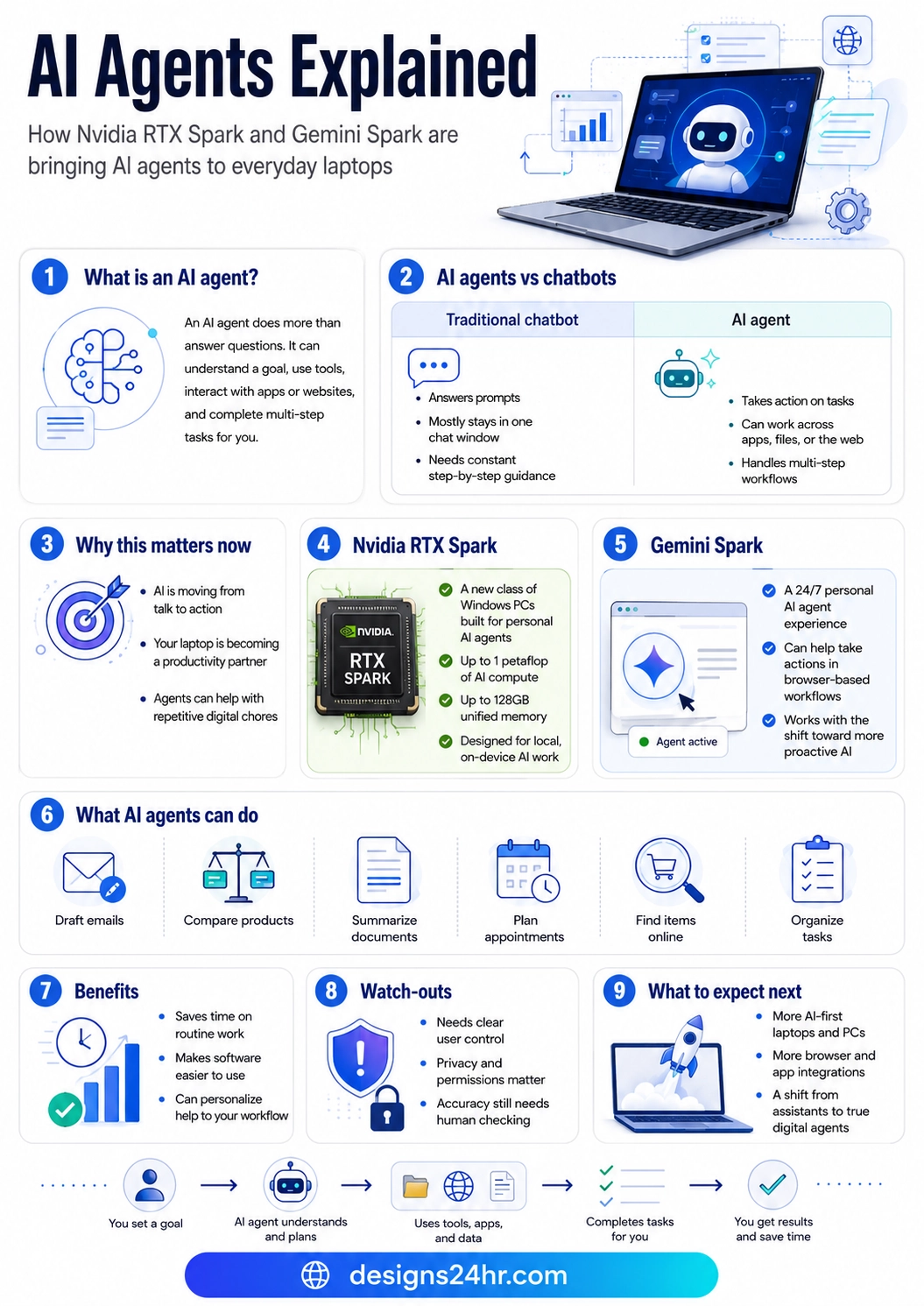
The next stage is about AI agents: digital systems that can understand a goal, use tools, work across apps or websites, and complete multi-step tasks with less manual effort from the user. Instead of only giving you an answer, an AI agent may help you draft an email, compare products, summarize documents, organize information, plan appointments, or take action inside a browser workflow.
This matters because major technology companies are now building around the same idea. Nvidia is pushing AI agents into a new class of Windows PCs with RTX Spark. Google is connecting Gemini Spark with browser-based actions through Chrome. Microsoft is positioning RTX Spark as part of a new chapter for Windows PCs. Together, these updates show a major direction for the future of computing: AI is moving from “talk to me” to “help me do this.”
What Are AI Agents?
AI agents are AI systems designed to complete tasks by following a goal, making decisions, and using tools. A basic chatbot usually waits for your next prompt. An AI agent can be more active. It can break a goal into steps, choose the right tool, interact with apps or websites, and keep working through a workflow until the task is complete or until it needs your approval.
For everyday users, the easiest way to understand AI agents is this: a chatbot gives answers, while an AI agent helps take action. For example, a chatbot can tell you how to plan a birthday party. An AI agent may help compare venues, check dates, organize a shopping list, draft invitations, and remind you what still needs to be done.
This does not mean AI agents should run everything without human control. The best version of AI agents should still keep the user in charge, especially when tasks involve private data, money, personal accounts, files, health information, legal decisions, or important work. But the direction is clear: AI is becoming more useful because it is getting closer to the places where people actually work.
AI Agents vs Chatbots: The Simple Difference
Many people use the terms AI chatbot and AI agent as if they mean the same thing, but there is an important difference. A chatbot is usually built around conversation. It answers prompts, explains information, writes text, or helps brainstorm ideas. An AI agent is built around action. It can use information, tools, apps, files, websites, and workflows to help complete a task.
| Traditional Chatbot | AI Agent |
|---|---|
| Answers prompts and questions | Works toward completing a goal |
| Usually stays inside one chat window | Can work across apps, files, tools, or the web |
| Needs step-by-step user instructions | Can plan steps and handle multi-step workflows |
| Mostly gives information | Can help take action with user permission |
This is why AI agents are becoming such a big deal. They are not just a smarter search box. They are a new layer between people and software. Instead of learning every menu, setting, tab, and app, users may eventually describe what they want and let an AI agent help move the task forward.
Why AI Agents Are Coming to Laptops Now
AI agents need more than clever software. To work smoothly, they also need powerful hardware, memory, app access, privacy controls, and fast local processing. This is why the phrase AI PC is becoming more important. The laptop itself is starting to become part of the AI experience, not just a device that opens a cloud chatbot.
Local AI agents and on-device AI agents are especially important because they can run more tasks directly on a computer instead of sending everything to the cloud. This can improve speed, reduce some cloud dependency, and create new privacy possibilities when designed correctly. For users, that could mean AI tools that feel faster, more personal, and more connected to daily computer use.
Nvidia describes this shift as personal computers moving from tools to teammates. That may sound bold, but the idea is simple: your laptop may become less like a passive machine and more like an active productivity partner that helps you complete everyday digital chores.
What Nvidia RTX Spark Means for AI Agents
Nvidia RTX Spark is important because it is being positioned as a new class of Windows PCs built for personal AI agents. Nvidia says RTX Spark includes up to 1 petaflop of AI compute and up to 128GB of unified memory, which is designed to support demanding on-device AI work and local agents.
In practical terms, this means future AI PCs may be able to run more advanced AI tasks directly on the device. That could help with creative work, productivity, research, coding, document handling, and multi-step workflows. For everyday users, the big idea is not the technical number itself. The big idea is that laptops are being redesigned for AI agents from the inside out.
This is different from simply adding an AI app to an old computer. RTX Spark points toward computers where AI acceleration, memory, and local processing are part of the core experience. If this direction continues, future laptops may be built to support AI agents the same way modern smartphones are built to support cameras, apps, and always-connected services.
What Gemini Spark Means for Browser-Based AI Agents
Gemini Spark matters because so much of modern life happens inside the browser. People shop, research, plan trips, manage calendars, read documents, compare products, fill forms, write emails, and organize work through websites. If AI agents can safely help inside the browser, they can become useful in the exact place where people already spend time.
Google’s Chrome team has described a future where Gemini Spark connects with auto browse so a 24/7 personal AI agent can take actions in the browser on a user’s behalf. That direction is important because it shows how AI agents may move beyond answering questions and toward completing real browser-based workflows.
For example, instead of asking an AI tool, “What should I buy?” and then opening ten tabs yourself, a browser-based AI agent may help compare options, check availability, summarize reviews, organize choices, and present the best next step. Instead of manually copying information between pages, an AI agent may help gather details and structure them into something useful.
What AI Agents Can Do for Everyday Users
The best way to understand AI agents is through real everyday tasks. Most people do not need a complicated technical definition. They need to know what AI agents can actually help with.
Here are practical examples of what AI agents may help everyday users do:
- Draft emails: Turn rough notes into polished messages, replies, or follow-ups.
- Compare products: Review prices, features, reviews, and availability across multiple pages.
- Summarize documents: Pull key points from reports, PDFs, notes, or long articles.
- Plan appointments: Help organize dates, reminders, booking details, or next steps.
- Find items online: Search for products, services, or information with less manual browsing.
- Organize tasks: Break big goals into smaller steps and help track what needs attention.
This is why AI agents could become useful for students, parents, creators, remote workers, small business owners, researchers, and everyday internet users. The real value is not that the AI sounds smarter. The value is that it may reduce the number of small, repetitive digital steps people deal with every day.
Benefits of AI Agents
The first major benefit of AI agents is time savings. Many digital tasks are not difficult, but they are repetitive. Searching, comparing, copying, organizing, summarizing, and formatting can take more time than the actual decision. AI agents can help reduce that friction.
The second benefit is easier software use. Many people do not use the full power of their tools because apps are complicated. An AI agent can act as a simpler layer on top of software. Instead of learning every feature, the user can explain the goal and let the agent help find the path.
The third benefit is personalization. A strong personal AI agent may eventually understand your preferences, work style, writing tone, schedule patterns, file structure, and common tasks. That could make AI support feel less generic and more useful over time.
Privacy, Accuracy, and Control: What Users Should Watch
AI agents are powerful, but they also require caution. When an AI tool starts taking action across apps, websites, files, calendars, emails, or shopping pages, users need clear control. The agent should ask before important actions, explain what it is doing, and make it easy to stop or reverse a task.
Privacy also matters. If an AI agent can access personal data, users should understand what information it can see, where that information is processed, and which permissions are turned on. Local AI agents and on-device AI processing may help in some cases, but privacy still depends on the full design of the tool, the apps involved, and the permissions users approve.
Accuracy is another issue. AI agents can still misunderstand instructions, make wrong assumptions, or complete a task in a way that does not match what the user intended. This is why human checking remains important. AI agents should be treated as helpful assistants, not perfect decision-makers.
What Happens Next for AI Agents?
The next stage of AI will likely be less about opening a single chatbot and more about AI showing up inside laptops, browsers, apps, documents, search tools, and workspaces. Nvidia RTX Spark points toward AI-first PCs. Gemini Spark points toward browser-based AI agents. Windows support points toward AI becoming part of mainstream personal computing.
For everyday users, this means the next few years may bring a new kind of computer experience. Instead of only asking AI for text, people may ask AI agents to help complete tasks. Instead of switching between apps manually, users may rely on agents to connect steps together. Instead of managing every small detail alone, users may let AI handle the boring parts while they stay in control of the final decision.
This does not mean everyone needs to buy a new AI PC immediately. It does mean users should start understanding the shift now. AI agents are likely to become a normal part of laptops, browsers, work tools, shopping, learning, and productivity. The people who understand how to use them safely will have an advantage.
Final Takeaway
AI agents are one of the clearest signs that AI is moving from simple answers to real action. Chatbots changed how people search, write, and brainstorm. AI agents may change how people use computers, browsers, apps, and everyday digital workflows.
Nvidia RTX Spark, Gemini Spark, and the broader AI PC movement all point in the same direction: the computer is becoming more proactive. The future of AI is not just a smarter chat window. It is an intelligent assistant that can understand goals, use tools, and help complete tasks while keeping the user in control.
For everyday users, the best way to think about AI agents is simple: they are not here just to talk. They are here to help you get things done.
At Designs24hr, we’ll continue tracking the biggest AI shifts and explaining them in a simple, practical way so you can understand what matters, what is changing, and how these tools may affect everyday life. Share your thoughts in the comments and visit Designs24hr whenever you want to learn something new about AI, design, and the future of smart digital living.
FAQs About AI Agents
What are AI agents?
AI agents are AI systems that can understand a goal, plan steps, use tools, and help complete tasks. Unlike basic chatbots, AI agents are designed to take action across apps, files, websites, or workflows with user permission.
How are AI agents different from chatbots?
Chatbots mostly answer questions inside a conversation. AI agents can work toward a goal, handle multi-step tasks, and interact with tools or websites. A chatbot may explain what to do, while an AI agent may help do it.
What is Nvidia RTX Spark?
Nvidia RTX Spark is a new Windows PC platform designed for personal AI agents and local AI work. It is part of the shift toward laptops and PCs that are built to support AI-first workflows.
What is Gemini Spark?
Gemini Spark is connected to Google’s broader push toward personal AI agents and browser-based actions. Google’s Chrome team has described Gemini Spark working with auto browse so a personal AI agent can help take actions in the browser.
Can AI agents work on laptops?
Yes. The industry is moving toward AI agents that can work directly on laptops and AI PCs. Some tasks may run locally on-device, while others may still use cloud-based services depending on the tool and setup.
Are local AI agents more private?
Local AI agents can improve privacy in some cases because more processing may happen on the device. However, privacy depends on the tool, permissions, connected apps, and whether data is sent to cloud services.
What can AI agents do for everyday users?
AI agents can help draft emails, compare products, summarize documents, plan appointments, organize tasks, research information, and reduce repetitive digital work.
Should users trust AI agents with personal tasks?
Users should be careful. AI agents can be helpful, but they still need clear permissions, human review, and strong privacy controls. Important tasks should always be checked before final action.