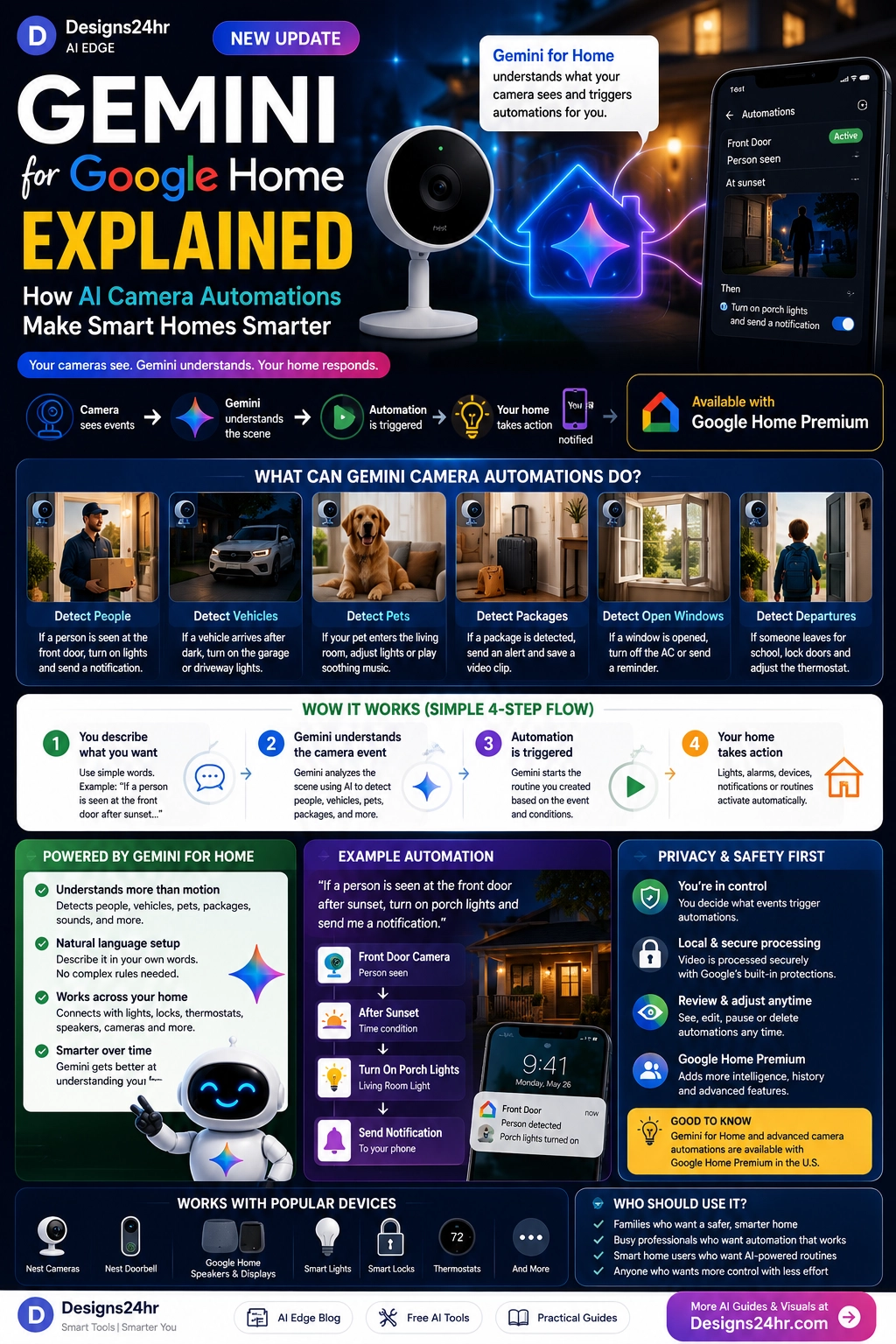
Gemini for Google Home is turning smart cameras into smarter automation starters. Instead of using only basic motion detection, Google Home can now use Gemini-powered camera understanding to help trigger routines based on what a camera sees.
That means your smart home can respond to more specific events: a person at the front door, a package on the porch, a vehicle in the driveway, a pet in the living room, or activity after sunset. The idea is simple: the camera sees the event, Gemini understands the scene, and your Google Home automation responds.
What Is Gemini Google Home Camera Automation?
Gemini Google Home camera automation is a smart home feature that lets camera events become automation triggers. In plain English, your camera can notice something happening, Gemini can help understand what happened, and Google Home can start a routine based on your setup.
This is different from a simple motion alert. Motion detection may only know that something moved. Gemini camera automation can be more specific because it can help identify the type of event, such as a person, package, vehicle, pet, or another supported visual trigger.
For everyday users, this makes smart home automation easier to understand and more useful. Instead of building complicated rules, you can describe what you want your home to react to.
Why Gemini for Google Home Matters
Smart homes are becoming more context-aware. Older routines often worked with simple triggers like time, motion, door sensors, or voice commands. Those are still useful, but they do not always understand what is actually happening.
Gemini for Google Home adds a more intelligent layer. A camera event can become a smarter routine starter, so your home can respond to real-life situations instead of generic movement.
This matters for homeowners, renters, families, pet owners, busy professionals, and anyone who wants a smart home that feels more helpful without requiring complex setup.
How Google Home AI Camera Automations Work
The basic flow is easy to understand:
- Your camera sees an event: A person, package, vehicle, pet, open door, or other supported visual event appears.
- Gemini understands the scene: AI helps interpret what the camera event means.
- Google Home triggers a routine: The automation you created starts when the event matches your rule.
- Your home responds: Lights, notifications, speakers, locks, thermostats, or other compatible devices can react.
A simple example would be: “If a person is seen at the front door after sunset, turn on the porch lights and send me a notification.”
Natural Language Setup Makes Smart Home Routines Easier
One of the biggest advantages is natural language setup. Instead of manually building every condition with technical logic, users can describe the event they want Gemini to watch for.
This makes Google Home AI camera automations more approachable for beginners. You can describe what should happen, choose the camera, set conditions, and connect the event to a smart home action.
If you need help turning a rough automation idea into a clearer prompt, the AI Prompt Generator can help you write better AI instructions.
1. Detect People at the Front Door
Front-door awareness is one of the most practical uses for Gemini camera automation. If a person appears at your door, Google Home can trigger a routine based on your rules.
For example, you could create a routine that turns on porch lights when a person is seen after dark, sends a phone notification, or starts another compatible home action.
This can be useful for visitors, deliveries, late-night activity, and general home awareness.
2. Detect Packages and Deliveries
Package detection is another strong use case for Nest camera automation triggers. If your camera detects a package, Google Home may be able to send an alert or start a routine.
This is helpful for people who receive frequent deliveries, live in apartments, or want faster awareness when something is left outside.
A useful routine could be: “When a package is detected, send me a notification and save a video clip if supported by my setup.”
3. Detect Vehicles in the Driveway
Driveway and garage automations can help your home respond when a vehicle arrives, leaves, or appears in a monitored area.
For example, if a vehicle enters your driveway after sunset, your routine could turn on exterior lights. If a car is left in a certain location, you may use an alert or reminder depending on your setup.
This can make outdoor lighting and home awareness feel more automatic and less dependent on manual checks.
4. Detect Pets and Indoor Activity
AI smart home routines are not only about security. Indoor camera automations may help with pets, household routines, and comfort settings.
For example, if a pet enters a certain room, a routine could turn on lights, play calming audio, or send a reminder. If activity is detected in a shared area, your home could respond with a comfort routine.
Indoor camera use should always be handled carefully. Avoid sensitive private areas and make sure everyone in the home understands how cameras and automations are being used.
5. Detect Open Windows, Doors, or Departures
Gemini for Home smart home automation can also support reminders around departures, open windows, open doors, or other household activity.
For example, if someone leaves in the morning, a routine could remind the household to lock doors, turn off lights, or adjust the thermostat. If a window appears open, the home could send a reminder.
These routines are best used as helpful reminders, not as your only source of safety or security.
Google Home Premium Camera Features: What to Know
Some Gemini-powered smart home features may depend on supported devices, Google Home app access, compatible cameras, Google Home Premium features, internet connection, Wi-Fi, and availability in your region.
This is important because not every camera, plan, or household setup will support every AI camera automation feature. Before buying devices or changing plans, check the latest Google Home and Google Nest details for your country, device model, and subscription level.
A smart approach is to confirm compatibility first, then build one simple routine before creating more advanced automations.
AI Home Security Privacy: What Users Should Review
AI camera triggers can make a home feel smarter, but privacy matters. A smart camera is watching a real space, and AI can add more meaning to what it sees.
Before turning on camera-based automations, review your settings carefully:
- Camera placement: Avoid bedrooms, bathrooms, and sensitive private areas.
- Account access: Know who can view cameras, events, and automation history.
- Event storage: Understand what clips, previews, or event descriptions may be saved.
- Notifications: Check who receives alerts and what information appears in them.
- Automation actions: Avoid risky actions without review, especially locks, alarms, or devices that affect safety.
- Regular review: Recheck routines as your household, devices, and privacy needs change.
What Gemini Camera Automations Should Not Replace
Gemini camera automation can improve convenience and awareness, but it should not replace important safety systems or human judgment.
AI can misunderstand scenes, delays can happen, and camera events may not always be processed instantly. That means AI camera automations should not be your only security layer.
Use smart home camera automations as helpful support alongside strong locks, alarms, safe habits, and professional security tools where needed.
Best Gemini for Google Home Automation Ideas
Here are beginner-friendly ideas for using Gemini for Google Home camera automation:
- Front door lights: If a person appears after sunset, turn on porch lights.
- Package alert: If a package is detected, send a notification.
- Driveway lighting: If a vehicle arrives at night, turn on exterior lights.
- Pet comfort: If a pet enters the living room, start a calming light scene.
- Open window reminder: If a window appears open, send a reminder.
- Morning departure routine: If someone leaves, run a home-away checklist.
If you are comparing several automation ideas, the Decision Helper can help you choose the safest and most useful option.
How to Plan a Safer Google Home Camera Automation
A strong smart home automation should be specific, useful, and safe. Use this simple workflow:
- Choose the camera: Pick the camera that can clearly see the event.
- Describe the visual trigger: Write the event in simple, specific language.
- Add conditions: Use time of day, device status, or location when needed.
- Choose the action: Decide what your home should do when the event happens.
- Test the routine: Make sure it works as expected before relying on it.
- Review privacy: Check camera placement, permissions, event history, and notifications.
- Update regularly: Adjust your automation when routines, devices, or household needs change.
If you want to organize smart home setup tasks into a simple checklist, try the AI Daily Task Planner.
Who Should Use Gemini Camera Automations?
Gemini for Google Home camera automations are best for people who already use smart home devices and want routines that respond to real events.
- Families: Create reminders for arrivals, departures, packages, and daily routines.
- Homeowners: Improve porch, driveway, lighting, and security awareness routines.
- Renters: Use supported cameras and notifications for simple home awareness.
- Pet owners: Trigger comfort routines based on pet activity.
- Busy professionals: Automate small home tasks and stay aware while away.
- Smart home beginners: Build useful routines with natural language instead of complex setup.
Smart Takeaway
Gemini for Google Home is making smart homes more responsive by turning camera events into smarter automation triggers. Your camera can see what is happening, Gemini can help understand the event, and Google Home can trigger a routine that makes your home respond.
The opportunity is exciting: smarter lighting, package alerts, driveway awareness, pet routines, open-window reminders, and easier natural-language setup. But privacy and safety should come first. Review camera placement, permissions, notifications, storage, and automation actions before relying on AI camera triggers.
FAQ: Gemini for Google Home Camera Automations
What is Gemini for Google Home camera automation?
Gemini for Google Home camera automation lets supported cameras use AI-understood visual events as smart home automation starters, so routines can trigger based on what a camera sees.
Can Nest cameras trigger Google Home automations?
Supported Nest cameras and eligible Google Home setups can use Gemini-powered camera events to trigger smart home routines, depending on device compatibility, plan requirements, app access, and availability.
What can Gemini camera automation detect?
Gemini camera automation can help with visual events such as people, vehicles, pets, packages, open doors, open windows, departures, and other supported camera events depending on your setup.
Do I need Google Home Premium for AI camera automations?
Some Gemini-powered camera features and advanced smart home automations may require Google Home Premium, compatible devices, and supported access. Always check Google’s latest plan and device requirements before relying on a feature.
Are Google Home AI camera automations safe for security?
They can help with awareness and convenience, but they should not replace locks, alarms, emergency systems, or professional security tools. AI can make mistakes, so privacy and safety settings should be reviewed carefully.
Explore simple AI tools, visual guides, and practical resources at Designs24hr.