AI Shopping Assistant Checklist: How U.S. Shoppers Can Compare Prices, Spot Fake Reviews, and Avoid Bad Deals
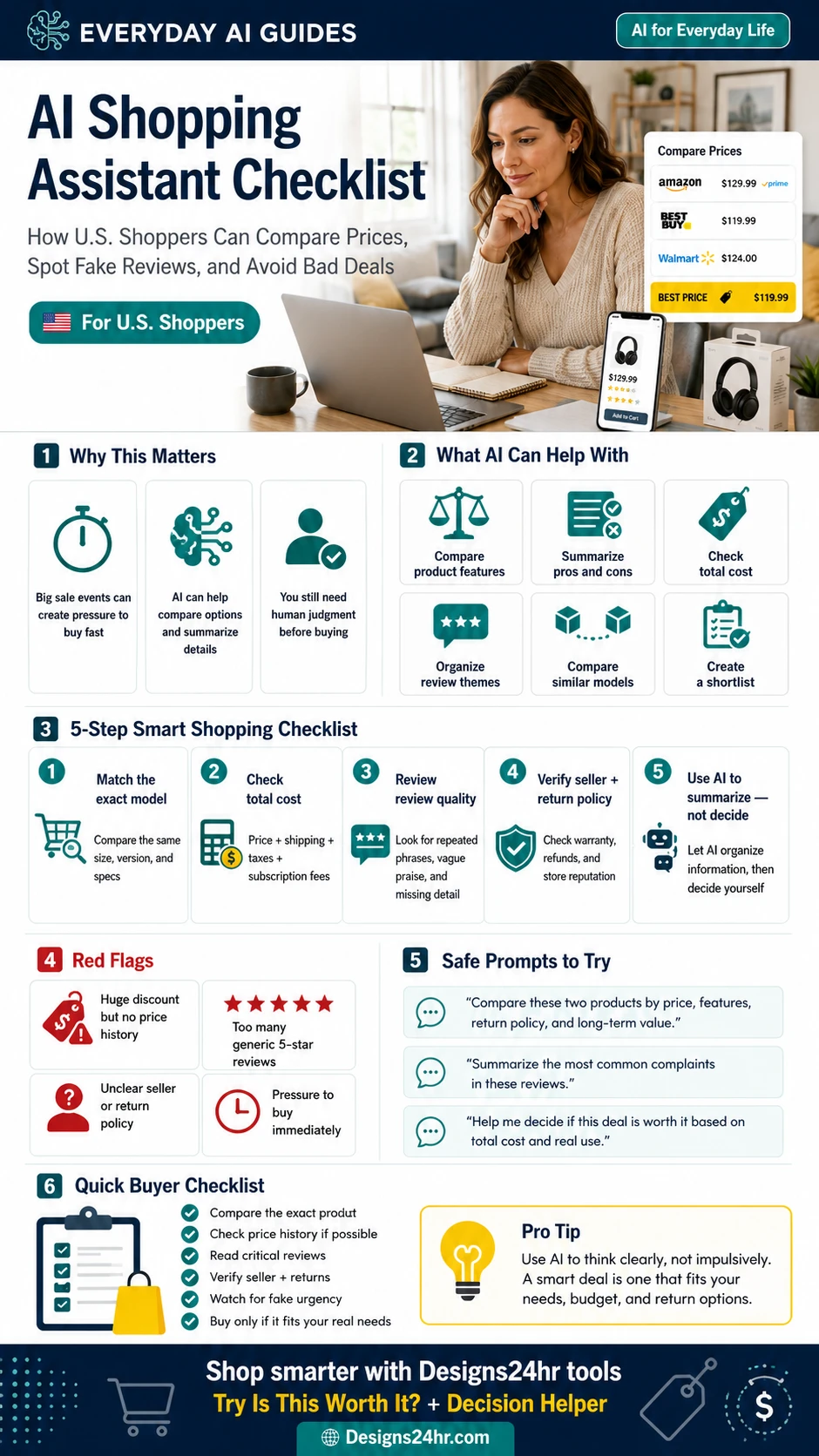
AI shopping assistants can help you compare products faster, organize reviews, check hidden costs, and think through a deal before buying. But they should help you decide smarter, not pressure you into spending faster.
AI shopping assistant tools are becoming part of everyday online shopping. Some can answer product questions, compare similar items, summarize reviews, track prices, or help shoppers find options faster. Google has added AI shopping features in Search and Gemini, while Amazon’s AI shopping assistant, originally called Rufus and later renamed Alexa for Shopping, is designed to answer shopping questions, compare products, and help with product discovery.
That sounds useful, especially during big sale events. But smarter shopping still needs human judgment. A tool can organize information, but it might miss fake urgency, confusing return policies, paid rankings, inflated “discounts,” privacy concerns, or the simple question that matters most: Do I actually need this?
What Is an AI Shopping Assistant?
An AI shopping assistant is a tool that helps shoppers ask product questions in plain language. Instead of searching one keyword at a time, you can ask things like “compare these two air fryers,” “summarize the biggest complaints in these reviews,” or “what hidden costs should I check before buying this subscription?”
Depending on the platform, an AI shopping assistant may help with product discovery, product comparisons, review summaries, price tracking, local availability, gift ideas, or checkout support. Some assistants are built into major shopping platforms, while others are general AI tools that help you think through the decision.
Why AI Shopping Tools Are Trending With U.S. Shoppers
AI shopping tools are growing because online shopping has become noisy. Shoppers often face dozens of similar products, limited-time deals, confusing model names, fake-looking reviews, changing prices, shipping fees, and return-policy fine print.
YouGov reported that many Americans are aware of AI shopping assistants, but trust is still a major barrier. That makes sense. A shopper might want AI to help find better prices or compare products, but still hesitate to trust AI with the final decision.
This is exactly why a checklist matters. The best use of AI while shopping is not “buy whatever the assistant suggests.” The better approach is to use AI as a research helper while you stay in control of the final purchase.
It can summarize product details, compare similar options, and turn messy research into a clearer shortlist.
It may not understand your budget, real need, return risk, long-term use, or whether a deal is actually good.
The smartest shopper uses AI to think clearly, then checks the seller, policy, price, and product details before buying.
What AI Can Help With Before You Buy
An AI shopping assistant can be helpful when you give it a focused task. It works best when you ask it to organize information, not make the final decision for you.
Ask AI to compare size, materials, specs, warranty, compatibility, and use cases side by side.
Use AI to turn long product pages and reviews into a short list of strengths and weaknesses.
Ask AI to remind you to include shipping, taxes, accessories, subscriptions, replacement parts, and return fees.
AI can help identify repeated complaints, repeated praise, missing details, and review patterns worth checking.
Instead of scrolling forever, ask AI to narrow your options based on your budget, priorities, and must-have features.
AI can list smart questions to ask before buying, especially for expensive products, electronics, appliances, and subscriptions.
Before buying, check if it is actually worth it
If you are unsure whether a deal fits your real needs, use the free Designs24hr “Is This Worth It?” tool to think through cost, value, alternatives, and long-term usefulness before spending money.
Step 1: Match the Exact Product Model
The first step in smart shopping is making sure you are comparing the same product. Many bad purchases happen because shoppers compare a headline deal against a similar-looking product that has a different size, year, model number, material, bundle, warranty, or feature set.
Check the exact details before comparing prices
Look for the model number, size, color, storage amount, compatibility, generation, included accessories, condition, and warranty terms. A product may look cheaper because it is smaller, older, refurbished, missing accessories, or sold by a weaker seller.
“This one is $40 cheaper, so it must be the better deal.”
“These look similar, but I need to verify model number, year, condition, included accessories, return policy, and warranty before comparing price.”
Step 2: Compare Price, Shipping, Taxes, and Fees
The lowest product price is not always the lowest total cost. A deal can look great until you add shipping, taxes, handling fees, required accessories, subscription costs, return shipping, restocking fees, installation, or replacement parts.
Calculate the real total cost
Before buying, add everything you may have to pay. This is especially important for electronics, printers, smart home devices, online services, furniture, appliances, fitness equipment, software, and subscription-based products.
| Cost to Check | Why It Matters | Example Question |
|---|---|---|
| Shipping | A lower price can disappear when delivery is expensive. | Is shipping free, discounted, delayed, or only free above a certain order amount? |
| Taxes and fees | The final checkout price may be higher than the product page price. | What is the final total after taxes and extra fees? |
| Accessories | Some products need add-ons to work properly. | Do I need batteries, cables, filters, ink, cases, mounts, or adapters? |
| Subscriptions | A cheap device may require monthly payments for full features. | Does this product need a subscription to be useful? |
| Returns | A return may cost money if shipping or restocking fees apply. | Who pays return shipping, and is there a restocking fee? |
Step 3: Check Price History When Possible
A “limited-time deal” does not always mean the product is at its best price. Sometimes a discount looks bigger because the original price is inflated, the product was cheaper before, or another retailer has a better offer.
Use AI to remind you what to check, but verify the actual price history through trusted shopping tools, retailer pages, price trackers, or comparison sites when available.
Do not trust the discount percentage alone
A product marked “40% off” may still be a weak deal if the price was lower last month, if the same item is cheaper elsewhere, or if the product is being cleared out because a newer version exists.
Look at more than one trusted retailer. Compare the exact same model, condition, bundle, and warranty.
Use price history tools when possible to see whether today’s deal is actually low or just marketed as urgent.
Step 4: Read Reviews With a Fake-Review Filter
Reviews can be helpful, but they can also be misleading. The FTC advises shoppers not to rely on star ratings alone because some reviews and ratings are fake or misleading. A product can have many five-star reviews and still have serious problems hidden in repeated complaints.
Look for patterns, not just stars
Ask AI to summarize review themes, but still read reviews yourself. Pay special attention to repeated complaints, review dates, vague praise, identical wording, photos, verified purchase labels, and whether critical reviews mention the same issue.
Many reviews using similar wording can be a warning sign, especially when the comments feel generic.
Reviews like “great product” without details are less useful than reviews explaining real use, pros, and problems.
If every review is glowing, search outside the product page for complaints, forum posts, or expert reviews.
A sudden flood of reviews over a short time can be worth investigating, especially for unknown brands.
Helpful reviews often include specific use cases, long-term feedback, photos, sizing notes, or compatibility details.
If many critical reviews mention the same issue, treat that issue as a real purchase risk.
Step 5: Verify the Seller, Return Policy, and Warranty
A good product from a weak seller can still become a bad purchase. Before buying, check who is selling the item, who fulfills it, who handles returns, and what happens if the product arrives damaged, defective, late, incomplete, or different from the listing.
Check the policy before checkout
Look for return windows, refund rules, restocking fees, return shipping costs, warranty terms, seller ratings, customer complaints, and whether sale or clearance items have different rules.
Use AI to Summarize, Not Decide for You
The safest way to use an AI shopping assistant is to treat it like a research organizer. It can help you make a clearer shortlist, compare the main options, and identify questions you forgot to ask.
But the final decision should still be yours because only you know your budget, timing, space, preferences, comfort level, and real need.
Comparing two or more products?
Use the free Designs24hr Decision Helper to compare products by price, usefulness, risk, return policy, long-term value, and your personal priorities.
Safe AI Prompts to Use While Shopping
Good prompts make AI shopping tools more useful. Instead of asking “Should I buy this?” ask for a structured comparison that helps you think.
Red Flags AI Might Miss
AI can summarize information, but it may not catch every shopping risk. Always slow down when you see any of these warning signs.
A big discount is not proof of value. Check whether the product was actually sold at the higher price.
Vague praise without real product details can be less useful than detailed three- or four-star reviews.
If you cannot tell who sells, ships, supports, or warranties the product, be careful.
Countdown timers, “only one left,” and extreme urgency can push impulse purchases.
A product may look cheap until you realize returns are expensive, limited, or not allowed.
Be careful if a seller pushes gift cards, wire transfers, payment apps, or cryptocurrency for normal purchases.
AI Shopping Assistant Checklist for Big Sale Events
Use this checklist during Prime Day, Black Friday, Cyber Monday, back-to-school sales, holiday shopping, Labor Day deals, electronics sales, furniture promotions, and any moment when a deal feels urgent.
| Before You Buy | What to Check | Why It Matters |
|---|---|---|
| Exact product | Model number, version, size, color, condition, accessories | Prevents comparing two different items by mistake. |
| Total cost | Shipping, taxes, fees, subscriptions, return costs | Shows the true price, not just the product-page price. |
| Price history | Past price, competitor price, sale pattern, price alerts | Helps you avoid inflated discounts and fake deals. |
| Review quality | Repeated complaints, review dates, verified purchases, vague wording | Helps spot fake-looking praise and real product problems. |
| Seller trust | Seller ratings, complaints, fulfillment, support, contact details | A good product from a bad seller can still be risky. |
| Return policy | Return window, restocking fee, return shipping, sale-item rules | Protects you if the product is defective or not right for you. |
| Real need | Budget, use frequency, alternatives, space, timing | Stops a “good deal” from becoming buyer’s remorse. |
Quick Buyer Checklist
Before clicking buy, go through this simple checklist.
Check model number, version, size, condition, and included accessories.
Include taxes, shipping, fees, add-ons, subscriptions, and return costs.
Look beyond the discount percentage and compare trusted retailers.
Look for repeated complaints, not just star ratings.
Check who sells it, who ships it, who supports it, and how returns work.
Do not let countdown timers or stock warnings replace careful checking.
Avoid sharing sensitive personal, financial, or account details with random tools.
Use AI for clarity, but buy only if it fits your real need and budget.
When You Should Wait Instead of Buy
Sometimes the smartest shopping decision is waiting. A product may be useful, but not urgent. A deal may be real, but still not right for your budget. AI can help you slow down and ask better questions before spending.
If you feel pressure from a timer, stock warning, or influencer recommendation, step away and check the details again later.
If the return policy is unclear, the seller is unknown, or warranty support is weak, the cheaper price may not be worth it.
A sale item is not automatically valuable if you already have something that solves the same problem.
If the purchase is mostly stress, boredom, urgency, or fear of missing out, give yourself more time before deciding.
Use AI to think clearly, not impulsively
A smart deal is one that fits your needs, budget, timing, and return options. Before buying, run the decision through a simple value check.
Final Takeaway
AI shopping assistants can make online shopping easier, but they should not replace your judgment. The best way to use AI while shopping is to compare exact products, summarize review patterns, calculate total cost, verify seller policies, and slow down before buying.
For U.S. shoppers, the safest mindset is simple: AI helps organize the decision. You make the decision.
Before your next purchase, ask whether the product solves a real need, whether the seller is trustworthy, whether the return policy protects you, and whether the final price still makes sense after all costs are included.
FAQs About AI Shopping Assistants
What is an AI shopping assistant?
An AI shopping assistant is a tool that helps shoppers compare products, summarize reviews, answer product questions, organize options, and sometimes track prices or help find deals.
Can AI help me compare prices?
Yes. AI can help organize price details across products, but you should still verify the final price, shipping cost, taxes, seller, coupon terms, and return policy before buying.
Can AI spot fake reviews?
AI can help summarize review patterns and highlight suspicious wording, but it cannot guarantee that reviews are real. Always check verified purchase labels, critical reviews, review dates, repeated complaints, and trusted third-party sources.
Should I let AI decide what to buy?
No. AI can help compare options and organize information, but the final decision should be yours. Consider your budget, real need, return options, seller trust, and long-term value.
What should I check before buying online?
Check the exact product model, total cost, seller reputation, return policy, warranty, price history, review quality, shipping timeline, and whether the deal fits your real needs.
How can I avoid bad online deals?
Avoid deals with unclear sellers, fake urgency, huge discounts without price history, vague return policies, only generic five-star reviews, or payment methods that offer weak buyer protection.
Are AI shopping assistants safe to use?
They can be helpful, but shoppers should avoid sharing sensitive personal, financial, account, or private information inside random AI shopping tools. Use trusted platforms and verify important details directly.
What is the best way to use AI while shopping?
Use AI to compare products, summarize pros and cons, organize reviews, list questions to ask, and check hidden costs. Do not use it as the only source for seller trust or purchase decisions.
Can AI help me avoid buyer’s remorse?
Yes, if you use it to slow down and think clearly. Ask AI to compare the product against your real needs, budget, alternatives, return options, and long-term value before buying.
What is a good AI shopping prompt?
A good prompt is specific. For example: “Compare these two products by total cost, features, warranty, return policy, review complaints, and long-term value. Do not choose for me; show the trade-offs.”
Helpful Sources and Related Tools
Use these trusted resources and free Designs24hr tools to shop more carefully and make better decisions.