AI Class Policy Checklist: What U.S. Students Should Check Before Using ChatGPT for Homework, Essays, or Research
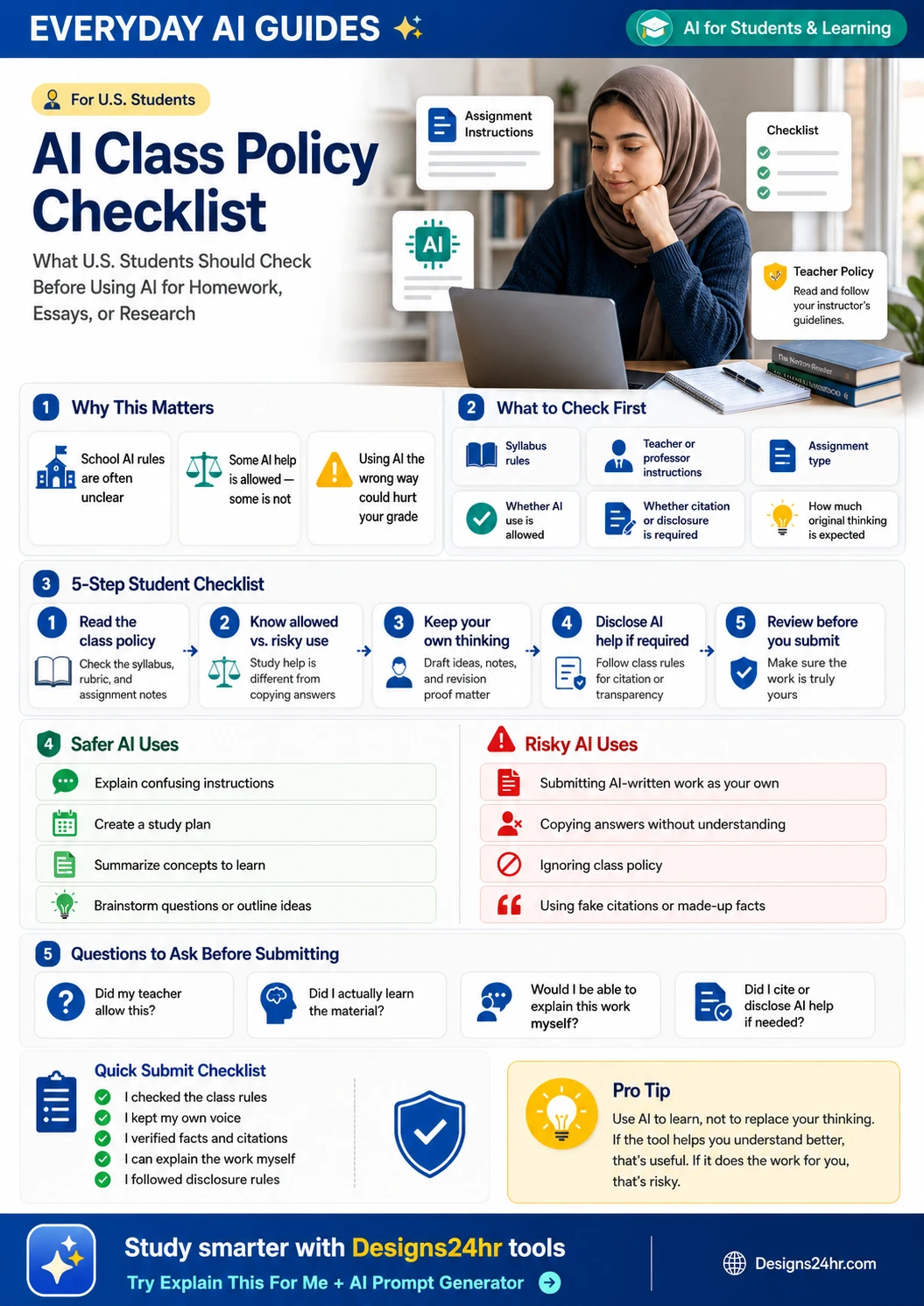
Students are using AI more often for schoolwork, but class rules are not always clear. This checklist helps U.S. students check what is allowed, avoid academic-integrity problems, and use AI to learn without letting it replace their own thinking.
AI class policy checklist is becoming an important search topic because students are already using tools like ChatGPT, Copilot, Gemini, and other AI chatbots for schoolwork, but many classes still have different rules. Gallup reported in 2026 that 57% of U.S. college students use AI in coursework at least weekly. Pew Research also reported that more than half of U.S. teens have used chatbots to search for information or get help with schoolwork.
That does not mean every use of AI is allowed. Some teachers may allow AI for brainstorming, explaining confusing concepts, or creating practice questions. Others may ban AI for essays, exams, quizzes, take-home assignments, or graded answers. The safest move is simple: check the class policy before using AI on anything you submit.
What Is an AI Class Policy?
An AI class policy is a teacher, professor, school, or course rule that explains whether students can use AI tools for schoolwork. It may appear in the syllabus, assignment instructions, academic-integrity policy, online classroom notes, exam rules, or a message from your teacher.
Some AI policies are clear. Others are vague. A policy might say “no AI-generated work,” “AI may be used for brainstorming only,” “AI must be cited,” “AI is allowed with disclosure,” or “students may use approved tools for study support.” Each phrase can mean something different depending on the assignment.
Why AI Rules Are Confusing for U.S. Students in 2026
AI rules are confusing because student AI use is growing faster than many school policies. Some instructors encourage AI for learning support. Others worry that students may copy answers, skip thinking, use fake citations, or submit AI-written work as their own.
RAND reported that student use of AI for homework has increased sharply, and many students themselves worry that overusing AI could hurt critical thinking. OpenAI’s Study Mode shows a better direction: AI can guide students step by step instead of simply giving fast answers. That learning-first mindset is exactly what students should aim for when class rules allow AI help.
Some classes allow AI to explain confusing ideas, create study questions, or help students plan their work.
Some teachers allow brainstorming or outlining but do not allow AI-written paragraphs or final answers.
Submitting AI-generated work as your own can violate academic-integrity rules and hurt your grade.
Step 1: Check the Syllabus Before Using AI
Your syllabus is usually the first place to check. Look for sections called academic integrity, AI policy, technology policy, plagiarism, citation rules, assignment rules, exam rules, or course expectations.
Read the class policy before opening ChatGPT
If the syllabus says AI use is limited, follow the limit. If it says AI use must be disclosed, disclose it. If it says AI is not allowed for graded work, do not use AI to complete graded work.
Pay attention to assignment-specific instructions too. A teacher may allow AI in one assignment but not another. For example, AI might be allowed for brainstorming an essay topic but banned for writing the final essay. It might be allowed for practice problems but banned for graded homework answers.
Confused by the syllabus or assignment instructions?
Paste the unclear part into Designs24hr’s free Explain This For Me tool to turn confusing assignment instructions into plain language before you decide how to use AI.
Step 2: Know the Difference Between Learning Help and Cheating
The safest way to think about AI for school is to separate learning help from replacement work. Learning help supports your understanding. Replacement work does the assignment for you.
“Explain this concept in simpler terms, then ask me practice questions so I can test my understanding.”
“Write my essay for me so I can submit it tomorrow.”
Learning help usually keeps you involved. You still read, think, draft, solve, revise, and explain the work. Risky use often removes you from the thinking process. If you cannot explain what you submitted, that is a warning sign.
Step 3: Ask What Kind of AI Use Is Allowed
AI use is not one single thing. A class may allow some uses and ban others. Before you use AI, identify the type of help you want.
| AI Use | Often Safer When Allowed | Risk Level |
|---|---|---|
| Explaining confusing instructions | Helps you understand what the assignment asks. | Usually lower risk |
| Creating a study plan | Helps organize your time without completing the work. | Usually lower risk |
| Brainstorming topic ideas | Can help you start thinking, if you choose and develop your own idea. | Medium risk if not disclosed when required |
| Outlining an essay | May be allowed in some classes, but not all. | Depends on the class policy |
| Editing grammar after you write | May be allowed if the content and ideas are yours. | Depends on disclosure rules |
| Writing final paragraphs | Can replace your own work. | High risk |
| Solving graded answers | Can violate independent-work rules. | High risk |
| Creating citations or sources | AI can invent sources, titles, authors, quotes, and page numbers. | High risk unless carefully verified |
Step 4: Keep Proof of Your Own Thinking
If your teacher allows some AI help, you should still keep proof that the work is yours. This can protect you if questions come up later, and it also helps you learn better.
Save drafts, notes, outlines, and decisions
Keep your early notes, rough outline, source list, draft changes, teacher feedback, revision history, and any AI prompts you used if disclosure is required. Your process matters.
For essays and research projects, your thinking might show up in topic choices, thesis drafts, source notes, handwritten notes, revision comments, or examples you personally selected. For math, science, or coding work, your thinking might show up in steps, explanations, sketches, attempts, mistakes, and corrections.
Brainstorm notes, assignment breakdown, source notes, rough draft, revision history, teacher feedback, and your own explanation of the final work.
Only a polished final answer with no notes, no drafts, no source trail, and no way to explain how you got there.
Step 5: Know When to Cite or Disclose AI Help
Some classes require students to disclose any AI help. Others only require disclosure for certain uses, such as AI-generated wording, AI-assisted outlines, AI feedback, or AI-created images. Some classes may ban AI entirely for the assignment.
If your class requires AI disclosure, follow the exact format your teacher or school gives you. If there is no format, ask before submitting. Do not guess on important graded work.
A simple disclosure might look like this if your teacher allows it: “I used an AI tool to brainstorm possible research questions and review grammar. I wrote the final draft myself and verified all sources.” Only use a disclosure like this if it accurately describes what you did and matches your class rules.
Safe AI Uses for Homework, Essays, and Research
Safe AI use depends on your class policy, but these uses are often more learning-focused because they support your thinking instead of replacing it.
Use AI to understand what an assignment asks, but not to complete the assignment.
Break a big project, exam review, or reading list into smaller study tasks.
Ask AI to explain ideas in simpler terms, then check your notes, textbook, or teacher resources.
Use AI to generate questions you can ask in class, during office hours, or while studying.
Ask AI to quiz you after you study so you can test what you understand.
After you write your own draft, AI may help identify unclear sentences if your class allows editing help.
Need a safer study prompt?
Use the Designs24hr AI Prompt Generator to create structured prompts that help you learn, practice, and organize ideas instead of copying answers.
Risky AI Uses That Could Hurt Your Grade
These uses can create academic-integrity problems, especially if your teacher did not clearly allow them.
This is one of the biggest risks. If the ideas, structure, or wording are not yours, do not submit it as your own work.
If you cannot explain the answer, you probably did not learn what the assignment was designed to teach.
If your teacher says AI is not allowed for the assignment, using it anyway can become a rule violation.
AI can invent sources that look real. Always verify sources directly before citing anything.
Take-home quizzes, problem sets, lab reports, and coding assignments may require independent work.
If your teacher requires AI disclosure and you skip it, that can create trust and grading problems.
Questions to Ask Your Teacher or Professor
If the AI policy is unclear, asking early is better than guessing. You do not need to make the question complicated. Keep it specific to the assignment.
If you are nervous about asking, remember that a clear question shows you are trying to follow the rules. Teachers usually prefer that over hidden AI use.
Examples: Better AI Prompts for Students
Good prompts keep the learning process with you. They ask for explanation, practice, and feedback instead of finished work to submit.
Write my final essay on this topic in 900 words.
Help me brainstorm possible angles for this essay topic. Ask me questions so I can choose my own thesis.
Solve this homework problem and give me the final answer only.
I tried this problem and got stuck at step three. Explain the concept behind the next step without giving me the final answer first.
Give me sources and quotes for my research paper.
Suggest search terms and types of sources I should look for. Do not invent citations. I will verify all sources myself.
How to Use AI Without Skipping the Thinking
The best student AI use keeps you active. Instead of asking AI to finish the work, ask it to guide your thinking. This is similar to how tutoring should work: the tutor helps you understand the next step, but you still do the learning.
Instead of asking for answers, ask AI to quiz you, challenge your reasoning, or ask what evidence supports your point.
After writing your own draft, ask what is unclear, what needs stronger evidence, or what the reader might not understand.
When solving a problem, ask AI to explain the process one step at a time so you can try before seeing the answer.
Use AI to break a chapter, project, or test into smaller tasks instead of asking it to produce the final work.
Quick Checklist Before Submitting Work
Before you submit homework, an essay, a research project, a discussion post, a lab report, or a take-home assignment, run through this checklist.
I reviewed the syllabus, assignment instructions, and academic-integrity rules.
I did not assume that every kind of AI help was approved.
The final ideas, structure, explanation, and wording are truly mine.
If asked, I can explain my reasoning without relying on the AI tool.
I did not trust AI-generated citations, quotes, or claims without checking them.
If my teacher required citation or disclosure, I included it honestly.
I kept notes, drafts, outlines, source notes, or revision history when useful.
The tool supported my learning instead of replacing my thinking.
Final Takeaway
AI can be useful for students, but the rules matter. Before using ChatGPT or any AI tool for homework, essays, research, or graded work, check the syllabus, understand the assignment, ask what is allowed, keep proof of your thinking, and follow citation or disclosure rules.
The safest approach is not to hide AI use or let AI do the assignment. The safest approach is to use AI to understand better, study smarter, ask better questions, and complete your own work with more confidence.
Study smarter with Designs24hr tools
Use free tools to simplify confusing instructions, create safer prompts, and plan your study work without letting AI replace your own thinking.
FAQs About AI Class Policies
Can students use ChatGPT for homework?
It depends on the class rules. Some teachers allow AI for brainstorming, studying, explaining concepts, or feedback, while others limit or ban AI for graded assignments. Always check the syllabus or ask your teacher first.
Is using AI for homework cheating?
Using AI is not always cheating, but it can become cheating if you submit AI-written work as your own, copy answers without understanding them, ignore class rules, or use AI on work that must be completed independently.
Should I cite ChatGPT or AI help in schoolwork?
If your teacher, professor, school, or assignment instructions require AI disclosure, you should follow those rules. When unsure, ask before submitting.
What should I check before using AI for an essay?
Check the syllabus, assignment instructions, allowed AI uses, citation rules, disclosure requirements, and whether the final writing must be fully your own.
What are safe ways to use AI for studying?
Safer uses include explaining confusing ideas, creating practice questions, helping organize notes, making study plans, brainstorming topics, and giving feedback on clarity after you write your own draft.
What AI uses are risky for students?
Risky uses include copying AI answers, submitting AI-written work, using fake citations, ignoring teacher rules, using AI on independent graded work, or relying on AI so much that you cannot explain the assignment yourself.
How can I ask my teacher if AI is allowed?
Ask a simple question like: “For this assignment, am I allowed to use AI for brainstorming, outlining, grammar feedback, or study help? If yes, do you want me to cite or disclose it?”
What should I do if the class policy is unclear?
If the policy is unclear, do not guess. Ask your teacher or professor before using AI on graded work, especially essays, exams, quizzes, lab reports, and take-home assignments.
Can I use AI to edit grammar?
Maybe. Some teachers allow grammar feedback after you write your own draft, while others may require disclosure or limit AI editing. Check the assignment rules before using AI editing on submitted work.
Can AI create citations for my paper?
You should be very careful. AI can invent sources, quotes, authors, and page numbers. Use your library, database, textbook, or trusted source directly, and verify every citation before submitting.
Helpful Sources and Related Tools
Use these trusted sources and free Designs24hr tools to understand AI class rules, study responsibly, and avoid academic-integrity mistakes.