AI Study Checklist: 7 Best Ways U.S. Students Can Use AI Without Cheating
AI can help students understand confusing lessons, create flashcards, practice for quizzes, organize notes, and plan study time. But students need clear rules so AI supports learning instead of replacing it.
This AI study checklist is written for U.S. students, parents, homeschool families, and college learners who want to use AI responsibly. The goal is simple: study smarter, follow school rules, protect privacy, and keep the final work honest.
Trust note: AI can support learning, but it should not be used to secretly complete assignments, submit copied answers, fabricate sources, or ignore your teacher’s policy. Always follow your class, school, or college rules first.
What Is an AI Study Checklist?
An AI study checklist is a practical set of steps students can follow before using AI for schoolwork. It helps students decide when AI is useful, when it may cross a line, and how to use AI in a way that builds real understanding.
Instead of asking AI to “do the homework,” a better approach is to ask AI to explain a concept, make a practice quiz, organize notes, or help build a study schedule. That keeps the student involved in the thinking process.
- Use AI to explain, not replace, learning.
- Check your teacher’s AI rules before using it for assignments.
- Write final answers in your own words.
- Fact-check important information with trusted sources.
- Protect private school and personal information.
Why Students Need Clear AI Rules
AI tools can feel like a tutor, planner, writing coach, quiz maker, and research helper in one place. That can be powerful, but it also creates confusion. One teacher may allow AI for brainstorming, while another may ban it for a specific essay, test, lab report, or take-home assignment.
That is why responsible AI use starts with the rules. U.S. students should ask what is allowed before using AI for graded work. If the policy is unclear, use AI only for studying, understanding, and practice until you get permission.
The U.S. Department of Education has published guidance on AI in teaching and learning, showing that AI is now a serious education topic for schools, families, and policymakers. Students should treat AI as a learning support tool, not a shortcut around effort.
Quick Answer: When Is AI Helpful for Studying?
Asking AI to explain a confusing science concept in simpler language.
Copying AI’s answer and submitting it as your own work.
Turning your own class notes into flashcards for a quiz.
Using AI during a test when your teacher did not allow it.
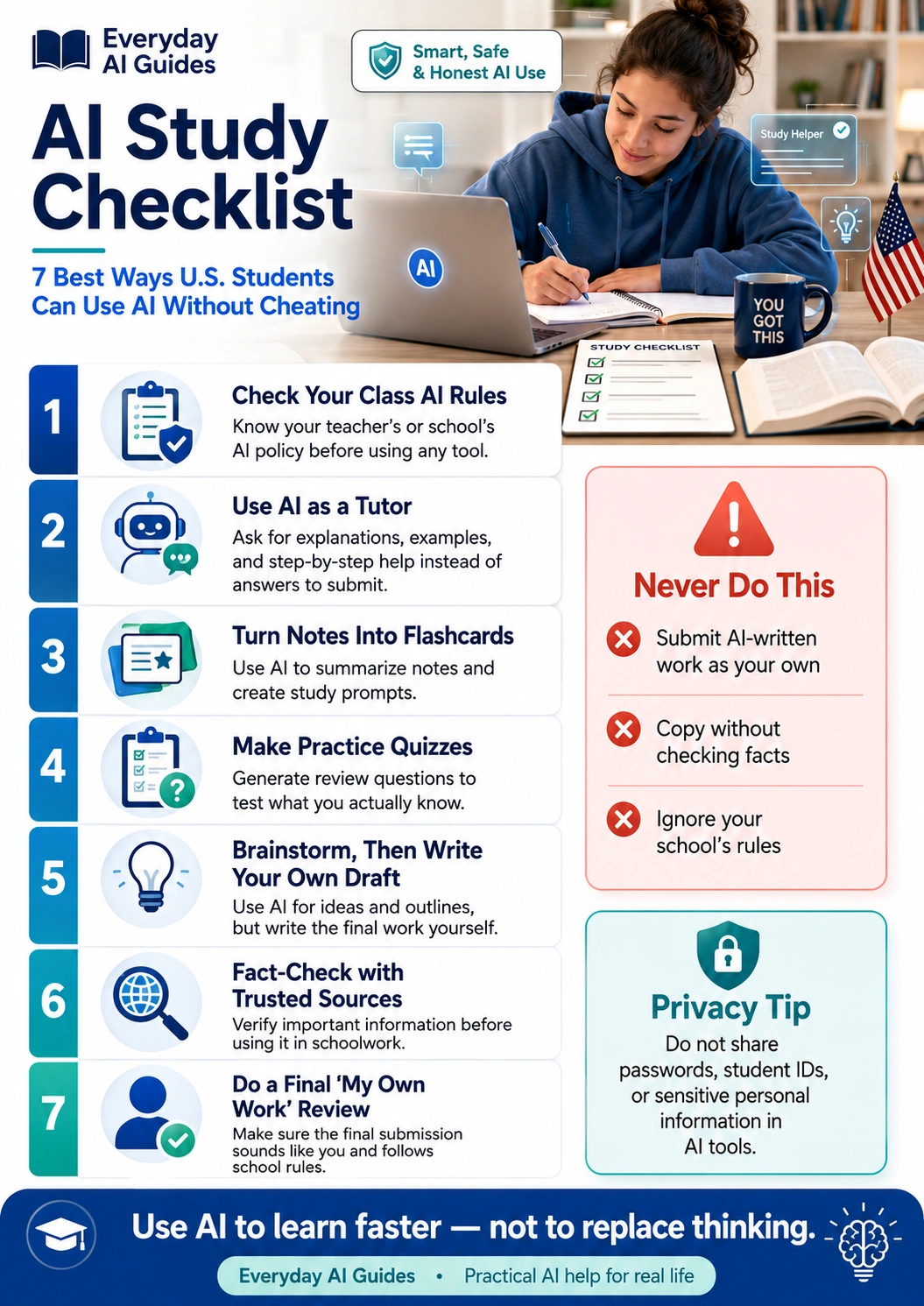
7 Best Ways to Use an AI Study Checklist
“`1Check Your Class AI Rules First
Before using AI for any school assignment, check the teacher’s instructions, syllabus, online classroom post, or school policy. Some assignments allow AI for brainstorming. Others may not allow AI at all.
If you are not sure, ask a simple question: “Can I use AI to help me study or outline ideas for this assignment?” Getting clarity first protects your grade and your integrity.
Student-friendly prompt: “Help me make a list of questions I should ask my teacher about what AI use is allowed for this assignment.”
2Use AI as a Tutor, Not an Answer Machine
The best use of AI for students is learning support. Ask AI to explain the steps, give examples, ask you questions, or help you understand why an answer works.
OpenAI’s Study Mode is designed around step-by-step learning support instead of quick answers. That is the right mindset for students: use AI to build understanding, not to avoid thinking.
Better prompt: “Act like a tutor. Do not give me the final answer right away. Ask me questions and guide me step by step.”
3Turn Notes Into Flashcards
Students often have notes but do not know how to study them. AI can turn class notes into flashcards, key terms, definitions, and review questions.
This works well for biology vocabulary, U.S. history dates, Spanish phrases, psychology terms, math formulas, and exam review. The student should still check the flashcards against class notes or the textbook.
Flashcard prompt: “Turn these notes into 15 flashcards. Put the question first, then the answer. Keep the wording simple and accurate.”
4Create Practice Quizzes
Practice quizzes help students find what they know and what they still need to review. AI can create multiple-choice questions, short-answer questions, true-or-false questions, and fill-in-the-blank practice.
Ask AI to wait before showing the answer key. That makes the quiz more useful because the student has to try first.
Quiz prompt: “Create a 10-question practice quiz from these notes. Do not show the answers until I answer first.”
5Brainstorm Ideas, Then Write Your Own Draft
AI can help students brainstorm essay topics, organize an outline, create a thesis question, or understand assignment instructions. But the final draft should be written by the student unless the teacher clearly allows AI writing.
A safe rule is this: use AI before writing to plan and after writing to review, but do not let AI replace your own draft.
Essay planning prompt: “Help me brainstorm three possible essay angles for this topic. Do not write the essay. Give me questions to think about before I choose my argument.”
6Fact-Check Before Trusting AI Answers
AI can make mistakes. It may sound confident even when it is wrong, outdated, or missing context. Students should check important facts with class materials, teacher-provided sources, library databases, textbooks, or trusted education websites.
This is especially important for history dates, science explanations, legal topics, health information, statistics, quotes, and citations.
Fact-check prompt: “List which claims in this answer should be verified with a textbook, teacher, or reliable source before I use them.”
7Do a Final “My Own Work” Review
The final step in this AI study checklist is a personal review. Before submitting anything, students should make sure the work sounds like them, follows the assignment, and reflects what they understand.
If a teacher asks the student to explain the work, the student should be able to do it without relying on AI.
Final review questions
- Did I follow my teacher’s AI rules?
- Can I explain this answer in my own words?
- Did I check important facts?
- Did I write the final response myself?
- Did I avoid sharing private information?
What Students Should Never Do With AI
AI can be useful, but some uses can create academic integrity problems. When in doubt, choose the safer path and ask your teacher.
- Do not submit AI-written work as your own.
- Do not use AI during a test unless it is clearly allowed.
- Do not copy AI answers without understanding them.
- Do not create fake citations, quotes, data, or sources.
- Do not use AI to hide plagiarism.
- Do not ignore your school’s AI policy.
- Do not paste private school login details or student IDs into AI tools.
Good vs. Bad AI Study Examples
| School task | Responsible AI use | Risky AI use |
|---|---|---|
| Biology test prep | Ask AI to explain cell division and quiz you on key terms. | Ask AI for answers to a take-home test. |
| History essay | Ask AI for topic questions and an outline you can build from. | Submit an AI-written essay as your own. |
| Math homework | Ask AI to show the steps and then solve a similar problem yourself. | Copy the final answer without understanding the method. |
| Reading assignment | Ask AI to summarize difficult paragraphs after you read them. | Skip the reading and rely only on AI summaries. |
| Study planning | Ask AI to create a realistic study schedule for the week. | Use AI planning as a substitute for actually reviewing. |
Helpful Designs24hr Tools for Students
These free Designs24hr tools can support responsible study habits when students use them for understanding, planning, and simplifying information.
- Use Explain This For Me to simplify confusing study material before asking for answers.
- Turn complex school wording into plain language when assignment instructions feel overwhelming.
- Build a simple study plan with AI Daily Task Planner for homework, quizzes, projects, and exam prep.
- Explore free AI tools and Everyday AI Guides from Designs24hr for practical help with school, work, writing, and daily tasks.
Privacy Tips for Students Using AI
Students should be careful about what they paste into AI tools. Schoolwork can include personal details, screenshots, grades, teacher comments, login pages, and private information about classmates.
Before using any AI tool, remove anything that is not needed for the study task.
- Do not share school account passwords.
- Do not share student ID numbers.
- Do not paste private school portal screenshots.
- Do not share grades, addresses, phone numbers, or private family details.
- Do not share personal information about classmates.
- Do not upload copyrighted class materials unless your school or teacher allows it.
How Parents Can Help Students Use AI Responsibly
Parents do not need to become AI experts to help. The most helpful thing is to create a simple family rule: AI should help students learn, not hide shortcuts.
“What does your teacher allow for this assignment?”
“Can you explain the answer without AI?”
“Did you remove personal details before using the tool?”
“Did AI help you study, or did it do the work for you?”
Common Sense Media offers family-focused guidance on generative AI, which can help parents talk with students about safe and responsible use.
Simple AI Prompts Students Can Use Safely
“`For understanding a hard concept
“Explain this concept in simple language for a U.S. high school student. Ask me two questions after the explanation to check if I understand it.”
For flashcards
“Turn these notes into flashcards. Keep each answer short and mark anything that might need fact-checking.”
For practice quizzes
“Create a practice quiz from these notes. Wait for my answers before showing the answer key.”
For essay planning
“Help me brainstorm possible essay angles and questions. Do not write the essay for me.”
For study planning
“Create a realistic 5-day study plan for this test. Include review, practice questions, breaks, and time to check weak areas.”
Final AI Study Checklist Before You Submit Anything
Use this AI study checklist before turning in homework, essays, projects, discussion posts, or take-home assignments.
- I checked my teacher’s or school’s AI policy.
- I used AI to learn, review, plan, or practice.
- I did not submit AI-written work as my own.
- I wrote the final answer in my own words.
- I checked important facts with trusted sources.
- I can explain my answer without AI.
- I removed private information before using AI.
- I followed the assignment instructions.
- I completed a final “my own work” review.
Trusted Resources for Responsible AI Study Habits
These resources can help students, parents, and educators understand responsible AI use in learning.
FAQs About the AI Study Checklist
“`What is an AI study checklist?
An AI study checklist is a simple set of rules students can follow before using AI for schoolwork. It helps students use AI for learning, notes, flashcards, quizzes, and explanations without copying answers or breaking school rules.
Can students use AI without cheating?
Yes. Students can use AI without cheating when they use it as a tutor, study planner, flashcard helper, or explanation tool. They should not submit AI-written work as their own or use AI in ways their teacher or school does not allow.
What is the best way to use AI for studying?
The best way to use AI for studying is to ask for explanations, examples, practice questions, summaries, and study plans. The student should still think through the answer, check facts, and complete the final work themselves.
Can AI help with homework?
AI can help explain homework instructions, break down hard concepts, create practice problems, and organize study steps. It should not be used to secretly complete homework that the student is supposed to do independently.
Is using ChatGPT for studying allowed in school?
It depends on the teacher, class, school, or college policy. Students should check the rules before using ChatGPT or any AI tool for assignments, essays, quizzes, or take-home work.
How can AI help with test prep?
AI can turn notes into flashcards, create practice quizzes, explain missed questions, build a study schedule, and help students review weak areas before a test.
What should students never do with AI?
Students should never submit AI-written work as their own, copy answers without understanding them, create fake citations, ignore school rules, paste private information into AI tools, or use AI during tests unless it is clearly allowed.
How can students make sure AI does not replace learning?
Students should explain answers in their own words, check facts with trusted sources, practice without AI, and do a final “my own work” review before submitting anything.
Can parents help students use AI responsibly?
Yes. Parents can help by asking about school rules, encouraging AI as a learning tool, reviewing privacy habits, and reminding students that AI should support effort, not replace it.
What private information should students avoid sharing with AI tools?
Students should avoid sharing passwords, student ID numbers, school login details, grades, home addresses, private family details, screenshots from school portals, or personal information about classmates.
Final Thoughts
An AI study checklist helps students use AI with confidence, but the real goal is still learning. AI can explain, quiz, organize, and guide. It should not replace the student’s effort, judgment, or original work.
For U.S. students, the safest approach is simple: check the rules, use AI as a tutor, protect private information, write in your own words, and review everything before submitting it.
For more practical help, visit Designs24hr and explore free AI tools built for everyday learning, writing, planning, and productivity.