Everyday AI Guides helps everyday readers use AI tools in practical, safe, and beginner-friendly ways.
AI Resume Optimizer Checklist: 7 Best ATS Resume Tips for U.S. Job Seekers
If you are applying for jobs in the United States, your resume usually needs to work for two audiences: the hiring manager and the applicant tracking system, also called ATS. An AI resume optimizer checklist can help you compare your resume with a job description, improve weak bullet points, add relevant keywords, and keep your resume easier to scan.
But there is a right way and a wrong way to use AI for resumes. The goal is not to make your resume sound fake, robotic, or exaggerated. The goal is to make your real experience clearer, more relevant, and easier for U.S. employers to understand.
This guide shows you how to use an AI resume optimizer checklist to improve ATS keywords, rewrite resume bullets honestly, protect your privacy, and do a final human review before applying.
Quick trust note: AI can help you edit, organize, and improve your resume, but it cannot guarantee interviews, job offers, recruiter responses, or ATS approval. Always review the final resume yourself before submitting any application.
AI Resume Optimizer Checklist for Better ATS Results
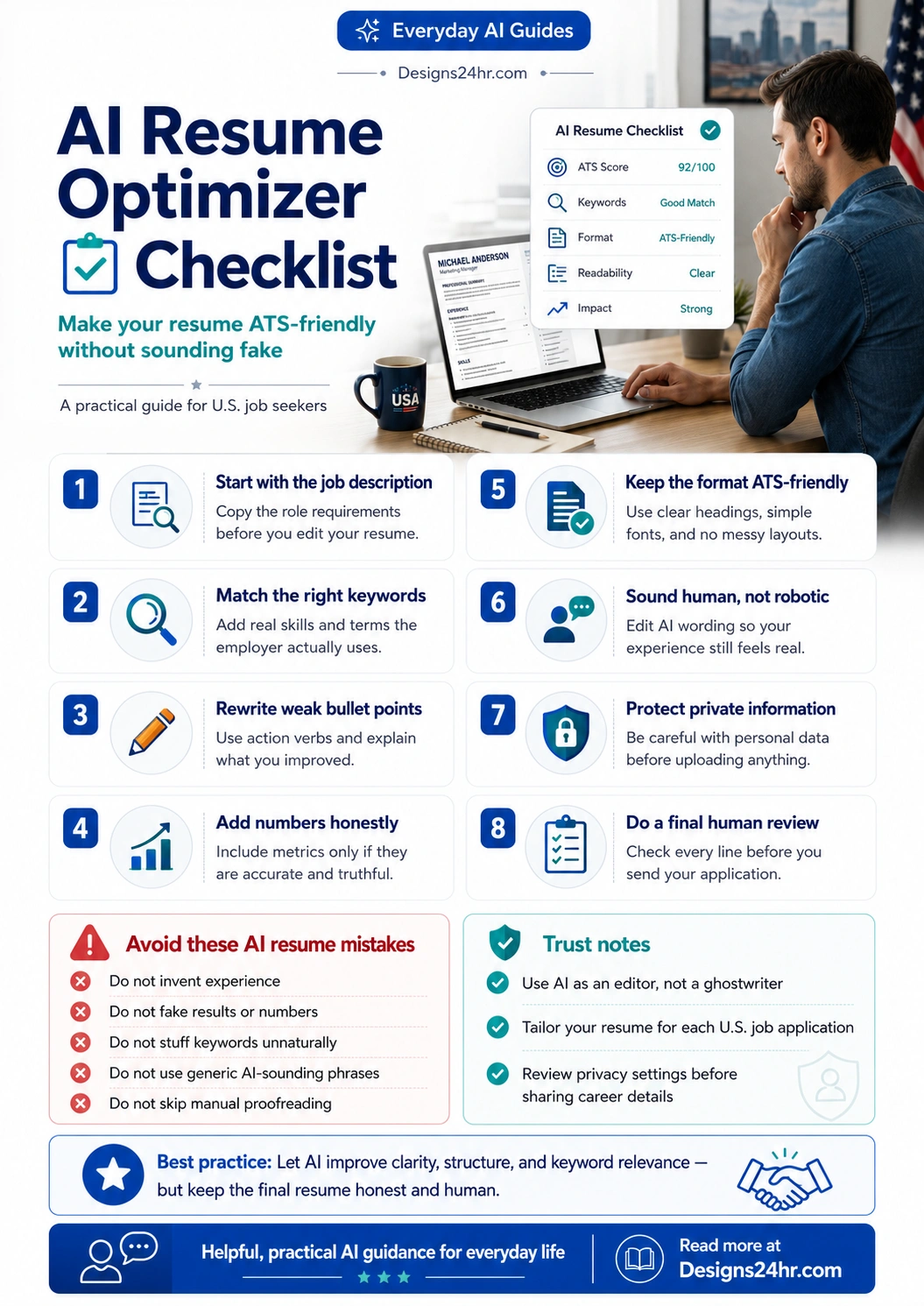
This AI resume optimizer checklist is designed for U.S. job seekers who want to improve their resume without sounding fake, generic, or over-polished. Instead of letting AI write your resume from scratch, use this checklist to compare your resume with the job description, improve real bullet points, add honest keywords, and review privacy before applying.
The best way to use an AI resume optimizer checklist is to treat AI as an editor. It can help you find missing skills, clarify your experience, and make your resume easier to read, but you should always confirm that every detail is true and interview-ready.
- Start with the job description.
- Compare the role requirements with your real experience.
- Add relevant keywords naturally.
- Rewrite weak bullet points clearly.
- Use honest numbers when you have them.
- Keep the format ATS-friendly.
- Protect private information before using any AI tool.
What Is an AI Resume Optimizer?
An AI resume optimizer is a tool that helps improve your resume based on a job description, role requirements, keywords, formatting, and readability. It can suggest stronger wording, identify missing skills, rewrite bullet points, and help your resume better match the job you want.
For example, if a job posting asks for “customer support,” “CRM software,” and “problem resolution,” AI may help you find places where your resume already proves those skills but does not clearly say them.
You can also explore free AI tools from Designs24hr for everyday writing, productivity, resume improvement, and work-related tasks.
Why ATS Resume Optimization Matters for U.S. Job Seekers
Many U.S. employers use applicant tracking systems to collect, organize, and review applications. ATS software may scan your resume for job-related skills, keywords, experience, education, and formatting clarity.
This does not mean you should stuff your resume with keywords. It means your resume should clearly reflect the real skills and experience the employer is asking for. A strong resume should be tailored to the role, easy to read, and honest about what you have actually done.
For U.S. job seekers applying through LinkedIn, Indeed, recruiter portals, and company career pages, a clear resume can help your application communicate your fit faster. The U.S. Bureau of Labor Statistics also publishes job openings and labor turnover data through JOLTS, which is useful context for understanding hiring activity and labor-market movement.
For general career-document guidance, Harvard Career Services explains that a resume should summarize your abilities, education, and experience while highlighting your strongest assets and skills. You can review their guidance here: Harvard guide to creating a strong resume.
What to Prepare Before Using AI on Your Resume
Before you paste anything into an AI resume checker, prepare the right information first. This helps the AI give more accurate suggestions and reduces the risk of generic wording.
Prepare these items first:
- Your current resume
- The exact job description
- A list of your real skills
- Your strongest work results or achievements
- Numbers you can honestly explain, such as sales growth, time saved, customers helped, projects completed, or errors reduced
- Any certifications, tools, platforms, or software you actually know
Do not start by asking AI to “write my resume from scratch.” A better approach is to give AI your real information and ask it to improve clarity, structure, and relevance.
7 Best ATS Resume Tips Using an AI Resume Optimizer Checklist
1. Start With the Job Description
Copy the job posting into your AI tool and ask it to identify the most important skills, responsibilities, tools, and qualifications. This helps you understand what the employer values most.
Example prompt:
Analyze this job description and list the most important skills, keywords, tools, responsibilities, and qualifications. Separate required skills from preferred skills.
This gives you a clear map before editing your resume.
2. Compare the Job Description to Your Resume
Next, ask AI to compare your resume with the job description. The goal is to find real gaps, unclear wording, and missing keywords that match your actual experience.
Example prompt:
Compare my resume to this job description. Show me which important keywords and skills are missing or unclear. Only suggest improvements that match my real experience.
This is where an AI resume optimizer checklist can be very helpful. It may notice that your resume says “helped customers,” while the job description uses terms like “customer support,” “ticket resolution,” or “CRM documentation.”
3. Rewrite Weak Resume Bullet Points
Weak resume bullets often sound vague. AI can help turn them into clearer, stronger, more specific statements.
Weak bullet:
Helped with customer emails and solved problems.
Improved bullet:
Responded to customer support emails, documented recurring issues, and helped resolve account questions using internal CRM tools.
The improved version is stronger because it explains the task, the context, and the tools without inventing fake results.
4. Add Numbers Honestly
Numbers can make a resume stronger, but only if they are true. Do not ask AI to invent metrics. Instead, provide real details and ask AI to make them clearer.
Good prompt:
Rewrite this resume bullet using the real number I provide. Keep it honest and professional: “Handled customer calls.” Real detail: about 35 calls per day.
Improved bullet:
Handled approximately 35 customer calls per day, answered account questions, and escalated complex issues to the correct support team.
That is much better than saying “increased customer satisfaction by 80%” if you cannot prove or explain that number.
5. Keep the Format ATS-Friendly
AI may suggest creative formatting, but ATS-friendly resumes are usually simple. Use clear headings, standard section names, and readable formatting.
ATS-friendly formatting tips:
- Use standard headings such as Summary, Work Experience, Skills, Education, and Certifications
- Avoid complicated tables, text boxes, graphics, icons, and columns
- Use a common font and clean spacing
- Save the resume in the format requested by the employer
- Keep job titles, dates, company names, and locations easy to find
If you are applying through a company portal, follow the employer’s file instructions exactly.
6. Make the Resume Sound Human
AI-generated resume writing can sound polished but generic. Before applying, remove phrases that feel too broad, too formal, or too robotic.
Watch out for phrases like:
- Dynamic professional with a proven track record
- Results-driven individual seeking opportunities
- Leveraged synergies to optimize workflows
- Highly motivated team player with exceptional skills
Instead, use direct wording that reflects your real work.
Better:
Managed daily customer support tickets, updated account notes, and helped new team members learn the CRM process.
7. Review Every Line Yourself
Before you submit your resume, read it line by line. Ask yourself:
- Is this true?
- Can I explain this in an interview?
- Does this match the job description?
- Does this sound like me?
- Did AI add anything I did not actually do?
If the answer is unclear, rewrite it before applying.
Good vs. Bad Ways to Use AI for Resume Writing
| Bad AI Resume Use | Better AI Resume Use |
|---|---|
| Ask AI to create fake achievements | Ask AI to improve real achievements |
| Copy the job description into your resume | Use matching keywords only where they fit your experience |
| Use generic AI phrases | Use clear, specific, human wording |
| Trust AI without checking | Review every sentence before applying |
| Paste sensitive personal information | Remove private details before using AI tools |
Common AI Resume Mistakes to Avoid
Inventing Experience
Never let AI add tools, responsibilities, certifications, or achievements you do not have. Employers may ask about them in interviews, and false claims can damage your credibility.
Stuffing Keywords
Adding keywords repeatedly does not make your resume stronger. Use job-related terms naturally and only when they reflect your real background.
Making Every Bullet Sound the Same
AI often creates similar sentence patterns. Mix the structure of your bullets so the resume feels natural and easy to read.
Ignoring the Job Description
A general resume is less effective than a targeted resume. Use the job description to guide what you highlight.
Forgetting the Human Reader
ATS matters, but a hiring manager still needs to understand your resume. Keep it clear, honest, and readable.
Privacy and Safety Tips Before Uploading Your Resume
Your resume may include personal details, employment history, contact information, and career goals. Before pasting it into any AI tool, think about privacy.
Remove or limit these details when possible:
- Full home address
- Social Security number
- Driver’s license number
- Banking or payment details
- Private employer documents
- Confidential client names
- Internal company data
- References’ personal contact information
The FTC warns job seekers to be careful with fake job offers, unusual payment requests, fake checks, and people asking for money in exchange for employment. You can read the FTC’s job scam guidance here: FTC job scams guide.
If you use ChatGPT or another AI assistant, review the tool’s privacy and data controls before sharing career details. OpenAI explains ChatGPT data controls here: OpenAI Data Controls FAQ.
When AI Should Not Rewrite Your Resume
AI is useful for editing, but there are times when you should slow down and use your own judgment.
Do not rely on AI alone when:
- You are applying for a highly regulated role
- The job requires exact certifications or licenses
- You are describing legal, medical, financial, or security-related responsibilities
- You are unsure whether a claim is accurate
- The AI output makes you sound more experienced than you are
In these cases, use AI for grammar and clarity only. Keep the final wording precise and truthful.
Final AI Resume Optimizer Checklist Before You Apply
Use this AI resume optimizer checklist before submitting your next U.S. job application:
- I compared my resume to the job description
- I added relevant keywords only where they match my real experience
- I rewrote vague bullet points into clearer statements
- I included honest numbers where possible
- I removed generic AI-sounding phrases
- I used simple ATS-friendly formatting
- I removed sensitive private information before using AI
- I checked every line manually before applying
- I can explain every claim in an interview
Example AI Prompts for Resume Improvement
Prompt for Keyword Matching
Compare my resume to this job description. List the most important missing or unclear keywords, but only suggest keywords that match my actual experience.
Prompt for Bullet Improvement
Rewrite this resume bullet to be clearer and more results-focused. Do not invent numbers, tools, or responsibilities.
Prompt for ATS Formatting
Review this resume for ATS-friendly formatting. Identify anything that may be hard for applicant tracking systems to read.
Prompt for Human Tone
Make this resume summary sound more natural, specific, and professional. Avoid generic AI-sounding phrases.
Helpful Resources for U.S. Job Seekers
- Free AI tools from Designs24hr — useful for everyday writing, resume improvement, interview preparation, and productivity tasks.
- Harvard Career Services resume guide — helpful resume structure and tailoring guidance.
- BLS Job Openings and Labor Turnover Survey — U.S. labor-market context and job openings data.
- FTC job scams guide — safety guidance for avoiding fake job offers and personal information scams.
- OpenAI Data Controls FAQ — privacy and data-control information for ChatGPT users.
FAQs About Using an AI Resume Optimizer Checklist
What should an AI resume optimizer checklist include?
An AI resume optimizer checklist should include job-description matching, ATS keyword review, honest bullet-point rewriting, measurable results, simple formatting, privacy checks, and a final human review before submitting your resume.
What does an AI resume optimizer do?
An AI resume optimizer helps compare your resume to a job description, identify missing keywords, improve bullet points, and make your resume easier to read. It should improve clarity and relevance, not invent experience.
Can AI help my resume pass ATS?
AI can help make your resume more ATS-friendly by improving keyword alignment, formatting, and wording. However, it cannot guarantee that an employer or applicant tracking system will select your resume.
Is it okay to use ChatGPT or AI to write my resume?
Yes, but use AI as an editing assistant. You should review every line, confirm that all experience is accurate, and make sure the final resume still sounds like you.
What should I not paste into an AI resume tool?
Avoid pasting Social Security numbers, full home addresses, private employer documents, confidential client details, salary records, banking details, or anything you would not want stored or shared.
How do I make an AI-written resume sound human?
Add your real work examples, use natural language, remove generic phrases, and rewrite any sentence that sounds too polished, vague, or robotic.
Should I use the same resume for every job?
No. U.S. job seekers usually get better results when they tailor each resume to the role, company, and job description while keeping the information honest.
Can AI create fake resume results?
AI can generate unrealistic numbers or claims if you ask it the wrong way. Only include numbers, achievements, and responsibilities that are true and can be explained in an interview.
What is the best way to use AI for resume bullet points?
Start with your real responsibility, add the result or impact if you know it, then ask AI to make the bullet clearer, shorter, and more relevant to the job description without changing the truth.
Final Thoughts
An AI resume optimizer checklist can be a smart tool for U.S. job seekers, especially when you use it to improve clarity, match real skills to job descriptions, and make your resume easier to read. But AI should not replace honesty, judgment, or a final human review.
Use AI as an editor, not a ghostwriter. Let it help you organize your experience, strengthen your bullet points, and remove unclear wording. Then review every line so the final resume is accurate, human, and ready for real conversations with employers.
For more practical AI help, visit Designs24hr and explore free tools built for everyday work, writing, learning, and productivity.