OpenAI Codex for Non-Developers: How AI Workflows Are Moving Beyond Coding
OpenAI Codex for non-developers is becoming a major workplace AI story because Codex is no longer only about writing code. It is starting to show how AI workflows can help marketers, analysts, designers, researchers, operators, investors, and other knowledge workers organize real work faster.
For years, Codex was mostly understood as an AI coding tool. Developers used it to write code, fix bugs, understand projects, and move faster inside technical workflows. But the newest Codex direction is much bigger than coding alone.
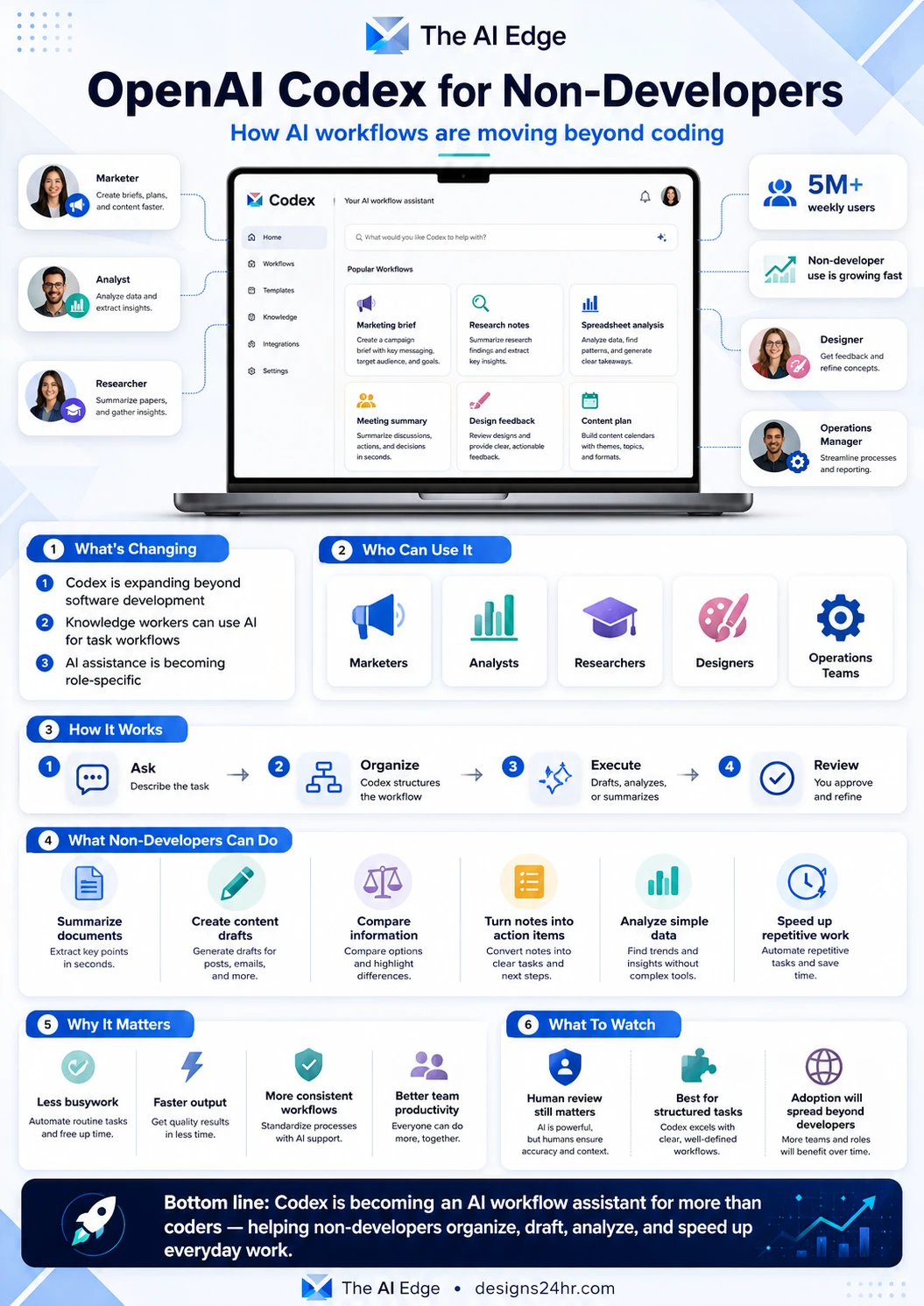
OpenAI now describes Codex as a tool for every role, tool, and workflow. The company says more than 5 million people use Codex every week, and non-developers including analysts, marketers, operators, designers, researchers, investors, and bankers make up about 20% of overall Codex users.
That is why OpenAI Codex for non-developers matters. It shows a shift from simple AI chat toward AI workflow assistants that can help people organize tasks, summarize information, create reports, prepare drafts, analyze data, and build repeatable systems for everyday work.
Simple explanation: Codex is moving from “AI that helps write code” toward “AI that helps complete structured work.” That shift could make it useful for marketers, analysts, researchers, designers, operations teams, and other knowledge workers.
What Is OpenAI Codex?
OpenAI Codex is an AI agent built to help users delegate work. In its core form, Codex is still deeply connected to software development. It can work with projects, files, codebases, environments, approvals, and tasks. But the same workflow model can also support many non-coding jobs.
Instead of only answering a question, Codex can help move a task forward. That makes it different from a normal chatbot. A user can give it a goal, provide context, ask it to work through a process, and then review the output before using it.
For non-developers, the important idea is not “Codex writes code.” The important idea is “Codex can help structure and complete repeatable digital work.”
Why Codex Is Moving Beyond Coding
Most office jobs are full of structured digital tasks. People summarize notes, compare information, analyze spreadsheets, prepare reports, create briefs, organize documents, review feedback, and turn messy input into useful output.
These tasks may not look like programming, but they often follow a process. That is where an AI workflow assistant becomes useful. Instead of asking AI one question at a time, workers can use AI to complete a sequence of steps.
What is changing
- AI is becoming workflow-based: People are moving from one-off prompts to repeatable AI-assisted processes.
- Codex is becoming role-aware: OpenAI is expanding Codex toward more roles, not only developers.
- Knowledge work is becoming more automated: Reports, summaries, analysis, briefs, and drafts can be created faster.
- Human review still matters: AI can accelerate the work, but people still need to check and approve final outputs.
- Teams want practical AI: Businesses want AI that helps finish tasks, not just explain concepts.
Who Can Use Codex Beyond Developers?
The strongest non-developer audience is knowledge workers. These are people who spend much of the day working with information, documents, data, notes, plans, reports, and decisions.
| Role | How Codex Could Help | Example Workflow |
|---|---|---|
| Marketers | Create briefs, organize campaign notes, draft content, and prepare SEO outlines. | Turn product notes into a campaign brief, content plan, or landing page outline. |
| Analysts | Review structured information, summarize findings, and prepare clear reports. | Analyze spreadsheet notes and create a short summary with key takeaways. |
| Researchers | Summarize papers, gather notes, compare sources, and organize findings. | Turn research notes into a clean outline with themes and action points. |
| Designers | Review feedback, organize creative direction, and prepare project notes. | Convert client feedback into a prioritized design revision checklist. |
| Operations teams | Document processes, create checklists, and standardize recurring workflows. | Turn a messy internal process into a clear SOP. |
| Investors and finance teams | Compare information, summarize reports, and organize decision notes. | Extract key points from documents and prepare a decision summary. |
How OpenAI Codex for Non-Developers Could Work
The best way to understand Codex for work is to think in four steps. A non-developer gives Codex a structured task, provides the right context, lets the AI organize or execute part of the workflow, and then reviews the final output before using it.
Describe the task clearly, including the goal, audience, format, and constraints.
Codex structures the workflow, reviews context, and decides what output is needed.
The AI drafts, summarizes, compares, analyzes, or prepares the requested work output.
A human checks accuracy, edits the final version, and approves the result before use.
What Non-Developers Can Do With AI Workflows
Non-developers do not need to think of Codex as a replacement for their job. A better way to see it is as a productivity layer for structured work. It can help move repetitive tasks forward so people can spend more time on judgment, strategy, creativity, and final decisions.
Practical workflow ideas
- Summarize documents: Pull key points from long notes, reports, or research materials.
- Create content drafts: Turn rough ideas into emails, briefs, posts, outlines, or campaign plans.
- Compare information: Highlight differences between options, vendors, tools, or strategies.
- Turn notes into action items: Convert meeting notes into tasks, owners, deadlines, and next steps.
- Analyze simple data: Find patterns and useful takeaways from structured information.
- Build repeatable workflows: Standardize common tasks so teams do not start from scratch every time.
- Prepare review checklists: Convert feedback into a cleaner approval or revision process.
Codex for Marketers
Codex for marketers is one of the clearest non-developer use cases. Marketers constantly move between research, planning, writing, optimization, reporting, and campaign review. Those tasks require structure, but they do not always require code.
A marketer could use AI workflows to turn customer notes into a content brief, convert product information into landing page sections, summarize competitor messaging, create SEO outlines, or organize campaign ideas into a schedule.
Marketing example: Instead of asking AI for one blog title, a marketer could ask Codex to organize a full workflow: research summary, buyer pain points, SEO angle, content outline, title ideas, meta description, and publishing checklist.
Codex for Analysts and Researchers
Analysts and researchers often spend hours turning raw information into clear findings. Codex-style workflows could help by reviewing notes, extracting key points, comparing documents, summarizing datasets, and preparing first-draft reports.
This does not remove the need for expert judgment. It simply reduces the busywork between collecting information and presenting useful insights. The human still needs to verify the output, check sources, and decide what the findings mean.
Codex for Designers and Creative Teams
Designers may not think of Codex as a design tool at first, but creative teams also deal with structured work. They review client feedback, organize revision notes, create design briefs, compare brand directions, document decisions, and prepare handoff notes.
An AI workflow assistant could help convert messy feedback into a prioritized revision list, summarize stakeholder comments, prepare a creative direction brief, or organize a project handoff document.
Codex for Operations Teams
Operations work is full of repeatable processes. Teams create SOPs, checklists, onboarding documents, issue summaries, internal reports, and process updates. These are exactly the kinds of tasks where AI workflows can reduce repetitive effort.
For operations teams, Codex could help turn scattered notes into clear steps, convert meeting decisions into action plans, and standardize recurring processes so work becomes easier to repeat.
Why This Matters for Workplace Productivity
The biggest productivity gain may not come from replacing people. It may come from removing the repetitive middle layer of work: formatting, summarizing, organizing, rewriting, comparing, and preparing first drafts.
When AI handles the first structured pass, humans can focus on higher-value work. That means better decisions, faster review cycles, stronger collaboration, and less time wasted on busywork.
| Benefit | What It Means | Why It Helps |
|---|---|---|
| Less busywork | AI handles repetitive organization and drafting tasks. | Teams can spend more time on decisions and strategy. |
| Faster output | First drafts, summaries, and reports can be prepared quicker. | Work moves forward without waiting for a blank-page start. |
| More consistent workflows | Teams can standardize how recurring tasks are completed. | Processes become easier to repeat, review, and improve. |
| Better collaboration | AI can organize feedback, notes, and next steps. | Teams get clearer handoffs and fewer missed details. |
Codex vs ChatGPT: What Is the Difference?
ChatGPT is great for conversation, brainstorming, writing help, explanations, and quick answers. Codex is more focused on delegated work across files, tools, tasks, environments, and workflows.
A simple way to understand the difference is this: ChatGPT helps you think through the work, while Codex is designed to help move parts of the work forward. For non-developers, that could mean organizing notes, preparing outputs, reviewing files, and supporting repeatable workflows.
| Tool | Best For | Non-Developer Use Case |
|---|---|---|
| ChatGPT | Conversation, brainstorming, writing, explanations, and quick help. | Ask for ideas, rewrite text, explain concepts, or plan a project. |
| Codex | Delegating structured work across tasks, files, tools, and workflows. | Organize a workflow, prepare a report, summarize files, or standardize a process. |
What Non-Developers Should Be Careful About
Codex may become useful beyond coding, but non-developers should not treat AI outputs as automatically correct. AI can misunderstand context, miss details, make assumptions, or produce polished work that still needs verification.
This is especially important for financial, legal, medical, technical, or client-facing work. Codex can help draft and organize, but humans should check the facts, review the logic, and approve the final version.
Safe usage checklist
- Start with low-risk workflows: Use AI first for drafts, summaries, outlines, and internal notes.
- Give clear instructions: Include audience, format, goal, deadline, and constraints.
- Review every output: Do not publish or send AI-generated work without human review.
- Protect sensitive data: Follow your company’s privacy, security, and data policies.
- Check important facts: Verify numbers, claims, sources, and recommendations.
- Keep humans in control: AI should assist the workflow, not make final decisions alone.
Will Codex Replace Office Workers?
Codex is better understood as a workflow accelerator than a replacement for office workers. Most valuable work still requires context, judgment, taste, strategy, relationship awareness, and final accountability.
The more realistic change is that workers who know how to use AI workflows may become faster and more organized. They may spend less time formatting, rewriting, and manually organizing information, and more time making decisions.
What To Watch Next
The biggest thing to watch is how Codex expands from technical workflows into more role-specific professional workflows. OpenAI has already highlighted role-specific plugins, Sites, annotations, mobile access, and Codex app experiences as part of making Codex more useful across teams.
If this direction continues, more people may start using Codex not because they write code, but because they need AI help with repeatable work. That could make Codex part of everyday productivity for marketers, analysts, researchers, designers, and operations teams.
What to watch
- Role-specific workflows: More Codex experiences may be built for specific jobs and departments.
- Mobile access: Codex in ChatGPT mobile could make workflow review easier away from a desk.
- Connected tools: The value of Codex will grow if it works smoothly with real work environments.
- Human approval systems: Review, permissions, and approval steps will matter for trust.
- Training for non-developers: Teams will need simple ways to teach AI workflow thinking.
Bottom Line
OpenAI Codex for non-developers is important because it shows how workplace AI is moving beyond simple chat and beyond coding alone. Codex is becoming a signal for the next stage of productivity: AI that helps organize, draft, analyze, and move structured work forward.
Developers may still be the core audience, but the larger opportunity is knowledge work. If Codex continues expanding across roles, it could help marketers, analysts, designers, researchers, operators, and other teams build faster, cleaner, and more repeatable workflows.
Build better AI workflows for everyday work
Codex shows where workplace AI is heading, but simple productivity tools can help right now. Try Designs24hr tools like AI Daily Task Planner, Text Summarizer, Decision Helper, and Title Meta Previewer.
For more practical AI updates, visit The AI Edge.
FAQ: OpenAI Codex for Non-Developers
What is OpenAI Codex for non-developers?
OpenAI Codex for non-developers refers to using Codex-style AI workflows for workplace tasks beyond coding, such as summarizing documents, creating briefs, organizing research, analyzing information, and preparing repeatable processes.
Can non-developers use Codex?
Yes. Codex is still deeply connected to coding and technical workflows, but OpenAI has highlighted growing use among non-developers such as analysts, marketers, operators, designers, researchers, investors, and bankers.
How can marketers use Codex?
Marketers could use Codex-style workflows to create campaign briefs, organize research, draft content plans, summarize customer notes, prepare SEO outlines, and turn messy ideas into structured marketing workflows.
Is Codex the same as ChatGPT?
No. ChatGPT is strongest for conversation, brainstorming, writing, and explanations. Codex is designed more for delegated work across files, tools, tasks, and structured workflows.
Will Codex replace office workers?
Codex is more likely to speed up repetitive work than replace office workers entirely. Human review, judgment, strategy, approval, and context still matter, especially for important business decisions.