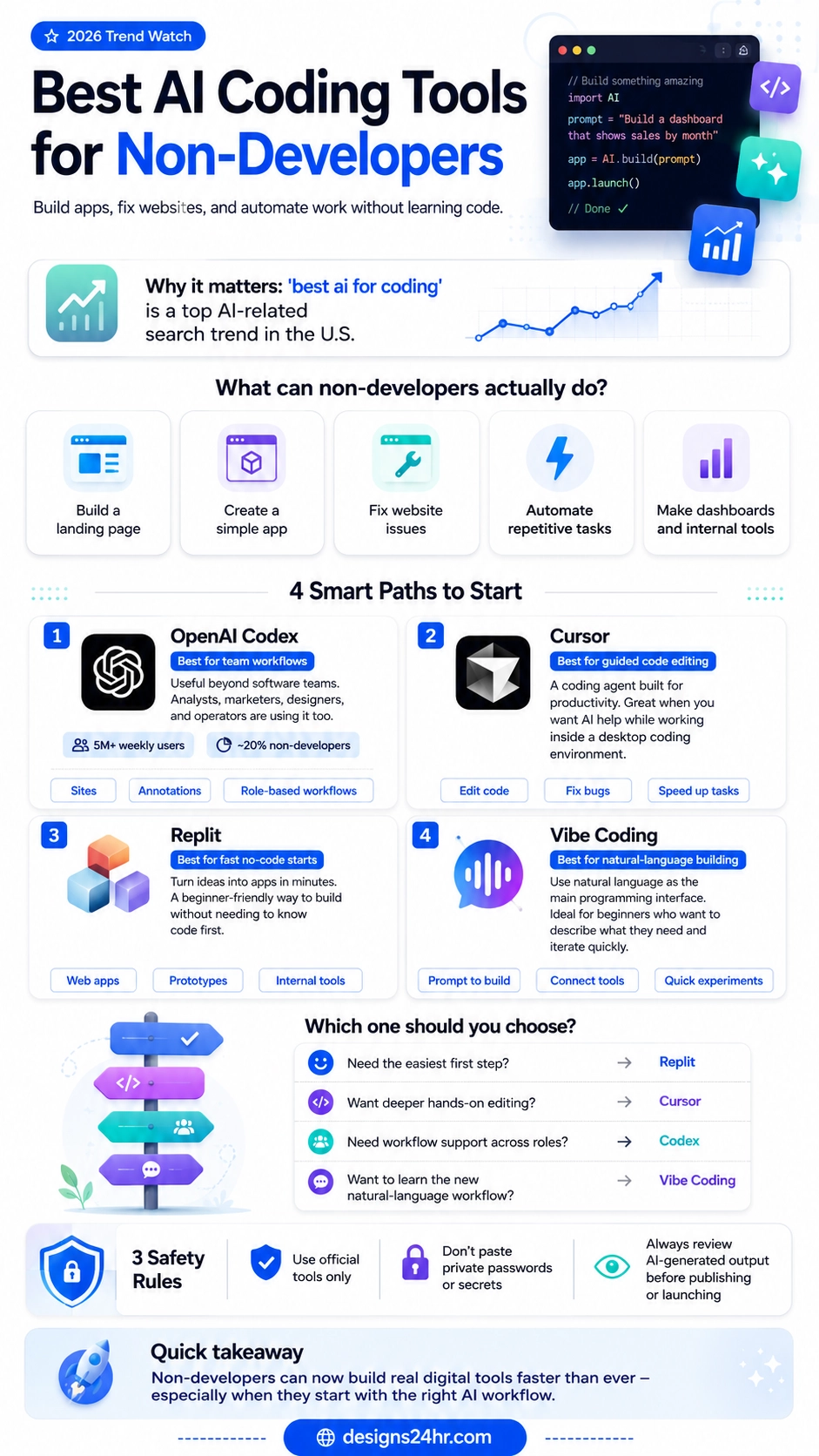
AI coding tools for non-developers are becoming one of the most powerful AI shifts of 2026 because people no longer want AI only to answer questions. They want AI to build things. Small business owners want landing pages. Creators want simple apps. Marketers want dashboards. Designers want prototypes. Operations teams want internal tools. Students want working projects. And many of them do not want to spend months learning traditional programming before they can start.
AI coding tools for non-developers are now one of the fastest ways for beginners, small business owners, creators, marketers, and designers to build useful digital tools without starting from traditional programming. Instead of learning every coding rule first, users can describe what they want, review the AI-generated result, and improve it step by step.
That is why searches around the best AI coding tools are growing fast. Google Trends lists “best ai for coding” as a top “best AI for…” search in the United States, which shows that people are actively looking for tools that can help them create software, websites, and digital workflows faster. At the same time, platforms like OpenAI Codex, Cursor, Replit, and vibe coding workflows are making coding feel less like writing every line manually and more like describing what you want, reviewing the result, and improving it step by step.
Recent AI product updates show why this shift is happening. OpenAI explains how Codex is expanding across roles and workflows, while Replit highlights how users can turn ideas into apps with AI. Google and Kaggle are also bringing attention to vibe coding as a natural-language building workflow.
Quick answer: The best AI coding tools for non-developers depend on what you want to build. Replit is usually the easiest starting point for quick app ideas. Cursor is better if you want deeper AI-assisted code editing. OpenAI Codex is useful for broader team workflows. Vibe coding is the beginner-friendly method of using natural language to create, test, and improve digital products.
Why AI Coding Tools for Non-Developers Matter Now
For years, coding felt locked behind technical knowledge. You needed to understand syntax, setup, hosting, debugging, file structure, frameworks, databases, and deployment before you could turn a simple idea into a working tool. AI is changing that process by giving beginners a new starting point: plain language.
A non-developer can now say, “Create a landing page for my service,” “Build a simple expense tracker,” “Fix this website error,” or “Make a dashboard that shows weekly sales,” and an AI coding assistant can help generate the first version. That does not mean humans can skip judgment, testing, or safety checks. But it does mean the blank-page problem is much smaller.
This is especially important for small teams. A founder may not have the budget to hire a full development team for every small idea. A marketer may need a quick campaign calculator. A designer may want an interactive prototype. A teacher may want a classroom tool. A local business owner may want a booking form or service estimator. AI coding tools for non-developers give these users a way to move from idea to prototype much faster.
What Non-Developers Can Actually Build With AI Coding Tools
The biggest mistake beginners make is thinking AI coding tools are only useful for building full software companies. That is not the best way to start. Non-developers get the most value when they use AI coding tools for focused, practical, small-to-medium projects.
- Landing pages: Create a simple page for a product, service, newsletter, or lead magnet.
- Website fixes: Improve layout issues, repair broken code, rewrite sections, or make a page mobile-friendly.
- Simple apps: Build calculators, trackers, checklists, forms, small directories, or planning tools.
- Dashboards: Turn spreadsheet data into a visual overview for sales, content, expenses, or tasks.
- Internal tools: Create small workflows for teams, such as intake forms, client portals, or task trackers.
- Automation helpers: Connect repeated steps into a more efficient workflow, especially for business operations.
The best starting point is not “build the next big app.” The better goal is: build one useful tool that solves one clear problem. That is where AI coding tools for non-developers can create the fastest real-world value.
Best AI Coding Tools for Non-Developers in 2026
The tools below are not all the same. Some are better for beginners who want to build quickly. Some are better for people who are willing to work inside a coding environment. Some are better for teams. Some are less about one specific product and more about a new way of building with natural language.
| Tool or Workflow | Best For | Beginner Fit | Main Use Case |
|---|---|---|---|
| OpenAI Codex | Team workflows and role-based AI assistance | Medium | Creating, refining, and reviewing work across different business roles |
| Cursor | AI-assisted code editing | Medium | Editing code, fixing bugs, and improving projects inside a coding environment |
| Replit | Fast app building for beginners | High | Turning ideas into apps, websites, prototypes, and internal tools |
| Vibe Coding | Natural-language building | High | Describing what you want, letting AI generate it, then improving through prompts |
OpenAI Codex: Best for Team Workflows and Role-Based Building
OpenAI Codex has moved beyond being just a tool for software developers. OpenAI says Codex now has more than 5 million weekly users, and non-developers such as analysts, marketers, operators, designers, researchers, investors, and bankers make up about 20% of overall Codex users. That matters because it shows a wider shift: AI coding is becoming useful for people whose main job is not writing software.
For non-developers, Codex is most interesting when it helps turn a work need into a digital output. For example, a marketer might use it to create a campaign landing page concept. A designer might use it to generate an interactive prototype. An operator might use it to build an internal checklist or reporting flow. A researcher might use it to organize and display data in a clearer way.
The strongest Codex use case is not simply “write code for me.” It is “help me turn this workflow into something usable.” That makes Codex valuable for people who understand their business problem clearly but need AI to help translate that problem into a working digital structure.
Cursor: Best for Guided AI Code Editing
Cursor is a strong option when you want more control over the code itself. It is designed as an AI coding environment, which makes it especially useful for people who are comfortable working closer to the technical side or who are willing to learn. A complete beginner may need more patience with Cursor than with a simpler app-building platform, but the payoff is stronger editing power.
For non-developers, Cursor works best when you already have a website, template, code file, or small project and you want AI to help improve it. You can ask the assistant to explain code, find issues, rewrite sections, make changes, or suggest improvements. That makes it useful for designers, website owners, content creators, and small business teams that need to modify existing projects.
The key advantage is control. Instead of only describing an app and hoping the result is right, you can work inside the files and ask AI to help make targeted changes. That is why Cursor is a better fit for non-developers who want to gradually become more confident with how websites and apps are actually built.
Replit: Best for Fast No-Code Starts
Replit is one of the most beginner-friendly options because it directly focuses on turning ideas into apps and sites. Its messaging emphasizes building apps in minutes with no coding needed, which makes it easier for non-developers to understand the value quickly. For someone who wants to test an idea without setting up a complex development environment, Replit can be a practical first step.
Replit is especially useful for quick prototypes. You can start with a plain-language prompt, generate a working version, then keep asking for changes. For example, you could ask it to build a simple invoice generator, a booking form, a habit tracker, a product comparison tool, a basic CRM-style contact list, or a landing page for a service.
The important thing is to start small. Replit can help beginners move fast, but the best results come from clear prompts. Instead of saying, “Build me an app,” say, “Build a simple web app where I can add customer names, phone numbers, service type, appointment date, and status. Show the entries in a clean table and let me edit or delete each row.” Clear instructions create better results.
Vibe Coding: Best for Natural-Language Building
Vibe coding is less about one single tool and more about a new way of creating with AI. Instead of writing every line of code manually, the user describes the outcome they want in natural language. The AI generates a version, the user reviews it, then the user keeps prompting for improvements until the project works better.
This workflow is becoming more visible because Google and Kaggle are bringing back their AI Agents Intensive Course in June 2026 with a focus on vibe coding workflows. The course description explains that natural language becomes the primary programming interface, which is exactly why this trend matters for beginners.
For non-developers, vibe coding feels more approachable because it starts with communication instead of syntax. You describe the problem, the layout, the features, the audience, the data, and the desired result. The skill is not memorizing code. The skill is learning how to explain the outcome clearly, test what AI creates, and ask for precise improvements.
How to Choose the Right AI Coding Tool
The right choice depends on your comfort level and your goal. A beginner who wants to create a simple app quickly should not start in the same place as someone who wants to edit existing code. A designer building a prototype has different needs than a small business owner building an internal tool.
Choose Replit if you want the easiest starting point for building a simple app, website, prototype, or internal tool.
Choose Cursor if you want deeper control and AI help inside a real coding environment.
Choose OpenAI Codex if you want AI support for team workflows, role-based tasks, or more structured work outputs.
Choose vibe coding if you want to learn the natural-language method of building and improving digital products with AI.
The biggest advantage of AI coding tools for non-developers is speed. You can test an idea before investing time or money into a full development process.
For small business owners, AI coding tools for non-developers can turn repeated manual tasks into simple dashboards, forms, and workflow helpers.
For creators and marketers, AI coding tools for non-developers make it easier to create landing pages, lead magnets, calculators, and campaign tools.
Prompt Examples for Non-Developers
Your results depend heavily on the quality of your prompt. A vague prompt produces a vague result. A specific prompt gives the AI more structure. Here are beginner-friendly prompts you can adapt.
Prompt for a Landing Page
“Create a clean one-page landing page for a local home cleaning service. Include a hero section, service benefits, pricing cards, customer review section, FAQ section, and a contact form. Use a modern, trustworthy style with clear call-to-action buttons.”
Prompt for a Simple App
“Build a simple task tracker app where I can add a task, choose a priority, set a due date, mark the task as complete, and filter tasks by status. Keep the design clean and mobile-friendly.”
Prompt for a Website Fix
“Review this HTML and CSS. Fix the mobile layout issue where the cards overlap on small screens. Keep the desktop design the same, but make the mobile version stack cleanly with proper spacing.”
Prompt for an Internal Tool
“Create a simple customer intake dashboard for a small service business. The form should collect name, phone, email, service needed, preferred date, and notes. Show submissions in a table with status options: new, contacted, booked, and completed.”
Safety Rules Before You Use AI Coding Tools for Non-Developers
AI coding tools for non-developers can save time, but beginners need to use them carefully. The biggest risk is treating AI-generated output as automatically correct. AI can create broken code, insecure code, outdated methods, or features that seem to work but fail in real use.
- Use official tools only. Avoid random downloads, unofficial extensions, or suspicious packages pretending to be popular AI coding tools.
- Do not paste private information. Avoid sharing passwords, API keys, payment details, customer data, private documents, or sensitive business information.
- Review before publishing. Test pages, forms, buttons, mobile layouts, and data handling before launching anything publicly.
- Start with low-risk projects. Build calculators, prototypes, dashboards, or landing pages before attempting anything involving payments, private accounts, or sensitive data.
- Ask for explanations. If the AI creates code, ask it to explain what the code does in plain English so you understand the basics.
The safest way to use AI coding tools for non-developers is to start with low-risk projects, review the output, and avoid sharing private data.
Common Mistakes Beginners Should Avoid
The first mistake is asking AI to build something too large at once. If you ask for a complete marketplace, full social network, advanced SaaS platform, or complex mobile app in one prompt, the result will likely be messy. Break the project into smaller steps.
The second mistake is ignoring testing. Even if the design looks good, you still need to click every button, submit every form, test on mobile, check loading speed, and confirm that the tool behaves correctly.
The third mistake is not saving versions. When AI makes changes, it can accidentally break something that was working earlier. Keep backups or version history so you can return to a better version if needed.
The fourth mistake is relying on AI for legal, financial, medical, or security-critical logic without expert review. AI can help draft and structure, but high-risk tools need professional verification.
Best Beginner Workflow: Idea to Working Tool
Here is a simple workflow non-developers can follow when using AI coding tools for non-developers.
- Define one clear problem. Example: “I need a simple tool to track client follow-ups.”
- List the required fields or features. Example: name, phone, last contact date, status, notes.
- Ask AI for a simple first version. Do not ask for everything at once.
- Test the first version. Click, type, submit, refresh, and check mobile view.
- Request focused improvements. Example: “Make the table easier to read on mobile.”
- Add only necessary features. Avoid clutter and complexity.
- Review safety and privacy. Remove sensitive data before sharing or publishing.
This workflow keeps the project realistic. It also teaches you how to think like a builder without requiring you to become a full-time developer.
Final Takeaway: AI Coding Tools for Non-Developers Are a Real Advantage
AI coding tools for non-developers are not magic buttons, but they are powerful shortcuts. They help beginners move from idea to prototype, from problem to workflow, and from manual task to digital tool much faster than before.
Replit is a strong first step for simple app building. Cursor is useful when you want guided code editing. OpenAI Codex shows how coding assistants are expanding across different roles and workflows. Vibe coding represents the bigger shift: natural language is becoming a real interface for creating software.
The smartest approach is to start small, build one useful thing, test it carefully, and improve it with clear prompts. Non-developers who learn that workflow will have a major advantage in 2026 because they will not just use AI to search, write, or summarize. They will use AI to build.
For more beginner-friendly AI guides, explore The AI Edge by Designs24hr and discover more practical ways to use AI tools for everyday productivity, design, and digital workflows.
FAQs About AI Coding Tools for Non-Developers
What are AI coding tools for non-developers?
AI coding tools for non-developers are platforms or assistants that help beginners create, edit, fix, or understand code using plain-language prompts instead of requiring advanced programming knowledge.
Can I build an app with AI without learning code?
Yes, you can build simple apps, prototypes, landing pages, dashboards, and internal tools with AI without learning traditional coding first. However, you still need to test the output and review it carefully before using it publicly.
Which AI coding tool is best for beginners?
Replit is one of the easiest starting points for beginners who want to build simple apps or prototypes quickly. Cursor is better for users who want more control inside a coding environment, while Codex is useful for broader workflows.
What is vibe coding?
Vibe coding is a natural-language workflow where you describe what you want to build, let AI generate the first version, then continue improving it through prompts, testing, and iteration.
Are AI coding tools safe to use?
AI coding tools for non-developers can be safe when used carefully. Use official platforms, avoid sharing passwords or private data, test all outputs, and get expert review for sensitive projects involving payments, user accounts, or private information.
Designs24hr helps readers stay ahead of the fast-moving world of AI and design with practical, beginner-friendly guides that turn new technology into real everyday value.
Share your experience in the comments: have you tried building an app, website, dashboard, or automation with AI yet? Visit Designs24hr whenever you want to learn something new about AI, design, smart tools, and the future of creative productivity.