OpenAI Codex is quickly becoming much more than a coding assistant. It started as a tool closely connected to software development, but OpenAI is now positioning Codex as a broader AI work agent that can help different roles build, analyze, research, automate, refine, and share useful work faster.
That shift matters because not every professional is a developer. Analysts, marketers, designers, researchers, operators, sales teams, business owners, and creators all deal with repetitive digital work. They need dashboards, reports, campaign assets, research summaries, prototypes, internal tools, client materials, and organized workflows. OpenAI Codex is moving toward that larger world of work.
This guide explains what OpenAI Codex is, how it is different from ChatGPT, why Codex is no longer only for developers, what Codex plugins, Sites, and annotations do, and how everyday professionals can use Codex safely as an AI work agent.
What Is OpenAI Codex?
OpenAI Codex is an AI agent from OpenAI designed to help people complete technical and work-related tasks. At its core, Codex can understand instructions, work with code and files, help build software, review changes, create useful outputs, and support workflows that would normally require many manual steps.
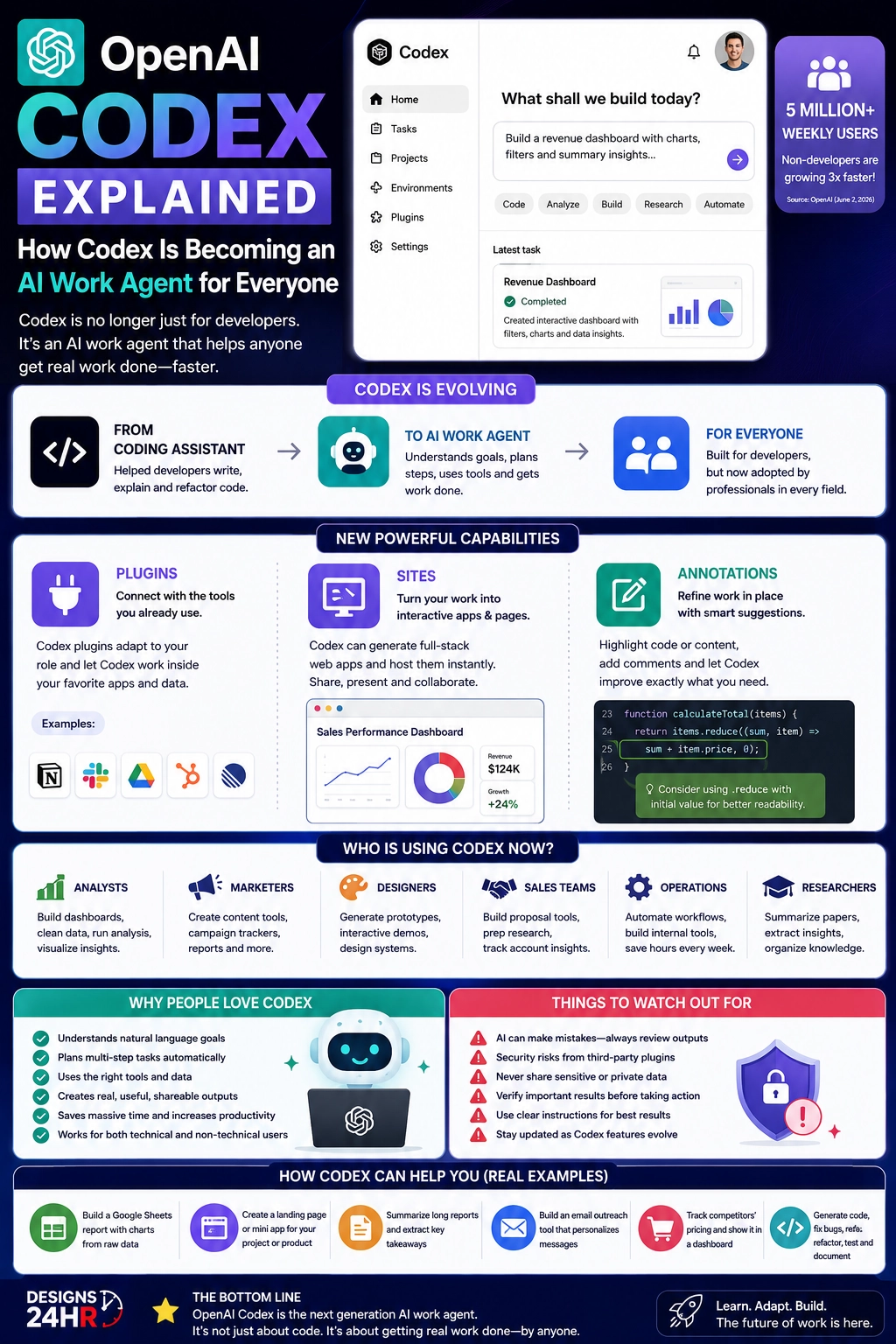
The important change is that Codex is expanding beyond traditional coding. OpenAI says more than 5 million people now use Codex every week, and non-developers such as analysts, marketers, operators, designers, researchers, investors, and bankers now make up about 20% of overall Codex users.
In simple terms, OpenAI Codex is becoming a work-focused AI agent. It can still help developers write, review, and ship code, but it is also being adapted for people who need to create dashboards, organize research, build lightweight tools, prepare client materials, improve workflows, and turn ideas into useful outputs.
Why OpenAI Codex Is No Longer Just for Coding
For many people, the word Codex still sounds like a coding tool. That makes sense because Codex has a strong connection to software development. But OpenAI’s latest Codex direction shows a broader goal: helping teams do more types of knowledge work, even when users are not professional programmers.
The reason this matters is simple. Most modern work already happens inside digital tools. Teams use spreadsheets, documents, slides, dashboards, design tools, sales platforms, project boards, cloud files, and communication apps. A useful AI work agent needs to understand those tools, connect context across them, and help turn information into action.
That is where OpenAI Codex becomes more interesting for everyday professionals. Instead of only asking an AI chatbot to write a paragraph, users may ask Codex to build a dashboard, create a project hub, refine a website, prepare sales follow-ups, analyze business data, generate campaign materials, or organize research into something their team can actually use.
OpenAI Codex vs ChatGPT: The Simple Difference
ChatGPT and OpenAI Codex can both help with work, but they are not exactly the same kind of experience. ChatGPT is often used as a conversational assistant for writing, brainstorming, summarizing, planning, learning, and answering questions. Codex is more focused on doing work inside structured workflows, especially when files, code, tools, apps, and outputs need to be created or changed.
| ChatGPT | OpenAI Codex |
|---|---|
| Best for conversation, writing, brainstorming, and explanations | Best for structured work, building, refining, coding, and workflow execution |
| Often starts with a prompt and returns an answer | Can work across tasks, files, tools, projects, and outputs |
| Useful for general productivity and learning | Useful for creating dashboards, sites, code, reports, prototypes, and internal tools |
| Feels like a smart assistant | Feels more like an AI work agent |
| Great for thinking through ideas | Great for turning ideas into usable work |
The simple difference is this: ChatGPT is often where you ask, explore, and draft. Codex is increasingly where you build, refine, connect, and complete work.
What Makes Codex an AI Work Agent?
An AI work agent is different from a basic chatbot because it is designed to help complete tasks, not just answer questions. A chatbot may tell you how to create a dashboard. An AI work agent can help build one, connect the right context, refine the output, and help turn it into something useful.
OpenAI Codex is moving in that direction through three major ideas: plugins, Sites, and annotations. These features are important because they make Codex more connected to real work. Instead of staying inside one chat window, Codex can be adapted to different roles, create shareable workspaces, and let users refine specific parts of the result.
This is why Codex matters for more than developers. The future of AI productivity is not only about writing faster. It is about helping people get complete work done with less friction.
What Are OpenAI Codex Plugins?
OpenAI Codex plugins help Codex adapt to different roles, tools, apps, workflows, and business needs. OpenAI says role-specific plugins can bundle relevant apps, skills, instructions, and workflows so Codex can become useful for different kinds of knowledge work.
This is a major step because every team works differently. A data analyst needs different tools than a designer. A sales team needs different context than a researcher. A marketer needs different outputs than an investment team. Codex plugins are designed to make Codex work closer to the way each role already works.
Examples of Codex plugin use cases include:
- Data analytics: Explore business data, explain metric changes, and create reports or dashboards.
- Creative production: Turn campaign briefs into assets, boards, ad variations, and review-ready creative work.
- Sales: Prepare customer meetings, update records, track account signals, and build close plans.
- Product design: Turn early ideas into prototypes, audit flows, and make screenshots interactive.
- Investing and finance: Review company information, compare data, prepare materials, and organize diligence.
For everyday professionals, plugins make OpenAI Codex easier to understand. Instead of thinking, “I need to code something,” the better question becomes, “What kind of work do I need Codex to help me finish?”
What Are Codex Sites?
Codex Sites are one of the most practical parts of the new Codex direction. OpenAI says Sites can help create and share interactive, hosted websites and apps. In the Codex changelog, OpenAI describes Sites as a preview feature in the Codex app that can create, save, deploy, and inspect websites, dashboards, internal tools, web apps, and games hosted by OpenAI.
This is important because many work outputs are trapped inside documents, spreadsheets, long messages, slide decks, or static files. A Codex Site can turn information into something interactive and easier to use.
For example, a team could use Codex Sites to create a customer review page, project dashboard, launch hub, event planner, product roadmap, scenario planner, creative brief library, or internal tool. Instead of sending scattered files around, the team can have a shared place to review the work, update details, and make decisions.
Availability note: Some Codex features, including Sites, may be in preview or available for specific workspace types. Always check the latest OpenAI Codex availability details before planning a workflow around a feature.
What Are Codex Annotations?
Codex annotations help users refine work in place. Instead of asking Codex to redo an entire project, users can point to a specific part of the output and explain what needs to change.
This matters because the first version of any work is rarely perfect. A dashboard may need clearer labels. A website section may need a different font. A report may need a stronger source. A slide may need a better chart title. An annotation lets the user focus Codex on the exact part that needs improvement.
For non-developers, this makes Codex feel more like a collaborative work partner. You do not need to restart the whole task. You can review, highlight, comment, and refine the result step by step.
Who Can Use OpenAI Codex Now?
OpenAI Codex is still very useful for developers, but its expanded direction makes it relevant to many more roles. The strongest opportunity is for people who work with digital information and need to turn that information into useful outputs.
| Role | How OpenAI Codex Can Help |
|---|---|
| Analysts | Build dashboards, explain metric changes, summarize data, and create reports |
| Marketers | Create campaign boards, organize content ideas, refine assets, and plan launches |
| Designers | Prototype ideas, review user flows, create interactive concepts, and refine design outputs |
| Sales teams | Prepare meetings, organize account research, draft follow-ups, and build close plans |
| Researchers | Summarize papers, organize findings, compare sources, and create research hubs |
| Operations teams | Build internal tools, document processes, automate workflows, and track projects |
| Business owners | Create lightweight tools, dashboards, customer pages, planning docs, and workflow systems |
This is why the phrase AI work agent fits the new Codex direction. Codex is becoming less about one narrow task and more about helping different people complete different kinds of digital work.
Real Examples of How Codex Can Help at Work
The easiest way to understand OpenAI Codex is through practical examples. Most users do not care about the technical architecture first. They care about what Codex can help them do.
Here are real-world style examples:
- Create a sales dashboard: Turn raw sales data into charts, filters, summaries, and action notes.
- Build a project hub: Organize milestones, owners, files, decisions, and next steps in one shareable page.
- Summarize research: Turn long notes, reports, or documents into a structured brief with key takeaways.
- Create a landing page: Turn a product idea or campaign brief into an interactive page for review.
- Prepare sales outreach: Use account context to create personalized follow-ups, meeting prep, and close plans.
- Prototype a product idea: Create a simple interface or interactive demo that a team can review.
- Refine a report: Use annotations to improve a chart, change a section, clarify a claim, or update a layout.
These examples show why OpenAI Codex is becoming important for both technical and non-technical users. It can help move work from idea to output faster.
Benefits of OpenAI Codex for Everyday Professionals
The first major benefit of OpenAI Codex is speed. Many work tasks take time because they involve switching between tools, copying information, creating structure, formatting outputs, and refining details. Codex can help reduce that friction.
The second benefit is accessibility. Not everyone knows how to build dashboards, websites, apps, automations, or prototypes from scratch. Codex can help more people create useful outputs without needing to start as professional developers.
The third benefit is collaboration. Features like Sites and annotations point toward a more interactive workflow where teams can review, share, comment, refine, and improve outputs together.
The fourth benefit is better use of existing context. Codex plugins are designed to connect Codex with role-specific tools and workflows, which means the AI can become more useful for the actual work a team already does.
What to Watch Before Trusting Codex with Work
OpenAI Codex can be powerful, but users should not treat any AI work agent as perfect. AI can misunderstand instructions, make incorrect assumptions, produce errors, or create outputs that look polished but still need human review.
This is especially important when work involves private data, customer records, financial analysis, sales information, legal materials, proprietary research, codebases, credentials, or sensitive business documents.
Before using Codex for important work, keep these rules in mind:
- Review all outputs: Check dashboards, code, reports, claims, numbers, and recommendations before using them.
- Protect sensitive data: Do not share confidential information unless your workspace settings and company policies allow it.
- Understand permissions: Admins should control which tools, apps, and data Codex can access.
- Verify important sources: Research summaries and business claims should be checked against trusted sources.
- Use human judgment: Codex can help create and refine work, but humans should make final decisions.
OpenAI Codex for Non-Developers
One of the biggest SEO and user-interest angles around OpenAI Codex is simple: Can non-developers use Codex? The answer is increasingly yes, especially as OpenAI adds role-specific plugins, Sites, annotations, and workflows that are useful beyond code.
Non-developers may not use Codex the same way developers do. They may not ask it to refactor code or review a pull request. Instead, they may ask it to build a dashboard, create an interactive planning page, prepare a campaign review, organize research, turn spreadsheet data into insights, or create a prototype from a rough idea.
That is the important shift. OpenAI Codex is becoming less about “Can you code?” and more about “What work are you trying to complete?”
OpenAI Codex and the Future of AI Productivity
The future of AI productivity will likely move beyond simple text generation. People will not only ask AI to write emails or summarize documents. They will ask AI to build tools, connect apps, organize data, prepare materials, create workspaces, update projects, and support decisions.
OpenAI Codex fits that future because it sits closer to action. It can help create the thing, not just describe the thing. That makes it part of a broader trend toward AI agents that work across tools, workflows, and roles.
For businesses, this may mean faster internal tools, better dashboards, cleaner team hubs, quicker prototypes, and more efficient workflows. For individuals, it may mean more creative power, less repetitive work, and more ability to turn ideas into useful outputs.
Final Takeaway
OpenAI Codex is evolving from a coding assistant into a broader AI work agent. It can still help developers write, review, and ship code, but its newest direction shows a much bigger opportunity for analysts, marketers, designers, researchers, sales teams, operators, business owners, and everyday professionals.
With role-specific plugins, Sites, and annotations, Codex is becoming a tool for building, refining, sharing, and completing real work. That does not mean users should trust every output blindly. It means Codex can become a powerful assistant when paired with clear instructions, careful review, strong privacy controls, and human judgment.
The best way to think about OpenAI Codex is simple: it is not only about coding anymore. It is about helping people turn goals into useful digital work.
At Designs24hr, we’ll continue breaking down the biggest AI updates in a simple, practical way so you can understand what matters, what is changing, and how new AI tools may affect everyday life, work, creativity, and digital productivity. Share your thoughts in the comments and return to Designs24hr whenever you want to learn something new about AI and design.
FAQs About OpenAI Codex
What is OpenAI Codex?
OpenAI Codex is an AI agent from OpenAI that helps users complete technical and work-related tasks. It can support coding, dashboards, reports, sites, prototypes, workflows, and other useful outputs.
Is OpenAI Codex only for developers?
No. OpenAI Codex is still useful for developers, but OpenAI says non-developers such as analysts, marketers, designers, researchers, operators, investors, and bankers are now using Codex for broader work tasks.
How is OpenAI Codex different from ChatGPT?
ChatGPT is often used for conversation, writing, brainstorming, and explanations. OpenAI Codex is more focused on structured work, building, refining, coding, connecting tools, and creating useful outputs.
What are Codex plugins?
Codex plugins help Codex adapt to specific roles, tools, apps, workflows, and business needs. They can connect Codex with the context and tools a team already uses.
What are Codex Sites?
Codex Sites are interactive, hosted websites and apps that Codex can help create, save, deploy, and inspect. They can be used for dashboards, internal tools, web apps, project hubs, planners, and shared workspaces.
What are Codex annotations?
Codex annotations let users point to a specific part of an output and ask Codex to refine it. This helps users improve selected sections without restarting the entire task.
How can non-developers use OpenAI Codex?
Non-developers can use OpenAI Codex to create dashboards, organize research, build project hubs, prepare campaign materials, prototype ideas, summarize documents, refine reports, and automate parts of their workflow.
Is OpenAI Codex safe to use for work?
OpenAI Codex can be useful for work, but users should review outputs, protect sensitive data, understand workspace permissions, verify important claims, and follow company privacy and security policies.