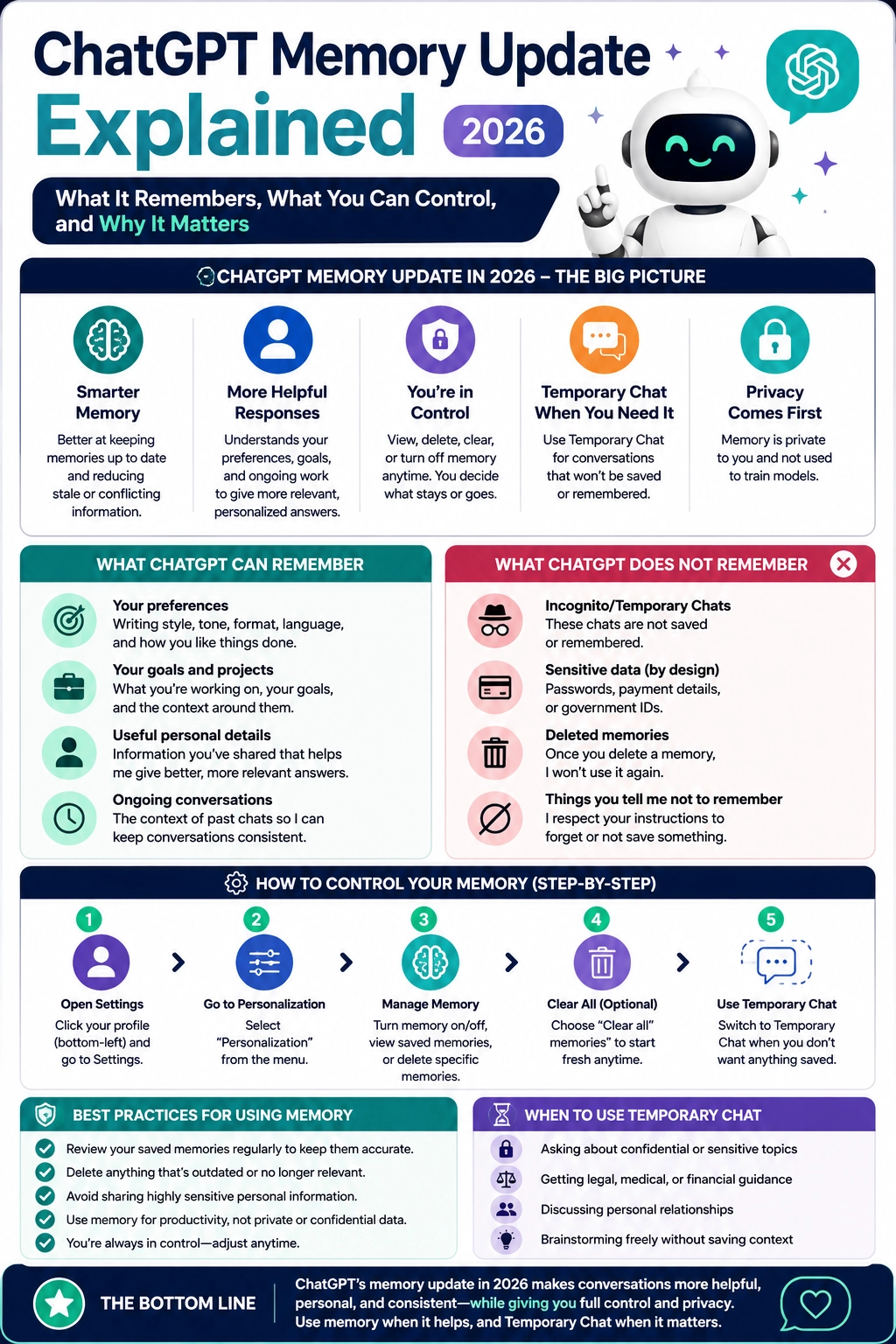
The ChatGPT memory update is one of the most important AI personalization changes for everyday users because it affects how ChatGPT understands your preferences, past work, goals, writing style, and ongoing projects.
Instead of treating every chat like a brand-new conversation, ChatGPT can now use memory and past context more intelligently to make answers feel more useful, consistent, and personal. That can save time, reduce repeated explanations, and make ChatGPT better at helping with long-term tasks.
But memory also raises a simple question: what exactly does ChatGPT remember, and how much control do you have?
This guide from Designs24hr explains the ChatGPT memory update in plain English, including what it can remember, what it should not be used for, how Temporary Chat works, and how to manage your memory settings safely.
What Is the ChatGPT Memory Update?
The ChatGPT memory update improves how ChatGPT uses saved memories, past chats, and user-controlled personalization settings to make future responses more relevant. OpenAI explains that memory helps ChatGPT remember useful information between conversations, including details and preferences you have shared.
The newer memory system is designed to make personalization more useful, more continuous, and easier to control. OpenAI’s release notes say recent memory improvements help ChatGPT pull in relevant context from past chats and saved memories so users do not have to repeat themselves as often.
For normal users, the meaning is simple: ChatGPT can become better at understanding how you like things done, what you are working on, and what details matter across conversations.
Simple example: If you often ask ChatGPT to write in a clean, direct tone, create Etsy listings, format blog posts a certain way, or remember your project goals, memory can help ChatGPT keep that context without you repeating it every time.
What ChatGPT Can Remember
ChatGPT memory is designed to remember useful context that can improve future conversations. It may include details you directly ask it to remember, saved preferences, relevant past context, and information that helps ChatGPT respond in a more helpful way.
1. Your preferences
ChatGPT may remember how you like answers formatted, your preferred tone, your writing style, or repeated instructions you give often. For example, it may learn that you prefer direct answers, SEO-focused blog structures, clean formatting, or beginner-friendly explanations.
2. Your goals and ongoing projects
Memory can help ChatGPT stay aligned with projects that continue over time. This is useful for creators, business owners, students, marketers, designers, and anyone who uses ChatGPT as a daily work assistant.
3. Useful details you share
If you share information that helps ChatGPT give better future answers, it may use that information when memory is enabled. This could include your business focus, content strategy, design direction, or recurring workflow.
4. Context from past conversations
Depending on your settings and plan, ChatGPT may use relevant context from past chats to personalize responses. OpenAI notes that saved memory and reference chat history are separate controls, so users should review both when checking how personalization is working.
What ChatGPT Does Not Automatically Mean by “Memory”
Memory does not mean ChatGPT is perfectly recording every word you ever typed. It also does not mean every answer is based on everything from your history. Memory is a personalization system that uses selected context when it may improve a response.
That difference matters because many users hear “memory” and assume ChatGPT is permanently storing every detail forever. The actual experience is more controlled than that. You can review memory, delete memories, turn memory off, and use Temporary Chat when you do not want a conversation to personalize future responses.
| Feature | What It Means | Best Use |
|---|---|---|
| Saved memories | Important details ChatGPT can carry into future chats. | Preferences, goals, recurring workflows, and long-term projects. |
| Reference chat history | ChatGPT can use relevant context from past conversations when helpful. | Ongoing work where past context improves the answer. |
| Temporary Chat | A chat mode that does not create memories or appear in history. | Sensitive, private, experimental, or one-time conversations. |
| Data controls | Settings that let you manage personalization and model improvement choices. | Privacy control, account-level preferences, and training settings. |
Why the ChatGPT Memory Update Matters
The biggest benefit of the ChatGPT memory update is less repetition. If you use ChatGPT often, you probably repeat the same instructions many times: your brand name, your content format, your product type, your preferred tone, your audience, your style rules, or your business goals.
Memory helps reduce that friction. It gives ChatGPT a better chance to respond like an assistant that understands your ongoing work instead of a tool that starts from zero every time.
This matters especially for people using AI for:
- Blog writing and SEO workflows
- Business planning and content strategy
- Etsy listing optimization
- Study support and learning plans
- Daily productivity and task management
- Design feedback and creative direction
- Personalized brainstorming and planning
For example, a blogger may want ChatGPT to remember their preferred article structure. A designer may want it to remember a brand style. A student may want it to remember a study goal. A shop owner may want it to remember product rules and listing preferences.
Where Privacy Comes In
Memory is powerful because it makes AI more personal. That is also why users should understand the privacy controls clearly.
OpenAI says users can review and delete saved memories, ask what ChatGPT remembers, delete specific conversations, turn memory controls off, and use Temporary Chat for conversations they do not want used to personalize future responses.
There is also an important difference between memory and model training. Temporary Chat is designed for conversations that do not appear in history and do not create memories. For regular chats, data use can depend on your account type and data control settings.
Important: Do not treat memory like a private vault. Avoid saving highly sensitive information such as passwords, payment details, government ID numbers, private medical details, or anything you would not want reused in future conversations.
How to Control ChatGPT Memory
The good news is that memory is not all-or-nothing. You can manage it based on how much personalization you want.
Step 1: Open Settings
Go to your ChatGPT settings from your profile menu. On most accounts, memory controls are found under Personalization or Memory-related settings.
Step 2: Review saved memories
Look at what ChatGPT has saved or summarized. If something is outdated, incorrect, too personal, or no longer useful, remove it.
Step 3: Delete individual memories
You can delete specific memories instead of clearing everything. This is useful when only one detail is wrong or outdated.
Step 4: Clear all memories if needed
If your saved memory has become messy or no longer matches how you work, clearing it can give you a fresh start.
Step 5: Use Temporary Chat for private conversations
When you want to ask about something sensitive, experimental, or unrelated to your normal work, use Temporary Chat. Temporary Chat helps keep that conversation separate from memory-based personalization.
When Should You Use Temporary Chat?
Temporary Chat is best when you do not want a conversation to shape future responses. It is not only for “secret” conversations. It is also useful for one-time research, rough brainstorming, or topics that should not become part of your normal AI profile.
Use Temporary Chat when you are discussing:
- Confidential personal information
- Private financial, legal, or medical questions
- One-time brainstorming that does not reflect your real preferences
- Someone else’s personal information
- Temporary plans you do not want remembered later
- Test prompts that should not affect future personalization
Temporary Chat gives you a clean space when memory would be more distracting than helpful.
Best Practices for Using ChatGPT Memory Safely
The smartest way to use memory is to treat it like a helpful assistant notebook. Keep useful context in it, but do not overload it with private or unnecessary details.
Keep useful preferences
It is helpful for ChatGPT to remember your writing style, formatting preferences, business focus, project rules, and repeated workflows.
Remove outdated details
If your goals change, your brand changes, or a project ends, update or delete old memories so ChatGPT does not keep using stale information.
Ask ChatGPT what it remembers
A simple way to audit memory is to ask, “What do you remember about me?” Then review whether the answer is still accurate and useful.
Do not save sensitive information
Never intentionally save passwords, ID numbers, payment details, private health information, or confidential client data as memory.
Use memory for productivity, not secrecy
Memory is best for making everyday AI help faster and more consistent. It is not the right place for highly sensitive personal records.
ChatGPT Memory Update: The Real Benefit
The real benefit of the ChatGPT memory update is not that ChatGPT “knows more” about you. The benefit is that it can understand your context better when that context is useful.
That means better first drafts, fewer repeated instructions, more consistent formatting, stronger long-term project support, and answers that feel more aligned with how you actually work.
For creators and website owners, this can be a major productivity advantage. If ChatGPT remembers your brand voice, SEO structure, content goals, target audience, and formatting rules, you can move faster without rebuilding the same context every day.
For everyday users, it can make AI feel more natural. ChatGPT can better understand your preferences, your learning style, your goals, and your usual way of asking for help.
Keep learning with Designs24hr: For more simple AI explainers, visit The AI Edge. You can also use the Keyword Density Checker to review your own SEO content before publishing, or try the Title Meta Preview Tool to improve your search snippet.
Frequently Asked Questions About the ChatGPT Memory Update
What is the ChatGPT memory update?
The ChatGPT memory update improves how ChatGPT uses saved memories and relevant past context to personalize future responses. It is designed to make answers more useful, consistent, and aligned with your preferences.
Can I turn off ChatGPT memory?
Yes. You can turn memory controls off in ChatGPT settings. You can also delete individual saved memories or clear memory if you want a fresh start.
Does Temporary Chat use memory?
No. Temporary Chat does not create memories for personalization, which makes it useful for private, sensitive, or one-time conversations.
Can ChatGPT remember sensitive information?
Sensitive information may appear in memory if you share it while memory is enabled. That is why it is better to use Temporary Chat or turn memory off when discussing private information.
Is ChatGPT memory the same as Custom Instructions?
No. Custom Instructions are direct guidance you set manually. Memory can include useful details from conversations or details you ask ChatGPT to remember. Both can influence personalization.
Should I use ChatGPT memory?
Use memory if you want more personalized help across conversations. Turn it off or use Temporary Chat when privacy, one-time questions, or sensitive topics matter more than personalization.
The Bottom Line
The ChatGPT memory update makes AI more personal, more useful, and more consistent. It can help ChatGPT remember your preferences, goals, projects, and working style so you do not have to repeat the same context again and again.
But the best way to use memory is with control. Review what ChatGPT remembers, delete anything outdated, avoid saving sensitive information, and use Temporary Chat when you want a conversation to stay separate from future personalization.
At Designs24hr, we believe the future of AI is not just about smarter tools. It is about helping people use those tools with clarity, creativity, and control. Share your experience with ChatGPT memory in the comments, and come back to Designs24hr whenever you want to learn something new about AI and design.
Sources: This article is based on OpenAI’s official documentation for ChatGPT Memory, Temporary Chat, Data Controls, ChatGPT Release Notes, and OpenAI’s article on better memory for a more helpful ChatGPT.