10 Free AI Tools to Work Smarter, Save Time, and Get More Done in 2026
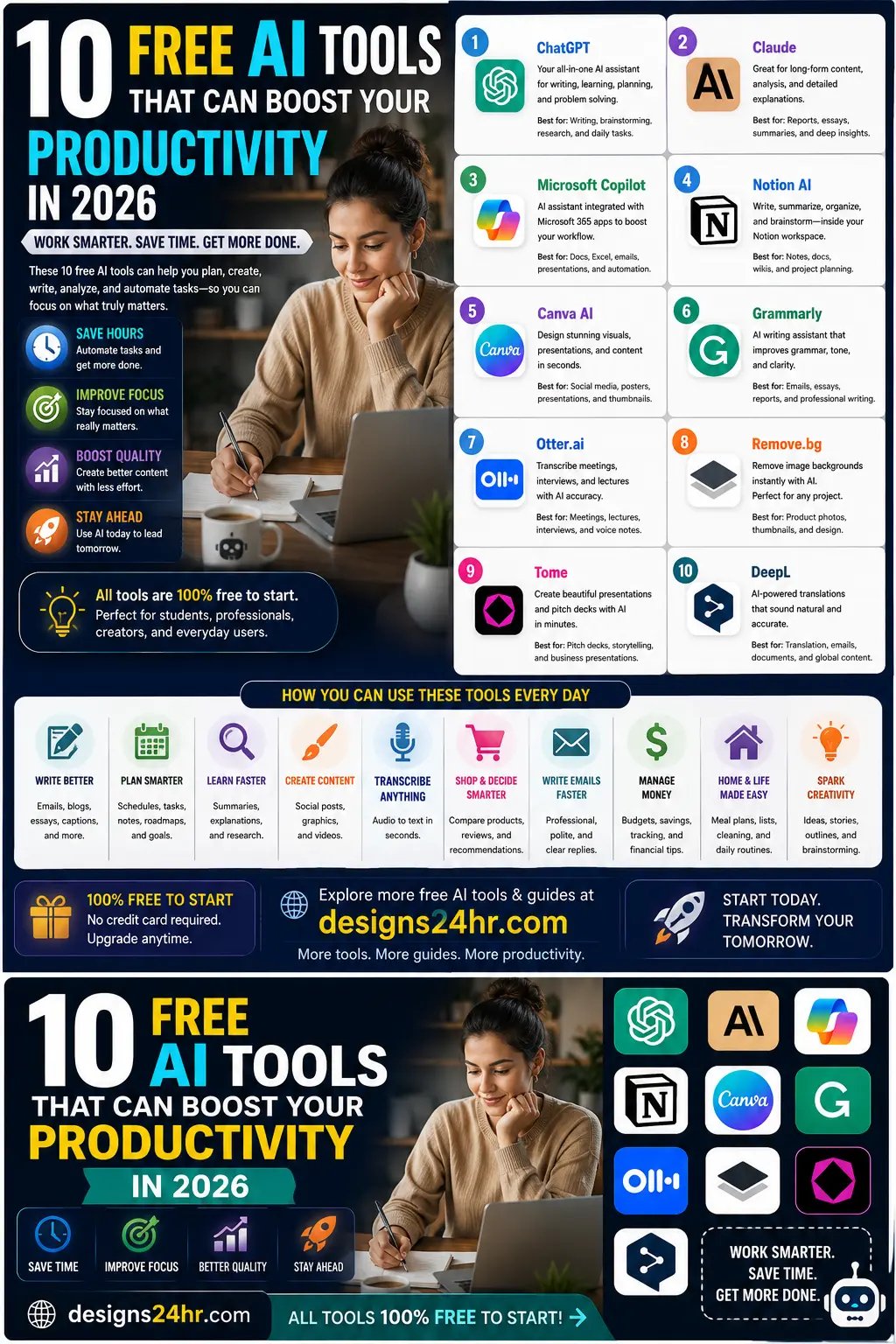
Best free AI tools for productivity is not just a search for random AI apps. Most people asking this question want one clear answer: which free AI tool should I use for writing, research, meetings, planning, design, presentations, or daily work without wasting time testing everything?
That is the real problem. There are too many AI tools, too many “top 50” lists, and too many apps that sound impressive but do not solve a clear productivity problem. This guide keeps it simple by matching each free AI tool to the task it handles best.
Quick answer: The best free AI tools for productivity in 2026 are ChatGPT for all-purpose help, Google Gemini for Google users, Microsoft Copilot for Microsoft users, Claude for long writing, Perplexity for AI search, NotebookLM for source-based research, Canva AI for design, Grammarly for writing polish, Fathom for meeting notes, and Gamma for presentations.
Best Free AI Tools for Productivity: Quick Comparison
Use this table first. It helps you choose the right tool based on the exact productivity problem you want to solve.
| Tool | Best For | Best User | Use It When You Need To |
|---|---|---|---|
| ChatGPT | All-purpose AI productivity | Beginners, professionals, creators, students | Write, plan, summarize, brainstorm, analyze, and organize tasks. |
| Google Gemini | Google ecosystem productivity | Google users, students, everyday users | Brainstorm, plan, write, learn, and connect ideas across Google workflows. |
| Microsoft Copilot | Microsoft and Windows productivity | Windows, Edge, Bing, and Microsoft users | Ask questions, draft content, summarize ideas, and support work tasks. |
| Claude | Long writing and careful explanations | Writers, researchers, students, business users | Rewrite, structure, explain, review, and organize longer content. |
| Perplexity | AI search and source-based answers | Researchers, students, creators, professionals | Find answers faster with links and source-backed summaries. |
| NotebookLM | PDFs, notes, sources, and research | Students, researchers, analysts, content teams | Analyze your own sources, notes, files, links, and research material. |
| Canva AI | Design and visual content | Creators, marketers, small businesses, students | Create graphics, slides, thumbnails, flyers, and social content. |
| Grammarly | Writing clarity and tone | Professionals, students, freelancers, teams | Fix grammar, improve clarity, adjust tone, and polish text. |
| Fathom | Meeting notes | Professionals, teams, consultants, sales users | Record, transcribe, summarize, and search meeting conversations. |
| Gamma | Presentations and visual documents | Founders, students, marketers, teams | Create presentation drafts, reports, websites, and visual documents. |
How We Chose These Free AI Productivity Tools
This list is not based on hype. A tool had to solve a clear productivity problem and be useful on a free or free-to-start plan.
- Clear use case: Each tool must own one major productivity task.
- Beginner-friendly: A new user should understand what to do with it quickly.
- Useful free access: The free plan or free-to-start access must be practical enough to test.
- Daily value: The tool should help with real tasks like writing, research, planning, meetings, design, or presentations.
- Trust factor: Preference goes to tools with strong product pages, official documentation, or clear free-plan details.
- Low overlap: Each tool should have a different reason to be on the list.
The goal is not to tell you to use all 10 tools. The goal is to help you choose the one or two tools that solve your biggest productivity problem right now.
1. ChatGPT: Best Free All-Purpose AI Productivity Tool
ChatGPT is the best free all-purpose AI productivity tool because it can help with many daily tasks in one place. You can use it for writing, planning, summaries, brainstorming, research structure, task breakdowns, decision support, content outlines, and problem solving.
ChatGPT is especially useful when you do not know which specialized tool to use yet. Instead of opening several apps, you can start with one general assistant and ask it to help organize your work.
Best prompt to try: “Organize my task list into urgent, important, quick wins, deep work, and later. Then create a realistic plan for today.”
Best for: everyday productivity, planning, writing, summaries, brainstorming, and problem solving.
Free-plan note: ChatGPT Free includes access to advanced AI capabilities and tools, but usage limits can apply.
Official source: OpenAI ChatGPT Free Tier FAQ
2. Google Gemini: Best Free AI Tool for Google Users
Google Gemini is a strong free AI productivity tool for people who already use Google products. It can help with writing, planning, brainstorming, learning, and everyday questions.
Gemini is useful when your workflow already includes Google Search, Gmail, Docs, YouTube, Calendar, or other Google tools. It is also easy for beginners because it works like a conversational assistant.
Best prompt to try: “Help me plan this project. Break it into steps, list what information is missing, and suggest the best first action.”
Best for: Google users, students, everyday planning, brainstorming, and learning.
Free-plan note: Gemini has free access through the Gemini app, while advanced features and higher limits may depend on plan, region, or rollout.
Official source: Google Gemini
3. Microsoft Copilot: Best Free AI Tool for Microsoft and Windows Users
Microsoft Copilot is a practical free AI productivity tool for people who already use Windows, Edge, Bing, Outlook, Word, Excel, or Microsoft 365 workflows.
Copilot can help with quick answers, writing support, idea generation, summaries, explanations, and everyday productivity. It is especially useful if you want an AI assistant that fits naturally into Microsoft’s ecosystem.
Best prompt to try: “Summarize this topic for a busy professional. Give me the key points, risks, and what I should verify before acting.”
Best for: Microsoft users, workplace questions, research support, summaries, and daily AI help.
Free-plan note: Free Copilot access is available through Microsoft’s consumer Copilot experience, while business and Microsoft 365 integrations may require separate plans.
Official source: Microsoft Copilot
4. Claude: Best Free AI Tool for Long Writing and Careful Thinking
Claude is one of the best free AI tools for productivity when the task involves longer writing, careful explanations, rewriting, research notes, structure, or thoughtful review.
Claude is useful for people who work with text-heavy tasks: reports, outlines, study notes, proposals, long emails, article drafts, documentation, and planning documents.
Best prompt to try: “Turn these rough notes into a clear outline. Add sections, key points, missing information, and the next three steps.”
Best for: long writing, rewriting, structured thinking, research notes, and careful explanations.
Free-plan note: Claude offers free access, but message limits and available models can change based on demand and plan.
Official source: Claude by Anthropic
5. Perplexity: Best Free AI Tool for Research and Search
Perplexity is one of the best free AI tools for productivity when your main problem is research. It works like an AI-powered answer engine that gives responses with source links, making it useful for fast learning, comparisons, and topic exploration.
Perplexity is stronger than a normal chatbot when you need current information, source-backed summaries, or a faster way to understand a topic before deeper research.
Best prompt to try: “Compare the best options for this topic and include source-backed reasons, pros, cons, and what I should verify.”
Best for: research, source-backed answers, comparisons, current topics, and quick learning.
Free-plan note: Perplexity offers free AI-powered search, with paid plans for deeper usage and advanced features.
Official source: Perplexity
6. NotebookLM: Best Free AI Tool for PDFs, Notes, and Source-Based Research
NotebookLM is one of the strongest free AI productivity tools for people who work with their own materials. Instead of asking the open web, you upload or add sources and let NotebookLM help you understand them.
This makes it useful for PDFs, notes, reports, research links, class material, documents, transcripts, and source-heavy projects. It is especially helpful when you need answers grounded in your own uploaded or selected content.
Best prompt to try: “Based only on my sources, summarize the key ideas, list contradictions, create a study guide, and show the most important questions to review.”
Best for: students, researchers, analysts, writers, long documents, source-based summaries, and study guides.
Free-plan note: NotebookLM is available as Google’s AI research and thinking partner, with feature limits depending on access, plan, and supported regions.
Official source: Google NotebookLM
7. Canva AI: Best Free AI Tool for Design and Visual Content
Canva AI is one of the best free AI productivity tools for visual work. It helps users create social posts, thumbnails, presentations, flyers, marketing graphics, posters, videos, and simple branded visuals without needing advanced design skills.
This is useful for creators, students, small business owners, bloggers, marketers, teachers, and anyone who needs clean visuals quickly.
Best prompt to try: “Create a clean square social media graphic about productivity. Use a bold headline, simple layout, modern colors, and strong visual hierarchy.”
Best for: design, social graphics, thumbnails, flyers, presentations, and quick visuals.
Free-plan note: Canva is free to use, but some AI features, templates, exports, and usage limits may require paid plans.
Official source: Canva
For visual sizing before publishing, use the Designs24hr Aspect Ratio Calculator.
8. Grammarly: Best Free AI Tool for Writing Polish
Grammarly is one of the best free AI tools for productivity when your main problem is writing quality. It helps with grammar, spelling, clarity, tone, and quick rewriting.
This is useful for emails, school writing, documents, client messages, social captions, cover letters, reports, and professional communication.
Best prompt to try: “Make this message clearer, shorter, and more professional while keeping the meaning the same.”
Best for: grammar, clarity, tone, emails, documents, and professional writing polish.
Free-plan note: Grammarly’s Free plan includes writing help and a limited number of AI prompts.
Official source: Grammarly
For fast email drafting, try the Designs24hr AI Email Reply Generator.
9. Fathom: Best Free AI Tool for Meeting Notes
Fathom is one of the best free AI productivity tools for meetings. It can record, transcribe, and summarize meetings so you can stay focused on the conversation instead of writing everything down manually.
This is useful for consultants, sales teams, managers, remote workers, freelancers, client calls, interviews, project updates, and internal team meetings.
Best prompt to use after a meeting: “Turn this transcript into decisions, action items, owners, deadlines, risks, and a follow-up message.”
Best for: meeting notes, call summaries, transcripts, follow-ups, and searchable meeting records.
Free-plan note: Fathom has a free individual plan with unlimited recordings and transcriptions, while advanced AI features and team features may require paid plans.
Official source: Fathom Pricing
10. Gamma: Best Free AI Tool for Presentations
Gamma is one of the best free AI tools for productivity when you need a presentation, visual document, or quick deck draft. It can turn a topic or outline into a structured presentation much faster than starting from a blank slide.
This is useful for students, founders, marketers, teachers, consultants, creators, and business users who need polished first drafts.
Best prompt to try: “Create a 7-slide presentation about this topic. Include the problem, audience, key points, examples, benefits, next steps, and final takeaway.”
Best for: presentations, pitch decks, reports, visual documents, and quick content structure.
Free-plan note: Gamma has a Free plan for simple projects, with paid plans for more AI power, branding removal, and advanced features.
Official source: Gamma Pricing
Best Free AI Tools by Task
Still not sure which tool to choose? Start with the task, then pick the tool.
| Task | Best Free AI Tool | Why |
|---|---|---|
| Daily planning | ChatGPT or Gemini | Both can organize messy tasks into priorities and next steps. |
| Work emails | Grammarly, ChatGPT, or Claude | They help with clarity, tone, rewriting, and concise replies. |
| Research | Perplexity | It gives AI answers with source links for faster topic exploration. |
| PDFs and notes | NotebookLM | It works with your own sources and helps turn complexity into clarity. |
| Meeting notes | Fathom | It records, transcribes, and summarizes meeting conversations. |
| Social graphics | Canva AI | It helps create visual content quickly without advanced design skills. |
| Presentations | Gamma | It helps turn ideas into structured decks and visual documents. |
| Microsoft workflow | Microsoft Copilot | It fits naturally for users already working inside Microsoft tools. |
Best Free AI Tools by User Type
Best Free AI Tools for Students
Students should start with ChatGPT for explanations, NotebookLM for class notes and PDFs, Perplexity for research, Grammarly for writing polish, and Gamma for presentations.
Best Free AI Tools for Professionals
Professionals should start with ChatGPT or Copilot for daily work, Fathom for meetings, Grammarly for communication, and Perplexity for quick research.
Best Free AI Tools for Small Business Owners
Small business owners should start with ChatGPT for planning, Canva AI for visuals, Grammarly for customer messages, Perplexity for research, and Gamma for quick pitch decks or service presentations.
Best Free AI Tools for Creators
Creators should start with ChatGPT for content ideas, Canva AI for graphics, Perplexity for trend research, Grammarly for polish, and Gamma for visual content structure.
Free AI Tools vs Paid AI Tools: When Should You Upgrade?
Free AI tools are enough when you are testing, learning, or handling light productivity tasks. But paid plans may be worth it when AI becomes part of your daily work and the free limits slow you down.
- Stay free if you only need occasional writing, planning, research, or summaries.
- Upgrade if you hit message limits, need better models, need team features, or need higher export quality.
- Upgrade if the tool saves enough time to justify the cost.
- Do not upgrade just because a tool is popular. Upgrade only when it solves a repeated problem.
Important: Free AI plans can change. Always check the current official plan limits, privacy settings, export rules, and commercial-use terms before building an important workflow around any free tool.
Privacy Checklist Before Using Free AI Tools
Free AI productivity tools can be useful, but you still need to protect private information. Before pasting anything into an AI tool, ask whether the content is sensitive, confidential, or risky.
- Do not paste passwords, private credentials, API keys, or account numbers.
- Do not share confidential customer data unless your organization allows it.
- Do not upload legal, health, financial, identity, or private business documents without checking privacy rules.
- Review whether the tool may use your data to improve the service.
- Check export rights before using AI visuals commercially.
- Verify important facts before publishing or making decisions.
- Use human judgment before sending AI-written messages to clients, managers, customers, or public audiences.
A Simple Free AI Productivity Workflow
The best workflow is not “use all 10 tools.” The best workflow is choosing the right tool for each repeated task.
- Plan your day: Use ChatGPT, Gemini, or the Designs24hr AI Daily Task Planner.
- Write faster: Use ChatGPT, Claude, Grammarly, or the Designs24hr AI Email Reply Generator.
- Research smarter: Use Perplexity or NotebookLM.
- Compare decisions: Use the Designs24hr Decision Helper.
- Create visuals: Use Canva AI and the Designs24hr Color Palette Generator.
- Build presentations: Use Gamma.
- Capture meetings: Use Fathom.
- Check content length: Use the Designs24hr Word Counter Pro.
This gives you a practical system: one tool for planning, one for writing, one for research, one for meetings, one for design, and one for presentations.
Best Free AI Productivity Prompts to Copy
Daily Planning Prompt
“Organize my task list into urgent, important, quick wins, deep work, and later. Then create a realistic plan for today.”
Writing Prompt
“Rewrite this so it is clear, professional, concise, and easy to understand. Keep the meaning the same.”
Research Prompt
“Research this topic and give me a source-backed summary, key takeaways, important risks, and what I should verify.”
NotebookLM Prompt
“Based only on my sources, summarize the main points, list contradictions, create a study guide, and identify the most important questions.”
Meeting Prompt
“Turn this transcript into decisions, action items, owners, deadlines, risks, and a short follow-up message.”
Design Prompt
“Create a clean social media graphic concept for this topic. Include headline text, layout idea, visual style, color direction, and call-to-action.”
Presentation Prompt
“Create a 7-slide presentation outline with a strong title, problem, solution, key points, examples, next steps, and final takeaway.”
Common Mistakes to Avoid With Free AI Tools
Free AI tools work best when you use them with a clear task. Avoid these mistakes:
- Choosing tools because they are trending instead of useful.
- Trying too many tools before building one reliable workflow.
- Using AI output without reviewing it.
- Sharing sensitive information without checking privacy settings.
- Assuming every free plan is unlimited.
- Using AI-generated visuals without checking rights, accuracy, or brand fit.
- Letting AI replace your judgment instead of supporting it.
Official Sources to Check
AI tools and free-plan limits change often, so check official pages before relying on any tool heavily:
- OpenAI: ChatGPT Free Tier FAQ
- Google Gemini
- Microsoft Copilot
- Claude by Anthropic
- Perplexity
- Google NotebookLM
- Canva
- Grammarly
- Fathom Pricing
- Gamma Pricing
Smart Takeaway
The best free AI tools for productivity are not the tools with the loudest marketing. They are the tools that solve one clear problem in your day.
Use ChatGPT for general productivity, Gemini if you live in Google tools, Copilot if you use Microsoft, Claude for long writing, Perplexity for research, NotebookLM for source-based notes, Canva AI for visuals, Grammarly for writing polish, Fathom for meetings, and Gamma for presentations.
Start with one task. Choose one tool. Build one repeatable workflow. Then add another tool only when it clearly saves time or improves your work.
For more practical AI explainers, free productivity tools, and smarter digital guides, visit Designs24hr whenever you want to learn something new about AI, design, and everyday productivity.
FAQ: Best Free AI Tools for Productivity
What are the best free AI tools for productivity in 2026?
The best free AI tools for productivity in 2026 include ChatGPT, Google Gemini, Microsoft Copilot, Claude, Perplexity, NotebookLM, Canva AI, Grammarly, Fathom, and Gamma. Each tool solves a different productivity problem, such as writing, research, meetings, design, presentations, or planning.
What is the best free all-purpose AI tool?
ChatGPT is one of the best free all-purpose AI tools because it can help with writing, planning, brainstorming, summaries, task organization, research structure, and everyday problem solving.
What is the best free AI tool for research?
Perplexity is strong for AI-powered search and source-backed answers, while NotebookLM is better when you want AI to analyze your own sources, PDFs, notes, links, and documents.
What is the best free AI tool for writing?
Grammarly is useful for grammar, tone, and clarity. ChatGPT and Claude are also strong for drafting, rewriting, outlining, and improving longer content.
What is the best free AI tool for meetings?
Fathom is a strong free AI meeting notes tool because it can record, transcribe, and summarize meetings. Check current free-plan limits before relying on it for heavy meeting workflows.
What is the best free AI design tool?
Canva AI is one of the best free AI design tools for social posts, presentations, flyers, thumbnails, simple graphics, and marketing visuals.
What is the best free AI tool for presentations?
Gamma is useful for creating presentation drafts, visual documents, reports, websites, and quick deck structures from prompts or outlines.
Are free AI productivity tools safe to use?
Free AI tools can be safe when used carefully. Avoid sharing passwords, private credentials, confidential customer data, financial records, legal documents, health information, or sensitive business data unless you understand the tool’s privacy controls and your organization allows it.
Can free AI tools replace paid AI tools?
Free AI tools can be enough for light daily use, testing, learning, and simple workflows. Paid tools are usually better for heavy usage, team features, higher limits, advanced models, cleaner exports, or professional production work.
How should beginners choose a free AI tool?
Beginners should start with one problem. Choose ChatGPT for general help, Perplexity for research, NotebookLM for notes and sources, Grammarly for writing polish, Canva AI for design, Fathom for meetings, or Gamma for presentations.