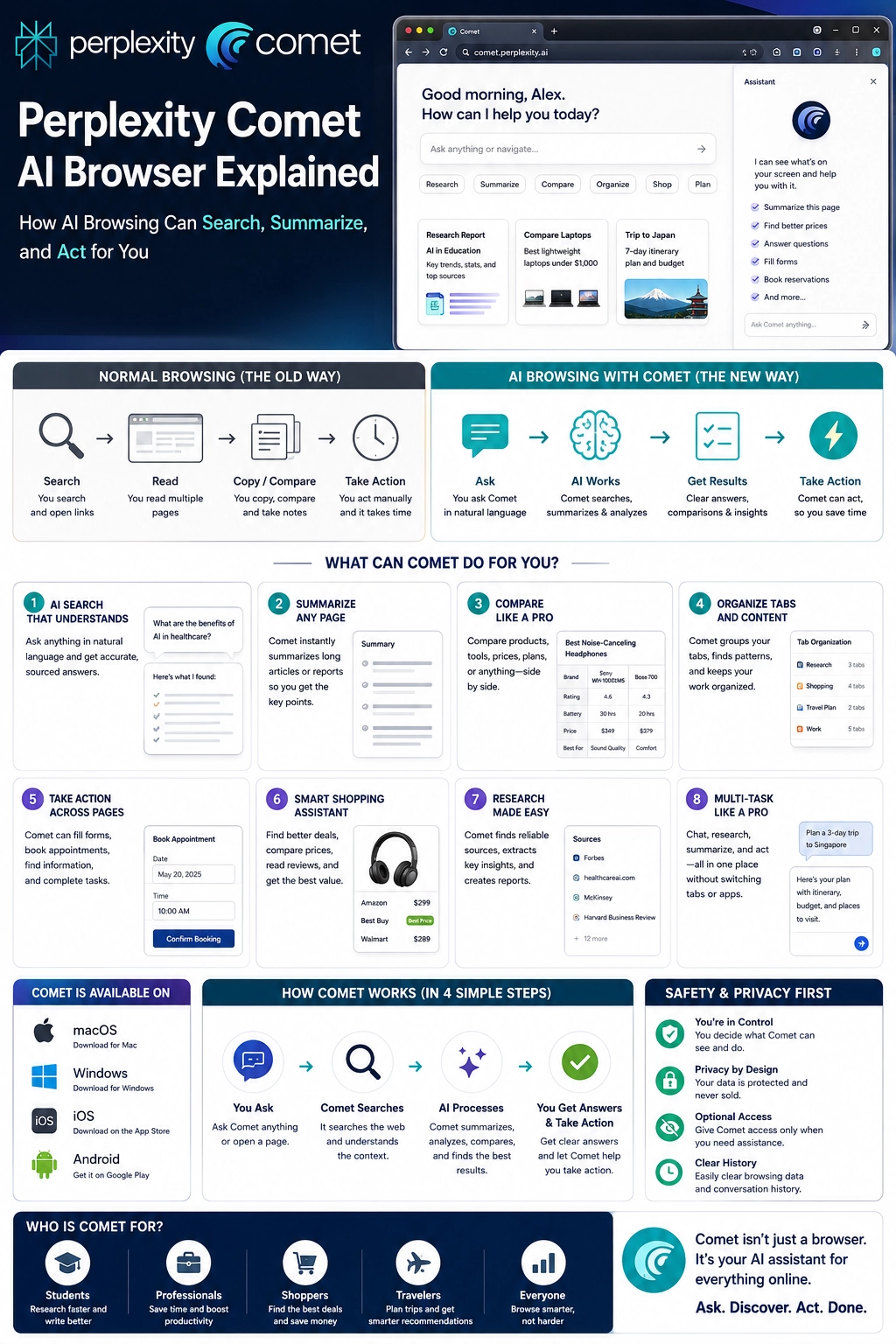
Perplexity Comet AI browser is an AI-powered browser built around one simple idea: instead of opening endless tabs, reading every page manually, and copying notes yourself, you can ask an assistant to search, summarize, compare, organize, and help you act faster online.
Normal browsing makes you do most of the work. You search, click, scan, compare, copy, open more tabs, forget where you found something, and then try to turn everything into a decision. AI browsing changes that workflow by adding an assistant directly inside the browser.
That is why Comet matters. It is not just another browser with a search bar. It points toward a new kind of web experience where your browser becomes a research helper, shopping assistant, planner, tab organizer, and productivity partner.
This guide from Designs24hr explains Perplexity Comet AI browser in plain English: what it is, how AI browsing works, what Comet can do, who it helps, and what safety habits users should keep before letting any AI browser act on their behalf.
What Is Perplexity Comet AI Browser?
Perplexity Comet AI browser is Perplexity’s AI-powered web browser. The official Comet page describes it as a browser that acts like a personal assistant and can help users automate tasks, research the web, organize email, shop, plan, and browse with less friction.
Instead of treating AI as a separate chatbot you open in another tab, Comet brings the assistant into the browsing experience. That means the assistant can help with the page you are reading, the tabs you have open, the topic you are researching, or the task you are trying to finish.
Perplexity lists Comet as available for Mac, Windows, iOS, and Android, though features and availability can change by device, region, account type, and app version. Users should always check Perplexity’s official Comet page or app listings for the latest details.
Simple example: Instead of opening ten laptop review pages and manually comparing prices, specs, and pros and cons, you can ask Comet to summarize the pages, compare options, and help you identify the best choice based on your needs.
Why AI Browsing Is Different From Normal Browsing
Traditional browsers are built around search, tabs, bookmarks, and manual reading. They are powerful, but they still require you to do the heavy lifting. You must decide which links to open, which pages to trust, what to copy, what to compare, and what to ignore.
AI browsing adds a second layer: interpretation. The browser can help understand what is on the page, pull out the important points, compare multiple sources, answer questions about open tabs, and suggest the next step.
That shift matters because the web has become noisy. Search results, ads, product pages, review sites, email threads, PDFs, forms, and long articles can quickly create information overload. A browser assistant can reduce that friction by turning scattered pages into clearer answers.
| Normal Browsing | AI Browsing With Comet |
|---|---|
| You search manually and open many tabs. | You ask in natural language and let the assistant help find direction. |
| You read every page yourself. | You can ask for summaries, key points, and comparisons. |
| You copy notes into another app. | The assistant can help organize findings into a cleaner format. |
| You compare products or ideas by hand. | Comet can help compare options side by side. |
| You switch between apps to finish tasks. | The assistant can help with browser-based actions and workflows. |
What Can Comet Do?
Comet is designed for people who want to do more than passively browse. Its strongest use cases are research, summarization, comparison, planning, shopping, organizing tabs, and working through online tasks faster.
1. Search smarter
You can ask Comet questions in natural language instead of typing short keyword-style searches. This helps when you are researching something complex and need a more direct answer, not just a list of links.
2. Summarize pages
Long articles, product pages, reports, guides, and documentation can take time to read. Comet can help summarize key points so you understand the page faster before deciding whether to read it fully.
3. Compare information across tabs
One of the most useful ideas behind an AI browser assistant is cross-tab understanding. Instead of treating every tab as separate, the assistant can help compare information from multiple open pages, which is useful for shopping, research, travel planning, and decision-making.
4. Organize online tasks
Comet can help users move from browsing to action. That may include turning research into a checklist, organizing findings, helping draft an email, planning a trip, or identifying next steps from the pages you are viewing.
5. Support shopping and product research
For shoppers, AI browsing can help compare prices, specs, features, reviews, and trade-offs. This is especially helpful when products look similar but differ in small details that matter.
6. Help with planning
Comet can support planning workflows such as travel research, meal planning, event planning, study planning, or project planning by collecting information and turning it into a more usable structure.
The real benefit: Perplexity Comet AI browser is not only about finding information. It is about reducing the gap between finding information and doing something useful with it.
How Comet Works in a Simple Workflow
The easiest way to understand Comet is to think of it as a four-step browsing assistant: ask, browse, summarize, and act.
- You ask. Give Comet a question, goal, or task in natural language.
- Comet searches or reads. The assistant helps find or understand relevant web content.
- AI summarizes and compares. It extracts key points, patterns, differences, and useful details.
- You take action. You use the results to decide, shop, plan, email, organize, or continue researching.
This does not mean the AI should make every decision for you. It means the browser can help handle the messy first pass, so you can spend more time reviewing, judging, and choosing.
Best Uses for Perplexity Comet AI Browser
The best use cases for Perplexity Comet AI browser are tasks where you normally open many tabs, read too much, and still feel unsure what to do next.
Research
Students, professionals, creators, and curious readers can use Comet to research complex topics, compare sources, summarize long pages, and turn scattered information into clearer notes.
Shopping
Comet can help compare product options, prices, features, and trade-offs. This is helpful for laptops, home products, travel gear, software, subscriptions, and other decisions with many choices.
Travel planning
Instead of jumping between hotel pages, flight options, maps, attraction lists, and travel blogs, users can ask Comet to summarize options and organize a plan.
Productivity
People who spend a lot of time in web apps can use Comet to summarize information, draft responses, organize tasks, and reduce tab overload.
Email and admin work
Perplexity’s official Comet messaging highlights email organization as one of the assistant use cases. That makes Comet interesting for people who want help managing online work without constantly switching tools.
| Use Case | How Comet Can Help | Best User |
|---|---|---|
| Research | Summarizes pages, compares sources, and extracts key points. | Students, writers, analysts, creators, and professionals. |
| Shopping | Compares prices, product features, reviews, and options. | Anyone making a purchase decision online. |
| Planning | Turns scattered pages into itineraries, checklists, or next steps. | Travelers, event planners, families, and teams. |
| Productivity | Helps summarize, organize, draft, and act faster inside the browser. | Remote workers, business owners, students, and busy users. |
| Tab overload | Helps make sense of many open pages at once. | Anyone who ends up with too many tabs and too little clarity. |
Comet on Mobile: Why It Matters
AI browsing becomes even more interesting on mobile because phones are not ideal for opening many tabs and comparing long pages. Mobile research can feel cramped, slow, and scattered.
Perplexity’s Android information describes Comet as an AI-powered web browser that can automate online tasks, summarize content, and save time. The Google Play listing also highlights the ability to chat with your tabs using voice features on Android, helping users ask questions across open tabs.
That mobile direction is important because AI browsing is not only for desktop power users. It can also help everyday users who research, shop, plan, and compare from their phones.
What Comet Should Not Replace
AI browsers can make browsing faster, but they should not replace careful judgment. Any AI assistant can misunderstand a page, summarize too aggressively, miss context, or make a confident mistake.
That is why users should treat Comet as a helper, not a final authority. It can save time, but the user still needs to review sources, check important details, and make the final decision.
Important: Do not rely only on an AI browser for medical, legal, financial, safety, or high-stakes decisions. Use trusted sources, professional guidance, and your own judgment before acting.
Safety and Privacy Tips Before Using an AI Browser
AI browsers are powerful because they can understand web pages and help with tasks. That same power means users should be careful about permissions, personal data, account access, and actions that affect money, identity, work, or private information.
Review before you act
If Comet helps draft an email, compare a product, plan a trip, or fill information, review everything before submitting, purchasing, sending, or saving.
Protect sensitive information
Be careful with passwords, payment details, personal IDs, private documents, medical information, financial records, and confidential work data. Do not give an AI assistant more access than it needs.
Verify important claims
If Comet summarizes a source, open the original page and check the key details. This matters especially for prices, dates, policies, health information, legal guidance, and product specifications.
Control permissions
Only allow the access you are comfortable with. Browser assistants can become more useful with context, but more access also means more responsibility.
Use human judgment
AI can speed up work, but it should not replace your decision-making. The safest workflow is: let AI gather and organize, then you verify and decide.
Who Should Try Perplexity Comet AI Browser?
Comet is most useful for people who already spend time researching, comparing, planning, or working inside the browser. If you only browse casually, the difference may feel small. But if you regularly use the web for tasks, Comet can feel like a major upgrade.
It may be especially useful for:
- Students researching complex topics
- Professionals comparing information across pages
- Shoppers looking for better product decisions
- Travelers planning trips and itineraries
- Creators gathering sources and ideas
- Business owners managing online research and admin tasks
- Anyone who constantly ends up with too many tabs open
Prompt Ideas to Try in Comet
The best way to use an AI browser assistant is to ask for a clear outcome. Instead of asking vague questions, tell Comet what you want to compare, summarize, decide, or organize.
Try prompts like these:
- “Summarize this page in 5 key points and tell me what matters most.”
- “Compare these open tabs and show the main differences.”
- “Find the best option under $100 and explain why.”
- “Turn this research into a simple checklist.”
- “Help me plan a 3-day trip based on these pages.”
- “What claims should I verify before trusting this article?”
- “Summarize all open tabs and group them by topic.”
The Bigger Shift: Browsers Are Becoming Assistants
The Perplexity Comet AI browser is part of a bigger shift in how people may use the web in 2026 and beyond. Browsers are moving from passive windows into active assistants.
That does not mean normal browsing disappears. People will still search, read, watch, shop, and explore manually. But more users will expect their browser to help summarize, compare, explain, organize, and act.
The old web workflow was “search and click.” The new AI browsing workflow is becoming “ask, understand, compare, and decide.”
Best mindset: Use Comet to reduce overload, not to remove thinking. The strongest results come when AI handles the messy first pass and you bring the final judgment.
Keep learning with Designs24hr: For more simple AI tool explainers, visit The AI Edge. You can also use the Keyword Density Checker to review SEO content before publishing, or try the Title Meta Preview Tool to improve your search snippet.
Frequently Asked Questions About Perplexity Comet AI Browser
What is Perplexity Comet AI browser?
Perplexity Comet AI browser is an AI-powered web browser from Perplexity that includes a built-in assistant to help users search, summarize, compare, organize, and act while browsing the web.
How is Comet different from a normal browser?
A normal browser helps you open pages and search manually. Comet adds an AI assistant that can understand pages, summarize content, compare tabs, and help with online tasks directly inside the browser.
What can Comet help with?
Comet can help with research, summaries, product comparisons, shopping decisions, planning, email organization, tab management, and browser-based productivity tasks.
Is Perplexity Comet available on mobile?
Perplexity lists Comet across Mac, Windows, iOS, and Android. Mobile features can vary by platform and app version, so users should check the official Comet page or app store listings for the latest availability.
Can Comet summarize open tabs?
Comet is designed around AI-assisted browsing, and Perplexity’s Android listing highlights the ability to chat with your assistant across open tabs. Feature details may vary by device and version.
Is Comet useful for shopping?
Yes. Comet can help compare product pages, prices, features, and options. Users should still verify prices, reviews, return policies, and seller details before buying.
Is Perplexity Comet safe to use?
Comet can be useful, but users should manage permissions carefully, avoid sharing unnecessary sensitive information, verify important claims, and review any action before submitting, sending, or purchasing.
Should AI browsers replace normal search?
No. AI browsers can make search and research faster, but users should still check sources, read original pages when needed, and use human judgment for important decisions.
The Bottom Line
Perplexity Comet AI browser shows where the web is heading: from manual browsing toward AI-assisted browsing. Instead of opening endless tabs and doing all the work yourself, you can ask the browser to summarize, compare, organize, and help you move faster.
That can be powerful for research, shopping, planning, productivity, and everyday web tasks. But the best use of Comet is not blind trust. The best use is smart delegation: let AI reduce the clutter, then verify the details and make the final decision yourself.
At Designs24hr, we believe the future of AI should make daily tasks easier without taking away human judgment. Share your thoughts in the comments, and come back to Designs24hr whenever you want to learn something new about AI and design.
Sources: This article is based on Perplexity’s official Comet browser page, the Comet download page, the official help article Comet for Android: Quick Start and Key Features, the Comet Google Play listing, and the Comet App Store listing.