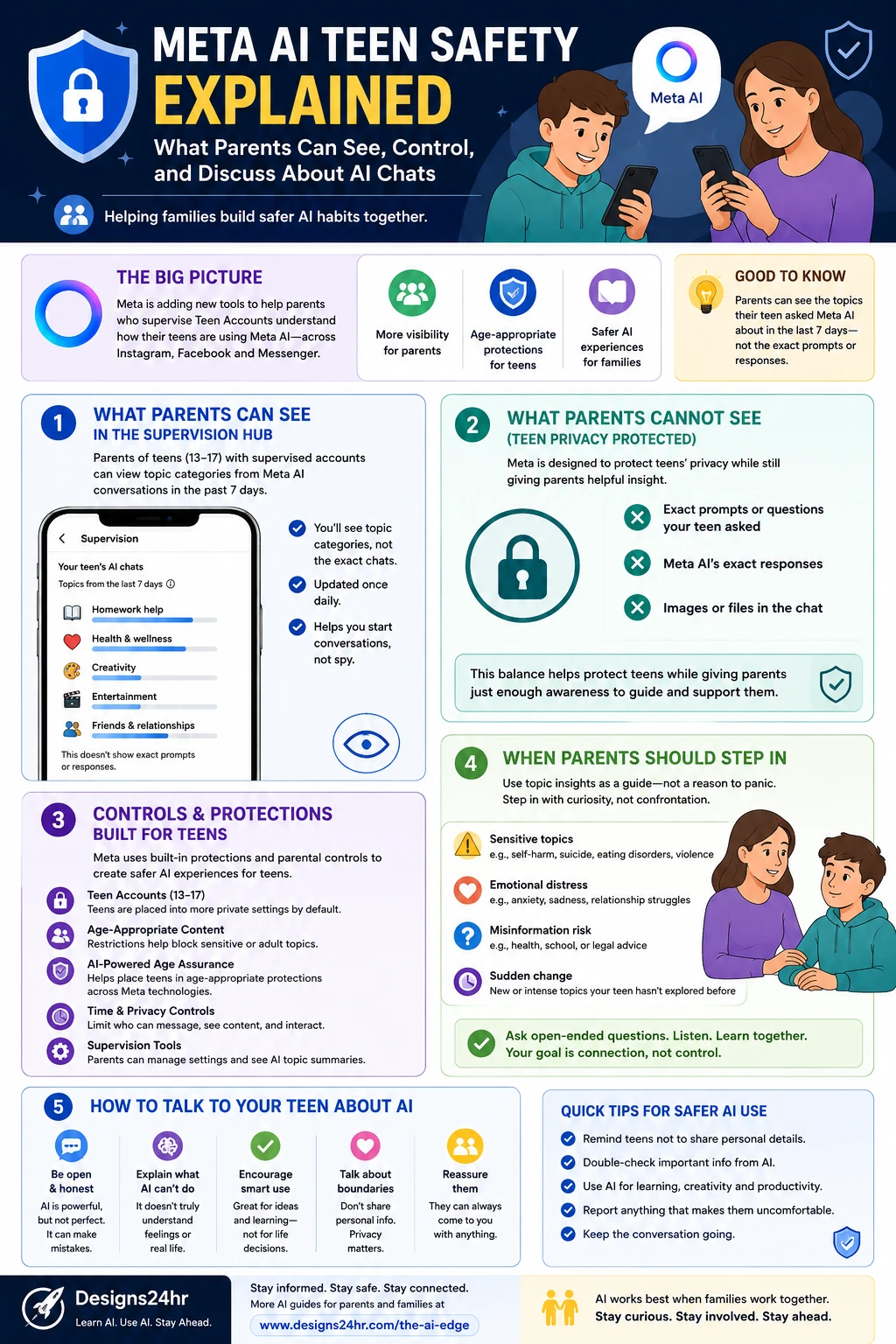
Meta AI teen safety is becoming a major topic for parents because teens are not only using social apps anymore — they are also talking to AI inside the same digital spaces where they message, create, scroll, and explore.
Meta has started adding more teen-focused AI safety tools across its apps, including supervision insights that help parents understand the general topics their teens discuss with Meta AI without showing the exact private prompts or responses.
That balance matters. Parents need enough visibility to guide safer AI habits, but teens also need age-appropriate privacy, trust, and room to grow. The goal should not be spying. The goal should be support, awareness, and better family conversations about AI.
This guide from Designs24hr explains Meta AI teen safety in plain English: what parents can see, what they cannot see, how parental controls work, why age-appropriate protections matter, and how families can talk about AI chats without fear or confusion.
What Is Meta AI Teen Safety?
Meta AI teen safety refers to the tools, settings, and protections Meta is building to help make AI experiences safer for teens across apps like Instagram, Facebook, and Messenger. These updates are part of Meta’s broader Teen Account and Family Center supervision system.
The most important part for parents is visibility. Meta has introduced tools that let parents supervising Teen Accounts see the topic categories their teen has asked Meta AI about during the last seven days. These insights are designed to show general themes, not exact conversations.
For example, a parent may see that their teen asked Meta AI about school, creativity, entertainment, health and wellness, or friendships. But parents are not shown every word the teen typed or every response Meta AI gave.
Simple example: If a teen asks Meta AI for homework help, song ideas, fitness questions, or friendship advice, a supervised parent may see broad topic categories. They should not expect to see a full transcript of the AI chat.
Why Meta AI Teen Safety Matters for Parents
AI chat tools can feel different from regular search engines or social media posts. A teen can ask AI private questions, get instant responses, and sometimes treat the chatbot like a personal guide, tutor, friend, or advice source.
That can be helpful when AI supports learning, creativity, planning, or curiosity. But it can become risky if teens rely on AI for sensitive emotional topics, health decisions, relationship advice, misinformation, or personal problems that need real adult support.
That is why Meta AI teen safety is not only a technology issue. It is a family communication issue. Parents need to understand what AI can do, where it can make mistakes, and how to help teens use it wisely.
What Parents Can See
Meta’s teen AI supervision tools are designed to give parents helpful awareness without turning every AI chat into a full surveillance report. Parents using supervision may be able to see topic categories from their teen’s Meta AI activity over the past seven days.
This can help parents notice patterns. If a teen is asking about homework, creativity, or hobbies, that may open a positive conversation. If a teen is asking about health, emotional distress, relationships, or risky topics, that may be a sign to check in gently.
| What Parents May See | What It Means | How to Use It |
|---|---|---|
| Topic categories | Broad themes from Meta AI chats, such as school, creativity, entertainment, or wellness. | Use the topics as conversation starters, not accusations. |
| Recent AI activity themes | Insights from the last seven days rather than a permanent full history. | Look for changes in patterns, not one-off curiosity. |
| Supervision hub insights | Family Center gives parents a central place to manage supervised accounts and safety settings. | Review settings together with your teen when possible. |
| Safety-related signals | Some safety systems may highlight areas where parental support could matter. | Step in calmly when a topic suggests distress or risk. |
What Parents Cannot See
Meta AI teen safety tools are not designed to show parents every exact private message. Meta has emphasized that parents can see broad topic categories, not exact prompts or exact AI responses.
That privacy boundary matters because teens are more likely to talk openly when they feel supported instead of watched every second. Parents still need enough information to guide safety, but trust is also part of healthy digital parenting.
Parents should not expect to see:
- Exact questions their teen typed into Meta AI
- Full AI responses shown to the teen
- Complete transcripts of AI conversations
- Images, files, or every detail exchanged inside a chat
- A perfect explanation of the teen’s intent or emotional state
Helpful mindset: Think of Meta AI teen safety insights as a dashboard light. A dashboard light tells you where to pay attention, but it does not tell the whole story. The real next step is a calm conversation.
How Meta’s Teen Protections Fit In
Meta AI teen safety is connected to Meta’s wider Teen Account system. Teen Accounts include built-in protections intended to limit unwanted contact, reduce exposure to sensitive content, and place teens into more age-appropriate experiences.
Meta has also expanded age assurance technology that uses AI signals to help identify accounts that may belong to teens and place them into teen protections, even when an account may not have the correct age listed.
These protections are important because teen safety cannot depend only on parents manually checking every setting. A safer system should combine platform protections, parental tools, teen education, and open family communication.
Where Parents Can Manage Supervision
Parents can use Meta’s Family Center to set up and manage supervision across supported Meta apps. Family Center is designed as a central place where parents can review supervised account settings, manage time limits, check certain activity insights, and support their teen’s digital experience.
Supervision is strongest when it is set up with the teen, not secretly forced into the relationship. When families talk through settings together, teens are more likely to understand that the purpose is safety and support, not punishment.
Parents can use supervision to:
- Review account safety settings
- Understand supervised account activity
- Set screen time boundaries
- Manage privacy and interaction settings
- Use AI topic insights as conversation starters
- Support healthier digital habits over time
When Parents Should Step In
Not every AI chat topic is a reason to panic. Teens are naturally curious. They may ask AI about homework, entertainment, friendships, creativity, sports, hobbies, and daily life. That can be normal.
Parents should step in when the topic suggests emotional distress, health confusion, safety concerns, self-harm, eating disorders, violence, misinformation, legal advice, financial pressure, risky challenges, or a sudden change from the teen’s usual behavior.
Important: If a teen appears to be in immediate danger or talks about self-harm, suicide, abuse, or serious emotional distress, parents should not rely on an AI tool. Contact local emergency services, a trusted medical professional, a school counselor, or a crisis support resource immediately.
How to Talk to Teens About AI Chats
The best conversations about AI start with curiosity, not confrontation. If a parent opens with blame, a teen may hide more. If a parent opens with curiosity, the teen may explain what they are exploring and why.
Instead of saying, “Why are you asking AI about this?” try saying, “I noticed AI came up around this topic. I’m not here to judge. I just want to understand what you were looking for and whether you got helpful information.”
That small shift can turn a safety tool into a trust-building moment.
Better questions parents can ask
- What do you usually use AI for?
- Do you trust AI answers, or do you double-check them?
- Has AI ever given you advice that felt strange or wrong?
- What kinds of questions feel easier to ask AI than a person?
- Do you know what personal details you should never share with AI?
- Would you come to me if AI gave you something upsetting?
What Teens Should Know About Meta AI
Teens should understand that AI is not a best friend, therapist, doctor, teacher, or final authority. It can be useful, but it can also be wrong, incomplete, outdated, biased, or too confident.
That is why families should teach teens to treat AI like a helpful tool, not a replacement for trusted people. AI can help brainstorm, explain, summarize, and practice. But important decisions still need real-world judgment and trusted adults.
| Teen AI Habit | Why It Matters |
|---|---|
| Do not share personal details | Teens should avoid sharing full names, addresses, passwords, school schedules, private photos, or sensitive personal information. |
| Double-check important answers | AI can make mistakes, especially with health, legal, financial, or school-related information. |
| Use AI for learning, not cheating | AI should help students understand ideas, not replace their own thinking or assignments. |
| Talk to a trusted adult | If an AI answer feels scary, confusing, or emotionally intense, a real person should help. |
Meta AI Teen Safety and Privacy: The Balance Parents Need
Meta AI teen safety is built around a difficult balance. Parents want to protect their children, but teens need privacy and independence. Too little visibility can leave parents unaware of risky AI use. Too much surveillance can damage trust.
The best approach is guided independence. Parents can use supervision tools to understand broad patterns, while also giving teens space to ask questions, learn, and develop digital judgment.
That means parents should not use every topic insight as proof of a problem. Sometimes a teen is simply curious. The key is knowing when curiosity becomes concern, and when a conversation needs adult support.
How Families Can Build Safer AI Habits
AI safety works best when families create clear expectations before something goes wrong. A simple family AI agreement can help teens understand what is okay, what is risky, and when they should ask for help.
A simple family AI agreement can include:
- Use AI for learning, creativity, planning, and brainstorming.
- Do not share passwords, addresses, private photos, or sensitive information.
- Do not rely on AI for medical, legal, financial, or crisis advice.
- Double-check important information with trusted sources.
- Tell a parent or trusted adult if an AI response feels upsetting or unsafe.
- Respect school rules around AI and assignments.
- Review privacy and supervision settings together regularly.
Why This Topic Is Bigger Than Meta
Meta AI teen safety is part of a much bigger shift. AI is becoming part of the apps teens already use every day. That means parents will need to understand AI safety the same way they learned about screen time, social media privacy, online bullying, and digital footprints.
The future of parenting will not be about blocking every new tool. It will be about helping teens build judgment. AI is powerful, but teens need to know how to question it, verify it, and walk away from it when a real person is needed.
That is why the strongest family strategy is not fear. It is awareness, boundaries, and ongoing conversation.
Keep learning with Designs24hr: For more simple AI safety and family-friendly explainers, visit The AI Edge. You can also use the Keyword Density Checker to review SEO content before publishing, or try the Title Meta Preview Tool to improve your search snippet.
Frequently Asked Questions About Meta AI Teen Safety
What is Meta AI teen safety?
Meta AI teen safety refers to Meta’s tools and protections designed to help make AI experiences safer for teens across apps like Instagram, Facebook, and Messenger. It includes teen protections, parental supervision insights, and age-appropriate safety features.
Can parents see what their teen asks Meta AI?
Parents using supervision may be able to see broad topic categories from their teen’s Meta AI chats over the last seven days. Meta says parents are not shown the exact prompts or exact AI responses.
Can parents read full Meta AI chat transcripts?
No. The supervision insights are designed to show general topic categories, not full transcripts of private AI conversations.
Where can parents manage Meta teen supervision?
Parents can manage supported supervision settings through Meta’s Family Center, where they can review supervised account settings, time limits, privacy controls, and related insights.
What should parents do if they see a concerning AI topic?
Parents should start with a calm, open conversation. If the topic involves self-harm, suicide, abuse, serious emotional distress, or immediate safety risk, they should contact emergency support, a school counselor, or a qualified professional.
Does Meta AI replace parent conversations?
No. AI tools can provide information or assistance, but they cannot replace real parent support, trust, empathy, or family guidance.
Should teens use AI for homework?
Teens can use AI to understand concepts, brainstorm, and practice, but they should follow school rules and avoid using AI to replace their own work.
What is the best way to keep teens safe with AI?
The best approach is a mix of supervision tools, privacy settings, clear family rules, regular conversations, and teaching teens to double-check AI answers with trusted sources.
The Bottom Line
Meta AI teen safety gives parents more awareness of how teens are using AI without turning every AI chat into a full transcript. Parents may see general topic categories, while exact prompts and responses remain private.
That balance is important. The goal is not to spy on teens. The goal is to help families notice patterns, start better conversations, set healthier boundaries, and teach safer AI habits.
At Designs24hr, we believe the future of AI should be practical, safe, and human-centered. Parents do not need to panic about every AI tool, but they do need to stay informed, stay involved, and keep the conversation open. Share your thoughts in the comments, and come back to Designs24hr whenever you want to learn something new about AI and design.
Sources: This article is based on Meta’s official updates on helping parents understand conversations their teens are having with AI, Meta’s AI-powered age assurance measures, Meta’s teen content settings expansion, Meta’s Family Center supervision guidance, and AP News coverage of Meta’s AI parental control updates.