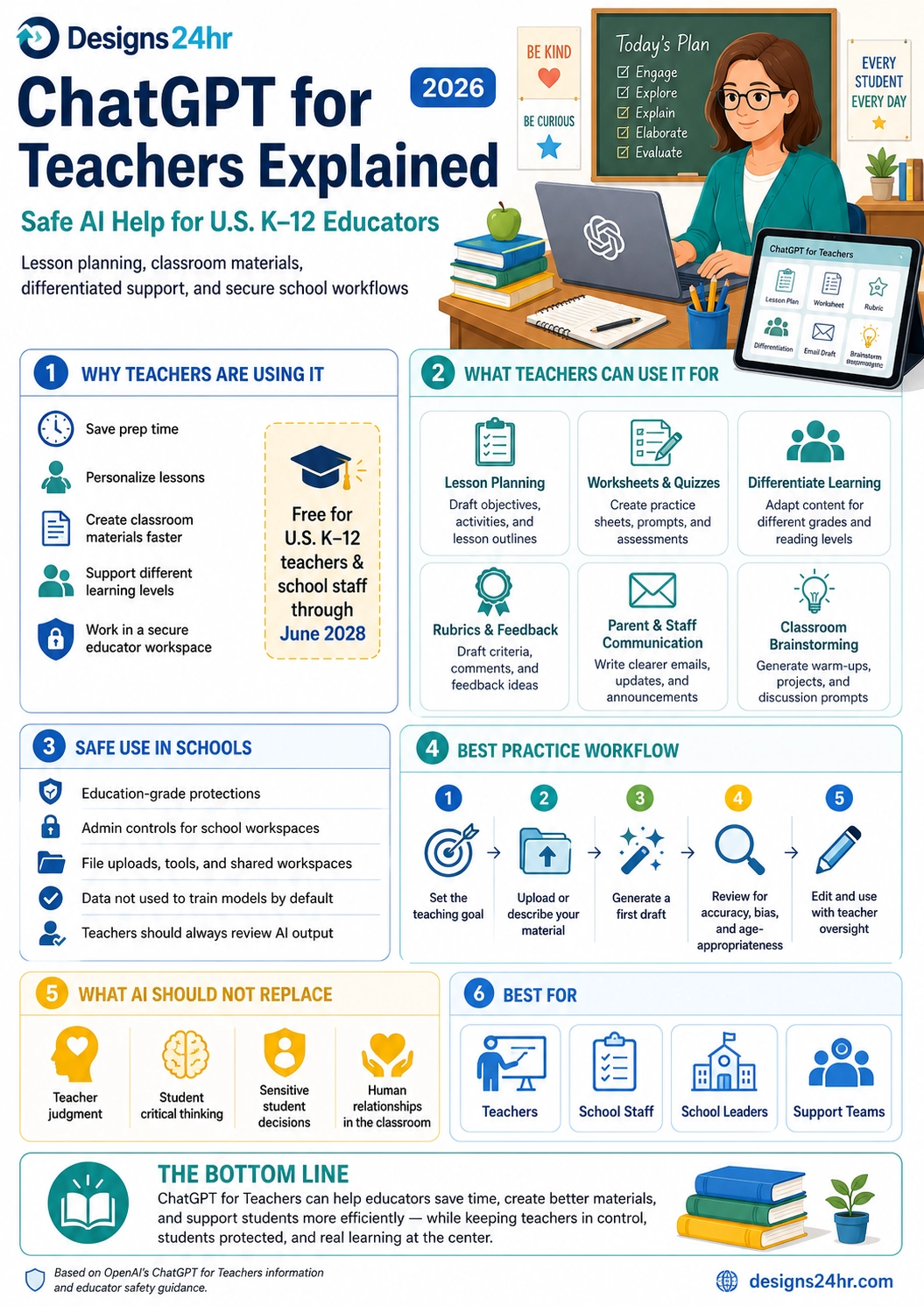
ChatGPT for Teachers is a secure version of ChatGPT built for U.S. K–12 educators, helping teachers plan lessons, create classroom materials, support different learning levels, and work inside a school-friendly AI workspace.
For many teachers, the challenge is not a lack of ideas. It is time. Lesson planning, worksheets, rubrics, parent emails, differentiated materials, substitute plans, quiz questions, classroom activities, and feedback can quickly fill the day before teaching even begins.
That is why ChatGPT for Teachers matters. It gives educators a safer, more structured way to use AI for classroom support without treating AI as a replacement for teacher judgment, student thinking, or human relationships in the classroom.
This guide from Designs24hr explains ChatGPT for Teachers in plain English: what it is, who it is for, what teachers can use it for, how it supports safer school workflows, and where educators should still use careful review before bringing AI-generated content into the classroom.
What Is ChatGPT for Teachers?
ChatGPT for Teachers is OpenAI’s teacher-focused version of ChatGPT for verified U.S. K–12 educators. OpenAI describes it as a secure workspace built for teachers and school leaders, with tools for lesson planning, classroom materials, collaboration, and education-grade protections.
Unlike a normal consumer AI account, ChatGPT for Teachers is designed around school needs. It includes a workspace where educators can work with classroom materials, collaborate with colleagues, use teacher-specific onboarding, and access tools that support planning and instruction.
At the time of writing, OpenAI’s ChatGPT for Teachers page lists the plan as free for U.S. K–12 teachers and school staff through June 2028, while official support details can change over time. Educators should always verify current eligibility and dates directly on OpenAI’s official page before signing up.
Simple example: A 5th-grade teacher can ask ChatGPT for Teachers to create a reading lesson, adjust it for different student levels, generate a short quiz, draft a parent email, and create a rubric — then review and edit everything before using it with students.
Who Can Use ChatGPT for Teachers?
ChatGPT for Teachers is built for verified educators who work at accredited U.S. K–12 schools or districts. OpenAI says teachers, school staff, administrators, school leaders, and district leaders may qualify, while the plan is not intended for student accounts.
This distinction is important. ChatGPT for Teachers is not a student homework shortcut. It is designed as a professional workspace for educators and school staff who need help preparing materials, organizing lessons, and supporting classroom workflows.
That makes the best use case very clear: teachers stay in control, AI helps with preparation, and students still do the thinking, writing, practice, discussion, and learning.
Why Teachers Are Interested in AI Right Now
Teachers are under constant pressure to do more with limited time. They often need to create materials for different reading levels, prepare activities for mixed classrooms, respond to families, grade assignments, build rubrics, support absent students, and plan lessons that match standards.
ChatGPT for Teachers can help reduce the blank-page problem. Instead of starting from zero, educators can ask for a first draft, review it, adapt it, and turn it into something classroom-ready.
The real benefit is not that AI writes the final lesson. The benefit is that AI can help teachers move faster from “I need to create this” to “I have something I can review, improve, and teach from.”
What Can Teachers Use ChatGPT for Teachers For?
ChatGPT for Teachers can support many classroom preparation tasks. The strongest use cases are practical, repeatable, and teacher-controlled.
1. Lesson planning
Teachers can use ChatGPT for Teachers to draft lesson objectives, warm-ups, discussion questions, activity ideas, exit tickets, and multi-day unit plans. A teacher can also ask the AI to align a lesson with a specific grade level, subject, learning goal, or classroom time limit.
2. Worksheets and quizzes
Educators can ask for practice questions, short quizzes, review sheets, vocabulary activities, reading checks, math problems, writing prompts, or comprehension questions. The teacher should always review answers, accuracy, difficulty, and age-appropriateness before using the material.
3. Differentiated learning support
One of the strongest uses is adapting content for different learners. A teacher might ask ChatGPT for Teachers to rewrite instructions at an easier reading level, create an extension activity for advanced students, or make a lesson more visual for students who need extra support.
4. Rubrics and feedback
Teachers can use AI to draft rubrics, feedback sentence starters, grading criteria, peer review guides, and revision checklists. This can save time while still allowing the teacher to apply professional judgment.
5. Parent and staff communication
ChatGPT for Teachers can help draft clearer emails, newsletters, classroom updates, meeting notes, and school announcements. It can also help adjust tone so communication sounds warm, professional, and easy for families to understand.
6. Classroom brainstorming
Teachers can use AI to brainstorm classroom activities, project ideas, discussion prompts, science demonstrations, reading activities, review games, substitute plans, and creative ways to explain difficult topics.
| Teacher Task | How ChatGPT for Teachers Can Help | Teacher Review Needed |
|---|---|---|
| Lesson planning | Drafts objectives, activities, timelines, and discussion questions. | Check standards, pacing, accuracy, and classroom fit. |
| Worksheets and quizzes | Creates practice questions, prompts, review sheets, and assessments. | Verify answers, difficulty level, and age-appropriateness. |
| Differentiation | Adapts content for different reading levels and learning needs. | Make sure support is respectful, accurate, and useful. |
| Rubrics | Drafts grading criteria, checklists, and feedback language. | Align with assignment goals and school expectations. |
| Communication | Helps draft parent emails, staff messages, and announcements. | Review privacy, tone, details, and school policy. |
How ChatGPT for Teachers Supports Safer School Use
Schools need AI tools that are more controlled than casual consumer tools. OpenAI says ChatGPT for Teachers includes education-focused privacy and security features, including a secure workspace, admin controls, role-based access controls, encryption, multi-factor authentication, and support for school compliance needs.
OpenAI also states that information shared with ChatGPT for Teachers is not used to train its models by default. That is a major detail for schools because classroom materials, planning documents, and student-related work require careful handling.
For school and district leaders, the workspace model matters because it gives educators a more organized place to collaborate instead of using scattered personal accounts with inconsistent settings.
Important safety point: ChatGPT for Teachers can support classroom work, but teachers and schools should still follow district rules, student data policies, parent communication guidelines, and federal/state privacy requirements before uploading or sharing sensitive information.
What AI Should Not Replace in the Classroom
Even when AI is helpful, it should not replace the teacher’s role. A strong classroom is built on relationships, observation, judgment, encouragement, feedback, trust, and real understanding of students.
ChatGPT for Teachers should not replace teacher judgment, student critical thinking, sensitive student decisions, classroom relationships, professional evaluations, or human support during difficult moments.
AI can draft a lesson plan, but it cannot truly know the energy of the classroom that morning. It can suggest feedback, but it cannot fully understand a student’s confidence, family situation, emotional state, or learning history. It can create examples, but it cannot replace discussion, practice, curiosity, and real classroom interaction.
Best rule: Use ChatGPT for Teachers as a planning assistant, not as the final authority. Teachers should review, edit, fact-check, and personalize all AI-generated classroom materials before using them.
A Safe Workflow for Teachers Using ChatGPT
The safest way to use ChatGPT for Teachers is to follow a review-first workflow. This helps teachers get the speed benefit of AI without losing professional control.
- Set the teaching goal. Start with the grade level, subject, objective, time limit, and student needs.
- Upload or describe the material carefully. Use only files and information that follow your school’s data rules.
- Generate a first draft. Ask ChatGPT for Teachers for a lesson, worksheet, rubric, email, activity, or support material.
- Review for accuracy and bias. Check facts, tone, representation, fairness, readability, and age-appropriateness.
- Edit with teacher oversight. Add your classroom context, examples, expectations, and personal teaching style.
This workflow keeps AI in the right place: useful, fast, and supportive — but not in charge.
Best Classroom Uses by Grade Level
ChatGPT for Teachers can be useful across K–12, but the best use depends on student age, subject, school policy, and the teacher’s goals.
Elementary school
Elementary teachers can use AI for read-aloud questions, vocabulary support, classroom routines, simple science explanations, math practice, behavior-friendly instructions, family communication, and differentiated activity ideas.
Middle school
Middle school teachers can use AI for project outlines, discussion prompts, reading comprehension questions, study guides, group activity structures, writing rubrics, and examples that help students understand expectations.
High school
High school teachers can use ChatGPT for Teachers for essay prompts, debate preparation, lab activity planning, source evaluation exercises, exam review materials, career exploration lessons, and advanced discussion questions.
Across all grade levels, the key is the same: AI should support teacher preparation and student learning, not replace student work.
How Teachers Can Write Better Prompts
The quality of AI output depends heavily on the quality of the prompt. A vague request usually produces a generic answer. A clear teaching prompt creates a much stronger draft.
A strong prompt for ChatGPT for Teachers should include:
- Grade level
- Subject
- Lesson objective
- Class time available
- Student learning level
- Materials available
- Desired format
- What the teacher wants students to practice or understand
Example prompt: “Create a 45-minute 7th-grade science lesson on kinetic energy. Include a 5-minute warm-up, a hands-on activity using simple classroom materials, three discussion questions, a short exit ticket, and one extension task for advanced learners. Keep the language student-friendly.”
Privacy Tips for Teachers Before Using AI
Even with a school-focused AI workspace, teachers should be careful with classroom data. A good privacy habit is to share the minimum information needed to get useful support.
Before uploading or typing anything into ChatGPT for Teachers, ask: Does this include a student’s full name, private record, disability detail, medical information, disciplinary issue, family situation, grade record, or other sensitive detail?
When possible, remove identifying details and use general classroom context instead. For example, instead of entering a student’s name, write “a 4th-grade student who needs reading support.” Instead of uploading private records, summarize the instructional need in a general way that follows school policy.
What School Leaders Should Consider
School leaders should not only ask whether teachers can use AI. They should ask how teachers can use AI safely, consistently, and productively.
A strong school AI plan should include clear guidance on student data, approved uses, prohibited uses, parent communication, staff training, documentation, human review, and classroom expectations.
District leaders may also want to create shared prompt libraries, approved templates, department-level workflows, and professional development sessions so teachers are not left guessing how to use AI responsibly.
| School Leader Question | Why It Matters |
|---|---|
| What information can teachers upload? | Protects student privacy and supports compliance. |
| What tasks are approved for AI support? | Helps teachers use AI consistently and safely. |
| When must humans review AI output? | Prevents mistakes, bias, and inappropriate classroom materials. |
| How will staff be trained? | Turns AI from a random tool into a useful school workflow. |
| How will student use be handled? | Keeps teacher AI support separate from student academic integrity policies. |
The Bigger Shift: AI as a Teacher Support System
ChatGPT for Teachers is part of a bigger shift in education. AI is moving from a general writing tool into specialized workspaces for real professional tasks.
For teachers, that shift could be powerful. AI can help with planning, preparation, differentiation, communication, and organization. But the best classroom outcomes will still come from teachers who understand their students and use AI thoughtfully.
The future of AI in schools should not be “AI teaches students instead of teachers.” The stronger future is “AI helps teachers spend less time on repetitive preparation and more time on meaningful instruction, feedback, and relationships.”
Keep learning with Designs24hr: For more simple AI education and productivity explainers, visit The AI Edge. You can also use the Keyword Density Checker to review SEO content before publishing, or try the Title Meta Preview Tool to improve your search snippet.
Frequently Asked Questions About ChatGPT for Teachers
What is ChatGPT for Teachers?
ChatGPT for Teachers is a secure ChatGPT workspace designed for verified U.S. K–12 educators. It helps teachers and school staff use AI for lesson planning, classroom materials, collaboration, and school workflows.
Is ChatGPT for Teachers free?
OpenAI’s official ChatGPT for Teachers page lists the plan as free for U.S. K–12 teachers and school staff through June 2028 at the time of writing. Educators should check the official page for the most current eligibility and pricing details.
Who qualifies for ChatGPT for Teachers?
OpenAI says the plan is for verified educators working at accredited U.S. K–12 schools or districts, including teachers, school staff, school leaders, and district administrators. It is not designed for student accounts.
Can ChatGPT for Teachers help with lesson planning?
Yes. Teachers can use it to draft lesson plans, activities, worksheets, quizzes, rubrics, discussion prompts, and classroom materials. Teachers should review and edit all AI-generated content before using it.
Can ChatGPT for Teachers help with differentiated learning?
Yes. It can help adapt materials for different reading levels, create extension activities, simplify directions, and support different learning needs when teachers provide clear classroom context.
Is student data used to train models by default?
OpenAI states that information shared with ChatGPT for Teachers is not used to train models by default. Teachers should still follow school and district rules before uploading classroom materials or student-related information.
Should students use ChatGPT for Teachers?
No. ChatGPT for Teachers is designed for teachers and school staff, not student accounts. Student use of AI should follow school policy, teacher guidance, and academic integrity rules.
Can AI replace teachers?
No. AI can support lesson planning, materials, communication, and organization, but it cannot replace teacher judgment, classroom relationships, student support, or real instruction.
The Bottom Line
ChatGPT for Teachers gives U.S. K–12 educators a safer and more practical way to use AI for daily classroom work. It can help with lesson planning, worksheets, differentiated support, rubrics, communication, brainstorming, and school collaboration.
But the smartest way to use ChatGPT for Teachers is with human oversight. Teachers should review every output, protect student privacy, follow school policy, and keep real learning at the center.
At Designs24hr, we believe the best future of AI in education is not about replacing teachers. It is about helping educators save time, support students more effectively, and bring more creativity into the classroom. Share your thoughts in the comments, and come back to Designs24hr whenever you want to learn something new about AI and design.
Sources: This article is based on OpenAI’s official ChatGPT for Teachers page, the OpenAI Help Center article ChatGPT for Teachers, and OpenAI’s education resources including OpenAI for Education.