Microsoft Scout AI agent is one of the clearest signs that workplace AI is moving beyond simple chatbots. Instead of waiting for a worker to type a prompt, Microsoft Scout is designed as an always-on personal agent that can keep work moving in the background.
That shift matters because most people do not need another chatbot tab. They need help coordinating meetings, finding the right information, preparing materials, protecting focus time, and noticing risks before work gets stuck.
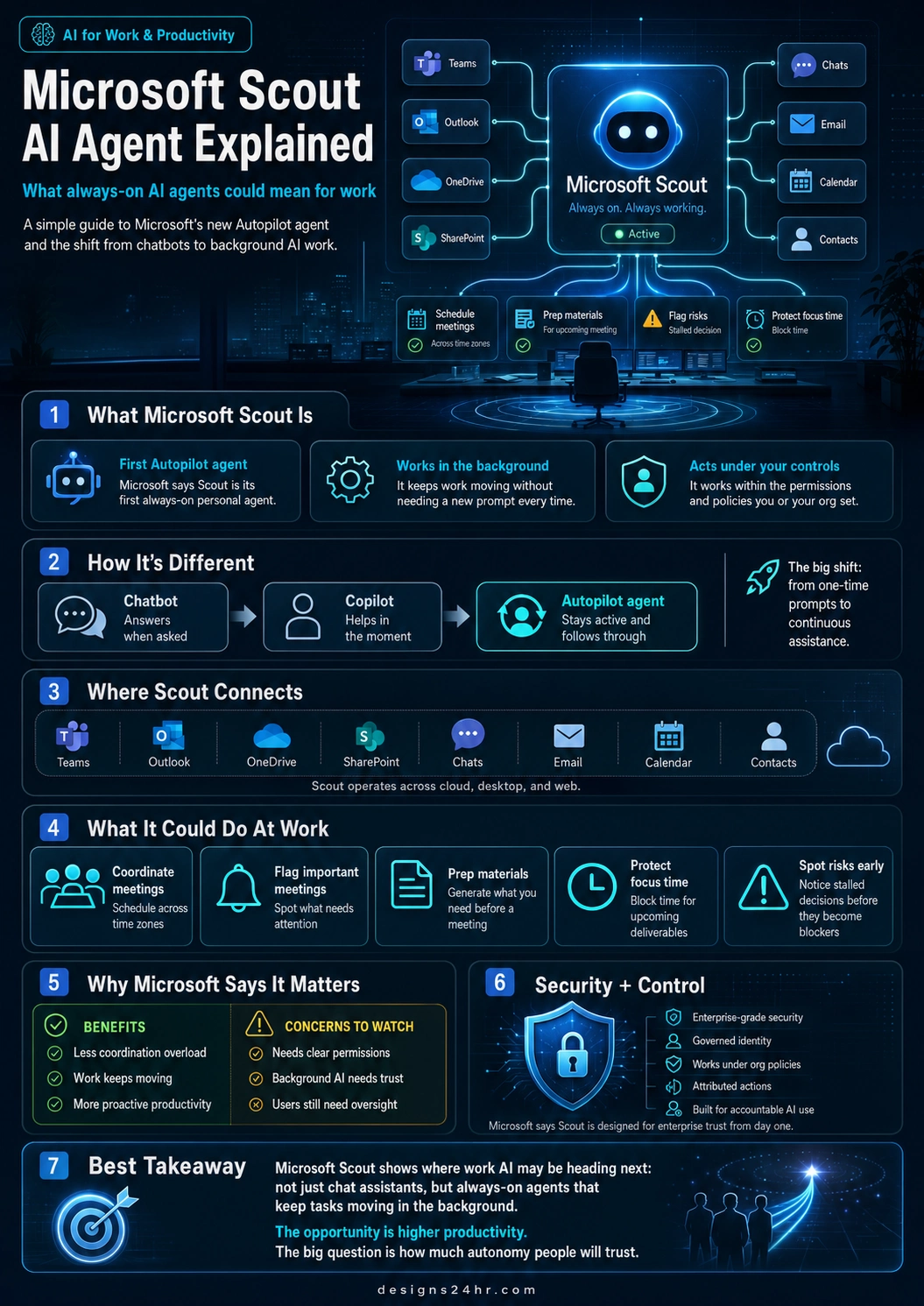
This Microsoft Scout AI agent explained guide breaks down what Microsoft Scout is, how it differs from Copilot and chatbots, where it connects inside Microsoft 365, what it could do at work, and what users should understand before trusting always-on AI agents with real workflows.
Simple takeaway: Microsoft Scout is Microsoft’s first Autopilot agent. The big idea is not just “AI that answers.” It is AI that stays active, follows work across apps, and helps move tasks forward under user and organization controls.
What Is Microsoft Scout?
Microsoft Scout is an always-on personal AI agent introduced by Microsoft as its first Autopilot agent. Microsoft describes Autopilots as agents that can work autonomously, stay active in the background, operate with their own identity, and act on a user’s behalf within the permissions and policies that the user or organization sets.
In simpler words, Microsoft Scout is built to help with the follow-through. A normal chatbot usually stops after giving an answer. Scout is designed to keep track of work context and help take action across the tools people already use.
For workers, teams, and organizations, this could become a major change in how AI fits into productivity. Instead of asking AI for help one task at a time, users may begin working with background AI assistants that monitor priorities, prepare next steps, and help reduce coordination overload.
Why Microsoft Scout AI Agent Matters
The reason the Microsoft Scout AI agent matters is that work is not usually one clean task. Work is scattered across chats, meetings, email, documents, calendars, contacts, files, and follow-ups.
People lose time switching between apps, remembering what needs attention, preparing for meetings, checking calendars, finding files, and trying to keep projects from stalling. Microsoft Scout is aimed at that messy middle layer of work.
Microsoft says Scout connects across Microsoft 365 apps and work data, including Teams, Outlook, OneDrive, SharePoint, chats, email, calendar, and contacts. That means the agent is not just answering isolated questions. It is intended to understand work across the flow of daily activity.
Important note: Microsoft Scout is not just another AI writing tool. It represents a bigger shift toward always-on AI agents that can work in the background. That makes productivity exciting, but it also makes permissions, privacy, security, and oversight more important.
Microsoft Scout AI Agent Explained: Chatbot vs Copilot vs Autopilot Agent
To understand what is Microsoft Scout, it helps to compare three stages of workplace AI: chatbots, Copilots, and Autopilot agents.
| AI Type | How It Works | Best Simple Meaning |
|---|---|---|
| Chatbot | Responds when a user asks a question or gives a prompt. | AI that answers when asked. |
| Copilot | Helps inside apps and workflows while the user is actively working. | AI that assists in the moment. |
| Autopilot agent | Stays active in the background and helps follow through across tasks, apps, and priorities. | AI that keeps work moving. |
This is the most important shift: workplace AI is moving from one-time prompting to continuous assistance. That does not mean humans disappear from the process. It means AI may handle more of the coordination layer while people stay responsible for decisions, judgment, approval, and direction.
Where Microsoft Scout Connects
Microsoft Scout is designed around the Microsoft 365 work environment. Microsoft says Scout operates across cloud, desktop, and web, and it connects to Teams, Outlook, OneDrive, SharePoint, chats, email, calendar, and contacts.
This is why the phrase Microsoft 365 AI agent is important. Scout’s value depends on context. A background AI assistant becomes more useful when it can understand the places where work actually happens.
For example, a meeting is not only a calendar event. It may involve a Teams chat, an Outlook invite, a OneDrive document, a SharePoint folder, previous emails, open decisions, and follow-up tasks. A work agent that can connect those pieces could reduce the mental effort required to stay organized.
What Microsoft Scout Could Do at Work
Microsoft says Scout can help reduce coordination work that builds throughout the day. Based on Microsoft’s announcement, Scout can support tasks such as scheduling meetings, coordinating across time zones, flagging important meetings, generating preparation materials, identifying upcoming deliverables, blocking focus time, and spotting risks like stalled decisions.
Here is what that could mean in practical work terms:
- Coordinate meetings: Help find meeting times across calendars and time zones.
- Flag important meetings: Identify meetings that may need extra attention or preparation.
- Prep materials: Generate materials or context users need before a meeting.
- Protect focus time: Block calendar time for upcoming deliverables so work does not get buried.
- Spot risks early: Notice stalled decisions or blockers before they become bigger problems.
This is where AI agent productivity becomes more practical. The value is not only speed. The value is reducing the invisible work of remembering, chasing, preparing, organizing, and following up.
Why Always-On AI Agents Could Change Productivity
An always-on AI agent is different because it is not limited to the moment when a user opens a chat window. It can stay connected to ongoing work and help keep priorities moving.
That could make AI more useful for people who already have too many tabs, meetings, documents, messages, and deadlines. Instead of asking, “What should I do next?” a background AI assistant could help surface what matters and prepare the next step before the user asks.
For teams, that could mean fewer missed follow-ups, fewer forgotten decisions, less calendar chaos, and more proactive project movement. For individuals, it could mean less mental clutter and more protected focus time.
Productivity takeaway: The promise of Microsoft Scout is not that AI replaces workers. The promise is that AI handles more of the coordination drag so people can spend more time on judgment, strategy, creativity, and meaningful work.
Microsoft Scout Privacy and Control: What Users Should Watch
Microsoft Scout privacy and control will be a major part of whether users trust always-on agents. A chatbot that only responds to a prompt is one thing. A background AI assistant that can act across work systems is much more sensitive.
Microsoft says Scout is built with enterprise-grade security and controls. Microsoft also says every agent operates under its own governed Entra identity rather than a shared anonymous service account, making the agent’s actions attributable to a known actor.
That accountability matters because if an agent schedules meetings, prepares files, flags risks, or works across company data, organizations need to know what it accessed, what it did, who approved it, and which policies controlled it.
AI Agents for Work Need Human Oversight
AI agents for work can be powerful, but they also need boundaries. The more an agent can do, the more clearly users and organizations need to define what it should not do.
Before trusting background AI assistants, teams should think through basic questions:
- What apps and files can the agent access?
- What actions can it take without approval?
- Which actions require human confirmation?
- How are agent actions logged and reviewed?
- Who is responsible if the agent makes a mistake?
- Can users easily pause, limit, or remove agent permissions?
The best version of always-on AI is not uncontrolled automation. It is controlled automation where people remain aware, responsible, and able to step in.
Microsoft Scout vs Copilot: The Key Difference
Microsoft 365 Copilot is already positioned as AI for work across Microsoft apps, helping with chat, search, documents, meetings, and agents. Scout builds on the broader Copilot and Work IQ direction but represents a more proactive agent category.
The key difference is follow-through. Copilot helps users while they work. Microsoft Scout is designed to stay active and move work forward in the background under the right permissions and controls.
That is why AI agents vs chatbots is now a major topic. The future of workplace AI may not be about asking better prompts. It may be about setting better goals, controls, permissions, and review systems for AI that can keep working after the prompt is over.
Who Could Benefit Most From Microsoft Scout?
Microsoft Scout could be especially useful for people and teams who spend a lot of time coordinating work instead of doing focused work.
- Managers could use it to track meetings, decisions, deliverables, and follow-ups.
- Sales teams could benefit from better preparation, scheduling, and customer follow-through.
- Project teams could use it to spot blockers, missed decisions, and upcoming deadlines.
- Remote teams could use it to coordinate across time zones and reduce communication gaps.
- Executives could use it to surface priorities and reduce meeting prep friction.
- Small businesses could eventually benefit from AI that helps organize work without adding more admin tasks.
The highest value will likely come from workflows where context is spread across email, meetings, documents, chats, calendars, and contacts.
What Could Go Wrong With Background AI Assistants?
A background AI assistant sounds helpful, but it also introduces real concerns. The biggest risk is not simply that the AI makes a mistake. The bigger risk is that it makes a mistake quietly, in the background, across important work systems.
Possible concerns include:
- Wrong assumptions: The agent may misunderstand a priority, deadline, or context.
- Over-automation: Users may allow too much action without enough review.
- Permission creep: Agents may gain access to more data than they actually need.
- Trust gaps: Workers may not know what the agent is doing or why.
- Accountability issues: Teams need clear ownership when AI takes action.
- Security exposure: More connected systems can mean more risk if controls are weak.
This does not mean always-on AI agents are a bad idea. It means they need careful rollout, clear permissions, strong audit trails, user education, and practical human checkpoints.
How to Think About Microsoft Scout Before Using It
The smartest way to think about Microsoft Scout is as a controlled work assistant, not a magic employee. It may help reduce coordination overload, but users still need to decide what matters, review important actions, and keep sensitive work under control.
Before adopting AI agents at work, teams should start with low-risk workflows. Meeting prep, schedule support, reminder organization, and focus-time protection are safer starting points than letting AI handle sensitive decisions or customer-facing actions without review.
As agents become more capable, the winning teams will not be the ones that automate everything blindly. The winners will be the ones that design clear workflows where AI helps, humans approve, and accountability remains visible.
Microsoft Scout AI Agent Explained in One Sentence
Microsoft Scout AI agent is an always-on Microsoft 365 Autopilot agent designed to work in the background across apps, data, meetings, messages, and workflows so it can help keep work moving under user and organization controls.
FAQ: Microsoft Scout AI Agent
What is Microsoft Scout?
Microsoft Scout is Microsoft’s first Autopilot agent. It is an always-on personal AI agent designed to work across Microsoft 365 apps and help keep work moving in the background under user and organization controls.
What is a Microsoft Autopilot agent?
A Microsoft Autopilot agent is an always-on AI agent that can stay active, work autonomously, operate with its own identity, and act on a user’s behalf within the permissions and policies that are set.
How is Microsoft Scout different from a chatbot?
A chatbot usually answers when asked. Microsoft Scout is designed to stay active in the background, understand work context across apps, and help follow through on tasks without needing a new prompt every time.
How is Microsoft Scout different from Copilot?
Copilot helps users in the moment across Microsoft apps and workflows. Microsoft Scout represents a more proactive always-on agent approach that can keep work moving in the background under the right controls.
What apps does Microsoft Scout connect to?
Microsoft says Scout connects across Microsoft 365 apps and work data, including Teams, Outlook, OneDrive, SharePoint, chats, email, calendar, and contacts. It is designed to operate across cloud, desktop, and web.
What can Microsoft Scout do at work?
Microsoft says Scout can help coordinate meetings, schedule across time zones, flag important meetings, generate preparation materials, identify upcoming deliverables, block focus time, and spot risks such as stalled decisions.
Is Microsoft Scout safe for work data?
Microsoft says Scout is built with enterprise-grade security and controls and operates under governed identity and organization policies. Users and organizations should still review permissions, audit logs, approval settings, and data access before relying on any background AI agent.
Why do always-on AI agents matter?
Always-on AI agents matter because they move AI from one-time answers to continuous assistance. They could reduce coordination overload, help protect focus time, and keep projects moving, but they also require clear permissions, trust, and human oversight.
Sources and Further Reading
- Microsoft 365 Blog: Introducing Microsoft Scout
- Microsoft 365 Copilot official page
- Microsoft Project Solara official post
- The AI Edge by Designs24hr
- How to Use AI at Work
- Best Free AI Tools for Productivity in 2026
- 10 Daily AI Habits That Can Supercharge Your Productivity
Final Thought
Microsoft Scout shows where work AI may be heading next. The future is not only chat assistants that answer questions. It is always-on AI agents that understand work context, monitor priorities, prepare next steps, and help reduce the hidden coordination work that slows people down.
The opportunity is higher productivity. The big question is how much autonomy people and organizations will trust.
At Designs24hr, we make fast-moving AI topics easier to understand through clear visual guides, practical explainers, and beginner-friendly breakdowns. Share your thoughts in the comments, and come back to Designs24hr whenever you want to learn something new about AI, work, design, and the future of smart technology.