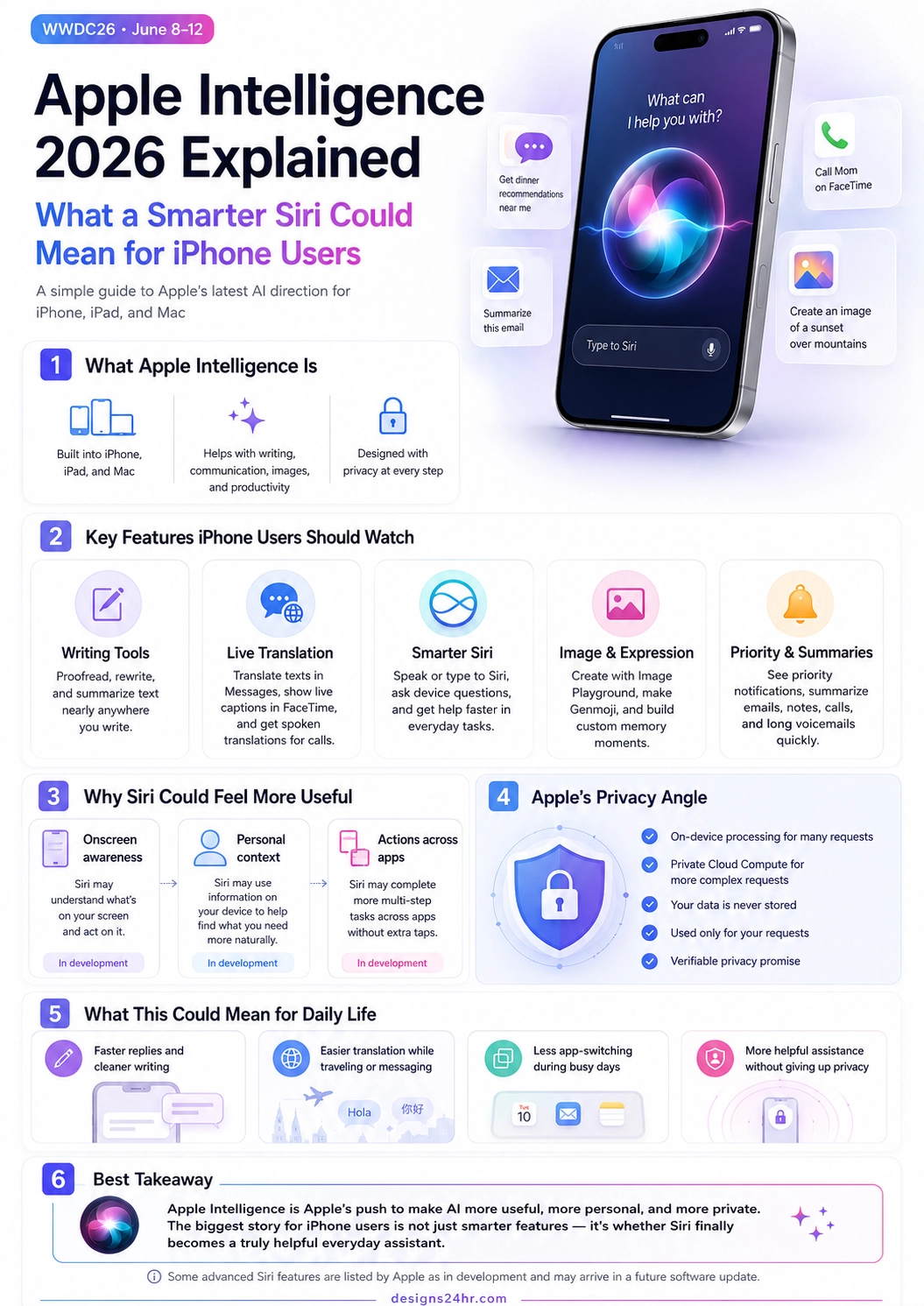
Apple Intelligence 2026 could become one of the biggest AI stories for everyday iPhone users because it connects directly to something millions of people already use: Siri.
Apple has already positioned Apple Intelligence as AI built into iPhone, iPad, Mac, and Apple Vision Pro to help users write, communicate, create images, summarize information, and get things done with privacy built in. The bigger question now is whether a smarter Siri can make those features feel useful in normal daily life instead of feeling like another complicated tech upgrade.
That is why this Apple Intelligence 2026 explained guide focuses on what matters most for regular users: what Apple Intelligence is, what Siri may be able to do better, which Apple Intelligence features are already part of the story, what is still in development, and how Apple’s privacy approach could shape the future of personal AI assistants.
Simple takeaway: Apple Intelligence 2026 is not just about adding AI features to the iPhone. The real story is whether Siri becomes a more helpful, more personal, and more private AI assistant for everyday tasks like writing, translation, messages, reminders, photos, emails, and app actions.
What Is Apple Intelligence 2026?
Apple Intelligence is Apple’s personal AI system built into its devices and software experience. Instead of feeling like a separate chatbot you need to open, Apple’s goal is to place AI closer to the apps and tasks people already use every day.
For iPhone users, that means Apple Intelligence features can show up inside communication, writing, notifications, email, photos, Siri, Shortcuts, and other parts of the Apple ecosystem. The strongest benefit is convenience: less copying text between apps, less searching through long messages, less rewriting emails manually, and more help inside the device experience itself.
The reason Apple Intelligence 2026 has strong search interest is that it combines three major questions people care about: what new AI features are coming to iPhone, whether Siri will finally become smarter, and how much personal data Apple’s AI system will need to be useful.
Why a Smarter Siri Matters So Much
Siri has been on iPhones for years, but many users still think of it as a basic voice assistant for timers, weather, calls, reminders, and simple questions. A new Siri AI explained simply would be this: Siri needs to move from answering small commands to understanding context and helping complete real tasks.
Apple says Siri can already help users speak or type requests, answer questions about Apple device features, and use ChatGPT when appropriate. But the most interesting Siri upgrades are the ones Apple has described as still being in development: onscreen awareness, personal context, and actions across apps.
If those advanced features arrive in a future software update, Siri could feel less like a voice command tool and more like an assistant that understands what you are trying to do in the moment.
Important note: Some advanced Siri capabilities, including onscreen awareness, personal context, and actions across apps, are listed by Apple as in development and expected in a future software update. That means users should watch for official Apple updates before assuming every smarter Siri feature is available immediately.
Apple Intelligence Features iPhone Users Should Watch
The most useful Apple Intelligence features are not only flashy AI demos. They are the small tools that can reduce daily friction: cleaning up writing, translating conversations, summarizing long messages, prioritizing notifications, and helping Siri understand more of what you need.
| Feature | What It Does | Why It Matters for iPhone Users |
|---|---|---|
| Writing Tools | Helps proofread, rewrite, adjust tone, and summarize text in places where you write. | Useful for messages, emails, notes, captions, work replies, and school writing. |
| Live Translation | Can translate texts in Messages, show translated captions in FaceTime, and support spoken translations for calls. | Helpful for travel, family communication, work calls, and multilingual conversations. |
| Smarter Siri | Lets users speak or type requests and get help with device questions, tasks, and AI-supported actions. | Could make everyday iPhone help faster, especially when users do not want to open multiple apps. |
| Image Playground and Genmoji | Helps create original images, expressive visuals, custom memory moments, and personalized emoji-style images. | Useful for creativity, social sharing, visual communication, and personal expression. |
| Priority Notifications and Summaries | Highlights important notifications and summarizes emails, notes, calls, and long voicemails. | Helps reduce noise and makes it easier to catch important information quickly. |
How the Apple AI Siri Update Could Change Daily Tasks
The biggest opportunity for the Apple AI Siri update 2026 is not simply making Siri answer questions better. The bigger opportunity is helping Siri understand what is happening across your device and take action with less effort from you.
For example, imagine a friend texts you a new address. Instead of copying the address, opening Contacts, finding the person, editing the contact card, and pasting the information, a smarter Siri could understand the address on your screen and help add it to the right contact.
Or imagine drafting an email, editing a photo, saving a note, translating a message, and setting a reminder as part of one larger task. The promise of a better Siri AI assistant is that it could help connect those steps without forcing you to move manually between every app.
1. Onscreen Awareness
Onscreen awareness means Siri may be able to understand what is currently visible on your device screen. This could make Siri more useful because you would not always need to explain every detail from scratch.
Instead of saying a long command with names, apps, and instructions, users may be able to point Siri toward what they are already viewing and ask for a related action.
2. Personal Context
Personal context means Siri may be able to use information on your device to help answer questions that are specific to you. That could include finding a detail from a note, message, email, photo, or other personal information stored on your device.
This is where Apple Intelligence privacy becomes especially important. The more useful a personal AI assistant becomes, the more carefully users will want to understand how their data is handled.
3. Actions Across Apps
Actions across apps could let Siri complete multi-step workflows that involve more than one app. This is one of the most important pieces of the smarter Siri story because real life rarely happens inside one app only.
If Siri can understand the task, identify the right app, use the right information, and complete the next step, the iPhone could start to feel less like a collection of separate apps and more like one connected personal assistant.
Apple Intelligence Privacy: Why It Is a Major Part of the Story
Apple’s AI strategy is strongly tied to privacy. Apple says Apple Intelligence is designed with privacy at every step, using on-device processing for many requests and Private Cloud Compute for more complex requests.
This matters because the most useful AI assistant is usually the one that understands the most personal context. But the more personal the assistant becomes, the more users need to trust how their information is protected.
Apple’s privacy message focuses on a few key points: many requests can be handled on device, more complex requests can use Private Cloud Compute, user data is not stored, data is used only for the user’s request, and the privacy promise is designed to be verifiable.
Privacy takeaway: The future of Siri depends on trust. If Siri becomes more personal, users need confidence that the assistant can help with private information without turning that information into a privacy risk.
What This Could Mean for Normal iPhone Users
For everyday users, iPhone AI features 2026 will matter most when they save time without adding confusion. Most people do not want to learn a complicated AI system. They want their phone to help them faster.
A smarter Siri and better Apple Intelligence features could help in simple moments like these:
- Writing a cleaner message: Rewrite a text to sound more professional, friendly, short, or clear.
- Understanding long information faster: Summarize emails, notes, calls, and voicemails instead of reading or listening to everything manually.
- Traveling or messaging across languages: Use Live Translation for texts, calls, and FaceTime conversations.
- Finding personal details: Ask Siri to help locate information from your device when you do not remember where it was saved.
- Reducing notification overload: Let priority notifications and summaries make important updates easier to notice.
- Completing multi-step tasks: Use Siri to help move information across apps with fewer taps.
This is where what is Apple Intelligence becomes easier to understand. It is not just “AI on iPhone.” It is Apple trying to make the iPhone feel more helpful, more aware, and more useful in the moments people already depend on it.
WWDC 2026 Apple Intelligence: What to Watch
Apple’s WWDC26 runs June 8–12, and Apple says the keynote will reveal the latest Apple software and technologies. That makes WWDC 2026 Apple Intelligence one of the most important topics for users watching the future of Siri, iOS, iPadOS, macOS, and Apple’s AI ecosystem.
The most important things to watch are not only new feature names. Users should pay attention to availability, supported devices, privacy details, app integrations, developer tools, and whether advanced Siri features move from “in development” to real user availability.
For creators, students, parents, workers, small businesses, and everyday iPhone users, the biggest question is practical: will Apple Intelligence make daily life easier, or will it feel like another feature people forget to use?
How Apple Intelligence Compares to Standalone AI Tools
Standalone AI tools are often powerful, but they usually require users to open a separate app, paste information, write a prompt, copy the result, and move it back into their workflow. Apple Intelligence is different because it is designed to live closer to the operating system and everyday apps.
That does not automatically make it more powerful than every AI tool. But it may make it easier to use for normal people. A feature that appears inside Mail, Messages, Notes, Photos, Siri, or Shortcuts can feel more natural than switching to a separate chatbot for every small task.
This is why the smarter Siri iPhone update matters so much. If Siri becomes the simple front door to Apple Intelligence, more people may use AI without feeling like they are “using AI” at all.
Who Benefits Most From Apple Intelligence 2026?
Apple Intelligence 2026 could be useful for many different types of users, but the highest-value groups are people who already use their iPhone for communication, organization, work, travel, learning, and family life.
- Busy professionals may use summaries, writing help, and priority notifications to stay organized.
- Students may use writing tools, summaries, and device help to study more efficiently.
- Parents and families may use Siri, reminders, messages, translation, and summaries to manage daily routines.
- Travelers may benefit from Live Translation and faster access to personal information.
- Small business owners may use writing help, email summaries, quick replies, and task automation.
- Creators may use Image Playground, Genmoji, memory tools, and faster idea organization.
The best AI features are not always the most dramatic. Sometimes the most useful AI is the one that saves two minutes, removes friction, and helps people finish a task without thinking too hard about the technology behind it.
What Users Should Be Careful About
Even with Apple’s privacy-first positioning, users should still be careful with any AI system. AI can summarize incorrectly, misunderstand context, produce awkward wording, or give answers that sound confident but need verification.
For important messages, legal information, financial decisions, medical topics, school assignments, work documents, or private family details, users should review AI output before relying on it.
A smarter Siri can be helpful, but it should still be treated as an assistant, not the final authority.
Apple Intelligence 2026 Explained in One Sentence
Apple Intelligence 2026 is Apple’s push to make AI more useful inside everyday iPhone, iPad, and Mac experiences, with Siri becoming the possible center of a more personal, more capable, and more privacy-focused assistant system.
FAQ: Apple Intelligence 2026 and Smarter Siri
What is Apple Intelligence 2026?
Apple Intelligence 2026 refers to Apple’s expanding AI system across iPhone, iPad, Mac, and Apple Vision Pro. It includes features for writing, communication, summaries, images, Siri, productivity, and privacy-focused AI assistance.
What does Apple Intelligence do on iPhone?
Apple Intelligence can help with tasks like proofreading and rewriting text, summarizing emails and notes, prioritizing notifications, creating images, making Genmoji, supporting Live Translation, and improving how Siri helps with everyday tasks.
Is Siri getting smarter with Apple Intelligence?
Yes, Apple Intelligence is designed to make Siri more helpful. Apple says Siri can support speaking or typing requests, answer questions about Apple devices, and connect with ChatGPT when appropriate. Some advanced Siri features, including onscreen awareness, personal context, and actions across apps, are still listed as in development.
What is the Apple AI Siri update 2026?
The Apple AI Siri update 2026 refers to expected and developing improvements that could make Siri more context-aware, more useful across apps, and better at helping with personal tasks on iPhone, iPad, and Mac.
What are the best Apple Intelligence features?
The most useful Apple Intelligence features for many users may include Writing Tools, Live Translation, email and voicemail summaries, priority notifications, Image Playground, Genmoji, smarter Siri, and privacy-focused AI assistance.
Does Apple Intelligence protect privacy?
Apple says Apple Intelligence is designed with privacy at every step. Many requests can use on-device processing, while more complex requests can use Private Cloud Compute. Apple says data is not stored and is used only for the user’s request.
Will Apple Intelligence work on every iPhone?
Not every iPhone supports every Apple Intelligence feature. Users should check Apple’s official compatibility information for supported devices, software requirements, language availability, and region availability.
Why does Apple Intelligence matter?
Apple Intelligence matters because it could bring AI directly into the daily tools people already use. Instead of opening a separate AI app, users may get help inside messages, email, notes, photos, Siri, notifications, and other Apple experiences.
Sources and Further Reading
- Apple: Apple Intelligence official overview
- Apple Developer: WWDC26 official page
- Apple Security Research: Private Cloud Compute
- The AI Edge by Designs24hr
- AI Voice Translator Explained
- Best Free AI Tools for Productivity in 2026
Final Thought
Apple Intelligence 2026 is important because it brings the AI conversation closer to everyday life. People may not care about technical model names, but they do care about writing faster, translating conversations, finding information, managing notifications, protecting privacy, and getting real help from their phone.
If Apple can make Siri more useful without making users feel like they are giving up control of their personal information, the iPhone could become one of the most important everyday AI devices for regular people.
At Designs24hr, we make fast-moving AI topics easier to understand through clear visual guides, practical explainers, and beginner-friendly breakdowns. Share your thoughts in the comments, and come back to Designs24hr whenever you want to learn something new about AI, design, and the future of smart technology.