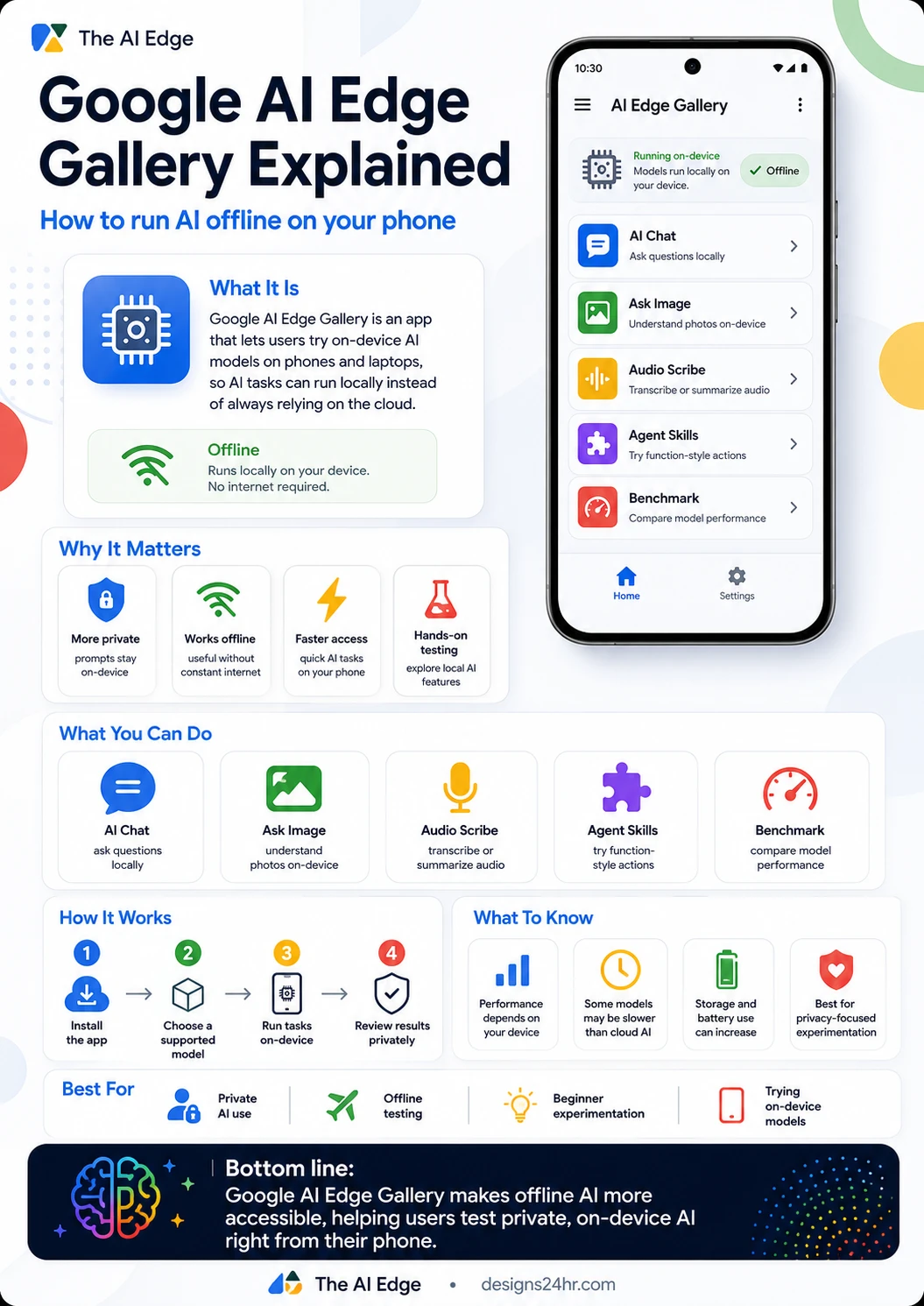
Google AI Edge Gallery Explained: How to Run AI Offline on Your Phone
Google AI Edge Gallery is a beginner-friendly way to try offline AI and on-device AI models directly on your phone, helping users test private AI tools without always depending on the cloud.
Most people think of AI as something that happens online. You open an app, type a prompt, and a powerful cloud model responds from a remote server. That works well for many tasks, but it also creates a big question: what happens when you want AI help without sending every prompt to the internet?
That is where Google AI Edge Gallery becomes interesting. It is an app from Google’s AI Edge ecosystem that helps users explore on-device AI models and try generative AI tasks locally. In simple terms, it lets supported phones and devices run certain AI tasks directly on the device instead of relying only on cloud-based AI.
Simple explanation: Google AI Edge Gallery is like a testing app for offline AI. You can try features such as AI chat, image understanding, audio transcription, and model benchmarking while learning how on-device AI works.
What Is Google AI Edge Gallery?
Google AI Edge Gallery is an app designed to showcase on-device machine learning and generative AI use cases. It gives developers, AI learners, and curious everyday users a way to test models locally on mobile devices.
Instead of treating AI as something that must always run in the cloud, Google AI Edge Gallery focuses on the idea of on-device AI. This means the model can run directly on your phone or supported device, depending on the model, hardware, storage, and app setup.
This makes the app especially useful for people who want to understand how offline AI works, why local AI matters, and what the trade-offs are compared with cloud-based tools like ChatGPT, Gemini, Claude, or Perplexity.
Why Offline AI Matters
Offline AI is becoming more important because people want faster access, better privacy, and more control over personal data. When an AI task runs on-device, the device can process the request locally instead of sending every prompt to a remote server.
That does not automatically mean every task is better offline. Cloud AI is still usually more powerful for complex reasoning, long research, coding, and creative work. But for smaller tasks, local AI can be very useful because it can work without constant internet access and may keep more activity on the device.
Why Google AI Edge Gallery is worth watching
- It makes offline AI easier to understand: Beginners can see what on-device AI actually feels like.
- It highlights privacy-focused AI: Some tasks can run locally instead of always relying on the cloud.
- It supports hands-on testing: Users can try different AI use cases from one app interface.
- It shows where mobile AI is heading: More AI features may move directly onto phones over time.
- It helps compare local AI performance: Users can test how models behave on real devices.
What Can You Do With Google AI Edge Gallery?
Google AI Edge Gallery is not just a single chatbot. It is more like a gallery of on-device AI experiences. The exact features may change over time, but the app has been presented around practical use cases such as AI Chat, Ask Image, Audio Scribe, Agent Skills, Prompt Lab, and Benchmark tools.
| Feature | What It Does | Why It Matters |
|---|---|---|
| AI Chat | Lets users have multi-turn conversations with an on-device model. | Useful for testing private, local AI responses without always using cloud AI. |
| Ask Image | Helps users ask questions about images or visual content. | Shows how on-device AI can understand more than plain text. |
| Audio Scribe | Supports audio transcription or summarization workflows. | Useful for testing local voice and audio AI tasks. |
| Agent Skills | Demonstrates action-style or function-style AI tasks. | Shows how local AI agents could eventually perform more useful device actions. |
| Benchmark | Helps compare how models perform on a specific device. | Important because on-device AI performance depends heavily on hardware. |
How to Run AI Offline on Your Phone
The exact setup can depend on your phone, operating system, app version, and supported model. But the basic idea is simple: install Google AI Edge Gallery, choose a supported model or experience, download what the app requires, and then run supported tasks locally.
Download Google AI Edge Gallery from an official source such as Google Play, the App Store, or Google’s project links.
Select a supported model or AI experience inside the app, such as AI Chat or Ask Image.
Try supported prompts, image tasks, audio tasks, or benchmarks directly on your device.
Compare the results with cloud AI and decide where offline AI is useful for your needs.
Google AI Edge Gallery vs Cloud AI Tools
The biggest difference between Google AI Edge Gallery and a cloud AI tool is where the work happens. Cloud AI tools usually send your prompt to powerful remote servers. On-device AI tries to process supported tasks locally on your phone or computer.
That difference creates a trade-off. Local AI can feel more private and may work without constant internet, but cloud AI often has stronger reasoning, larger models, faster updates, and better performance for advanced tasks.
| Comparison | Google AI Edge Gallery | Cloud AI Tools |
|---|---|---|
| Where AI runs | On supported devices using local models. | On remote servers through an internet connection. |
| Privacy feel | More privacy-focused for supported local tasks. | Depends on the service, account settings, and data policy. |
| Internet need | Some experiences can work offline after setup. | Usually requires internet access. |
| Performance | Depends heavily on phone hardware, model size, and battery. | Usually stronger for complex tasks because cloud models are larger. |
| Best use case | Private testing, offline experiments, and local AI learning. | Deep research, advanced writing, coding, planning, and complex reasoning. |
Is Google AI Edge Gallery Private?
Google AI Edge Gallery is privacy-focused because its core purpose is to demonstrate AI experiences that can run on-device. When a task runs locally, the model processes supported prompts directly on the device instead of relying on a cloud response for that specific action.
Still, users should understand the difference between “offline-capable” and “everything is always offline forever.” App setup, model downloads, updates, store pages, and certain features may still require internet access. Privacy also depends on the specific model, app version, settings, and how the feature is being used.
Important note: Use Google AI Edge Gallery as a privacy-focused testing tool, but always read the latest app details, permissions, and official documentation before using it for sensitive information.
Who Should Use Google AI Edge Gallery?
Google AI Edge Gallery is best for people who want to learn where mobile AI is heading. It is especially useful for AI beginners, privacy-conscious users, students, developers, testers, and anyone curious about running AI offline on a phone.
Best for
- AI beginners: Learn what on-device AI means without needing a complicated setup.
- Privacy-focused users: Explore AI tasks that can run locally on supported devices.
- Students: Test how AI models behave without always relying on cloud tools.
- Developers: Understand how mobile AI experiences may work inside apps.
- Offline users: Try AI features that may work without constant internet after setup.
- Tech creators: Compare local AI with popular cloud AI platforms.
What Are the Limitations?
Offline AI is exciting, but it is not magic. A phone has limited memory, storage, battery, and processing power compared with cloud servers. That means some local models may respond slower, produce weaker answers, or struggle with complex tasks.
Some models may also require large downloads. Performance can vary between phones, and battery use may increase during heavier AI tasks. This is why Google AI Edge Gallery should be seen as a practical learning and testing app, not a complete replacement for every cloud AI tool.
What to know before using it
- Device matters: A newer phone may handle local AI better than an older phone.
- Models can be large: Some local AI models may take significant storage space.
- Battery use can increase: Running AI locally can use more power.
- Responses may be slower: Cloud tools may still feel faster for advanced prompts.
- Quality can vary: Smaller local models may not match the best cloud models.
- Features can change: The app may update over time as Google adds or changes experiences.
Can Offline AI Replace ChatGPT or Gemini?
For most users, offline AI is not a full replacement for ChatGPT, Gemini, Claude, or other advanced cloud AI tools yet. Cloud AI still has major advantages for complex reasoning, long writing, coding, research, image generation, and advanced planning.
But that does not make offline AI less important. The better way to think about it is this: cloud AI is best for power, while on-device AI is best for privacy, speed, offline access, and smaller everyday tasks. Over time, the gap may shrink as mobile hardware and smaller models improve.
Why This Is a Big Signal for the Future of AI
Google AI Edge Gallery matters because it shows a bigger direction: AI is moving closer to the device. Instead of every AI task depending on a cloud server, more phones and laptops may start handling personal AI tasks locally.
This could change how people use AI for private notes, voice summaries, simple planning, image questions, personal productivity, and offline help. It also means app developers may build more AI features that work directly on mobile devices.
Future takeaway: The next wave of AI may not only be about bigger cloud models. It may also be about smaller, faster, more private AI models running directly on the devices people already use every day.
How Everyday Users Can Try Offline AI Safely
Before using any offline AI app, make sure you download it from official sources, understand what model you are using, and avoid entering sensitive information until you understand the app’s privacy behavior.
Offline AI can be helpful, but users should still treat AI answers carefully. Local models can make mistakes, misunderstand prompts, or give incomplete answers. Always verify important information, especially for health, money, legal, school, or work decisions.
Safe usage checklist
- Download the app from official Google, Google Play, App Store, or GitHub links.
- Check model size before downloading to avoid storage issues.
- Test simple prompts first before relying on the output.
- Do not enter highly sensitive personal information until you understand the privacy setup.
- Compare important answers with trusted sources.
- Watch battery and storage usage when testing larger models.
- Keep the app updated for new features and fixes.
Bottom Line
Google AI Edge Gallery is one of the clearest beginner-friendly examples of where offline AI is going. It helps users understand on-device AI, test local models, and explore private AI tools directly from a phone.
It may not replace cloud AI for every task, but it makes an important idea easier to understand: AI does not always have to live in the cloud. For private experiments, offline testing, and learning how mobile AI works, Google AI Edge Gallery is worth watching.
Explore AI tools for everyday tasks
Offline AI is useful when privacy and control matter. For quick everyday tasks, you can also try Designs24hr tools like Text Summarizer, Decision Helper, and AI Daily Task Planner.
For more beginner-friendly AI updates, visit The AI Edge.
FAQ: Google AI Edge Gallery
What is Google AI Edge Gallery?
Google AI Edge Gallery is an app that lets users explore on-device AI and generative AI use cases, including local AI chat, image understanding, audio tools, agent-style experiences, and benchmarking.
Can Google AI Edge Gallery run AI offline?
Some Google AI Edge Gallery experiences can run locally on supported devices after setup. Availability depends on the app version, model, device hardware, and feature being used.
Is on-device AI more private?
On-device AI can be more privacy-focused because supported tasks are processed locally on the device. However, users should still review app permissions, model details, and official privacy information before using sensitive data.
Is Google AI Edge Gallery better than ChatGPT?
Google AI Edge Gallery is better for testing offline and on-device AI, while ChatGPT and other cloud AI tools are usually stronger for complex reasoning, writing, research, coding, and advanced tasks.
Who should try Google AI Edge Gallery?
It is useful for AI beginners, developers, students, privacy-focused users, and anyone who wants to understand how offline AI and local models work on phones and supported devices.