ChatGPT Pronunciation Help Explained: How to Use AI Audio Guidance to Say Words Correctly
ChatGPT pronunciation help can make difficult words easier to hear, break down, and practice. Instead of guessing how a word sounds, you can ask for audio guidance, syllables, word stress, slower pronunciation, and accent comparisons.
This guide is built for U.S. students, English learners, job seekers, professionals, parents, and everyday users who want to speak more clearly without feeling embarrassed or stuck.
Quick answer: ChatGPT pronunciation help lets you ask ChatGPT how to say a word, hear audio guidance when available, see syllables, understand which part of the word is stressed, compare pronunciation styles, and practice out loud. It is useful for everyday learning, but high-stakes names, medical terms, legal language, and formal speech should still be checked with a trusted dictionary, teacher, native speaker, or official source.
What is ChatGPT pronunciation help?
ChatGPT pronunciation help is a way to use ChatGPT for spoken word practice. You can ask how to pronounce a word, name, phrase, or term, then request a slower explanation, phonetic spelling, syllable breakdown, stress pattern, accent comparison, or practice script.
OpenAI has added pronunciation guidance that can include text and audio pronunciation help for words in more than 60 languages. This makes ChatGPT more useful for language learning, school presentations, job interviews, travel phrases, and professional vocabulary practice.
Simple example
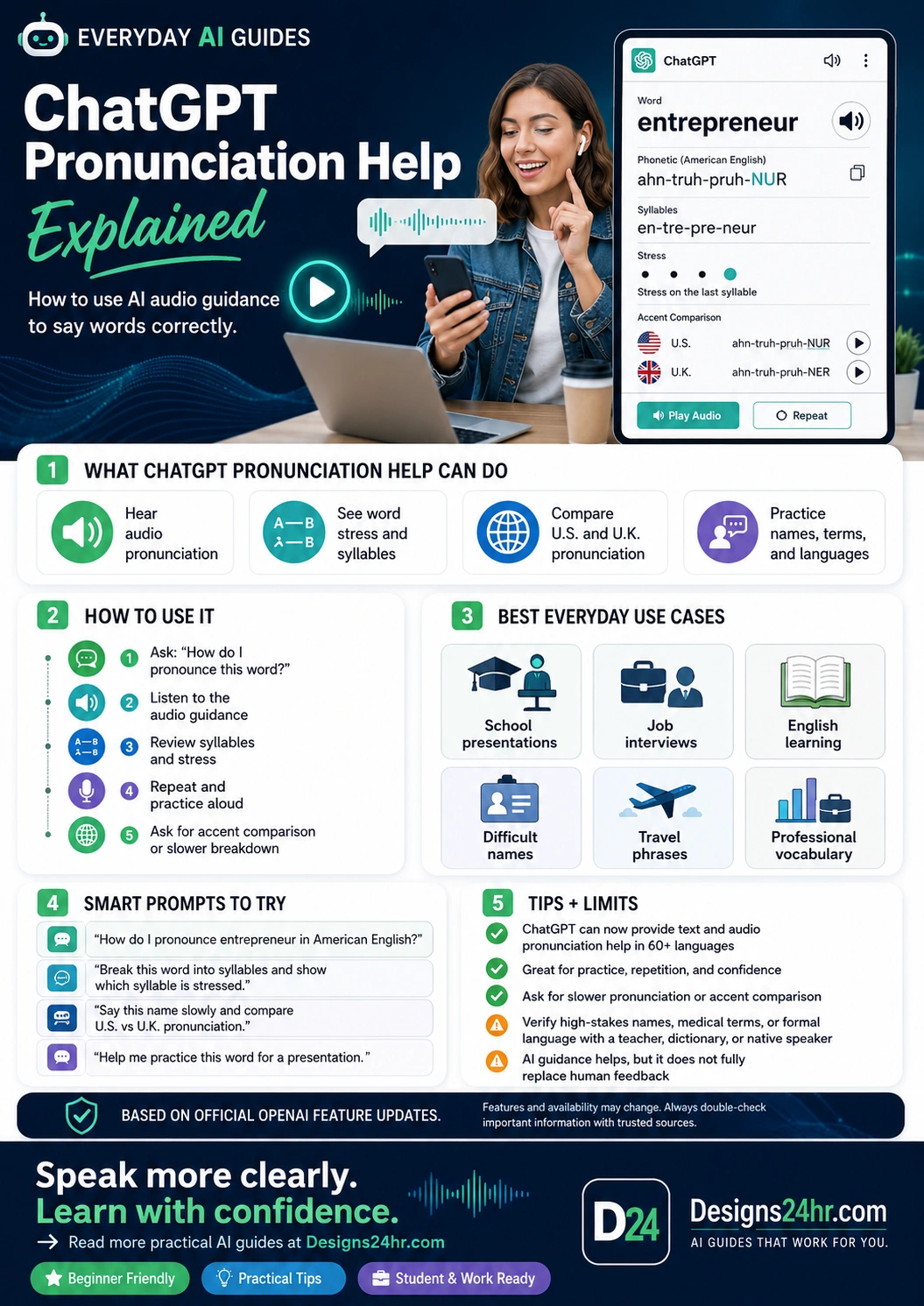
You can ask: “How do I pronounce entrepreneur in American English?” ChatGPT can help break the word into smaller parts, show the stressed syllable, and explain how to repeat it more confidently.
What ChatGPT pronunciation help can do
Pronunciation is not only about hearing a word once. To say a word clearly, you usually need to hear it, understand the syllables, notice the stress, and practice it in a real sentence. ChatGPT can help with each of those steps.
Helpful note: If audio is not available in your current ChatGPT experience, you can still ask for phonetic spelling, syllable breaks, stress marks, mouth-position tips, and practice sentences.
How to use ChatGPT for pronunciation
The best way to use ChatGPT for pronunciation is to ask for one word or phrase at a time. If you ask for too many words at once, the guidance may become harder to follow.
5-step pronunciation practice method
- Ask the word clearly. Type or say the word you want to practice.
- Request the pronunciation style. Ask for American English, British English, or another target pronunciation if it matters.
- Listen to the audio guidance. Play the pronunciation when audio is available, or use Voice Mode for spoken practice.
- Review syllables and stress. Ask which syllable is stressed and where your voice should rise or slow down.
- Repeat in a sentence. Practice the word inside a real sentence so it feels natural, not robotic.
Copy this starter prompt:
How do I pronounce this word in American English? Please give me a simple phonetic spelling, syllable breakdown, stressed syllable, and one short practice sentence.
Best everyday use cases for AI pronunciation practice
ChatGPT audio pronunciation guidance is useful when you need a quick, private, low-pressure way to practice before speaking in class, work, travel, or social situations.
For related learning support, you can use How It Works to understand a difficult term first, Explain This For Me to simplify confusing language, or How Do I Say This? to practice clearer wording before speaking.
Smart ChatGPT pronunciation prompts to try
Strong prompts give ChatGPT a clear target. Tell it the word, the accent or language you want, your speaking goal, and the kind of breakdown that helps you learn best.
American English pronunciation:
How do I pronounce “entrepreneur” in American English? Break it into syllables, show the stressed syllable, and give me a slow practice version.
Accent comparison:
Compare the U.S. and U.K. pronunciation of this word. Explain the difference in a simple way and give me one practice sentence for each.
Name practice:
Help me practice saying this name respectfully. Break it into sounds, warn me about common mistakes, and give me a polite sentence I can use if I am unsure.
Interview vocabulary:
I have a job interview and need to pronounce these terms clearly. Break each one into syllables, mark the stress, and give me a short practice line.
Presentation practice:
Help me practice this sentence for a school presentation. Identify any words that may be hard to pronounce and give me a slower speaking version.
You can also use the AI Prompt Generator to turn a simple goal into a better pronunciation-practice prompt.
Example: how ChatGPT can explain a difficult word
Here is a simple format you can ask ChatGPT to use when practicing a word. This kind of structure helps you move from guessing to repeating with confidence.
| Pronunciation detail | Example for “entrepreneur” | Why it helps |
|---|---|---|
| Phonetic guide | ahn-truh-pruh-NUR | Gives a plain-English sound guide before you practice aloud. |
| Syllables | en-tre-pre-neur | Breaks a long word into smaller, less intimidating parts. |
| Stress | Stress the last syllable | Helps you avoid saying each part with the same emphasis. |
| Accent comparison | U.S. vs. U.K. pronunciation | Shows that some words can sound different depending on the speaker or region. |
| Practice sentence | “She is a successful entrepreneur.” | Helps you use the word naturally, not just pronounce it alone. |
Tips and limits for ChatGPT audio pronunciation guidance
ChatGPT can be a helpful pronunciation coach, but it should not be treated as perfect for every word, name, dialect, or formal situation. Use it for practice and confidence, then verify anything important.
Smart tips for better results
- Ask for one word at a time. This keeps the explanation focused and easier to repeat.
- Choose the target accent. Say whether you want American English, British English, or another pronunciation style.
- Ask for slower guidance. Use prompts like “say it slowly,” “break it down,” or “show the mouth movement.”
- Practice in a sentence. Words are easier to remember when you use them in real context.
- Repeat several times. Pronunciation improves through repetition, not just reading one explanation.
Important limits to remember
- AI can make mistakes. Double-check high-stakes or unfamiliar terms with trusted sources.
- Names deserve extra care. If possible, ask the person how they pronounce their name instead of relying only on AI.
- Medical, legal, and formal terms should be verified. Use a trusted dictionary, official source, teacher, or professional reference.
- Regional pronunciation can vary. Even within the U.S., words may be pronounced differently by region, culture, and speaker.
- AI feedback does not fully replace a human coach. A teacher, tutor, speech coach, or native speaker can hear your exact pronunciation and correct subtle mistakes.
How students and professionals can use this safely
For U.S. students and professionals, the biggest benefit is private practice. You can prepare before a classroom presentation, client call, job interview, speech, or meeting without feeling judged.
Privacy tip: Avoid sharing private names, student records, client details, medical records, or confidential workplace information when practicing pronunciation. Use placeholders when possible.
FAQs about ChatGPT pronunciation help
Can ChatGPT help me pronounce words?
Yes. ChatGPT can help you pronounce words by giving audio guidance where available, phonetic spelling, syllable breakdowns, stressed syllables, accent comparisons, and practice sentences.
Does ChatGPT pronunciation help include audio?
OpenAI has added text and audio pronunciation guidance for words in more than 60 languages. Availability can vary by account, device, region, and current ChatGPT experience, so check your interface for audio or Voice Mode options.
How do I ask ChatGPT to pronounce a word?
Ask a direct prompt such as, “How do I pronounce this word in American English? Give me the syllables, stressed syllable, phonetic spelling, and a practice sentence.”
Can ChatGPT compare U.S. and U.K. pronunciation?
Yes. You can ask ChatGPT to compare American English and British English pronunciation, explain the difference, and provide practice examples for each style.
Can ChatGPT help with difficult names?
ChatGPT can help you practice unfamiliar names by breaking them into sounds and warning about common mistakes. However, the most respectful option is to ask the person directly when possible.
Is ChatGPT pronunciation always correct?
No. AI pronunciation guidance can help with practice, but it may make mistakes or miss regional differences. Verify high-stakes names, medical terms, legal terms, and formal language with a trusted dictionary, teacher, native speaker, or official source.
Can I use ChatGPT pronunciation help for English learning?
Yes. ChatGPT can support English learners by explaining sounds, syllables, stress, sentence rhythm, and common pronunciation mistakes. It works best when combined with listening, repetition, and human feedback.
Can I use Voice Mode for pronunciation practice?
Yes, Voice Mode can support spoken practice where available. OpenAI notes that voice conversations allow users to speak with ChatGPT and receive spoken responses, but important information should still be checked.
Helpful official sources
These official OpenAI resources are useful for checking current pronunciation, audio, and voice feature availability.
Speak more clearly. Learn with confidence.
ChatGPT pronunciation help is a simple way to hear difficult words, break them into smaller parts, and practice before school, work, interviews, travel, or everyday conversations.
For more beginner-friendly AI learning guides and simple free tools, visit Designs24hr.com.