Smart Living with AI
Why Smart AI Shopping Still Needs Human Verification
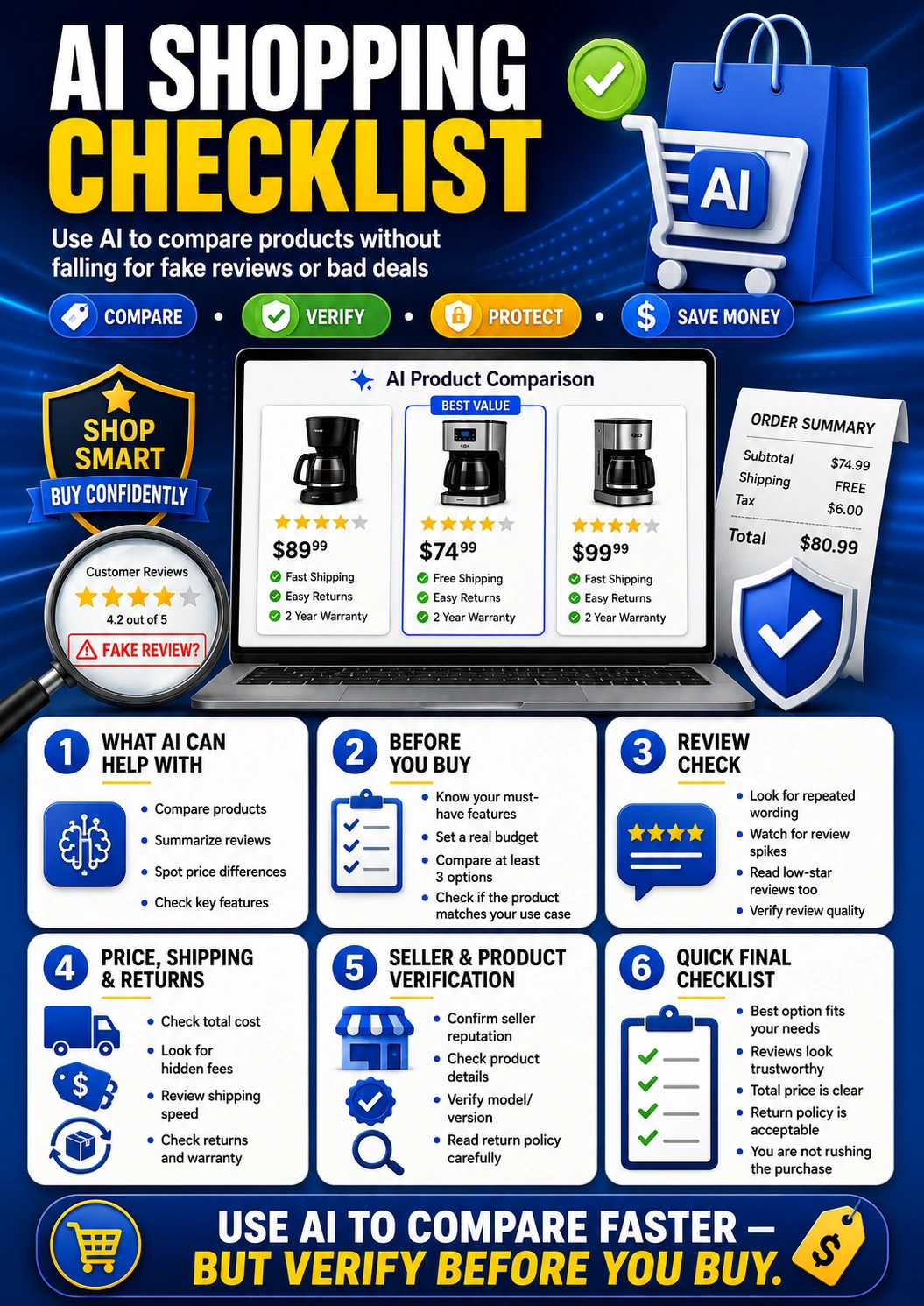
AI can help you compare products faster, summarize reviews, spot feature differences, and organize buying options. But it can also miss hidden fees, repeat weak sources, overlook fake reviews, or recommend a product that does not match your real needs. Use this AI shopping checklist before buying online so you can compare faster without trusting every AI answer blindly.
Updated for July 2026. This guide is for everyday online shoppers who want to use AI for product research while still checking reviews, prices, shipping, returns, seller details, and warranty terms carefully.
Quick Answer: What Should You Check Before Buying With AI?
Before buying a product recommended by AI, check whether the product truly matches your use case, whether the reviews look trustworthy, whether the total price includes shipping and fees, whether the seller is reliable, and whether the return policy and warranty are acceptable. AI can speed up product research, but you should still verify the final buying decision yourself.
Best rule: Let AI help you compare options, but do not let AI make the final purchase decision. The final check should include your budget, must-have features, seller reputation, fake review signals, return policy, warranty coverage, and total cost.
AI Shopping Checklist: What This Guide Covers
- What AI can help you compare before buying
- The AI product research checklist
- How to check reviews without getting fooled
- Price, shipping, return, and warranty checks
- Useful prompts for AI product comparisons
- Red flags before you buy
- When not to trust AI shopping advice
- The final AI shopping checklist
- Frequently asked questions
What AI Can Help You Compare Before Buying
AI shopping tools can be useful when you are overwhelmed by too many choices. For example, Google’s AI Mode in Chrome can support side-by-side browsing with AI assistance, making it easier to compare details and ask follow-up questions while keeping search context. That kind of workflow can help shoppers move faster, especially when comparing features across multiple product pages.
The best use of AI shopping is not “tell me what to buy.” A safer use is “help me organize what I should check before I buy.”
AI can help with
- Summarizing product features
- Comparing two or more options
- Listing pros and cons by use case
- Spotting missing specifications
- Preparing questions to ask before buying
- Explaining confusing warranty or return wording
You should still verify
- Current price and availability
- Shipping cost, delivery time, and taxes
- Seller reputation and product version
- Review quality and fake review signals
- Return policy and warranty coverage
- Whether the product fits your real need
The AI Product Research Checklist
Before asking AI to compare products, give it a clear buying goal. A vague prompt can produce vague recommendations. A better prompt includes your budget, must-have features, deal-breakers, use case, preferred size, compatibility needs, and whether you care more about price, durability, speed, comfort, portability, or long-term value.
Define the real job of the product
Do not start with “best product.” Start with what the product must do for you. A budget coffee maker, a travel backpack, a student laptop, and a home office chair all have different buying standards.
Set a real budget before comparing
AI may suggest products outside your comfort zone if you do not set a budget. Include your maximum price and whether that budget includes tax, shipping, accessories, or replacement parts.
List your must-have features
Separate must-have features from nice-to-have features. This makes it easier to reject a popular product that looks impressive but does not solve your actual problem.
Compare at least three options
One AI recommendation is not enough. Ask for at least three options and compare them by price, quality, reviews, seller, warranty, return policy, and long-term value.
Check the exact model or version
Many products have similar names but different versions, sizes, years, bundles, or compatibility details. Verify the exact model number before buying.
Use AI to find questions, not just answers
Ask AI what you may be missing. A useful shopping assistant should help you notice hidden costs, weak reviews, missing specs, return limits, and compatibility risks.
How to Check Reviews Without Getting Fooled
Reviews can be helpful, but they are not always reliable. The FTC finalized a rule banning fake reviews and testimonials, including AI-generated fake reviews, because fake review behavior can mislead buyers and damage honest competition.
A strong AI shopping checklist should never stop at star ratings. Look at review patterns, timing, wording, photos, low-star complaints, verified purchase labels, and whether the same phrases repeat across many reviews.
Check repeated wording
Many fake or low-quality reviews sound similar. Watch for repeated phrases, generic praise, and reviews that avoid real product details.
Read low-star reviews
Low-star reviews often reveal problems that five-star summaries hide, such as poor durability, missing parts, sizing issues, or weak support.
Watch for sudden spikes
A sudden wave of positive reviews can be normal after a launch, but it can also be a signal to investigate more carefully.
Look for real use details
Stronger reviews usually mention specific use cases, pros, cons, timing, product version, setup, size, or long-term experience.
Compare across sources
Do not rely on one sales page. Check retailer reviews, manufacturer details, independent reviews, forums, support pages, and return feedback.
Be careful with incentives
Reviews connected to discounts, free products, or rewards may still be useful, but you should read them with extra caution.
Sources: FTC final rule on fake reviews and testimonials and FTC online shopping advice.
Price, Shipping, Return, and Warranty Checks
A product can look like the best deal until you add shipping, tax, handling fees, subscriptions, accessories, return shipping, restocking fees, or replacement parts. The FTC advises shoppers to learn the total cost of a product, including shipping, handling, delivery, taxes, and other fees.
| What to check | Why it matters | Smart AI prompt |
|---|---|---|
| Total cost | The cheapest listed price may not be the cheapest final price. | “Help me list every possible cost before buying this product.” |
| Shipping speed | A lower price may come with slower delivery or unreliable shipping. | “Compare the shipping times and delivery risks for these options.” |
| Return policy | Some products have short return windows or buyer-paid return shipping. | “Summarize this return policy in plain language and list any risks.” |
| Warranty | A warranty may exclude important parts, labor, or accidental damage. | “Explain what this warranty covers and what it does not cover.” |
| Seller reputation | A product can be good, but the seller may be unreliable. | “What should I verify about this seller before buying?” |
| Product version | Old versions, international versions, or third-party bundles can create problems. | “Help me verify the exact model, version, and compatibility details.” |
Source: FTC Online Shopping consumer advice.
Best Prompts for AI Product Comparisons
Better shopping prompts lead to better comparison results. Instead of asking AI for the “best” product, ask it to compare products against your exact needs, budget, constraints, and deal-breakers. You can also use the Designs24hr AI Prompt Generator to write better AI product comparison prompts.
Useful prompt to copy:
I am comparing these products: [product 1], [product 2], and [product 3]. My budget is [budget]. My main use case is [use case]. My must-have features are [features]. Compare them by total cost, quality, reviews, seller reputation, warranty, return policy, hidden costs, and long-term value. Do not choose a winner until you list what I should verify manually.
Use this when you already have a shortlist and want AI to organize the decision.
Useful prompt to copy:
Analyze these customer reviews and look for possible fake review signals, repeated wording, review spikes, vague praise, missing product details, and common complaints. Then summarize the most trustworthy pros and cons: [paste review text or review summary].
Use this before trusting star ratings or review summaries.
Useful prompt to copy:
Before I buy this product, create a final buyer checklist. Include total price, shipping, taxes, return policy, warranty, seller reputation, model number, compatibility, accessories needed, and reasons this product may not be right for me.
Use this right before checkout to slow down impulse buying.
If you are unsure whether a product is worth the money, try Is This Worth It?. If you are comparing two or more options, use Decision Helper. If the warranty or return policy feels confusing, use Explain This For Me or the Plain Language Translator.
Red Flags Before You Buy
AI can help you move faster, but speed is not always your friend when shopping. Slow down if you notice any of these warning signs.
Product red flags
- The product name is unclear or keeps changing.
- The model number does not match the official product page.
- The photos, specs, and description disagree.
- The price is far lower than trusted retailers without a clear reason.
- The listing hides important size, material, compatibility, or warranty details.
Review and seller red flags
- Many reviews use the same generic wording.
- There are lots of five-star reviews but few specific details.
- Low-star reviews mention the same serious problem repeatedly.
- The seller has little history or unclear contact information.
- The return policy is hard to find, too short, or too restrictive.
When Not to Trust AI Shopping Advice
Some buying decisions need extra care. If the product affects safety, health, finances, privacy, children, home security, legal compliance, or expensive long-term use, treat AI shopping advice as a starting point only.
Use extra caution for
- Medical, wellness, or safety products
- Baby, child, or school safety items
- Expensive electronics or appliances
- Financial, tax, insurance, or legal tools
- Security cameras, locks, routers, or privacy devices
- Products with unclear certifications or safety claims
Verify with better sources
- Official product documentation
- Manufacturer warranty pages
- Retailer return policy pages
- Independent expert reviews
- Safety recall databases when relevant
- Trusted customer support before purchase
Final AI Shopping Checklist
Use this quick checklist before you buy anything based on AI recommendations or AI-assisted product research.
Before you compare
- Your budget is clear.
- Your must-have features are listed.
- Your real use case is defined.
- You are comparing at least three options.
- You know your deal-breakers.
Before you buy
- Reviews look trustworthy.
- Total price is clear.
- Shipping and taxes are checked.
- Return policy is acceptable.
- Warranty and seller details are verified.
Bottom line: AI can help you compare products faster, but a smart shopper still verifies reviews, prices, sellers, returns, warranties, and real needs before clicking buy.
Helpful Designs24hr Tools for Smarter Shopping
These free Designs24hr tools can help you slow down, compare options, and make a more confident buying decision.
Is This Worth It?
Use it to check whether a product is actually worth buying for your budget, needs, and priorities.
Decision Helper
Use it to compare two or more buying options before making the final choice.
AI Prompt Generator
Use it to write better prompts for product comparisons, review checks, and buying decisions.
Explain This For Me
Use it to understand confusing product details, warranty language, or return policy wording.
Frequently Asked Questions
What is an AI shopping checklist?
An AI shopping checklist is a simple set of steps to follow before buying a product with help from AI. It helps you compare options, check reviews, verify prices, review seller details, understand return policies, and avoid bad buying decisions.
Can AI help me compare products before buying?
Yes, AI can help summarize product features, compare pros and cons, organize reviews, explain technical details, and create a buying checklist. You should still verify the final details manually before purchasing.
Should I trust AI product recommendations?
You can use AI product recommendations as a starting point, but you should not trust them blindly. Always check current prices, review quality, seller reputation, product version, return policy, warranty coverage, and whether the product matches your real use case.
How can I spot fake reviews when shopping online?
Look for repeated wording, vague praise, sudden review spikes, reviews without specific product details, and low-star reviews that mention the same problem repeatedly. Compare reviews across multiple sources before trusting the rating.
What should I ask AI before buying a product?
Ask AI to compare the product against your budget, must-have features, use case, hidden costs, review quality, seller reputation, warranty, return policy, compatibility, and reasons the product might not be right for you.
Can AI help compare prices and hidden costs?
AI can help you list the costs to check, such as product price, shipping, taxes, fees, accessories, subscriptions, return shipping, and replacement parts. You should still confirm the final price on the retailer’s checkout page.
What should I verify before clicking buy?
Before clicking buy, verify the exact product model, total price, shipping time, seller reputation, return policy, warranty coverage, review quality, compatibility, and whether the product truly fits your needs.
When should I avoid using AI shopping advice?
Avoid relying on AI shopping advice alone for high-risk purchases involving safety, health, privacy, finances, legal matters, expensive electronics, children’s products, or products with unclear certifications. Use AI for organization, then verify with trusted sources.