ChatGPT Shared Links Explained: How to Share AI Conversations Safely and Delete Old Links
ChatGPT shared links make it easy to send an AI conversation to someone else, but they also create a privacy risk if you share the wrong chat. This guide explains what shared links include, who can view them, how to share safely, and how to delete or manage old links.
What are ChatGPT shared links?
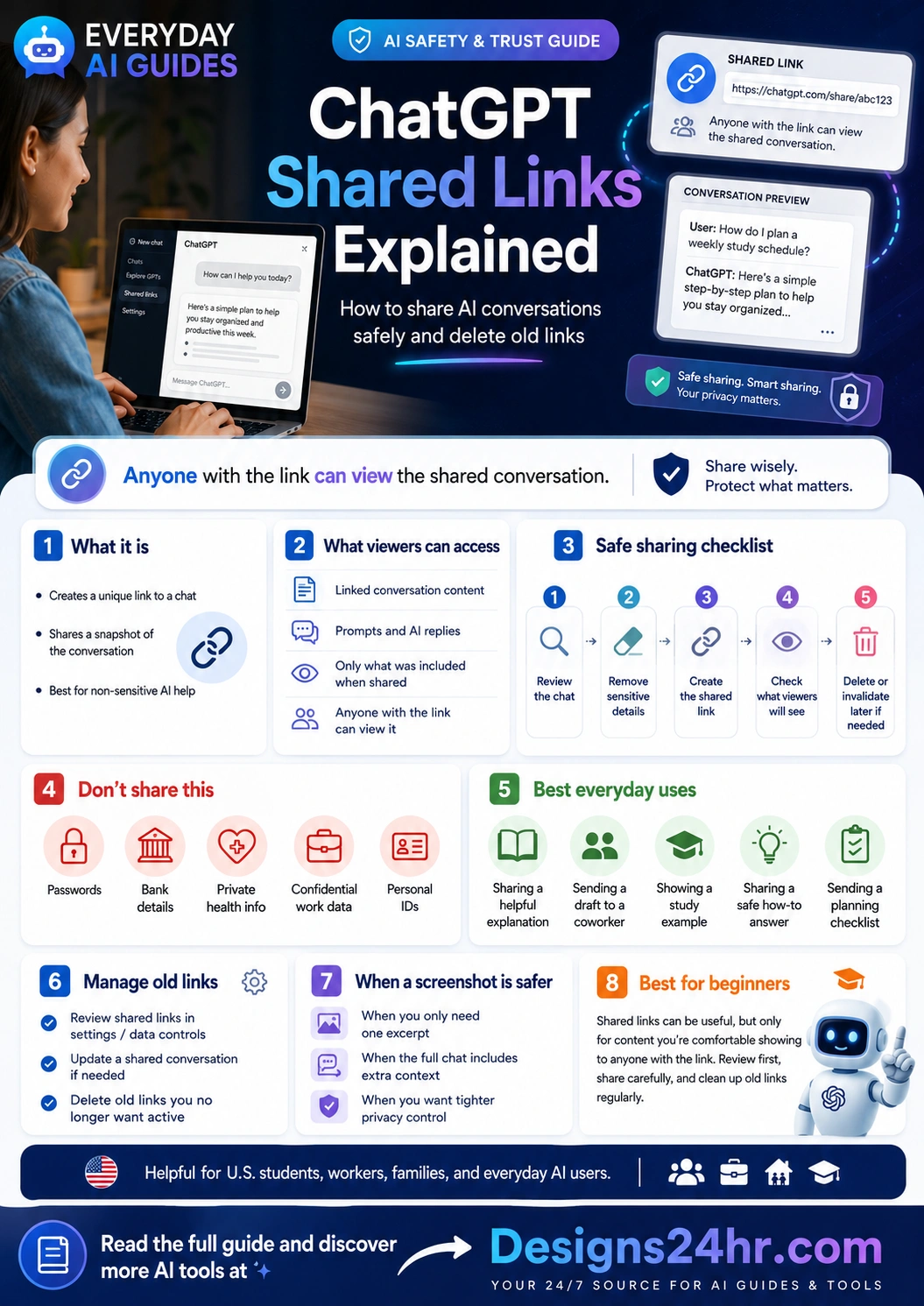
ChatGPT shared links are unique URLs that let you share a snapshot of a ChatGPT conversation with someone else. Instead of copying text or sending screenshots, you can create a link to the conversation and send it to a friend, coworker, classmate, client, teacher, or family member.
OpenAI’s official ChatGPT Shared Links FAQ explains that shared links generate a unique URL for a ChatGPT conversation. The important privacy point is simple: anyone with access to the shared link may be able to view the shared conversation.
That is why ChatGPT shared links are useful, but they should not be treated casually. Before you share a link, you should review the chat, remove sensitive details, understand what the viewer can see, and know how to delete old shared links later.
Shared links are convenient
They are helpful when you want to share a useful AI answer, study example, draft, checklist, explanation, or planning conversation without copying everything manually.
Shared links need privacy review
Before sharing, check the conversation for personal details, work information, passwords, private health details, financial data, and anything you would not want someone else to see.
Why ChatGPT shared links matter
People use ChatGPT for almost everything now: work drafts, school notes, emails, family planning, business ideas, personal questions, coding help, resumes, and quick research. That makes sharing a helpful conversation tempting, but it also means the chat may contain details you forgot were there.
A shared link can be especially risky because the person receiving it may see more context than you intended. A conversation that starts with a simple checklist might also include names, private background, earlier prompts, sensitive project details, or personal concerns.
In plain language, shared links help you share useful AI work, but they can also expose:
- Your prompts and the context you gave ChatGPT.
- ChatGPT’s replies inside the shared conversation.
- Private details you included while asking for help.
- Work or school context that may not be meant for public viewing.
- Old information from the conversation snapshot if you share too quickly.
Simple example: when a shared link is useful
Imagine you ask ChatGPT to explain a confusing topic in simple language. The answer is clear, organized, and helpful, so you want to send it to a classmate or coworker. A shared link can make that easy because the other person can open the conversation and see the explanation in context.
That is a good use case if the conversation does not include private details. But if your chat also includes personal background, company information, health details, financial questions, or someone else’s private situation, it is safer to copy only the useful answer or send a screenshot of the specific section instead.
What can someone see in a ChatGPT shared link?
The exact viewer experience may change over time, but the basic idea is that a shared link gives access to the shared conversation snapshot. That can include the prompts and responses that were part of the conversation at the time the link was created or updated.
| Item | Can it appear in the shared conversation? | What to check before sharing |
|---|---|---|
| Your prompt | Yes, prompts can be visible as part of the shared conversation. | Remove names, personal details, private background, client information, or sensitive context. |
| ChatGPT’s response | Yes, the AI reply can be visible to the person opening the link. | Check for inaccurate claims, private details repeated from your prompt, or content that needs editing. |
| Conversation context | Yes, the link may show more than one message if those messages are part of the shared snapshot. | Review the whole visible conversation, not just the final answer. |
| Future messages | Not automatically in the same way unless the link is updated from the original conversation. | Use OpenAI’s shared link update controls if you intentionally want the shared version changed. |
| Private account access | No, a shared link should not give someone full access to your ChatGPT account. | Still treat the link carefully because the shared conversation itself may contain sensitive information. |
Important: anyone with the link may be able to view it
The biggest ChatGPT shared links privacy rule is this: do not share a link unless you are comfortable with the linked conversation being viewed by someone who has access to that URL.
Even if you only send the link to one person, that person could forward it, save it, screenshot it, or paste it somewhere else. Deleting a shared link later can help invalidate access, but it cannot erase copies, screenshots, or notes someone already made.
How to share a ChatGPT conversation safely
Before creating or sending a shared link, use a simple safety workflow. This takes less than a minute and can prevent privacy problems later.
Review the full conversation
Do not only read the final answer. Scroll through the conversation and check your prompts, earlier context, uploaded text, names, examples, and any details ChatGPT repeated back to you.
Remove or avoid sensitive details
If the chat contains passwords, private health information, bank details, personal IDs, client data, school records, or confidential work information, do not share the full conversation.
Decide whether a link is really needed
If the person only needs one answer, a copied excerpt or screenshot may be safer than sharing the whole conversation link.
Create the shared link
Use ChatGPT’s share option to create the link. Share it only with people who actually need to see the conversation.
Check and clean up old links later
After the link has served its purpose, review your shared links and delete old ones you no longer want active.
Safe uses for ChatGPT shared links
ChatGPT shared links work best when the conversation is helpful, general, and non-sensitive. Think of them as a way to share an example or explanation, not as a place to expose private details.
Good things to share
- A general study explanation.
- A non-private checklist.
- A helpful how-to answer.
- A cleaned-up writing example.
- A simple planning template.
Do not share this
- Passwords or recovery codes.
- Bank, tax, or payment details.
- Private health information.
- Confidential work or client data.
- Personal IDs, addresses, or private family details.
When a screenshot or copied excerpt is safer
A shared link is convenient, but it is not always the safest option. Sometimes the better choice is to copy only the useful paragraph, paste it into a clean message, or take a screenshot of the exact section you want to show.
Use a screenshot or copied excerpt when:
- The full chat includes extra context the viewer does not need.
- You only want to show one answer, not the entire conversation.
- The conversation includes personal examples or private background.
- You want tighter control over what someone can see.
- You are sharing with a large group, public forum, classroom, or workplace channel.
If you need to rewrite a sensitive message before sharing it, use How Do I Say This? to make the wording clearer without exposing unnecessary private details.
How to manage old ChatGPT shared links
OpenAI provides settings where users can access shared links and manage them. The official guide on where to see shared links explains how to access shared links through ChatGPT settings and Data Controls.
It is smart to review this area regularly, especially if you share conversations for work, school, clients, or group projects.
Review old shared links when:
- A project is finished.
- A class assignment or study group no longer needs the link.
- You shared a draft with a coworker or client.
- You posted a link in a public or semi-public place.
- You are cleaning up your privacy settings.
How to delete or invalidate a ChatGPT shared link
If you no longer want a shared link to stay active, you can delete or invalidate it. OpenAI’s official delete or invalidate a shared link guide explains that users can delete a shared link from the conversation or shared link modal.
Delete old shared links when:
- The link was only needed temporarily.
- The conversation includes information you no longer want visible.
- You accidentally shared more context than intended.
- The link was posted in the wrong place.
- You are doing a privacy cleanup of your account.
Deleting a shared link is a good cleanup step, but remember that it cannot remove screenshots, copied text, downloaded notes, or forwarded copies that already exist outside ChatGPT.
How to update a ChatGPT shared link
If you continue working in a conversation after creating a shared link, the shared version may not automatically show every new thing you add. OpenAI’s official How to Update a Shared Link guide explains how users can update a shared link from the same conversation where it was originally created.
Use this carefully. Updating a shared link can make more of the conversation visible, so review the chat again before updating it.
Before updating a shared link, ask:
- Did I add any private details after creating the original link?
- Does the viewer need the new messages?
- Could the updated conversation reveal more than intended?
- Would a copied excerpt be safer?
- Should I delete the old link and create a cleaner conversation instead?
Do not share sensitive information through ChatGPT shared links
Even if the link is easy to send, shared AI conversations are not the right place for private credentials, sensitive documents, or confidential information.
Avoid sharing conversations that contain:
- Passwords, passcodes, private keys, or recovery codes.
- Bank account numbers, credit card information, tax IDs, or Social Security numbers.
- Private health information, medical records, therapy notes, or sensitive family details.
- Confidential workplace files, internal strategy, client data, contracts, or HR information.
- Personal addresses, school names, children’s details, or identifying information about someone else.
If your account security is weak, create stronger passwords with the Free Password Generator before relying on any online tool for important work.
ChatGPT shared links for students
Students may use shared links to show study explanations, essay outlines, project ideas, or practice questions. That can be helpful in a study group, but only if the chat is clean and does not include private information.
Before sharing with classmates or a teacher, remove personal details, grades, school account information, private messages, or anything that could break your school’s AI policy. If you only need to share a useful explanation, copying the answer may be safer than sharing the full link.
If an assignment or explanation is hard to understand, try Plain Language Translator or Explain This For Me before sharing the final cleaned-up version.
ChatGPT shared links for work
At work, shared links can be useful for showing a draft, summarizing a meeting idea, explaining a process, or sharing a brainstorming example. But work chats often contain information that should not leave your team, company, or client relationship.
Before sharing a ChatGPT link at work, check for:
- Client names or private customer details.
- Internal pricing, strategy, product plans, or revenue details.
- Employee information, HR topics, or private feedback.
- Confidential documents pasted into the chat.
- AI-generated claims that need fact-checking before others rely on them.
If you are not sure whether a link is safe to share, use the Decision Helper to weigh the risk, or share a cleaned-up excerpt instead of the full conversation.
ChatGPT shared links for families and everyday users
Families and everyday users may share ChatGPT conversations about recipes, travel plans, gift ideas, school routines, checklists, or simple explanations. These are usually safer when the chat is general and does not include private names, addresses, schedules, or health details.
Be extra careful with conversations about children, medical issues, money, family conflicts, legal problems, or personal identity information. If the conversation includes private context, summarize the useful answer in a new message instead of sending the shared link.
ChatGPT shared links privacy checklist
Use this quick checklist before you send any shared ChatGPT conversation.
Before sharing
- Read the full visible conversation.
- Check your prompts and AI replies.
- Remove or avoid sensitive details.
- Decide if a screenshot is safer.
- Share only with people who need it.
After sharing
- Review shared links in settings.
- Update links only when needed.
- Delete old links after use.
- Do regular privacy cleanups.
- Do not assume deleted links erase copies.
Copy-and-use prompts for safer sharing
These prompts can help you clean up a conversation before you share anything. Do not paste sensitive information into the prompt.
To check a conversation before sharing
“Review this text and tell me what types of private or sensitive information I should remove before sharing it with someone else.”
To create a safer excerpt
“Turn this answer into a short, clean excerpt I can share without including personal details or extra context.”
To rewrite a work message safely
“Rewrite this message in a professional way and remove any unnecessary private or confidential details.”
To decide whether to share a link
“Give me a simple checklist to decide whether I should share a full ChatGPT link, a screenshot, or a copied excerpt.”
Common mistakes to avoid
Sharing the link before reading the full chat
The final answer may look safe, but earlier prompts may include private details. Always review the full conversation first.
Assuming only one person can see the link
If someone can access the URL, they may be able to view the shared conversation. Treat shared links like something that can be forwarded.
Sharing work conversations too casually
Work chats may include client information, internal context, or strategy details. When in doubt, share a cleaned-up excerpt instead.
Forgetting to delete old links
Old shared links can stay active longer than needed. Review and delete links that no longer serve a purpose.
Updating a link without reviewing new messages
If you update a shared link after adding more to the conversation, check the new content first. Do not accidentally expose more than intended.
Recommended Designs24hr tools to use with this guide
These free tools can help you rewrite, simplify, check, and safely share AI-assisted content.
Frequently asked questions about ChatGPT shared links
What are ChatGPT shared links?
ChatGPT shared links are unique URLs that let you share a snapshot of a ChatGPT conversation with someone else. They are useful for sharing AI explanations, drafts, checklists, and examples.
Can anyone view a ChatGPT shared link?
Anyone with access to the shared link may be able to view the shared conversation, so you should only share links when you are comfortable with the visible content being seen by others.
What can viewers see in a ChatGPT shared link?
Viewers may see the shared conversation snapshot, including prompts and ChatGPT replies that were part of the conversation when the link was created or updated.
How do I delete a ChatGPT shared link?
You can delete or invalidate a shared link through ChatGPT’s shared link controls. OpenAI’s help center explains that users can delete a shared link from the conversation or shared link modal.
Does deleting a shared link erase screenshots or copied text?
No. Deleting a shared link can help stop access through that link, but it cannot erase screenshots, copied text, saved notes, or forwarded copies that already exist outside ChatGPT.
When is a screenshot safer than a shared link?
A screenshot or copied excerpt is safer when the other person only needs one answer, when the full chat includes extra private context, or when you want tighter control over exactly what is visible.
Should I share work or school ChatGPT conversations?
Only share work or school conversations after reviewing them carefully. Remove confidential information, private details, client data, school records, and anything that could violate a workplace or school AI policy.
Share ChatGPT conversations carefully
ChatGPT shared links are useful when you want to show a helpful AI conversation, but privacy comes first. Review the full chat, remove sensitive details, share only what is needed, manage old links, and delete shared links when they no longer serve a purpose.
Explore more Everyday AI Guides