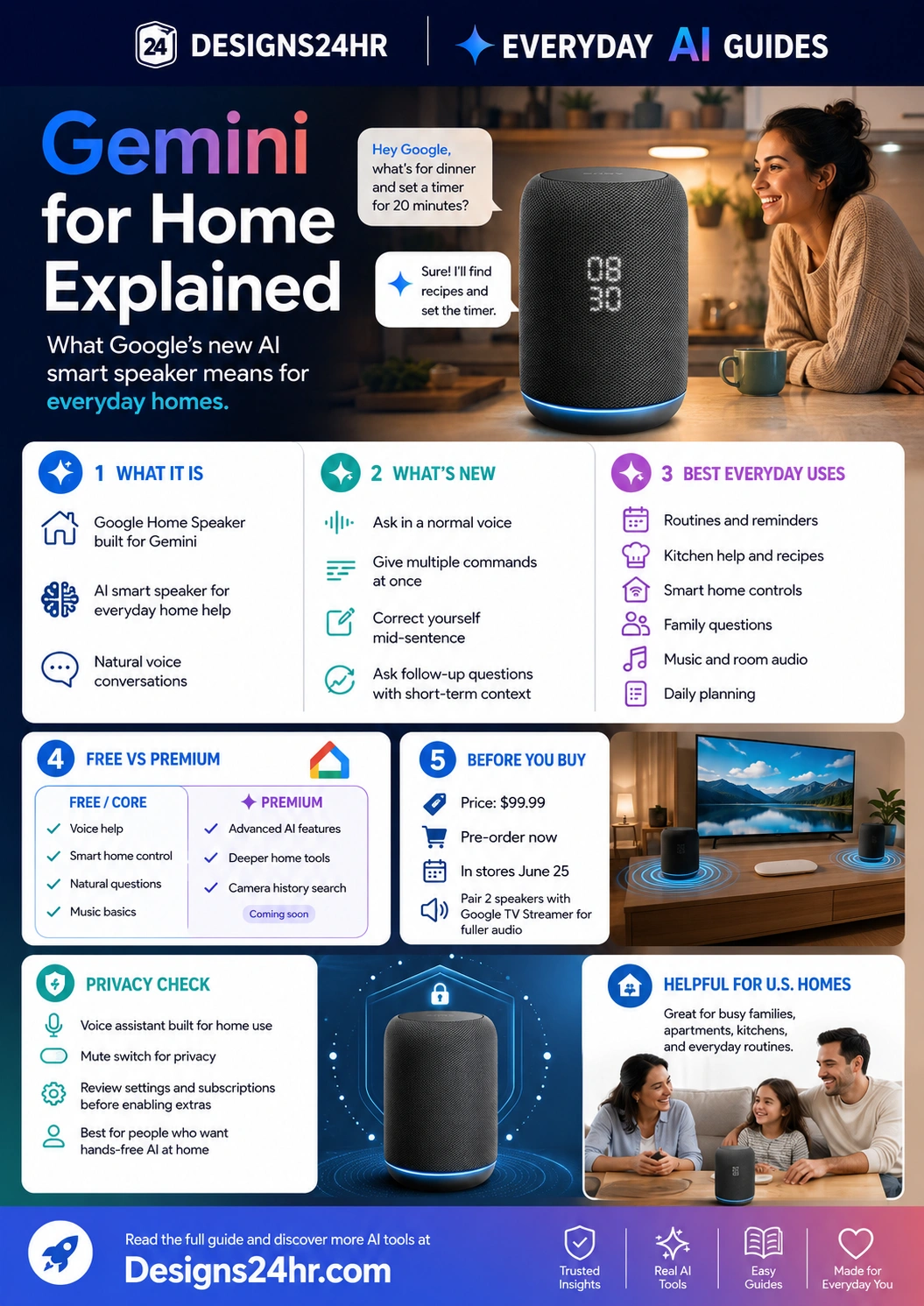
Gemini for Home Explained: What Google’s New AI Smart Speaker Means for Everyday Homes
Gemini for Home is Google’s newer AI voice assistant experience for the smart home. With the new Google Home Speaker built for Gemini, everyday users can ask more natural questions, give multi-step commands, control smart devices, plan routines, and get hands-free help around the house.
What is Gemini for Home?
Gemini for Home is Google’s AI-powered voice assistant experience for Google Home devices. Instead of forcing you to memorize stiff commands, it is designed to understand more natural speech, handle multi-step requests, answer follow-up questions, and help with everyday home routines.
Google announced the new Google Home Speaker built for Gemini as its first audio device built for Gemini for Home. Google says the speaker is available for pre-order at $99.99 and is scheduled to hit shelves on June 25, 2026.
For everyday U.S. homes, the bigger question is not just “What are the specs?” It is: Will this actually make daily life easier, and what should you check before bringing an AI microphone into your home?
Best for smart home routines
Gemini for Home can help with lights, timers, reminders, music, family questions, kitchen tasks, and multi-step home commands.
Best for natural voice help
You can speak more casually, correct yourself mid-sentence, ask follow-up questions, and combine multiple requests in one conversation.
Why Gemini for Home matters
Most smart speakers were useful, but they often felt limited. You had to say commands the “right” way, repeat context, or break a simple task into several separate requests. Gemini for Home aims to make the assistant feel more conversational and less robotic.
That matters because a home assistant is only helpful if the whole household can use it easily. A busy parent, roommate, student, older adult, or work-from-home professional should not need to memorize exact phrases just to set a timer, dim lights, start music, or ask a practical question.
In plain language, Gemini for Home is meant to help with:
- Natural questions instead of rigid voice commands.
- Multi-step tasks like dimming lights, playing music, and setting a timer in one request.
- Corrections when you change your mind mid-sentence.
- Follow-up conversations without restarting the whole prompt.
- Smart home control for connected lights, thermostats, cameras, speakers, and other compatible devices.
Simple example: how Gemini for Home could help at dinner time
Instead of saying three separate commands, you could ask something like: “Hey Google, what can I make for dinner with chicken and spinach, dim the kitchen lights, and set a timer for 20 minutes.”
A more natural assistant can understand the bigger goal: you are cooking, you need an idea, and you want the kitchen set up. That kind of hands-free help is where AI smart speakers become more useful than basic voice timers.
For meal planning outside your speaker, you can also use the free AI Recipe Generator to turn ingredients into recipe ideas and shopping lists.
What is new with the Google Home Speaker Gemini experience?
The Google Home Speaker Gemini experience is less about one single trick and more about making the whole voice assistant feel smarter. Google highlights natural language understanding, reasoning, multiple commands at once, corrections, follow-up questions, and short-term conversational context.
| Feature | What it means | Everyday home example |
|---|---|---|
| Natural voice requests | You can speak more normally instead of memorizing exact command phrases. | “Turn off all the lights except the bedroom lamp.” |
| Multi-step commands | You can combine several requests in one sentence. | “Dim the kitchen lights, play relaxing music, and set a 20-minute timer.” |
| Mid-sentence corrections | You can correct yourself while speaking and Gemini should understand the change. | “Turn off the coffee maker… I mean turn it on.” |
| Complex questions | Gemini can reason through questions that need more context. | Asking about weather for an upcoming game or outing without giving every detail manually. |
| Follow-up conversations | Gemini can keep short-term context so you can ask another related question. | “What about tomorrow?” after asking about today’s schedule or weather. |
Best everyday uses for Gemini for Home
For most people, the value of an AI smart speaker is not the technology itself. The value is whether it removes friction from normal daily routines.
Kitchen help and recipes
Ask for dinner ideas, substitutions, timers, shopping list additions, or simple cooking steps while your hands are busy.
Morning and evening routines
Use Gemini for Home to help start routines like lights, weather, calendar reminders, music, commute planning, or bedtime wind-down actions.
Smart home control
Control compatible lights, thermostats, plugs, speakers, cameras, and other devices with more natural voice requests.
Family questions and planning
Ask for quick explanations, weekend outing ideas, reminders, packing lists, or help deciding what to do next as a household.
Music, podcasts, and room audio
Use the speaker for music and podcasts, and pair compatible speakers with a Google TV Streamer for a more immersive living room setup.
Free vs premium: what to understand before you buy
Not every AI smart home feature may be included for every user in the same way. Google’s announcement mentions Google Home Premium for advanced AI capabilities, including Gemini Live, Camera History Search, and Home Briefs.
That means buyers should separate the speaker itself from subscription-based features. The hardware may give you the Gemini for Home speaker experience, but some deeper AI home tools may require a paid Google Home Premium plan or compatible smart home devices.
Before buying, ask:
- Which features work without a subscription?
- Which features require Google Home Premium?
- Do I already own compatible Google Home or Nest devices?
- Do I need camera-related AI features, or only voice and smart speaker help?
- Will the speaker work well with my current phone, TV, streaming device, and smart home setup?
For a simple buying decision, use Is This Worth It? to compare the price, use cases, subscription costs, and privacy trade-offs before ordering.
Gemini for Home privacy checklist
Any AI smart speaker deserves a privacy check because it sits inside your home and uses microphones to hear your voice commands. Google says the new speaker includes a microphone mute toggle switch, which is an important physical privacy control.
Check before setup
- Review the microphone mute switch and how it works.
- Check voice, activity, and Google Home settings.
- Review who in the household can control devices.
- Understand which features require cameras or subscriptions.
- Keep account security strong before connecting smart devices.
Be careful with
- Private family conversations near the speaker.
- Camera history and home monitoring features.
- Children’s access to purchasing, search, or connected devices.
- Shared homes, rentals, dorms, and roommate situations.
- Weak Google account passwords or unsecured Wi-Fi.
For safer account setup, use the Free Password Generator to create a stronger password for important accounts, and always use your own judgment when connecting home devices.
Important: an AI smart speaker is not just a speaker
The Google Home Speaker Gemini device is designed for voice help, smart home control, audio, routines, and AI-powered answers. That makes it more powerful than a basic Bluetooth speaker, but it also means you should think about settings, permissions, household access, and subscriptions before using every feature.
For families, roommates, and shared homes, it is smart to agree on rules: when the microphone should be muted, who can change device settings, whether camera-related features should be enabled, and what information should not be asked out loud.
Who should consider Gemini for Home?
Gemini for Home is most useful for people who already want hands-free help at home and are comfortable with Google’s smart home ecosystem.
It may be a good fit if you:
- Already use Google Home, Nest, Android, Google Calendar, YouTube Music, Google TV, or other Google services.
- Want a smarter voice assistant that understands normal speech better.
- Use smart lights, plugs, cameras, thermostats, or connected speakers.
- Often need help with timers, reminders, recipes, family planning, and routines.
- Want a speaker that can also support music, podcasts, and room audio.
It may not be the best fit if you:
- Do not use Google services or compatible smart home devices.
- Only need a simple speaker for music.
- Do not want microphones in your living space.
- Do not want to manage smart home privacy settings.
- Want advanced AI features but do not want a subscription.
Gemini for Home for families
Families may get the most value from Gemini for Home when it helps with repeated household friction: school lunches, timers, grocery lists, chores, reminders, weekend ideas, bedtime routines, and quick explanations.
The key is to keep it practical. Use it for safe, low-risk help such as routines, recipes, reminders, and general questions. Be more cautious with personal details, children’s information, home monitoring, and connected locks, cameras, or purchases.
When a family decision feels messy, try the Decision Helper to organize options before relying on a voice assistant to make the choice for you.
Gemini for Home for apartments, dorms, and shared homes
In shared spaces, an AI smart speaker needs clear boundaries. A roommate, guest, or family member may trigger the assistant, change music, ask questions, or control connected devices. That can be convenient, but it can also become annoying or risky without settings.
Smart setup tips for shared homes:
- Place the speaker in a common area, not a private bedroom, unless everyone agrees.
- Use the microphone mute switch when privacy matters.
- Review voice match, household access, and device permissions.
- Do not connect sensitive devices unless you understand the controls.
- Make sure everyone knows what the speaker can and cannot control.
Gemini for Home for work-from-home users
For remote workers, Gemini for Home can be useful for timers, reminders, music, ambient sound, weather, quick definitions, and simple planning. But it should not be used carelessly around confidential meetings, client calls, private documents, or sensitive workplace information.
If you work from home, mute the microphone during private calls and avoid asking about confidential projects out loud. Treat the speaker as a helpful home device, not a secure workplace assistant.
How to decide if the Google Home Speaker Gemini device is worth it
The new Google Home Speaker is listed by Google at $99.99. That may be reasonable if you will use it daily, but less valuable if it becomes another gadget that only plays music once in a while.
Use this quick buying checklist:
- Daily use: Will you use it for routines, reminders, recipes, lights, music, or planning at least several times a week?
- Compatibility: Do your current devices work with Google Home?
- Subscription: Are the features you want free, or do they require Google Home Premium?
- Privacy: Are you comfortable with an always-ready microphone and smart home settings?
- Household fit: Will everyone in your home understand how to use and mute it?
If you are unsure how the technology works, use How It Works? to break down the product in plain English before you buy.
Useful prompts to try with Gemini for Home
These examples show the kind of natural, practical requests that make an AI smart speaker more useful. Adjust them based on your actual smart home setup and privacy comfort level.
For the kitchen
“Hey Google, suggest a quick dinner with eggs, spinach, and rice, then set a 15-minute timer.”
For routines
“Hey Google, turn on the living room lights, play calm music, and remind me to take out the trash in 30 minutes.”
For family planning
“Hey Google, help us plan a simple Saturday afternoon outing if the weather is good.”
For smart home control
“Hey Google, turn off all the downstairs lights except the kitchen.”
For follow-up questions
“What about tomorrow?” or “Make that shorter,” after asking a related question.
What not to ask an AI smart speaker
Voice assistants are convenient, but not every question belongs on a home speaker. Avoid asking out loud about passwords, bank account details, private medical issues, confidential work problems, legal strategy, or sensitive family matters.
For complex language, policies, or product terms, use the Plain Language Translator privately on your own device before reading anything sensitive aloud near a speaker.
Recommended Designs24hr tools to use with this guide
These free tools can help you plan smarter home routines, make better buying decisions, and use AI more safely.
Frequently asked questions about Gemini for Home
What is Gemini for Home?
Gemini for Home is Google’s AI-powered voice assistant experience for Google Home devices. It is designed to understand more natural speech, handle multi-step commands, answer follow-up questions, and help with smart home routines.
What is the Google Home Speaker Gemini device?
The Google Home Speaker built for Gemini is Google’s first audio device built for the Gemini for Home voice assistant. Google announced it with a $99.99 price and June 25, 2026 shelf availability.
What can Gemini for Home do?
Gemini for Home can help with natural voice questions, smart home controls, timers, routines, music, recipes, reminders, complex questions, and follow-up conversations depending on your device setup and available features.
Does Gemini for Home require Google Home Premium?
Some advanced AI features may require Google Home Premium, including features Google described such as Gemini Live, Camera History Search, and Home Briefs. Check current Google Home plan details before buying for premium features.
Is Gemini for Home good for families?
It can be useful for family routines, timers, recipes, reminders, music, and simple planning. Families should review privacy settings, microphone controls, household access, and camera-related features before relying on it.
Does the Google Home Speaker have a microphone mute switch?
Google says the new Google Home Speaker includes a toggle switch that lets users quickly mute the microphone. This is an important privacy feature for households that want more control.
Should I buy the Google Home Speaker for Gemini?
It may be worth considering if you already use Google Home or compatible smart devices and want more natural voice help. It may not be necessary if you only need a basic music speaker or do not want an AI microphone in your home.
Use Gemini for Home as a helper, not a replacement for judgment
Gemini for Home can make daily routines easier, especially for cooking, reminders, music, smart home control, and quick planning. Before buying or enabling advanced features, review subscriptions, device compatibility, privacy settings, microphone controls, and whether your household will actually use it.
Explore more Everyday AI Guides