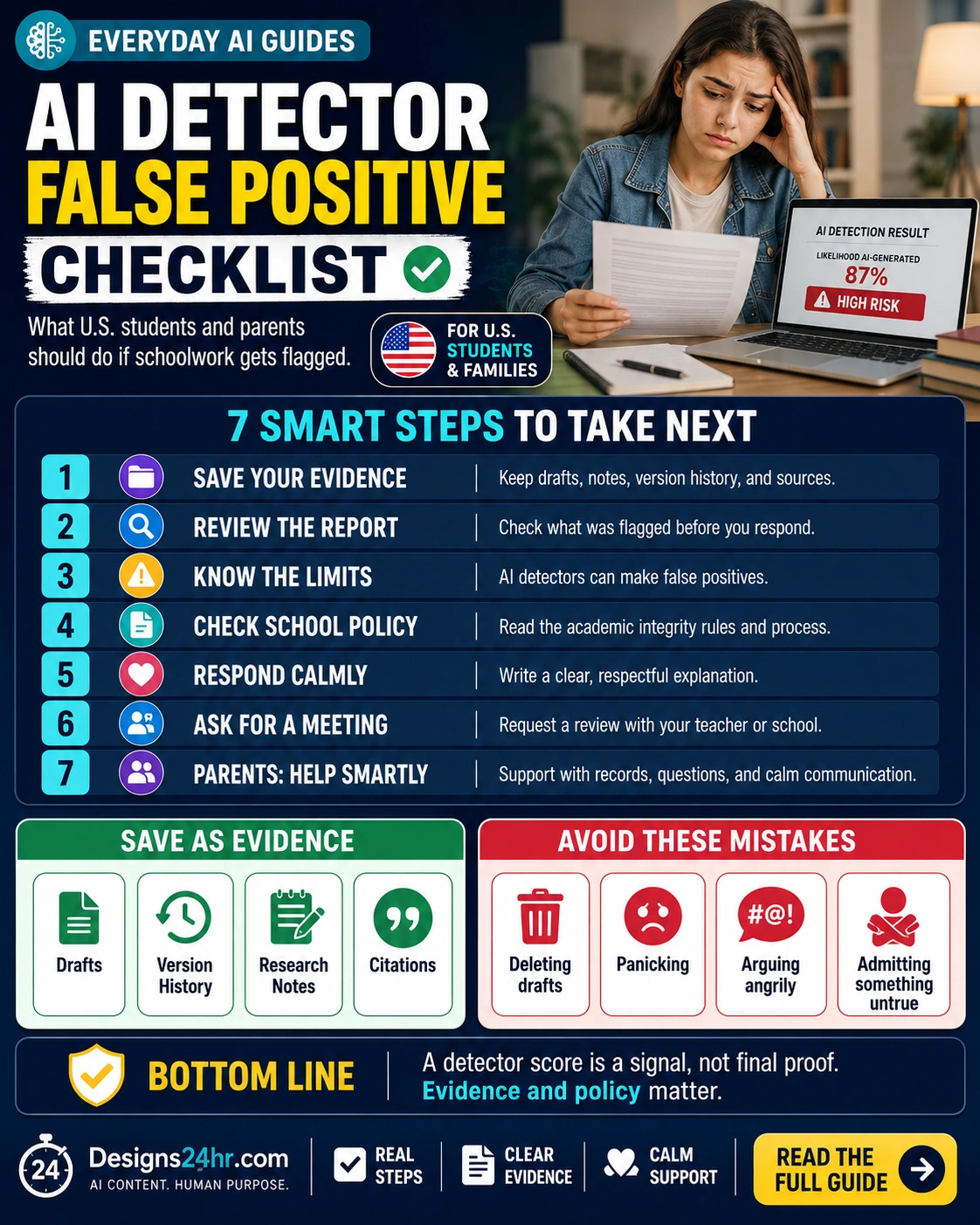
AI detector false positive checklist: if your essay, assignment, discussion post, research paper, homework, or college paper gets flagged as AI-generated, do not panic and do not delete anything. Save your evidence first, review the AI detection report carefully, check the school policy, and respond calmly with records that show your real writing process.
This AI detector false positive checklist is for U.S. students, parents, and families who need practical next steps after a possible AI cheating accusation. An AI detector score can feel scary, but a score alone does not show how the work was created. Your best response is an organized evidence file, a calm message, and a fair review based on policy and context.
Quick answer: Use this AI detector false positive checklist to save drafts, version history, outlines, research notes, citations, assignment instructions, prior writing samples, and the full AI detection report. Then ask what tool was used, what sections were flagged, what school policy applies, and how your evidence can be reviewed before any final decision is made.
AI Detector False Positive Checklist: Start Here Before You Reply
A flagged assignment can feel urgent because students may worry about grades, scholarships, college applications, class standing, academic integrity records, or teacher trust. Parents may also want to respond immediately. But the strongest first move is not anger. It is documentation.
This AI detector false positive checklist helps you slow down and organize proof of the writing process. Instead of arguing only about whether the AI detector is right or wrong, you can show drafts, notes, timestamps, sources, revision history, and communication that support your work.
The goal is simple: treat the AI detector score as a signal that may need review, not as final proof by itself.
7 Steps to Take After an AI Cheating Accusation
Use this AI detector false positive checklist before you send an email, rewrite the paper, attend a meeting, or begin an AI detector appeal.
1. Save Your Evidence Immediately
Before editing, deleting, or rewriting anything, save the records that show how the assignment was created.
Keep drafts, outlines, brainstorming notes, research notes, source lists, citations, screenshots, assignment instructions, teacher feedback, submission receipts, Google Docs version history, Microsoft Word file history, and learning platform timestamps. If the work was submitted through Canvas, Google Classroom, Blackboard, Moodle, Schoology, or another school system, save those records too.
2. Review the Full AI Detection Report
Do not respond to a percentage alone.
Ask what AI detector was used, what sections were flagged, whether the report shows sentence-level results, whether the teacher manually reviewed the writing, and whether the detector score is being treated as evidence or only as a starting point for conversation.
3. Understand AI Detector Accuracy Limits
AI detector accuracy is not perfect.
A formal writing style, repeated academic phrases, citations, templates, technical vocabulary, grammar tools, or non-native English patterns can sometimes affect how writing is judged by detection systems. That does not automatically prove the tool is wrong, but it does mean the score should be reviewed with context.
4. Check the School AI Policy
The school’s actual rules matter more than assumptions.
Look for the course syllabus, assignment instructions, academic integrity policy, AI use policy, disclosure rules, grading rubric, and appeal process. Some teachers allow AI for brainstorming or tutoring but not drafting. Others ban AI completely. Some policies require more evidence than an AI detector score before a student can be penalized.
5. Respond Calmly and Clearly
A calm response gives you a better chance of being heard.
Explain that you understand the concern and would like to review the report. Say that you can provide drafts, notes, version history, sources, and other records showing your writing process. Avoid accusing the teacher, attacking the tool, or writing a long emotional message before you know the school’s process.
6. Ask for a Fair Review or Meeting
A meeting can be more useful than a long email chain.
Ask to review the flagged sections, explain your writing process, show your evidence file, and understand the next step. Students should bring organized records. Parents should support the student with calm questions and documentation instead of taking over the entire conversation.
7. Use the Formal AI Detector Appeal Process If Needed
If the result could seriously affect a grade, record, scholarship, or graduation requirement, ask for the official process.
An AI detector appeal may involve a teacher review, department review, academic integrity office, written response, meeting, or evidence submission. Keep your tone respectful and focus on facts, records, policy, and fairness.
Why an AI Writing Detector False Positive Can Happen
An AI writing detector false positive happens when human-written work is incorrectly flagged as likely AI-generated. This can happen because AI detection tools estimate patterns instead of proving authorship. They may look at sentence predictability, wording patterns, structure, and other signals, but those signals are not direct proof that a student cheated.
Turnitin’s own AI writing detection guidance says false positives are possible in AI models and explains that some lower-score ranges are handled carefully to reduce misinterpretation. Turnitin also says its reports provide data for educators, not a final misconduct decision by themselves. You can read the official guidance here: Turnitin AI writing detection model.
Vanderbilt University also published guidance explaining why it disabled Turnitin’s AI detection tool, citing concerns around transparency, student access to reports, and the impact of false positives. That does not mean every AI detector result is wrong, but it does show why many schools are careful about using AI detection as the only evidence. Read Vanderbilt’s guidance here: Vanderbilt guidance on AI detection.
This is why an AI detector false positive checklist should focus on evidence, process, and policy instead of panic.
Evidence to Save for Your AI Detector False Positive Checklist
The most important part of any AI detector false positive checklist is the evidence file. Save anything that shows how the schoolwork developed from idea to final submission.
Drafts and Outlines
Save rough drafts, partial paragraphs, thesis notes, outlines, brainstorming pages, and earlier versions of the assignment.
Version History
Google Docs, Microsoft Word, and some school platforms may show edits, timestamps, document creation dates, and revision patterns.
Research Notes
Keep source notes, quote lists, article links, book page notes, reading logs, database records, and handwritten planning notes.
Citation Records
Save bibliography drafts, citation manager files, source screenshots, Works Cited pages, reference lists, and notes showing where information came from.
Prior Writing Samples
Older essays and assignments may help show your normal style, especially if the flagged work sounds similar to your previous writing.
Assignment Records
Keep the prompt, rubric, due date, submission receipt, feedback, teacher messages, and platform timestamps.
Mistakes to Avoid If Your Essay Is Flagged as AI
Many students search “what to do if your essay is flagged as AI” because they are scared and want to fix the situation fast. Before you do anything, return to this AI detector false positive checklist and avoid these common mistakes.
Deleting Drafts or Notes
Do not delete files, comments, document history, screenshots, outlines, or research notes. Even messy records can help show a real writing process.
Rewriting Everything in Panic
A rushed rewrite can make the record more confusing. Save the original submission first, then ask what sections were flagged and what evidence can be reviewed.
Arguing Before Reading the Policy
The syllabus, assignment instructions, and academic integrity policy may explain what AI use is allowed, what must be disclosed, and how reviews work.
Admitting Something Untrue
Do not say you used AI if you did not. Also do not deny real AI use if you used a tool in a way the assignment required you to disclose. Be honest and specific.
Sending an Angry Parent Email
Parents can help, but the first message should usually ask for the report, the policy, the review process, and an opportunity to provide evidence.
Turnitin AI False Positive: What Students Should Ask
If the report came from Turnitin or another AI detection platform, ask for context before assuming the result is final. A Turnitin AI false positive concern should be handled with the same AI detector false positive checklist: report, policy, writing history, drafts, and calm review.
Ask: What exact tool or report was used?
Ask: Which sentences, paragraphs, or sections were flagged?
Ask: Was the report manually reviewed by the teacher or only read as a score?
Ask: What school policy explains how AI detector reports are used?
Ask: What evidence can the student provide to show the assignment was written honestly?
The University of Pittsburgh Teaching Center has also described concerns about relying on AI detection tools and does not endorse or support Turnitin’s AI detector. You can review that academic integrity guidance here: University of Pittsburgh academic integrity guidance.
Student Response Template for an AI Detector Appeal
Your first reply should be short, respectful, and focused on evidence. Use the AI detector false positive checklist to gather records before you write a long explanation.
Student Message Template
Hello [Teacher Name],
I saw that my assignment was flagged by an AI detection tool. I understand why this needs to be reviewed, and I would like to provide evidence of my writing process. I have drafts, notes, sources, citations, and version history that show how I worked on the assignment.
Could you please share what sections were flagged, what report or tool was used, and what the next review step is under the course policy?
Thank you.
Use this template as a starting point, not as a script to copy blindly. Your response should match the facts of your assignment and your school’s policy.
Parent Email Template for an AI Cheating Accusation
Parents can help by gathering records, keeping the tone calm, and asking for a fair process. The goal is not to attack the teacher. The goal is to make sure the student’s evidence is reviewed.
Parent Message Template
Hello [Teacher or Administrator Name],
We understand there is a concern about an AI detection report for [Student Name]’s assignment. We would like to review the report, the specific flagged sections, the relevant academic integrity policy, and the process for providing evidence of the student’s writing work.
We are gathering drafts, notes, version history, sources, citations, and assignment records and would appreciate a fair opportunity to discuss them.
Thank you for helping us understand the next step.
This parent message works best when it is paired with a complete AI detector false positive checklist, including student drafts, notes, version history, source records, and the school policy.
AI Detector False Positive Checklist for a Teacher Meeting
If you meet with a teacher, professor, counselor, administrator, or academic integrity team, bring a small organized folder. Make it easy for the school to review the facts.
Bring the Assignment Instructions
Show the prompt, rubric, AI rules, citation requirements, and any teacher notes.
Bring Drafts and Version History
Show how the work changed over time, especially if the document has timestamps and visible revisions.
Bring Research Notes and Sources
Show the notes, quotes, links, books, databases, and citations used to build the assignment.
Bring Prior Writing Samples
Older assignments can help show your normal writing style, vocabulary, sentence structure, and academic voice.
Bring Calm Questions
Ask what tool was used, what parts were flagged, whether the result was manually reviewed, and what evidence the school accepts.
How Students Can Prevent Future AI Detector Problems
Even when a student did nothing wrong, a flagged assignment can be a reminder to keep better records going forward. Future assignments should have a clear paper trail from idea to final submission.
Save drafts as you work. Keep source notes. Write outlines in your own words. Use citations carefully. Follow the teacher’s AI policy. If AI is allowed for brainstorming, tutoring, or grammar help, ask whether it must be disclosed. If AI is not allowed for the assignment, do not use it.
The best protection is a transparent writing process. When you can show your work, revision history, and research path, you are in a stronger position if you ever need an AI detector false positive checklist again.
Helpful Designs24hr Tools for Students and Parents
These free Designs24hr tools can help students, parents, and everyday learners organize questions, write clearer messages, and understand AI more safely.
AI Prompt Generator
Create structured questions for a teacher meeting or organize a calm response draft.
Use the AI Prompt GeneratorEveryday AI Guides
Read more simple AI guides for school, work, family, privacy, and everyday life.
Visit Everyday AI GuidesAI for Students & Learning
Explore student-friendly AI guides for studying, schoolwork, research, and learning skills.
Open AI for Students & LearningAI Safety, Privacy & Trust
Learn safer AI habits for privacy, trust, online tools, scams, and responsible AI use.
Open AI Safety, Privacy & TrustAI for Parents & Families
Find practical AI guides for parents helping kids, teens, and students use AI wisely.
Open AI for Parents & FamiliesFinal Takeaway
An AI detector false positive can be stressful, but the best response is not panic. It is a calm, organized record of how the assignment was created.
Use this AI detector false positive checklist to save drafts, version history, research notes, citations, prior writing samples, assignment records, and the full report. Then ask for a fair review based on evidence, policy, and context.
Bottom line: a detector score is a signal, not the whole story. Save your evidence before you reply.
AI Detector False Positive Checklist FAQs
What is an AI detector false positive?
An AI detector false positive happens when an AI writing detector incorrectly flags human-written work as likely AI-generated.
What should I do first if my essay is flagged as AI?
Start with an AI detector false positive checklist: save drafts, notes, version history, research sources, outlines, citations, assignment instructions, prior writing samples, and the full report before responding.
Can AI detectors be wrong?
Yes. AI detectors can produce false positives and false negatives. A detector report should be treated as a signal that may need review, not automatic proof of cheating.
What is a Turnitin AI false positive?
A Turnitin AI false positive means a Turnitin AI report may have incorrectly identified human-written text as AI-generated. If this happens, ask for the full report, the flagged sections, the school policy, and the review process.
Should parents contact the school immediately?
Parents can help by gathering records, reading the policy, and asking calm questions. It is usually better to request a fair review than to start with an angry or defensive message.
What evidence helps with an AI detector appeal?
Helpful evidence may include Google Docs version history, Microsoft Word edit history, drafts, outlines, research notes, source lists, citation records, teacher feedback, LMS timestamps, assignment instructions, and prior writing samples.
Is an AI detector report enough to prove cheating?
An AI detector report alone should not be treated as the full story. Schools may consider reports, writing history, drafts, teacher judgment, course policy, student evidence, and the assignment context during review.
Related AI School and Safety Resources
Keep learning with practical AI resources for students, parents, families, and everyday readers.