An AI lesson plan generator can organize learning objectives, activities, assessments, classroom materials, and suggested timing within seconds. That speed can help teachers begin planning, but a polished-looking document is not automatically accurate, aligned, accessible, or realistic enough to teach.
An AI-generated plan may include invented standards, incorrect facts, weak assessments, vague differentiation, inaccessible activities, or timing that ignores transitions and student questions. The plan may also recommend links or materials that are unavailable, unsuitable, or not permitted for classroom use.
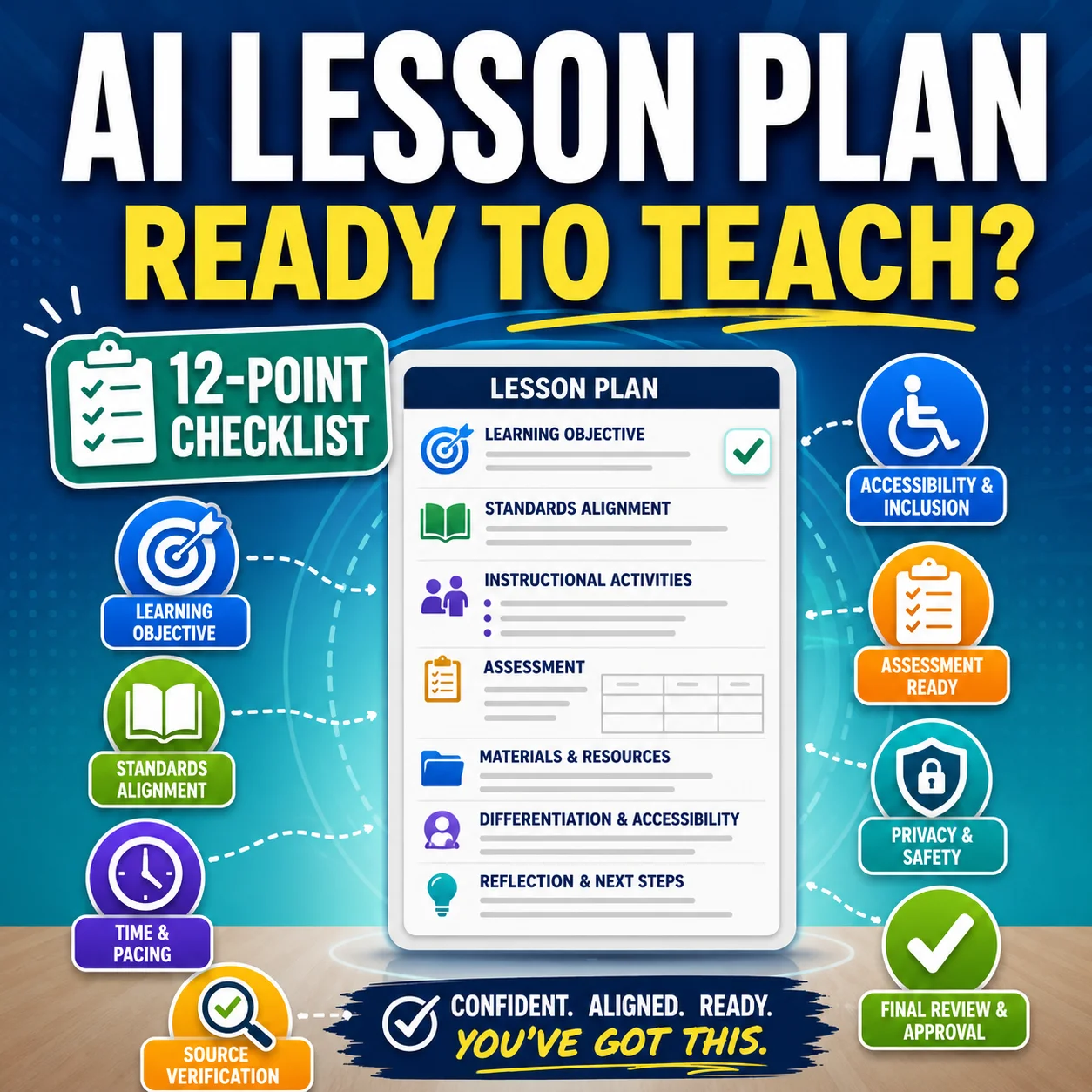
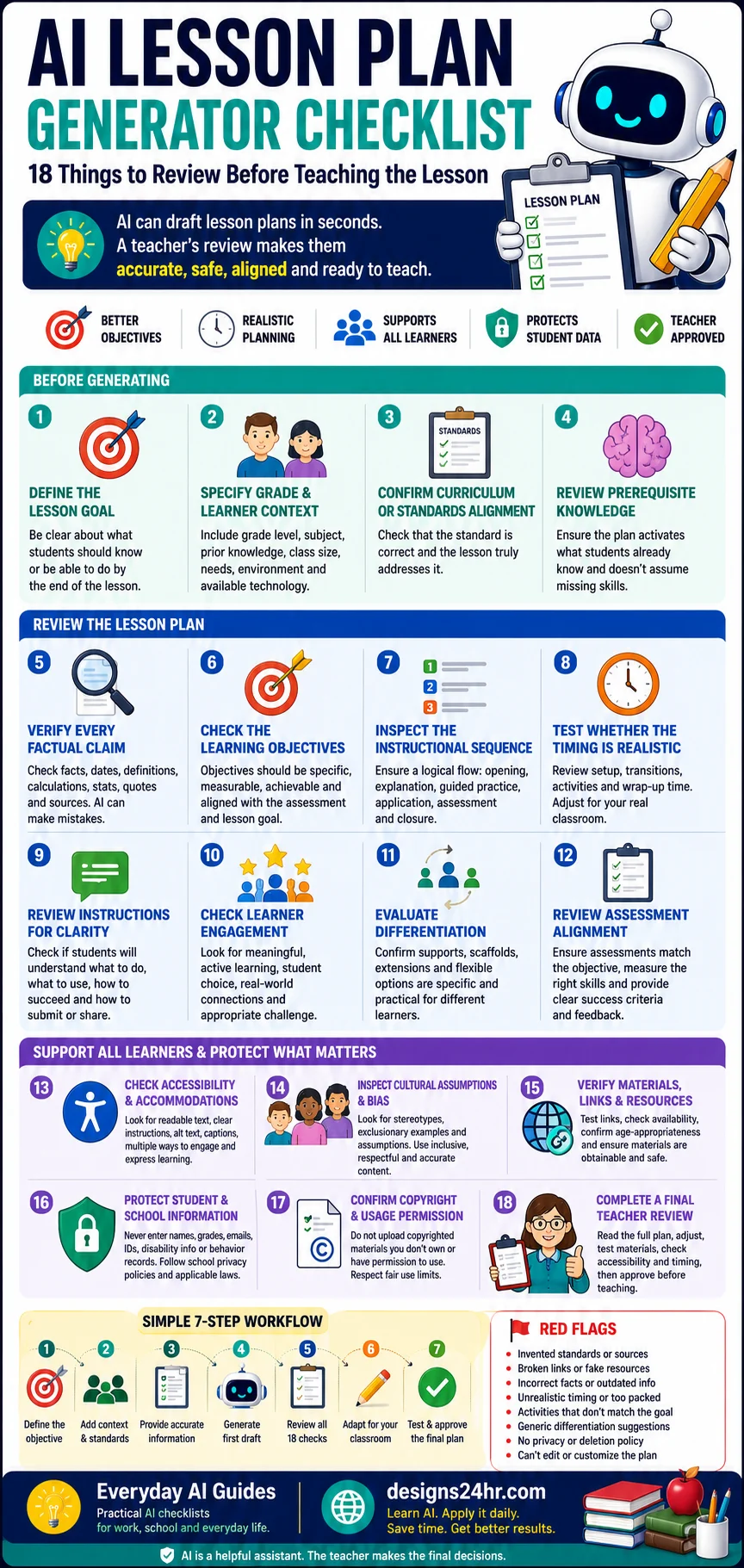
This AI lesson plan generator checklist covers 18 things to review before teaching from an AI-created plan. It is designed for classroom teachers, tutors, homeschool educators, substitute teachers, trainers, and education students who want to use AI as a planning assistant without giving up professional judgment.
Use the checklist with any lesson-planning tool. Available features differ between platforms, so always review the service’s current privacy policy, terms, sharing settings, and export options.
Important: This guide provides general educational information. It is not legal, regulatory, curriculum-compliance, or individualized special-education advice. Follow the policies and procedures that apply to your school, district, institution, or learning environment.
Quick answer: What should teachers check?
Before teaching from an AI-generated lesson plan, verify its goal, learner context, standards, facts, objectives, sequence, timing, instructions, differentiation, assessment, accessibility, privacy, resources, copyright permissions, and classroom practicality. Then adapt the plan and approve the final version yourself.
What is an AI lesson plan generator?
An AI lesson plan generator is a tool that drafts instructional objectives, activities, materials, questions, assessments, and lesson sequences from information supplied by an educator. It may use details such as the subject, grade level, lesson length, learning goal, learner needs, available materials, or curriculum requirements.
Some tools create a simple outline. Others may suggest standards, warm-up activities, direct instruction, guided practice, independent work, differentiation, formative assessment, homework, or an exit ticket. These features can reduce first-draft work, but they do not remove the need to verify and adapt the content.
A generator does not know your learners, classroom routines, available resources, local curriculum, or professional responsibilities unless you provide that context. Even then, it may misunderstand the instructions or produce information that sounds convincing but is inaccurate.
Planning related materials? Review the AI worksheet generator checklist before creating practice sheets and the AI presentation maker checklist before building classroom slides.
First-draft prompt for an AI lesson plan generator
A detailed prompt can produce a more relevant first draft. It cannot guarantee accuracy, curriculum alignment, accessibility, or suitability for your class.
Create a first-draft lesson plan for [grade, age range, or course].

Subject:
Topic:
Lesson length:
Learning objective:
Relevant curriculum requirement:
What learners already know:
Class size:
Available materials:
Available technology:
Learning environment:
Known accessibility needs:
Language or vocabulary considerations:

Include:
- A short opening or prior-knowledge activity
- Clear teacher instructions
- Student-friendly instructions
- Teacher modeling or explanation
- Guided practice
- Independent or collaborative application
- A formative assessment
- A brief lesson closure
- Realistic timing for each section
- Suggested differentiation options
- Accessibility considerations
- Required materials
- A backup activity if technology fails

Requirements:
- Do not invent standards, sources, quotations, or links.
- Identify anything that requires teacher verification.
- Do not include personal student information.
- Do not reproduce copyrighted lesson plans or worksheets.
- Keep the plan editable and suitable for teacher review.
After generating the draft, review it with all 18 checks below. Do not move directly from generation to classroom use.
AI lesson plan generator checklist: 18 things to review
1Define the lesson goal
Start by deciding what the lesson should accomplish. A plan for introducing a new idea requires a different structure from a lesson for practice, revision, application, discussion, or assessment.
Common lesson goals include:
- Introducing a concept or process
- Building a specific skill
- Reviewing previous learning
- Applying knowledge in a new situation
- Analyzing information or comparing viewpoints
- Preparing learners for a project or assessment
- Checking current understanding
Tell the AI what learners should achieve by the end of the lesson. Avoid broad requests such as “make a lesson about ecosystems” without defining the intended outcome.
2Specify the grade and learner context
A grade level is useful, but it is rarely enough. Two classes in the same grade may differ in prior knowledge, reading ability, class size, language experience, technology access, and familiarity with the topic.
Provide relevant context such as:
- Grade, age range, or course level
- Subject and unit
- Class size
- What learners have already studied
- Available classroom time
- Available devices and internet access
- Language and vocabulary needs
- Whether the setting is in person, remote, or hybrid
- Materials and room limitations
Do not enter identifiable student records to provide this context. Describe needs generally unless an approved system and process allows more specific information.
3Confirm curriculum or standards alignment
AI tools may attach a standards code or curriculum label that looks official. Verify it against the appropriate current source instead of assuming the code exists or matches the lesson.
Check that:
- The standard belongs to the correct subject and grade
- The code and wording are accurate
- The plan actually teaches the knowledge or skill described
- The activity and assessment provide evidence of that learning
- Local school or district requirements are also addressed
Do not rely on the label alone: A plan is not genuinely standards-aligned merely because the AI includes a standards code at the top.
4Review prerequisite knowledge
Determine what learners must already understand before they can complete the lesson. AI-generated plans may assume vocabulary, background knowledge, mathematical skills, reading ability, or technology experience that has not been taught.
Ask:
- Which ideas or skills should learners already know?
- Does the opening activate relevant prior knowledge?
- Are new terms defined before they are used?
- Does the activity depend on an untaught skill?
- Is a brief review or diagnostic question needed?
If prerequisite knowledge is missing, add review, modeling, vocabulary support, or a simpler first activity.
5Verify every factual claim
Check the lesson against reliable source material before teaching it. AI can produce inaccurate definitions, invented quotations, incorrect historical details, faulty calculations, outdated statistics, or fabricated links.
Verify:
- Names and dates
- Definitions and terminology
- Scientific explanations
- Historical context
- Mathematical examples and units
- Statistics and numerical claims
- Quotations and attributions
- Sources, references, and URLs
Teacher-review principle: Confident wording is not proof that an AI-generated claim is correct. Verify important content independently.
6Check the learning objectives
A useful learning objective should describe something learners can demonstrate. Broad words such as “know” or “understand” can make it difficult to decide what success looks like.
Too broad:
“Students will understand ecosystems.”
More specific:
“Students will classify organisms as producers, consumers, or decomposers and explain one relationship within a food chain.”
Check whether the objective is:
- Specific and understandable
- Observable or measurable
- Appropriate for the learner group
- Achievable within the available time
- Supported by the lesson activities
- Measured by the final assessment
7Inspect the instructional sequence
The lesson should move through a logical learning progression rather than present a random collection of activities.
A possible sequence is:
- Opening or prior-knowledge activation
- Clear introduction of the goal
- Teacher explanation or modeling
- Guided practice with support
- Independent or collaborative application
- Assessment or reflection
- Closure and next step
This is not a required template for every subject. A discussion, laboratory activity, creative workshop, physical lesson, or inquiry task may need a different structure. The sequence should support the objective and make sense for the learning experience.
8Test whether the timing is realistic
AI plans often estimate only the activity itself. Real classrooms also require time for setup, instructions, transitions, questions, group formation, material distribution, technology problems, cleanup, assessment, and closure.
Review each segment and create a practical estimate:
| Lesson component | AI estimate | Teacher estimate | Final time |
|---|---|---|---|
| Opening and instructions | 5 minutes | 7 minutes | 7 minutes |
| Teacher explanation | 10 minutes | 12 minutes | 12 minutes |
| Group activity | 15 minutes | 22 minutes | 22 minutes |
| Exit ticket and closure | 5 minutes | 7 minutes | 7 minutes |
Leave a small buffer. A lesson with every minute filled may be difficult to adjust when learners need more explanation.
9Review instructions for clarity
Read the instructions from the learner’s point of view. The plan may tell the teacher what to do without providing enough information for students to begin the activity successfully.
Learners should be able to identify:
- What task they need to complete
- Which materials they should use
- Whether the work is individual, paired, or collaborative
- How much time is available
- What a successful response or product looks like
- How the work will be submitted, presented, or discussed
Replace vague directions such as “discuss the topic” with a clear question, expected outcome, time limit, and participation structure.
10Check learner engagement
Engagement should support learning rather than add entertainment that distracts from the objective. A game, video, or digital activity is not automatically meaningful simply because it feels interactive.
Look for appropriate opportunities for:
- Student choice
- Discussion and explanation
- Collaboration
- Problem solving
- Hands-on application
- Relevant real-world connections
- Reflection and self-checking
- Appropriate challenge
Not every lesson requires games, devices, group work, or movement. Select methods that fit the learners, environment, content, and objective.
11Evaluate differentiation suggestions
AI may suggest generic differentiation such as “give struggling students extra help” or “provide advanced students with more challenging work.” These statements do not explain what should actually change.
Useful support may include:
- Preteaching important vocabulary
- Breaking instructions into smaller steps
- Providing a model or worked example
- Using visual organizers
- Offering multiple response formats
- Providing additional guided practice
- Using flexible grouping
- Offering an extension that deepens the same objective
- Reducing unnecessary cognitive load
Important: General AI-generated suggestions are not a substitute for individualized planning, formal accommodations, or professional decisions about a specific learner.
12Review assessment alignment
The assessment should measure the stated objective. A lesson about applying a process should not end with an assessment that tests only vocabulary recall.
Check:
- What evidence will demonstrate learning
- Whether the assessment covers what was taught
- Whether the response format matches the intended skill
- Whether success criteria are clear
- Whether scoring or feedback is practical
- Whether students have an accessible way to demonstrate learning
When AI creates assessment questions, review the AI quiz generator checklist before using them. For written work, the AI essay grader checklist explains why automated evaluation also requires human oversight.
13Check accessibility and accommodations
Review whether learners can access the information, understand the task, and demonstrate what they know without unnecessary barriers.
Check for:
- Readable text and suitable language complexity
- Clear headings, labels, and instructions
- Sufficient visual contrast
- Information that does not depend on color alone
- Captions or transcripts for meaningful audio and video
- Useful text alternatives for meaningful images
- Keyboard access for required digital interactions
- Alternative ways to participate or respond when appropriate
- Compatibility with available assistive technology
Universal Design for Learning encourages educators to consider multiple means of engagement, representation, and action and expression. This can help teachers review how learners access content and show their understanding.
Learn more from the official CAST Universal Design for Learning Guidelines and the W3C Web Accessibility Initiative tutorials.
14Inspect cultural assumptions and bias
AI-generated examples may include stereotypes, oversimplifications, or assumptions that are unrelated to the learning objective.
Look for:
- Gender, cultural, racial, or occupational stereotypes
- Assumptions about family structure
- Examples that require unnecessary financial resources
- Exclusionary or disrespectful language
- Historical or geographical oversimplification
- Token representation without meaningful context
- Idioms or cultural references that create an unrelated barrier
Replace questionable examples with original, respectful, and contextually accurate material. Review sensitive subjects with particular care.
15Verify materials, links, and resources
Do not assume a resource exists merely because the AI provides a realistic title or URL. Open every link and inspect every recommended material before class.
Confirm that:
- Links work and lead to the intended resource
- Videos and webpages are still available
- Content is accurate and age-appropriate
- Downloads are safe and permitted
- Physical materials are affordable and obtainable
- The classroom has enough devices or supplies
- Accounts, subscriptions, or permissions are available
- The activity has a backup option if technology fails
If the lesson uses classroom slides, check visual clarity and source permissions with the AI presentation maker checklist.
16Protect student and school information
Avoid entering identifiable or confidential information into an AI lesson-planning service unless the platform and process are approved for that purpose.
Do not include unnecessary:
- Student names
- Email addresses
- Identification numbers
- Grades or assessment results
- Disability or accommodation records
- Behavioral information
- Medical or family details
- Confidential school documents
Review what the service collects, whether prompts and uploads are stored, how long information is retained, whether data may be used to improve AI systems, who receives it, and how deletion works.
The U.S. Department of Education provides guidance for schools evaluating privacy and security when using third-party online educational services. Review Protecting Student Privacy While Using Online Educational Services.
17Confirm copyright and usage permission
Use original, licensed, public-domain, openly licensed, or otherwise permitted materials. Do not upload or reproduce protected educational content merely because the AI tool makes it technically possible.
Use extra care with:
- Paid lesson plans
- Complete textbooks or chapters
- Teacher-edition materials
- Commercial worksheets
- Test banks and answer keys
- Restricted curriculum packages
- Copyrighted illustrations and photographs
- Proprietary training documents
In the United States, fair use is evaluated case by case using multiple factors. An educational purpose does not automatically make every upload, copy, adaptation, or distribution permissible.
For general information, see the U.S. Copyright Office’s fair-use guidance. Seek qualified advice when a specific legal determination is required.
18Complete a final teacher review
Read and adapt the complete lesson before teaching it. A final review should cover both the written plan and the real classroom experience.
- Read the complete plan from beginning to end.
- Verify facts, standards, sources, and links.
- Compare every activity with the learning objective.
- Rehearse complex instructions or demonstrations.
- Adjust the timing for setup and transitions.
- Test required media, files, devices, and materials.
- Review differentiation and accessibility.
- Remove private or unnecessary information.
- Confirm copyright and usage permission.
- Prepare a backup activity or alternative.
- Approve the final version personally.
If another educator, department lead, curriculum specialist, or administrator normally reviews this type of lesson, follow that process as well.
Sample audit of an AI-generated lesson plan
This original mini-audit shows how a professional-looking draft can still require significant teacher correction.
Sample draft: Fifth-grade ecosystems lesson
Problem 1: Broad objective
AI draft: “Students will understand ecosystems.”
Teacher revision: “Students will classify producers, consumers, and decomposers and explain one relationship in a food chain.”
Problem 2: Unverified standard
AI draft: Includes a standards code without a source.
Teacher revision: Verify the current code and wording through the official state, district, or curriculum source.
Problem 3: Unrealistic timing
AI draft: Ten minutes for instructions, group formation, research, poster creation, and presentations.
Teacher revision: Shorten the task, provide prepared information cards, or divide it across lessons.
Problem 4: Weak assessment fit
AI draft: Exit ticket asks learners only to define “ecosystem.”
Teacher revision: Ask learners to classify three organisms and explain one food-chain relationship.
Problem 5: Accessibility barrier
AI draft: Students must identify categories using color alone.
Teacher revision: Add written labels, symbols, and verbal instructions so color is not the only cue.
Problem 6: Invented resource
AI draft: Recommends a video link that does not work.
Teacher revision: Replace it with a verified, permitted resource and prepare an offline alternative.
The AI draft may still be useful as a starting structure. The teacher’s review turns that structure into a lesson that is more accurate, measurable, realistic, and appropriate for the actual learners.
AI lesson plan quality comparison table
| Review area | Stronger lesson plan | Warning sign |
|---|---|---|
| Learning objective | Specific, observable, and achievable | Broad statement such as “understand the topic” |
| Standards | Verified and meaningfully addressed | Unverified code added for appearance |
| Facts | Checked against reliable sources | Unsupported or fabricated claims |
| Sequence | Activities build toward the objective | Random activities without progression |
| Timing | Includes setup, transitions, and closure | Every minute is filled unrealistically |
| Differentiation | Specific scaffolds and flexible options | Generic instruction to “make it easier” |
| Assessment | Measures the stated objective | Tests unrelated facts or only surface recall |
| Accessibility | Multiple ways to access and demonstrate learning | One inflexible format with avoidable barriers |
| Resources | Verified, available, and appropriate | Broken, invented, unsafe, or inaccessible links |
| Privacy | No unnecessary personal information | Student records or confidential details in prompts |
| Copyright | Original or appropriately permitted material | Copied paid plans, worksheets, or textbooks |
| Approval | Adapted and approved by the educator | Used immediately without verification |
AI lesson plan generator red flags
Pause and investigate further when a tool or generated plan contains any of these warning signs:
- Invented or incorrect curriculum standards
- Fabricated quotations, references, or links
- Incorrect facts, dates, definitions, or calculations
- Activities that do not support the objective
- An assessment that measures something different from the lesson
- Unrealistic timing with no transitions or setup
- Materials that are unavailable or inappropriate
- Age-inappropriate vocabulary or examples
- Generic differentiation without practical support
- Stereotypes or exclusionary assumptions
- Visual information provided only through color
- Requests for unnecessary student information
- No clear privacy, retention, or deletion information
- Claims of guaranteed standards or legal compliance
- No way to edit or export the plan
- A plan that appears ready to teach but contains no verification notes
Simple seven-step workflow for creating a lesson plan with AI
After the lesson, note what worked and what needs adjustment. Real classroom evidence should guide future planning more than the AI’s original structure.
Frequently asked questions
What is an AI lesson plan generator?
An AI lesson plan generator is a tool that drafts lesson objectives, instructional activities, materials, assessments, and suggested timing from information supplied by an educator. It can help produce a first draft, but the resulting plan still requires verification and adaptation for the actual learners, curriculum, classroom, and available resources.
Can AI create a complete lesson plan?
AI can draft the major components of a lesson plan, but “complete” does not necessarily mean ready to teach. The output may contain errors, invented standards, weak assessments, unrealistic pacing, inaccessible activities, or unsuitable resources. A qualified educator should review and adapt every section before classroom use.
Are AI-generated lesson plans accurate?
Not always. An AI-generated lesson plan may contain incorrect facts, fabricated sources, outdated information, or activities that do not align with the objective. Verify factual claims, curriculum references, links, examples, assessment questions, and instructional recommendations using reliable sources and professional judgment.
Can teachers use AI for lesson planning?
AI can support brainstorming, organization, first-draft writing, activity ideas, and material preparation when its use is consistent with applicable school or district policies. Teachers should protect student information, verify the output, check source permissions, and remain responsible for the final instructional decisions.
Can an AI lesson plan generator align lessons with standards?
An AI tool can attempt to suggest standards, but it may provide an incorrect code, outdated wording, or superficial alignment. Verify every cited standard through the appropriate official curriculum source and confirm that the objective, instruction, practice, and assessment genuinely address it.
How do I check an AI-generated lesson plan?
Review the goal, learner context, prerequisite knowledge, standards, facts, objectives, instructional sequence, timing, instructions, engagement, differentiation, assessment, accessibility, bias, materials, privacy, copyright permissions, and final classroom practicality. Test links and activities before personally approving the plan.
Can AI differentiate a lesson for different learners?
AI can suggest general scaffolds, vocabulary support, alternative formats, extension activities, or additional practice. Those suggestions may be generic or unsuitable for individual learners. Educators should evaluate them carefully and follow established processes for formal accommodations, modifications, and individualized support.
Is it safe to enter student information into an AI lesson planner?
Avoid entering identifiable or confidential student information unless the platform and process are approved for that use. Use general descriptions instead of names, grades, email addresses, identification numbers, disability records, behavior details, family information, or private assessment data.
Can I upload textbook content to an AI lesson plan generator?
Do not assume that educational use automatically permits uploading protected textbook content. Consider copyright ownership, licensing terms, the amount used, the purpose, the effect on the market, and the AI service’s terms. Original notes, authorized excerpts, and appropriately licensed materials may be safer choices.
Should teachers disclose that AI helped create a lesson?
Disclosure expectations vary by school, district, institution, assignment, and professional policy. Follow the rules that apply to your setting. When disclosure is required, state accurately how AI assisted and what human verification or adaptation was completed.
Can substitute teachers use AI-generated lesson plans?
An AI-generated structure may help organize instructions, but a substitute plan should be especially clear, realistic, self-contained, and consistent with school procedures. The regular teacher or another authorized educator should verify the content, materials, timing, student expectations, safety details, and backup options.
What is the biggest risk of using an AI lesson planner?
The biggest risk is treating a fluent, professionally formatted draft as if it has already been verified. A convincing plan can still contain incorrect information, weak alignment, privacy problems, unsuitable resources, inaccessible activities, or impractical timing. Human review is the essential safeguard.
Final takeaway
An AI lesson plan generator can reduce the time required to organize an initial draft, brainstorm activities, and create a basic instructional structure. Its speed is most useful when the teacher remains in control of the final decisions.
Before teaching from any generated plan, verify its learning goal, learner context, standards, facts, objectives, sequence, timing, instructions, assessment, differentiation, accessibility, resources, privacy, and copyright permissions. Adapt every section to the real classroom rather than assuming the AI understands local needs.
Use this AI lesson plan generator checklist as a repeatable review process. Let AI help with drafting, but let verified information, professional judgment, school policy, and knowledge of your learners determine the final lesson.
Authoritative resources
- U.S. Department of Education: Artificial Intelligence and the Future of Teaching and Learning
- U.S. Department of Education: Protecting Student Privacy While Using Online Educational Services
- CAST Universal Design for Learning Guidelines
- W3C Web Accessibility Initiative Tutorials
- W3C Images Tutorial: Text Alternatives
- W3C Form Instructions and Labels Guidance
- U.S. Copyright Office: More Information on Fair Use
Editorial note: AI tools, pricing, features, privacy policies, terms, curriculum requirements, and educational policies can change. Review current information before using a service. Designs24hr is not affiliated with or endorsed by any AI lesson-planning platform, school district, standards organization, accessibility organization, or government agency referenced in this guide.