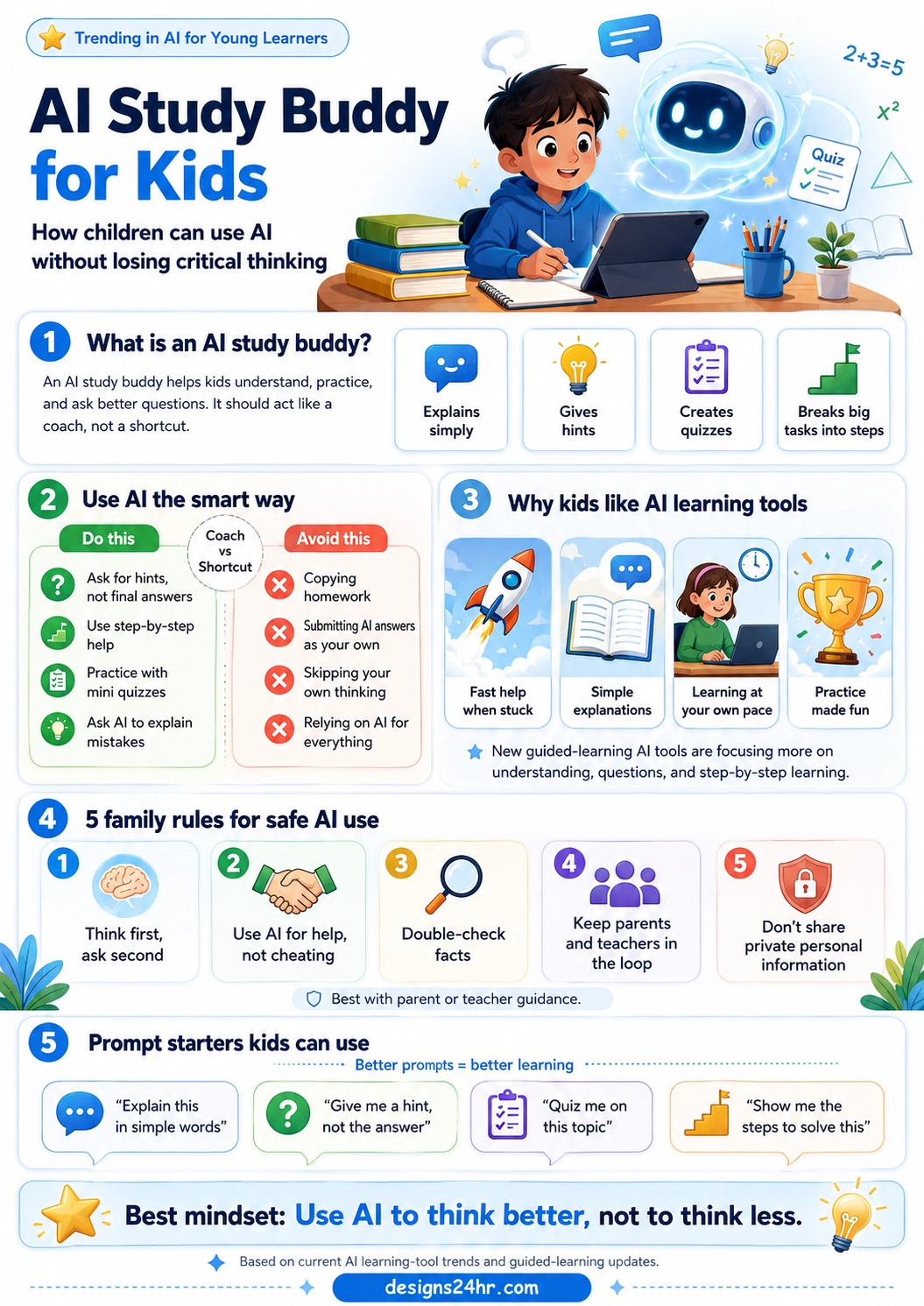
AI study buddy for kids is one of the most important AI learning ideas parents and teachers should understand right now. Used the right way, AI can help children ask better questions, get simple explanations, practice with quizzes, and learn step by step without simply copying answers.
The key is mindset. An AI study buddy should act like a coach, not a shortcut. It should help kids think better, not think less.
That difference matters because AI learning tools are becoming more common in schools, homes, and student workflows. Google’s Guided Learning in Gemini, for example, is designed to move students from quick answers toward deeper understanding by using questions, step-by-step breakdowns, images, videos, and quizzes.
Quick answer: An AI study buddy for kids is an AI tool used for learning support, not cheating. It can explain topics simply, give hints, create practice quizzes, and break big tasks into smaller steps while still keeping the child responsible for thinking.
Key takeaways for parents and young learners:
- Best use: Use AI for hints, explanations, practice, and step-by-step learning.
- Wrong use: Do not copy AI answers and submit them as your own work.
- Best rule: Think first, ask AI second, then explain the answer in your own words.
- Parent role: Set simple rules, review usage, and keep learning focused on understanding.
What Is an AI Study Buddy for Kids?
An AI study buddy for kids is an AI assistant that helps children understand school topics, practice skills, ask better questions, and learn at their own pace. It is not supposed to replace a parent, teacher, tutor, or the child’s own effort.
The best AI study buddy works like a patient learning coach. It can explain a math problem in simpler words, turn a science topic into a quiz, help a child brainstorm ideas for a story, or show the steps needed to solve a problem.
But it should not become an answer machine. If a child uses AI only to get final answers, the tool can weaken learning instead of improving it.
Why AI Learning Tools for Children Are Trending
AI learning tools for children are trending because students are already surrounded by AI-powered search, chatbots, writing tools, homework helpers, and study apps. Parents are now asking a practical question: how can kids use AI safely without becoming dependent on it?
This is why guided-learning AI tools are getting more attention. The goal is not just to answer questions faster. The better goal is to help children build understanding through hints, follow-up questions, examples, practice, and reflection.
Google describes Guided Learning in Gemini as a learning companion that helps people go deeper into topics through questions and step-by-step support. That direction shows where AI education is moving: away from “give me the answer” and toward “help me understand.”
AI Study Buddy vs. AI Homework Shortcut
The most important difference parents should teach is the difference between using AI as a study buddy and using AI as a shortcut.
| Smart AI Study Buddy Use | Wrong AI Shortcut Use |
|---|---|
| Ask for a hint before trying again. | Ask AI for the final answer immediately. |
| Use AI to explain a topic in simpler words. | Copy AI text without understanding it. |
| Ask AI to quiz you after studying. | Submit AI answers as your own homework. |
| Use AI to find mistakes in your thinking. | Let AI do all the thinking for you. |
| Explain the answer back in your own words. | Move on without learning the idea. |
How Kids Can Use AI Safely for Learning
Parents do not need to ban every AI tool. A better approach is to teach children how to use AI with rules, purpose, and supervision.
1. Use AI for hints, not final answers
The safest learning habit is to ask for help without giving away the answer. A child can say, “Give me a hint, but do not solve it for me.” This keeps the child involved in the thinking process.
2. Use AI for step-by-step explanations
AI can help break large tasks into smaller steps. This is useful for math problems, reading comprehension, science concepts, writing assignments, and study plans.
3. Use AI for mini quizzes
One of the best uses of an AI tutor for kids is practice. Children can ask AI to create a short quiz, check their answers, and explain what they missed.
4. Use AI to explain mistakes
Learning improves when kids understand why an answer is wrong. AI can help explain mistakes in simple language, but the child should still redo the work and explain the corrected answer.
5. Use AI with parent or teacher guidance
For young learners, AI works best when adults are involved. Parents and teachers can help children understand when AI is helpful, when it is risky, and when they need to rely on their own thinking first.
5 Family Rules for Safe AI Use
Families can make AI safer by using clear rules. These rules should be simple enough for kids to remember and strong enough to prevent bad habits.
- Think first, ask second. Try the problem before asking AI for help.
- Use AI for help, not cheating. AI can explain, guide, and quiz, but it should not do the assignment.
- Double-check facts. AI can make mistakes, so important answers should be checked with a teacher, textbook, or trusted source.
- Keep parents and teachers in the loop. Children should not hide AI use when it affects schoolwork.
- Do not share private personal information. Kids should avoid sharing full names, addresses, school details, passwords, phone numbers, or private family information.
Parent tip: The best safe AI rule for kids is not “never use AI.” It is “use AI in a way that helps you understand the work better.”
Best Prompt Starters Kids Can Use
Good prompts can turn AI from an answer machine into a learning coach. Here are simple prompt starters children can use safely:
- “Explain this in simple words.”
- “Give me a hint, not the answer.”
- “Quiz me on this topic.”
- “Show me the steps to solve this.”
- “Ask me questions so I can figure it out.”
- “Check my answer and explain what I missed.”
- “Help me make a study plan for this chapter.”
- “Explain this like I am in elementary school.”
How AI Can Build Critical Thinking for Children
AI critical thinking for children starts with teaching kids to question the answer. AI should not be treated as always correct. Kids should learn to ask, “Does this make sense?” “Can I prove it?” and “Can I explain it myself?”
That is why parents should encourage children to use AI for reasoning, not just results. The child should still compare answers, show work, check facts, and explain the solution in their own words.
A useful AI study habit is the “three-step check”: try first, ask for a hint, then explain the final answer without AI.
Best Uses of AI for Young Learners
AI for young learners can be helpful when the task is focused on understanding, practice, or creativity. Here are some of the strongest learning-friendly uses:
| Learning Need | Helpful AI Use | Safe Prompt Example |
|---|---|---|
| Math practice | Get hints and step-by-step guidance. | “Give me one hint for this math problem, but do not solve it.” |
| Reading comprehension | Explain difficult words or summarize a passage. | “Explain this paragraph in simple words.” |
| Science learning | Turn a topic into examples, diagrams, or quiz questions. | “Quiz me on photosynthesis with five questions.” |
| Writing help | Brainstorm ideas and improve structure. | “Help me make an outline, but do not write the essay for me.” |
| Test prep | Create practice questions and review weak areas. | “Ask me one question at a time and explain my mistakes.” |
When Kids Should Not Use AI
AI is not the right tool for every learning moment. Kids should avoid using AI when the assignment specifically says not to use it, when they are supposed to show their own thinking, or when they feel tempted to copy an answer instead of learning.
Children should also avoid using AI for private personal problems without adult support. For emotional, health, safety, or serious school issues, a trusted adult is more important than a chatbot.
What Parents Should Check Before Letting Kids Use AI
Before using any AI homework helper for kids, parents should check the tool’s age rules, privacy settings, parental controls, data policies, and whether the product is designed for children or general users.
Parents should also set expectations before the child starts using the tool. The goal should be clear: AI is allowed for learning support, not for cheating or replacing effort.
AI Study Buddy for Kids: The Best Mindset
The best mindset is simple: use AI to think better, not to think less.
When children use AI for hints, quizzes, explanations, and step-by-step learning, it can become a powerful study partner. But when they use it to skip the work, it becomes a shortcut that can weaken learning.
That is why the future of AI learning is not just about better tools. It is about better habits.
Sources and Further Reading
This article is based on current AI learning-tool trends and guided-learning updates, including Google’s official explanation of Guided Learning in Gemini. Read more here: Google: Guided Learning in Gemini.
For more beginner-friendly AI explainers, visit The AI Edge by Designs24hr. You can also try helpful tools like the Explain This For Me tool and the Plain Language Translator for simpler explanations.
FAQs About AI Study Buddy for Kids
What is an AI study buddy for kids?
An AI study buddy for kids is an AI tool used to help children understand topics, get hints, practice with quizzes, and learn step by step. It should support learning, not replace the child’s own thinking.
Is AI safe for kids to use for homework?
AI can be helpful for homework when kids use it for explanations, hints, and practice. It becomes a problem when children copy answers, submit AI work as their own, or share private personal information.
How can kids use AI without cheating?
Kids can use AI without cheating by asking for hints, examples, quizzes, and explanations instead of final answers. They should also explain the final answer in their own words.
What are the best AI prompts for young learners?
Good prompts include “Give me a hint, not the answer,” “Explain this in simple words,” “Quiz me on this topic,” and “Show me the steps to solve this.”
Can AI improve critical thinking for children?
AI can support critical thinking when children use it to ask better questions, compare answers, check reasoning, and explain ideas in their own words. It should not be used to skip thinking.
Should parents monitor kids using AI tools?
Yes. Parents should monitor AI use, set clear rules, check privacy settings, and make sure the tool is being used for learning support instead of cheating or unsafe conversations.
What is the best rule for kids using AI?
The best rule is: think first, ask AI second, and explain the answer yourself. This keeps AI focused on learning instead of shortcuts.
AI is moving fast, but learning should still feel human, curious, and meaningful. Designs24hr helps families, students, and everyday users understand AI in a simple way. Share your thoughts in the comments, tell us how your family uses AI for learning, and come back to Designs24hr whenever you want to learn something new about AI and design.