YouTube Likeness Detection Explained for U.S. Creators
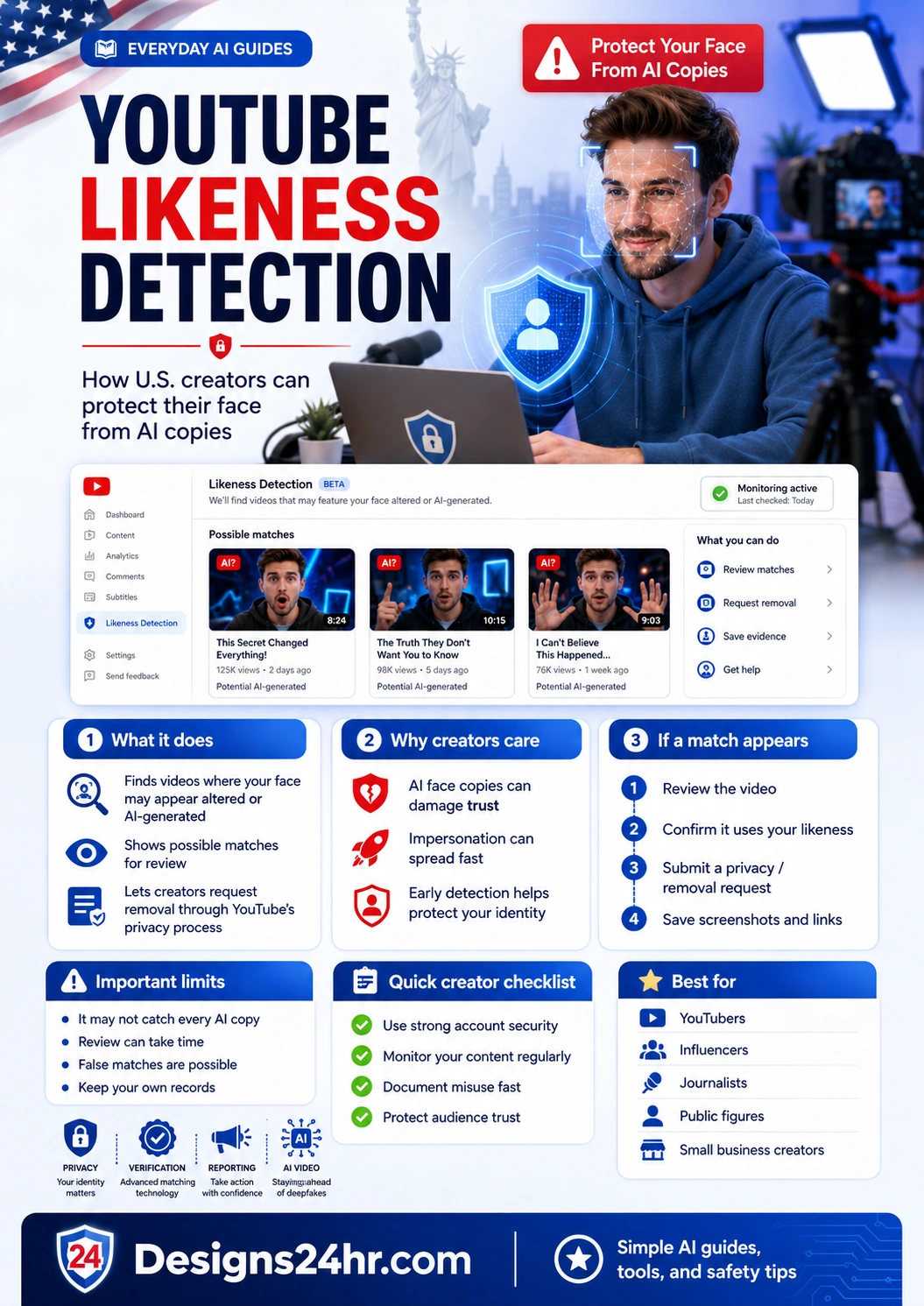
YouTube Likeness Detection is a YouTube Studio feature designed to help creators find videos where their face may appear altered, copied, or generated by AI. For U.S. creators, this matters because AI video tools can make face copies look convincing, spread quickly, and damage audience trust before the real person even knows the video exists.
Quick Answer: What Is YouTube Likeness Detection?
YouTube Likeness Detection helps eligible creators find YouTube videos where their face appears to be altered or generated by AI. When possible matches are found, creators can review the videos and decide whether to request removal through YouTube’s privacy complaint process.
The simple idea is this: if AI-generated videos are using your face, YouTube wants to give creators a clearer way to find possible matches, review them, and take action when the content violates privacy rules.
In This Guide
- Why likeness detection matters for U.S. creators
- How YouTube Likeness Detection works
- Who can use the feature
- What verification may require
- What to do when a match appears
- What the tool cannot guarantee
- Privacy and identity protection notes
- Creator checklist before AI copies your face
- Helpful Designs24hr tools to use next
- FAQs about YouTube Likeness Detection
Why YouTube Likeness Detection Matters for U.S. Creators
The creator economy is built on identity, trust, and audience connection. If someone uses AI to create a realistic video that looks like you, viewers may believe you said something, promoted something, or supported something you never approved.
That risk is especially serious for U.S. creators who use YouTube for education, business, news commentary, public communication, coaching, entertainment, reviews, or personal branding. A fake AI video can confuse viewers, harm credibility, damage partnerships, or create privacy concerns.
YouTube Likeness Detection is important because it moves creator protection from “hope nobody copies me” toward a more practical review workflow inside YouTube Studio.
What the Feature Is Designed to Help With
How YouTube Likeness Detection Works
YouTube says the feature helps creators find content where their face appears altered or generated by AI. If relevant content is found, creators can review it and decide whether to request removal through the privacy complaint process.
Think of it like a creator identity dashboard. The tool is not just looking for copyright violations. It is focused on your visual likeness, especially when AI may have been used to create or alter a face that looks like you.
It looks for possible matches
The tool can surface videos that may feature your face or an AI-generated version of your face. A match does not automatically mean a violation happened. It means the creator should review it carefully.
It gives creators review control
Creators can check the possible match and decide whether the content looks harmless, authorized, misleading, synthetic, or privacy-invasive.
It connects to YouTube’s privacy process
If the video appears to use your realistic likeness without permission, the next step may be requesting removal through YouTube’s privacy complaint system.
Who Can Use YouTube Likeness Detection?
YouTube announced that Likeness Detection is expanding to creators 18 and over. That makes the topic more important for everyday creators, not only celebrities or major public figures.
The feature is especially relevant for:
- YouTubers and Shorts creators
- Influencers and personal brands
- Journalists and commentators
- Educators and coaches
- Small business creators
- Public figures and civic voices
- Creators whose face appears often in thumbnails, videos, livestreams, or interviews
For creators who do not yet see the feature, the safest move is to keep checking YouTube Studio updates, maintain strong account security, and document any suspicious AI-generated content manually.
What Verification May Require
Because the tool deals with identity and likeness, creators should expect verification steps. YouTube’s process may ask creators to confirm identity before using or completing likeness detection setup.
This makes sense because a face-detection tool should not be easy for someone else to misuse. If a bad actor could enroll another person’s face without permission, the protection system itself could become risky.
Before setting it up, creators should make sure they are using their real YouTube account, checking official YouTube Studio prompts, and avoiding fake emails or third-party messages that claim to “activate” likeness detection outside YouTube.
What Creators Can Do When a Match Appears
If YouTube Likeness Detection shows a possible match, do not react emotionally or rush. Review the video, save evidence, and decide whether the content is actually using your likeness in a realistic altered or synthetic way.
Review the matched video
Watch enough of the video to understand whether it actually uses your face, whether it is AI-generated, and whether viewers could reasonably think it is you.
Check whether it is authorized
Ask whether you gave permission, whether the content is from your own team, whether it is a clip you licensed, or whether it appears to be a fake AI copy.
Save screenshots and links
Before submitting any request, save the video URL, channel name, screenshots, upload date, title, description, and any evidence that the content is confusing or unauthorized.
Use YouTube’s privacy complaint process
If the video realistically alters or creates content that looks or sounds like you, YouTube’s identity protection guidance explains that you can ask for removal through the privacy process.
Communicate calmly if needed
If you need to contact a brand, collaborator, school, client, or audience, keep your message factual. Explain that a possible AI-generated likeness issue is being reviewed and avoid making claims you cannot support yet.
What YouTube Likeness Detection Cannot Guarantee
YouTube Likeness Detection is useful, but creators should not treat it like a perfect shield. It may not catch every AI copy, it may surface possible matches that require review, and removal decisions may depend on YouTube’s privacy rules and the details of the content.
- It may not catch everything: AI-generated content can appear in different styles, edits, formats, or contexts.
- A match is not always a violation: Creators still need to review the content carefully.
- Removal is not automatic: YouTube may evaluate complaints based on several factors.
- It is not copyright protection: Likeness protection and copyright protection are different issues.
- It does not replace monitoring: Creators should still search their name, brand, and channel identity regularly.
Privacy and Identity Protection Notes
Creator identity protection is not only about finding fake videos. It is also about protecting your account, your personal information, and your audience’s trust.
Creators should be careful with emails, forms, and services that claim to help with AI face removal. Use official YouTube help pages and YouTube Studio whenever possible. Do not upload identity documents, selfies, or private account information to random third-party websites promising quick AI deepfake removal.
If you believe a realistic AI version of your face or voice is being used, focus on verified reporting steps, evidence collection, and calm documentation.
Creator Checklist: What to Do Before AI Copies Your Face
The best time to prepare is before a fake video appears. Use this checklist to reduce risk and respond faster if something happens.
- Turn on strong YouTube and Google account security.
- Use two-step verification for your creator accounts.
- Keep a record of your official channels, handles, and brand pages.
- Monitor your name, channel name, and brand phrases regularly.
- Save evidence quickly if you see suspicious AI-generated content.
- Use official YouTube reporting and privacy complaint tools.
- Tell your audience where your real accounts are located.
- Avoid sharing private identity details publicly unless necessary.
- Keep creator contracts clear about AI use, editing, and likeness permissions.
- Prepare a short, calm statement in case your face is misused.
Helpful Designs24hr Tools to Use Next
If you are a creator dealing with AI content, takedown messages, or public communication, these free Designs24hr tools can help you respond more clearly.
Use the AI Prompt Generator to create better prompts for content planning, safety checklists, and creator workflow notes.
Use How Do I Say This? when you need to explain an AI impersonation issue to a brand, school, client, or collaborator.
Visit Designs24hr.com to search free AI tools and Everyday AI Guides for safety, privacy, creator, and productivity topics.
Bottom Line
YouTube Likeness Detection is worth understanding because AI video tools are making face misuse easier and more realistic. For creators, your face is part of your brand, your trust, and your public identity.
The feature does not guarantee that every AI copy will disappear, but it gives creators a practical place to review possible matches and request action when their likeness is used in a realistic altered or synthetic way.
The smartest approach is simple: protect your account, monitor your identity, save evidence, use official reporting tools, and communicate clearly if your face is copied by AI.
Sources and Further Reading
This guide is based on official YouTube help pages, YouTube announcements, and current creator identity protection guidance.
FAQs About YouTube Likeness Detection
What is YouTube Likeness Detection?
YouTube Likeness Detection is a YouTube Studio feature that helps creators find content where their face appears to be altered or generated by AI. Creators can review possible matches and request removal through YouTube’s privacy complaint process when appropriate.
How does YouTube Likeness Detection work?
The feature looks for possible videos on YouTube where a creator’s face may appear altered or AI-generated. If possible matches are found, the creator can review them and decide whether to take action.
Who can use YouTube Likeness Detection?
YouTube announced that likeness detection is expanding to creators 18 and over. Availability may depend on YouTube Studio rollout, account status, verification, and official YouTube requirements.
Can YouTube Likeness Detection remove AI deepfakes automatically?
No. The feature helps creators find and review possible matches. If a video appears to violate YouTube’s privacy rules, the creator may request removal through the privacy complaint process.
What should I do if YouTube finds a video using my face?
Review the video, confirm whether it uses your likeness, save screenshots and links, check whether it was authorized, and use YouTube’s privacy complaint process if the content realistically alters or creates your likeness without permission.
Does YouTube Likeness Detection catch every AI copy?
No tool can guarantee that every AI copy will be found. Creators should still monitor their name, channel, brand, and social platforms regularly.
Is YouTube Likeness Detection the same as copyright protection?
No. Likeness detection focuses on your face or identity being altered or generated by AI. Copyright protection focuses on ownership of creative works such as videos, music, images, scripts, and other protected content.
Can someone use AI to copy my face on YouTube?
AI tools can be used to create realistic synthetic or altered faces. That is why creators should understand YouTube Likeness Detection, protect their accounts, monitor for suspicious content, and know how to report identity misuse.
How can creators protect their identity from AI copies?
Creators can use strong account security, monitor their name and likeness, save evidence quickly, avoid sharing unnecessary private information, use official YouTube reporting tools, and prepare a clear response plan.
What should U.S. creators do before a deepfake appears?
U.S. creators should secure their accounts, document official channels, understand YouTube’s privacy process, prepare a calm response message, and regularly check for unauthorized AI-generated content using their face or brand identity.
Protect Your Face Before AI Copies It
AI safety for creators is not only about avoiding fake information. It is also about protecting your identity, your audience, and the trust you have built.
Explore more simple AI guides and free creator tools at Designs24hr.com.