Adobe Creative Agent Explained: How Photoshop, Premiere, and Firefly AI Assistants Can Help Everyday Creators
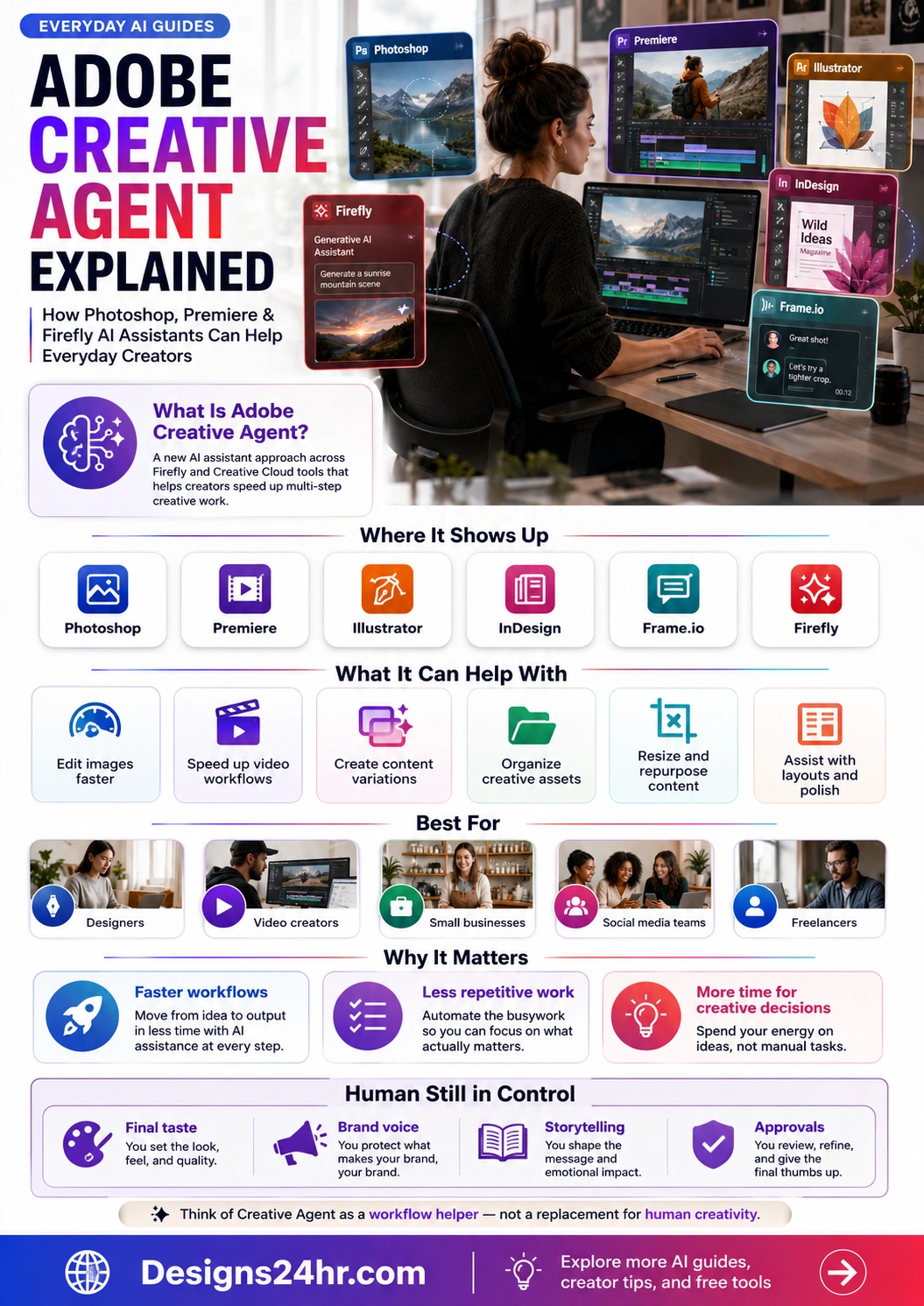
Adobe Creative Agent is Adobe’s new AI assistant approach for creative workflows. Instead of only generating one image or one clip, it is designed to help creators move through multi-step tasks inside tools like Firefly, Photoshop, Premiere, Illustrator, InDesign, and Frame.io.
Quick answer: Adobe Creative Agent is best understood as a workflow helper for creators. It can help with creative planning, image editing, video workflow ideas, content variations, asset organization, and repetitive production steps, while the creator still controls the taste, message, brand voice, storytelling, and final approval.
What Is Adobe Creative Agent?
Adobe Creative Agent is Adobe’s agentic AI direction for creative work. The idea is simple: instead of jumping between menus, panels, tools, and apps for every step, a creator can describe what they want and use an AI assistant to help move the project forward.
Adobe announced a major expansion of Creative Agent across Firefly and Creative Cloud apps including Photoshop and Premiere. Adobe has also described the Firefly AI Assistant as a conversational interface that can help orchestrate multi-step creative workflows.
A creative workflow assistant
It helps translate a creative goal into useful actions, suggestions, variations, edits, or next steps inside Adobe’s creative tools.
Speeding up production
It can reduce repetitive work, help beginners understand tools faster, and help experienced creators test more creative directions.
Final creativity stays human
AI can assist the workflow, but creators still decide what looks good, what fits the brand, and what should be published.
Why Adobe Creative Agent Matters for Everyday Creators
Creative work often takes more time than people expect. A single social post, YouTube thumbnail, product image, short video, client mockup, or ad creative can involve planning, editing, resizing, reviewing, exporting, and repurposing.
Adobe’s 2026 Creators’ Toolkit Report says 87% of creators using creative AI say it has accelerated business or audience growth. That is why Adobe Creative Agent matters: it points toward a future where AI helps creators move from idea to output faster without removing human creative judgment.
of creators using creative AI say it has accelerated business or audience growth, according to Adobe’s 2026 Creators’ Toolkit Report.
Less busywork
Creators can spend less time on repeated edits, layout versions, formatting, and asset preparation.
More content output
Small businesses can test more visuals, videos, thumbnails, banners, and marketing ideas without slowing down.
Where Adobe Creative Agent Shows Up
Adobe is connecting AI assistance across several parts of its creative ecosystem. For everyday users, the most important idea is not the product name alone. It is the workflow: image creation, photo editing, video production, design layouts, asset review, and collaboration can become more connected.
Photoshop
- Edit images by describing what you want.
- Get help with retouching, cleanup, and visual changes.
- Ask for step-by-step guidance when you want more control.
- Move faster from rough idea to polished visual.
Premiere
- Support faster video editing workflows.
- Help organize ideas, footage, versions, and creative direction.
- Assist creators who make Shorts, Reels, YouTube videos, ads, or client edits.
- Reduce repetitive production steps before final review.
Firefly
- Generate images, video, audio, and more from creative prompts.
- Explore multiple directions before choosing a final style.
- Use Firefly as a starting point for content ideas and production assets.
- Connect AI generation with broader Creative Cloud workflows.
Think of it this way
Adobe Creative Agent is not just “type a prompt and get a picture.” It is closer to asking a creative assistant to help with the next step of a project: edit this, resize that, improve the layout, make variations, organize the asset, or prepare something for review.
How Photoshop AI Assistant Could Help Designers
Adobe Research says Photoshop’s AI Assistant can let users edit images by describing what they want, and it can also provide customized steps for users who want to make changes themselves. That matters for both beginners and professionals.
Helpful for beginners
- Understand what to do next without searching through every menu.
- Ask for guided steps instead of guessing the right tool.
- Try edits faster while learning how the workflow works.
- Make simple changes without needing advanced Photoshop knowledge first.
Helpful for professionals
- Speed up repetitive cleanup and production tasks.
- Test more versions before choosing the final direction.
- Prepare quick mockups for clients or internal review.
- Spend more energy on quality, mood, brand style, and creative judgment.
How Premiere AI Assistant Could Help Video Creators
Video creators often lose time before the final creative edit even begins. They sort clips, test pacing, create versions, adjust formats, prepare captions, make thumbnails, and repurpose one idea into several platform sizes.
A Premiere AI assistant can be valuable when it helps creators move through those workflow steps faster. For YouTubers, freelancers, social media managers, course creators, and small businesses, the biggest win is not replacing editing skill. It is reducing the friction between an idea and a finished video.
Faster video planning
Creators can use AI assistance to explore rough structure, pacing, versions, and supporting assets before final editing.
More repurposing
A long idea can become shorter formats, captions, thumbnails, and promo variations with less manual back-and-forth.
Cleaner review cycles
Assistants connected with review tools can help teams move from feedback to final delivery more efficiently.
How Firefly Is Becoming a Creative AI Studio
Adobe Firefly is positioned as an AI-powered creative space for images, video, audio, and more. For everyday creators, that means Firefly can become the place where ideas are explored before they are polished in Creative Cloud apps.
| Creative Need | How Firefly Can Help | What Humans Should Still Check |
|---|---|---|
| Social media graphics | Generate visual directions, backgrounds, creative concepts, and design variations. | Brand fit, readability, originality, accuracy, and platform size. |
| Product visuals | Explore mockup ideas, backgrounds, lifestyle scenes, and content variations. | Product accuracy, material realism, customer expectations, and legal usage rules. |
| Video ideas | Generate or develop visual ideas for clips, motion, b-roll, and story direction. | Pacing, storytelling, audience emotion, quality, and final edit decisions. |
| Ad creative | Create multiple campaign concepts and test different visual styles faster. | Claims, compliance, brand tone, audience targeting, and conversion message. |
| Creator workflow | Move faster from brainstorming to assets that can be refined in Adobe apps. | Creative taste, approval process, publishing quality, and consistency. |
What Adobe Creative Agent Can Help With
Adobe Creative Agent is most useful when it reduces friction in the creative process. It can help creators get unstuck, create first drafts, test options, and handle workflow tasks that usually slow down production.
Plan
Turn a rough idea into a direction, mood, layout, or creative brief.
Create
Generate starting visuals, edits, versions, or assets for a project.
Edit
Describe changes, refine details, and improve the creative direction.
Repurpose
Adapt one idea into different formats, sizes, versions, or platforms.
Review
Prepare work for approval, collaboration, export, or publishing.
What Humans Should Still Control
Creative AI can speed up the process, but it should not become the final decision-maker. The best creators will use Adobe Creative Agent to move faster while still protecting the parts of the work that require human taste and judgment.
Keep these decisions human
- Final taste: You decide whether the result actually looks good.
- Brand voice: You protect the tone, emotion, and style that make the work recognizable.
- Storytelling: You shape the message, pacing, context, and emotional impact.
- Accuracy: You check claims, text, product details, and visual mistakes.
- Approvals: You review, refine, and give the final thumbs up before publishing.
Who Adobe Creative Agent Is Best For
Adobe Creative Agent is especially useful for people who create often, manage multiple assets, or need to produce more creative work without lowering quality.
More versions, faster edits
Designers can explore more creative directions, prepare client mockups, and speed up repetitive image or layout work.
Faster production flow
YouTubers, educators, and short-form video creators can move faster from concept to edit to repurposed content.
More marketing assets
Small teams can create campaign ideas, visuals, ad variations, product content, and social graphics more efficiently.
Better client turnaround
Freelancers can test ideas quickly, prepare previews, respond to revisions, and manage more content without burning out.
More content variations
Marketing teams can create platform-specific versions for posts, ads, stories, thumbnails, banners, and reels.
Less tool confusion
New creators can get guided steps and tool suggestions instead of feeling stuck inside advanced creative software.
Creator Checklist Before Using Adobe Creative Agent
Before using Adobe Creative Agent or any creative AI assistant, creators should set a clear workflow. AI works best when the creator gives direction, checks the output, and uses the tool as a production partner rather than a replacement.
Check these before publishing AI-assisted creative work
- Does the final design match your brand, audience, and message?
- Are all names, claims, product details, captions, and text accurate?
- Does the image, video, or design look polished enough for your audience?
- Did you check usage rights, licensing, client requirements, and platform rules?
- Does the final work still feel original and human-directed?
- Did a real person review the final output before publishing?
Smart Ways to Use Adobe Creative Agent
The strongest use of Adobe Creative Agent is not asking it to “do everything.” The stronger approach is to use it for small, useful workflow steps that save time and make your final creative decision better.
Good prompts to try
- Give me three visual directions for this social media campaign.
- Suggest a cleaner composition for this product image.
- Help me turn this design into a vertical story version.
- Show me the steps to improve the lighting and contrast.
- Create a few thumbnail layout ideas for this video topic.
Risky uses to avoid
- Publishing AI output without checking details.
- Letting AI decide your entire brand style.
- Using AI to copy another creator’s look too closely.
- Ignoring licensing, disclosure, or client requirements.
- Trusting every generated detail without review.
How This Helps Small Businesses and Social Media Creators
Small businesses often need a lot of creative content but do not always have a full design team. Adobe Creative Agent can help turn one idea into more usable marketing assets, especially when paired with a clear brand kit, content calendar, and review process.
| Business Task | How Creative Agent Can Help | Human Review Needed |
|---|---|---|
| Product launch | Generate visual directions, product graphics, social posts, and promo variations. | Product accuracy, offer details, pricing, and brand consistency. |
| YouTube content | Plan thumbnails, supporting graphics, short clips, and visual concepts. | Hook strength, audience fit, storytelling, and final thumbnail quality. |
| Etsy or online shop | Create listing visuals, mockup ideas, banners, seasonal variations, and ad creatives. | Product realism, buyer expectations, file accuracy, and listing compliance. |
| Client design work | Prepare faster previews, layouts, revisions, and presentation options. | Client brief, design quality, originality, and final approval. |
| Social media calendar | Repurpose one concept into multiple posts, formats, and campaign variations. | Caption accuracy, platform fit, brand voice, and posting strategy. |
Adobe Creative Agent vs. Regular AI Image Generators
A regular AI image generator usually focuses on producing an image from a prompt. Adobe Creative Agent is more about helping across a creative workflow. That difference matters because most real creative projects involve more than one output.
Regular AI generator
- Usually starts with a single prompt.
- Often creates one image, clip, or variation at a time.
- May not understand your full design workflow.
- Can be useful for brainstorming and first drafts.
Creative Agent approach
- Helps with multi-step creative tasks.
- Works closer to the tools creators already use.
- Can support editing, organizing, variations, and workflow actions.
- Is more useful when the creator gives clear direction and reviews the result.
Helpful Designs24hr Resources for Creators
Adobe Creative Agent fits naturally into the wider world of practical AI tools and creative productivity. For more simple guides, explore Everyday AI Guides, especially AI for Design & Creativity, AI for Small Business & Marketing, and AI Tools & Beginner Guides.
You can also use the free tools on Designs24hr for everyday creator tasks like planning titles, checking metadata, building color palettes, creating gradients, formatting text, cleaning lists, and preparing content faster.
Official Sources and References
Adobe Creative Agent and creative AI features may change over time, so creators should always check Adobe’s latest official pages before making workflow, licensing, or business decisions.
- Adobe Newsroom: Adobe unveils major expansion of Creative Agent across Firefly and Creative Cloud apps
- Adobe Newsroom: 2026 Creators’ Toolkit Report
- Adobe Research: The research behind Photoshop’s AI Assistant
- Adobe Firefly: AI-powered creative space
- Adobe Firefly product page and Creative Cloud app information
FAQ About Adobe Creative Agent
What is Adobe Creative Agent?
Adobe Creative Agent is Adobe’s AI assistant approach for creative workflows. It is designed to help creators complete multi-step creative tasks across Firefly and Creative Cloud tools by describing what they want to do.
Which Adobe apps are connected to Creative Agent?
Adobe announced Creative Agent expansion across Firefly and Creative Cloud apps including Photoshop, Premiere, Illustrator, InDesign, and Frame.io.
Can Adobe Creative Agent replace designers or editors?
No. Adobe Creative Agent should be used as a workflow helper, not a replacement for human creativity. Designers and editors still control taste, brand direction, storytelling, accuracy, and final approval.
How can Photoshop AI Assistant help creators?
Photoshop AI Assistant can help users edit images by describing what they want. It can also provide customized steps for users who want more control over the editing process.
How can Premiere AI Assistant help video creators?
Premiere AI assistance can help video creators speed up workflow planning, content variations, organization, edits, repurposing, and review steps, while the final creative edit still stays under human control.
Is Adobe Firefly useful for small businesses?
Yes. Adobe Firefly can help small businesses generate creative ideas, images, video, audio, and campaign assets faster. Businesses should still check quality, accuracy, brand fit, and usage rights before publishing.
What is the biggest benefit of Adobe Creative Agent?
The biggest benefit is faster creative workflow. It can help reduce repetitive work, create more variations, guide beginners, and give experienced creators more time for strategy, storytelling, and final quality.
Should creators trust AI-generated creative work automatically?
No. Creators should review AI-assisted work for accuracy, brand fit, originality, image quality, text errors, product details, licensing, and audience expectations before publishing.