OpenAI Academy Courses Explained: How U.S. Workers Can Build Practical AI Skills
OpenAI Academy’s new course path gives workers, job seekers, freelancers, and small business owners a clearer way to learn AI for real tasks, not just theory.
OpenAI Academy courses are designed to help people move from basic AI understanding to practical prompting, repeatable workflows, and agent-assisted work with human review.
Learning AI can feel confusing because every week brings a new tool, feature, model, or headline. For everyday workers in the United States, the bigger question is not simply “What is new?” It is “What should I actually learn first, and how can I use AI in a responsible way at work?”
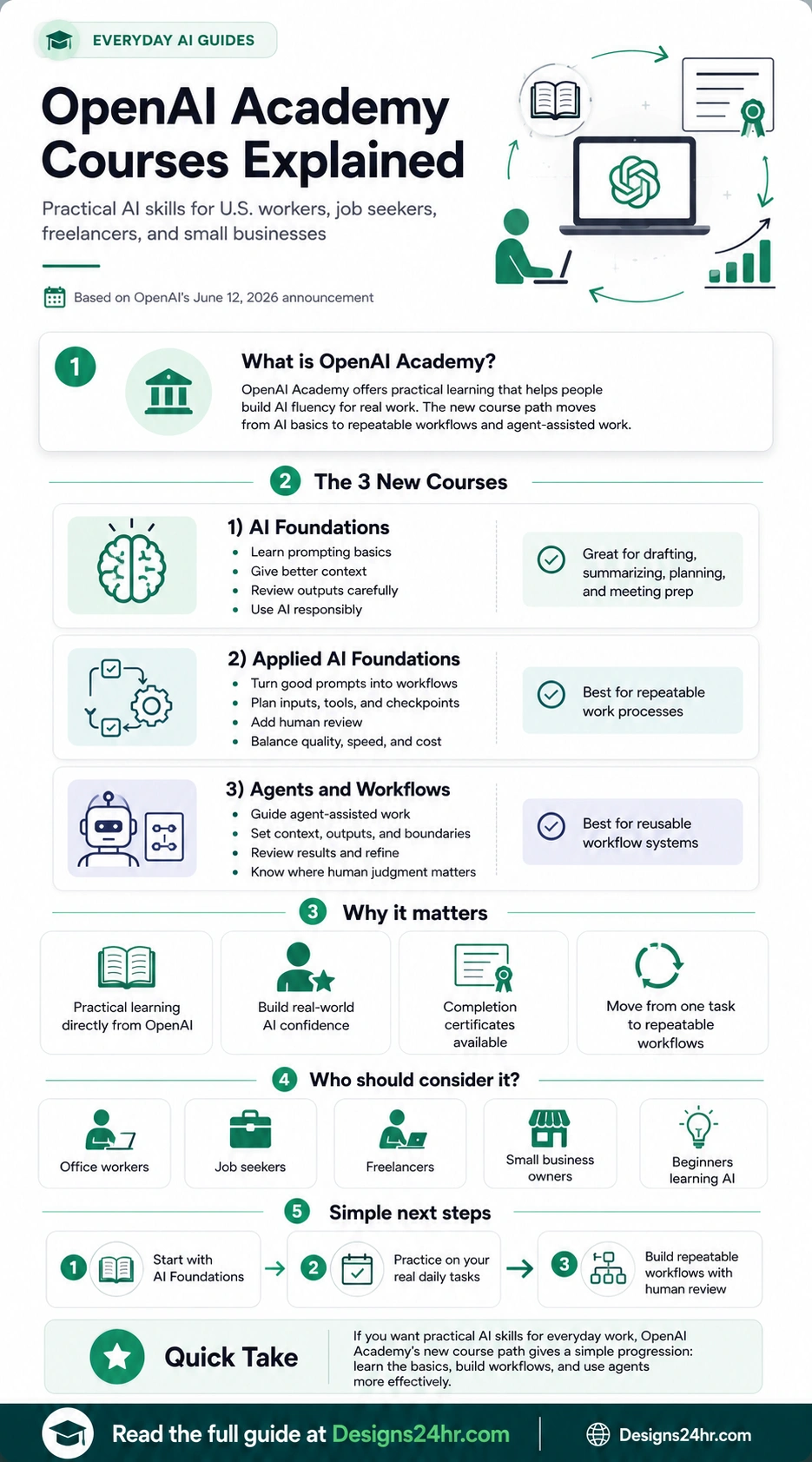
That is where OpenAI Academy courses are worth understanding. OpenAI announced three new Academy courses on June 12, 2026: AI Foundations, Applied AI Foundations, and Agents and Workflows. The courses are built around practical learning, workplace use cases, and a path from simple AI tasks to repeatable workflows.
This guide explains what the courses are, who they are for, what each course teaches, and how U.S. workers can turn the lessons into real skills for resumes, daily tasks, freelance work, small business operations, and team productivity.
What Are OpenAI Academy Courses?
OpenAI Academy courses are learning programs from OpenAI that help people build AI fluency. Instead of focusing only on abstract AI theory, the Academy direction is practical: helping learners use AI in the context of real work.
OpenAI describes the new course path as a way to move from understanding AI to applying it in recurring work and then directing more structured workflows with agents. That matters because many people already know that AI can draft, summarize, and brainstorm, but they do not always know how to turn one-off prompts into repeatable systems.
The simple version
OpenAI Academy courses help people learn how to use AI more effectively at work. The path starts with AI basics, then moves into workflow planning, and finally introduces agent-assisted work where human review and boundaries still matter.
Why This Matters for U.S. Workers Right Now
For many U.S. workers, AI is no longer a distant future skill. It is becoming part of daily writing, planning, research, customer communication, marketing, data organization, meeting prep, and job searching. But access to AI tools is not the same as knowing how to use them well.
A beginner can ask a chatbot to “write an email,” but a stronger AI user knows how to give context, set constraints, review the output, protect private information, and refine the result. A more advanced worker can build a repeatable workflow for recurring tasks like weekly reporting, content planning, customer follow-up, proposal drafting, or resume tailoring.
That is the real value of the OpenAI Academy course path: it gives people a progression. You do not have to jump directly into advanced agents. You can start with the basics, practice on familiar tasks, and then build more structured workflows over time.
The 3 New OpenAI Academy Courses Explained
OpenAI announced three new Academy courses that work together as a learning path. Each course has a different purpose, so the best choice depends on your current skill level and what you want AI to help you do.
AI Foundations
This is the best starting point for beginners. It focuses on the core habits people need when using AI for everyday work.
- Prompting basics
- Giving better context
- Reviewing AI outputs carefully
- Using AI responsibly
Applied AI Foundations
This course is for people who already understand simple AI prompting and want to turn useful prompts into repeatable work processes.
- Building workflow plans
- Defining inputs and tools
- Adding checkpoints
- Balancing quality, speed, and cost
Agents and Workflows
This course focuses on directing agent-assisted work. It is useful for people who want AI to help with more structured, multi-step tasks while keeping human oversight in place.
- Setting context and boundaries
- Defining expected outputs
- Reviewing results
- Knowing where human judgment is required
Which OpenAI Academy Course Should You Start With?
Most beginners should start with AI Foundations. Even if you have used ChatGPT before, the basics are still important because small prompting habits can make a major difference in output quality.
If you already use AI regularly and want to create a repeatable process, Applied AI Foundations is the natural next step. This is especially useful for people who do similar tasks every week, such as creating reports, summarizing notes, drafting client messages, or planning content.
If you are already comfortable with AI workflows and want to understand agent-assisted work, Agents and Workflows is the more advanced option. The key is not to treat agents as magic. The course direction still emphasizes context, boundaries, review, and human judgment.
| Course | Best For | What You Learn | Good First Use Case |
|---|---|---|---|
| AI Foundations | Beginners and everyday AI users | Prompting, context, review, and responsible use | Drafting emails, summarizing notes, planning a meeting |
| Applied AI Foundations | Workers who want repeatable processes | Inputs, tools, checkpoints, human review, workflow planning | Creating a weekly report workflow or content planning system |
| Agents and Workflows | More confident users and teams | Agent-assisted work, boundaries, outputs, refinement, oversight | Building a reusable workflow for research, operations, or support tasks |
Who Should Consider OpenAI Academy Courses?
These courses can be useful for many non-technical people. You do not need to be a developer to benefit from better AI habits. The most important requirement is having real tasks where AI can help you save time, think more clearly, or organize work more effectively.
Use AI for meeting notes, email drafts, planning, summarizing documents, and organizing weekly priorities.
Use AI to improve resumes, tailor cover letters, prepare interview answers, and understand job descriptions.
Use AI to draft proposals, create client checklists, plan content, summarize feedback, and manage repeatable services.
Use AI for customer replies, marketing ideas, process documentation, product descriptions, and daily planning.
Use AI to build practical work habits before applying for internships, entry-level roles, or freelance projects.
Use AI workflows to create shared processes, reduce repeated work, and help teams review AI outputs consistently.
How to Turn the Courses Into Real Workplace Skills
The biggest mistake beginners make is treating AI learning like passive video watching. A course can explain the concepts, but the skill grows when you practice on real tasks. The best way to use OpenAI Academy courses is to connect each lesson to something you already do.
Pick one real task you do every week
Start with something familiar. Examples include writing a weekly update, preparing meeting notes, drafting customer emails, researching a topic, or planning a small project.
Use AI Foundations to improve your prompt
Practice giving context, setting the goal, explaining the audience, adding constraints, and asking AI to show assumptions or organize the answer clearly.
Use Applied AI Foundations to make the process repeatable
Turn the task into a simple workflow. Decide what information goes in, what the AI should produce, what you must review, and what final quality standard you need.
Use Agents and Workflows only when the process is clear
Agent-assisted work is easier when you already know the goal, boundaries, expected output, and review points. Do not skip the human judgment step.
For practice, you can use the AI Prompt Generator to create stronger prompts, the AI Daily Task Planner to organize your day, and Explain This For Me to simplify confusing concepts as you learn.
Do OpenAI Academy Certificates Matter?
OpenAI says learners who complete a course receive a certificate of completion that can be shared with teams and networks. That does not mean a certificate alone will guarantee a job, promotion, client, or raise. But it can still be useful as a signal that you are actively building practical AI skills.
For job seekers, a completion certificate may support a resume, LinkedIn profile, or interview answer when paired with real examples. For employees, it may help show initiative. For freelancers and small business owners, it can support trust if you can explain how you use AI responsibly in your work process.
If you are updating your career materials, try the AI Resume Optimizer to improve your resume wording after you finish a course or build a new AI-related skill.
Practical Examples: How U.S. Workers Can Use These Skills
Here are simple examples of how each course level can translate into real work.
Example 1: Office worker
An office worker can use AI Foundations to summarize meeting notes, draft follow-up emails, and create a clear action list. With Applied AI Foundations, that same person can build a weekly meeting workflow that includes agenda input, summary format, action owners, and final review.
Example 2: Job seeker
A job seeker can use AI Foundations to understand job descriptions and draft stronger resume bullet points. Then they can create a repeatable workflow for tailoring a resume to each role without inventing experience or exaggerating achievements.
Example 3: Freelancer
A freelancer can use AI to draft client proposals, organize project questions, summarize discovery calls, and create reusable onboarding checklists. The key is to review everything carefully and keep client-sensitive information protected.
Example 4: Small business owner
A small business owner can use AI for product descriptions, customer reply templates, social media ideas, hiring checklists, and basic process documentation. Applied workflows can help make those tasks consistent instead of starting from scratch every time.
What Not to Expect From OpenAI Academy Courses
OpenAI Academy courses can help you build practical AI skills, but they are not a shortcut around judgment, experience, or responsibility. AI can make work faster, but it can also make mistakes, miss context, or sound confident when the answer needs review.
Keep these limits in mind
- AI courses do not replace job-specific expertise.
- Certificates do not guarantee employment or promotion.
- AI outputs still need human review.
- Sensitive workplace or customer data should be handled carefully.
- Agent-assisted workflows need clear boundaries and oversight.
This is why responsible use is part of the learning path. Strong AI users are not just faster prompt writers. They are better reviewers, better process builders, and better decision-makers.
A Simple Learning Plan for Beginners
If you are starting from zero, do not try to master everything in one week. Use this simple plan:
- Week 1: Start with AI Foundations and practice writing better prompts for everyday tasks.
- Week 2: Choose one recurring work task and document the steps you normally follow.
- Week 3: Use Applied AI Foundations to turn that task into a repeatable workflow.
- Week 4: Review where AI helps, where it makes mistakes, and where human judgment is required.
For more beginner-friendly AI help, visit the Everyday AI Guides hub.
Best Tools to Practice After Taking the Courses
The best way to make AI learning stick is to practice immediately. Designs24hr has simple tools that can help you apply the concepts from the courses to real work.
Use the AI Prompt Generator to turn rough ideas into clearer prompts.
Use the AI Daily Task Planner to connect AI learning with real daily priorities.
Use the AI Resume Optimizer to improve resume clarity and keyword alignment.
Use Explain This For Me when a course concept, workplace document, or technical explanation feels unclear.
OpenAI Academy Courses vs. Random AI Tutorials
There are thousands of AI tutorials online, and many of them are helpful. The challenge is that random tutorials can be scattered. One video may teach prompts, another may show a tool hack, and another may focus on a specific feature that changes later.
The benefit of a course path is structure. OpenAI Academy gives learners a clearer progression: learn the basics, apply AI to recurring work, and then understand agent-assisted workflows. That progression is especially helpful for beginners who do not yet know what to learn first.
Still, the best approach is not to rely on one source only. Use the Academy courses for structure, then use your own work tasks for practice. That combination is what turns AI knowledge into usable skill.
Final Takeaway
OpenAI Academy courses are useful because they focus on practical AI fluency, not just AI hype. For U.S. workers, the strongest value is the simple progression: start with AI Foundations, learn to build repeatable workflows, and then explore agent-assisted work with clear boundaries and human review.
If you are a beginner, start small. Pick one real task you already do. Improve your prompt. Review the output. Turn the best version into a repeatable workflow. That is how AI learning becomes a real workplace advantage.
You can read OpenAI’s original announcement on the OpenAI website, then use the practical tools and guides on Designs24hr to apply what you learn in everyday work.
Frequently Asked Questions
What are OpenAI Academy courses?
OpenAI Academy courses are practical learning programs from OpenAI designed to help people build AI fluency, use AI in real work, and move from basic prompting to repeatable workflows and agent-assisted tasks.
What are the three new OpenAI Academy courses?
The three new courses are AI Foundations, Applied AI Foundations, and Agents and Workflows. Together, they create a path from understanding AI basics to applying AI in recurring work and directing structured workflows with agents.
Who should take OpenAI Academy courses?
They can help office workers, job seekers, freelancers, small business owners, students entering the workforce, team leaders, and beginners who want practical AI skills for everyday work.
Do OpenAI Academy courses offer certificates?
Yes. OpenAI says learners who complete a course receive a certificate of completion that can be shared with teams and networks.
Are OpenAI Academy courses only for technical users?
No. The courses are useful for non-technical users too because they cover prompting, giving context, reviewing outputs, responsible use, workflow planning, and agent-assisted work in practical workplace terms.
How can U.S. workers use these courses?
U.S. workers can use these courses to improve daily tasks such as drafting, summarizing, planning, meeting prep, workflow building, research organization, resume updates, and careful review of AI-generated outputs.
Keep Learning AI the Simple Way
Explore more beginner-friendly guides and tools from Everyday AI Guides to turn AI learning into practical daily skills.
Visit Everyday AI Guides AI Tools & Beginner Guides AI for Work & Productivity