Android fake call detection is Google’s new protection for suspicious calls that appear to come from someone you know. It is designed to warn users when a scammer may be spoofing a trusted contact’s number, which can help protect against AI voice cloning scam calls.
Voice scams are becoming harder to spot because scammers can spoof caller ID and use AI-generated voices to sound like a friend, family member, coworker, or authority figure. The call may look familiar, sound urgent, and push you to send money, share personal details, or act before you can think.
Android fake call detection adds an extra warning layer inside the Phone by Google app. Instead of asking you to trust caller ID alone, the feature checks verification signals and warns you when a call may not really be coming from the contact shown on your screen.
This guide from Designs24hr explains Android fake call detection in plain English: how Google fake call detection works, why AI voice cloning scam calls are dangerous, what to do when a warning appears, and how families can build safer phone habits.
What Is Android Fake Call Detection?
Android fake call detection is a Phone by Google scam detection feature that helps warn users when an incoming call may be spoofed. In simple terms, it can alert you when a call looks like it is coming from a trusted contact but does not pass the verification signals expected from that contact’s real device.
The key idea is not just detecting a fake voice. Android fake call detection focuses on whether the call is actually coming from the contact’s real phone. That matters because modern scammers can copy a familiar number, fake caller ID, and even use AI voice cloning to sound convincing.
Google’s approach gives users a clearer warning before they trust a suspicious call. If the call looks risky, the phone can show a warning that someone may be pretending to call from your contact’s number.
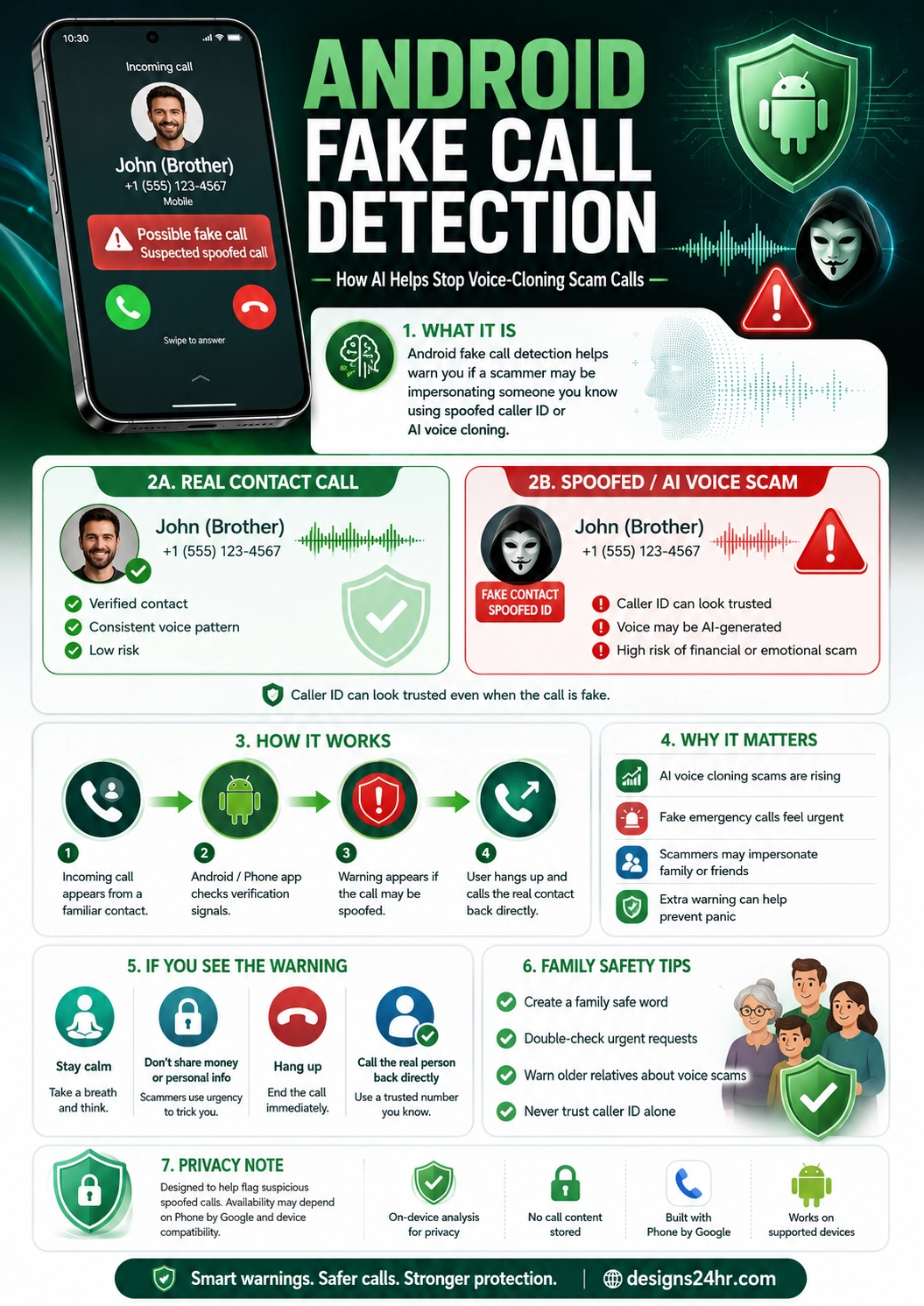
Simple example: Your phone shows a call from “John — Brother.” The voice sounds urgent and asks for money. Android fake call detection may warn that the call could be spoofed, giving you a chance to hang up and call your brother directly using the number saved in your contacts.
Why Android Fake Call Detection Matters
Phone scams have always been a problem, but AI voice cloning makes them more personal and more believable. A scammer no longer has to sound like a stranger. They may try to sound like your child, sibling, parent, boss, friend, bank representative, or delivery contact.
That is dangerous because emotional pressure works. A fake emergency call can make someone panic. A familiar voice can lower suspicion. A trusted caller ID can make the scam feel real.
Android fake call detection matters because it attacks one of the scammer’s biggest tricks: impersonation. It helps users question whether the call is actually from the trusted person shown on the screen.
How Phone by Google Scam Detection Works
Phone by Google scam detection uses verification signals to help confirm whether a call is really coming from the contact’s device. Google built the feature around Rich Communication Services, or RCS, so supported devices can send a silent confirmation signal in the background.
When the verification signal is present, the phone has more confidence that the call is really from the expected device. When that signal is missing and the call appears to be from a saved contact, Android may warn that the caller could be impersonating someone you know.
This is important because caller ID alone is not enough. Scammers can spoof numbers. The stronger question is whether the call can be verified as coming from the real device.
Important clarification: Android fake call detection is mainly about verifying the call source, not listening to your entire conversation and judging whether the voice sounds real. The goal is to catch suspicious spoofing signals before you trust the call.
Real Contact Call vs Spoofed AI Voice Scam
A real contact call and a spoofed AI voice scam can look almost identical at first. That is what makes this kind of scam so powerful. The phone number may look familiar, the name may match a saved contact, and the voice may sound convincing.
| Real Contact Call | Spoofed AI Voice Scam |
|---|---|
| The call comes from the person’s real device. | The scammer spoofs the contact’s number or caller ID. |
| The caller can verify details naturally. | The scammer creates urgency and avoids verification. |
| The request usually fits normal behavior. | The request may involve money, codes, secrecy, or pressure. |
| The call may pass supported verification signals. | The call may fail verification and trigger a warning. |
| You can continue if everything feels normal. | You should hang up and call the real contact directly. |
Why AI Voice Cloning Scam Calls Are So Convincing
AI voice cloning can imitate speech patterns, tone, rhythm, and emotional delivery. Scammers may use short audio clips from social media, voicemail, videos, or public recordings to create a voice that sounds familiar enough to create panic or trust.
The scam usually depends on speed. The caller might say they are in trouble, injured, arrested, stranded, locked out, or urgently need money. They may ask you not to tell anyone. They may push for gift cards, instant transfers, payment apps, crypto, passwords, or verification codes.
The goal is to make you react emotionally before you verify the call.
What Happens When Android Shows a Fake Call Warning?
When Android fake call detection flags a suspicious call, the Phone by Google app can show a warning that someone may be pretending to call from your contact’s number. The warning gives you a moment to stop and think before trusting the caller.
If you see a warning, the safest move is simple: do not continue the conversation as if the caller is verified.
What to do immediately
- Stay calm and do not let the caller rush you.
- Do not send money, codes, passwords, or personal information.
- Hang up if the call feels suspicious.
- Call the real person back using the number already saved in your contacts.
- Use another method, such as a text message or family group chat, to confirm the situation.
- Report the call if your phone or carrier provides that option.
Best safety rule: If a call asks for money, secrecy, login codes, bank details, or urgent action, hang up and verify through a separate trusted channel. Never rely on caller ID alone.
Android Scam Call Protection: What It Can and Cannot Do
Android scam call protection can reduce risk, but no phone feature can stop every scam. Users still need good habits, especially when scammers use fear, urgency, and emotional manipulation.
| What It Can Help With | What It Cannot Guarantee |
|---|---|
| Warn when a saved contact’s call may be spoofed. | It cannot prove every suspicious call is fake in all situations. |
| Reduce trust in caller ID alone. | It cannot stop scammers from calling from unknown numbers. |
| Help users pause before reacting to urgent requests. | It cannot replace common sense or family verification rules. |
| Support safer calls when compatible devices and apps are used. | It may not work if both sides are not using supported systems. |
Who Can Use Android Fake Call Detection?
Google has described fake call detection as part of Android’s June update and the Phone by Google app experience. Coverage from Google and major tech outlets says the feature is starting with supported Android devices, including Pixel phones, and is designed for Android 12 and later.
The feature works best when both the caller and receiver are using supported phone experiences that can send the verification signal. If the other person is not using Phone by Google or a compatible implementation, the feature may not have the same confirmation path.
That means Android fake call detection is helpful, but it is not a universal shield for every call from every phone yet.
Why Caller ID Is Not Enough Anymore
Many people still trust caller ID because it feels official. If the name says “Mom,” “Dad,” “Boss,” “Bank,” or “Doctor,” the call feels familiar before anyone speaks.
But caller ID can be spoofed. Scammers can make a call appear to come from a number you recognize. When AI voice cloning is added, the scam becomes even more believable because the voice may sound familiar too.
That is why Google fake call detection focuses on verification signals, not just the displayed name or number.
Family Safety Tips for AI Voice Cloning Scam Calls
Families should not wait for a scam to happen before creating a plan. A few simple habits can protect parents, grandparents, teens, and anyone who may panic during an urgent call.
Create a family safe word
Choose a simple private phrase that only family members know. If someone calls with an emergency request, ask for the safe word. Do not use a word that is easy to guess from social media.
Verify urgent requests separately
If someone asks for money or help, hang up and call them back directly. If they do not answer, contact another family member or trusted friend before acting.
Warn older relatives
Older adults are often targeted by impersonation scams. Explain that a familiar voice or caller ID is no longer enough proof.
Do not share verification codes
Scammers may ask for one-time passwords, bank codes, account recovery numbers, or login approvals. A real family member should not need those codes.
Keep emergency contacts updated
Make sure important contacts are saved correctly, and teach family members how to call back directly from the saved contact instead of using a number spoken by the caller.
Family rule to remember: Real emergencies can wait 30 seconds for verification. Scams depend on panic.
What to Do If You Already Answered a Suspicious Call
Answering a suspicious call does not mean you failed. Scammers are trained to sound believable. The important thing is what you do next.
- Stop the conversation. Do not keep explaining, arguing, or answering questions.
- Do not send money or codes. End the call before sharing anything sensitive.
- Call the real contact directly. Use the number saved in your phone or another trusted method.
- Check accounts if you shared information. Change passwords, contact your bank, or secure accounts if needed.
- Report the scam. Use your phone, carrier, platform, or local fraud reporting options.
- Warn family members. If one person was targeted, others may be targeted too.
Privacy Notes: Does Fake Call Detection Listen to Your Calls?
One of the biggest questions people may ask is whether Android fake call detection listens to conversations. Based on Google’s description and reporting around the feature, the protection is focused on verification signals between devices, not recording your entire call to analyze the voice.
The system is built around confirming that the call is actually coming from the contact’s real smartphone. This is different from a tool that continuously listens to call audio and tries to decide whether a voice is AI-generated.
That privacy distinction matters. The feature is meant to warn about suspicious call origin signals while helping users avoid spoofed caller ID and AI voice cloning scams.
Privacy takeaway: Android fake call detection is about call verification, not trusting a caller just because the name and photo look familiar. Users should still review Google’s official privacy details and device settings for the most current information.
How This Changes Everyday Phone Safety
Android fake call detection is part of a bigger change in digital safety. The old advice was simple: do not answer unknown numbers. But AI voice cloning scam calls create a harder problem because the number may appear to be someone you know.
That means phone safety has to move beyond unknown-number blocking. Users need warnings for trusted-looking calls too.
The future of scam protection may combine caller verification, AI safety tools, user warnings, family education, carrier protections, and better reporting systems. Android fake call detection is an important step in that direction.
Best Practices for Safer Phone Calls
Even with Android scam call protection, safer phone habits matter. The best approach is a mix of technology and human verification.
- Never trust caller ID alone.
- Hang up and call back directly when money or personal information is involved.
- Create a family safe word for emergencies.
- Teach older relatives about AI voice cloning scam calls.
- Do not share passwords, codes, or bank details over the phone.
- Be suspicious of urgency, secrecy, and emotional pressure.
- Keep your Android phone and Phone by Google app updated.
- Report scam calls when possible.
Why This Topic Matters Beyond Android
Android fake call detection is important even for people who do not use Android because it shows where phone security is heading. As AI scams become more convincing, phones need stronger ways to verify identity.
Caller ID was built for a simpler era. AI-generated voices and spoofed numbers require a new kind of trust signal.
The bigger lesson is this: the future of phone safety will not only be about blocking spam. It will be about proving whether the person calling is really who the phone says they are.
Keep learning with Designs24hr: For more practical AI safety guides, read our Meta AI Teen Safety explained guide. You can also explore ChatGPT Lockdown Mode explained to understand how AI tools are adding stronger protection for sensitive work.
Frequently Asked Questions About Android Fake Call Detection
What is Android fake call detection?
Android fake call detection is a Phone by Google feature that can warn users when a call appearing to come from a saved contact may actually be spoofed or suspicious.
How does Google fake call detection work?
Google fake call detection uses verification signals, built around RCS technology, to help confirm whether a call is really coming from the contact’s real device. If expected confirmation is missing, the phone may show a warning.
Does Android fake call detection listen to my call?
The feature is focused on verifying call origin signals, not analyzing the full conversation or deciding whether the voice sounds fake. It helps detect suspicious spoofing patterns before users trust the call.
Can it stop AI voice cloning scam calls?
It can help warn users when a scammer may be spoofing a trusted contact’s number, which is one way AI voice cloning scam calls become convincing. It does not stop every possible voice scam by itself.
What should I do if I see a fake call warning?
Stay calm, do not share money or personal information, hang up, and call the real contact back directly using the number saved in your phone or another trusted method.
Does Android fake call detection work on every phone?
Google has described the feature for supported Android devices using Phone by Google, starting with devices such as Pixel phones and Android 12 or later. Compatibility and rollout can vary by device, app version, and region.
Why are AI voice cloning scam calls dangerous?
They can make scammers sound like someone you know. When combined with spoofed caller ID and urgent emotional pressure, they can trick people into sending money, sharing codes, or revealing private information.
What is the best way to protect my family from voice scams?
Create a family safe word, verify urgent requests through a separate channel, warn older relatives, avoid sharing codes or payment details, and never trust caller ID alone.
The Bottom Line
Android fake call detection is a smart new layer of protection against spoofed contact calls and AI voice cloning scam calls. It helps users question calls that look trusted but may not actually come from the real person’s device.
The most important habit is still verification. If a caller asks for money, codes, secrecy, or urgent action, hang up and contact the real person directly.
At Designs24hr, we believe AI safety should protect everyday people in real situations, not only experts. Android fake call detection is a reminder that as scams get smarter, our phones, families, and habits need to get smarter too. Share your thoughts in the comments, and come back to Designs24hr whenever you want to learn something new about AI and design.
Sources: This article is based on Google’s official Android fake call detection announcement on The Keyword, The Verge coverage of Phone by Google scammer impersonation warnings, and WIRED’s report on Android’s caller verification and scam call protection.