Apple Intelligence Passwords: 7 Powerful Benefits for U.S. iPhone Users
Apple Intelligence Passwords can help U.S. iPhone users find weak or compromised passwords, upgrade supported accounts, and make everyday password security easier without advanced tech skills.
Most people know they should use stronger passwords, but actually fixing weak, reused, or compromised passwords can feel annoying. You have to find the risky login, open the website, sign in, locate the security settings, create a new password, save it, and hope everything updates correctly.
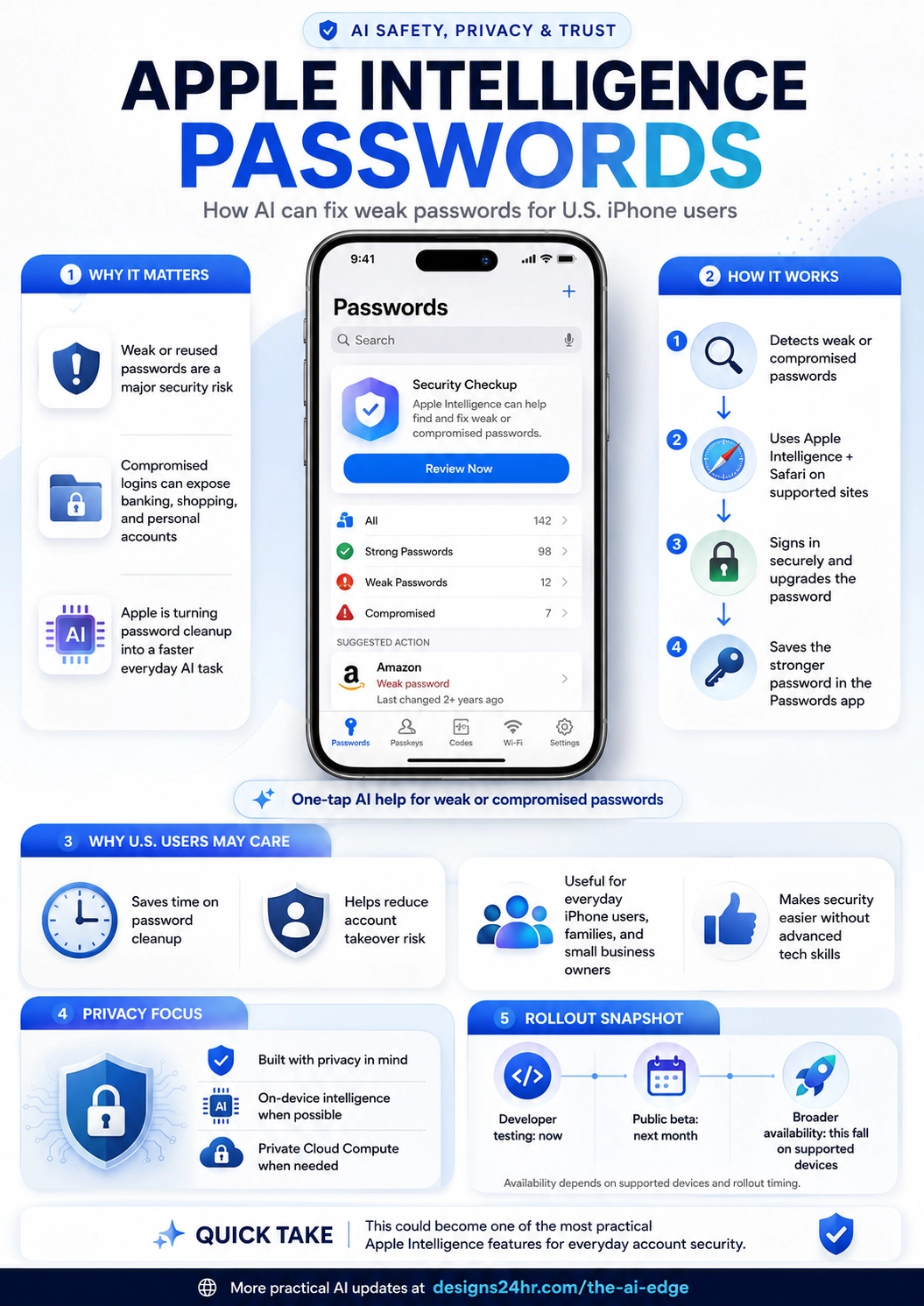
That is why Apple Intelligence Passwords is one of Apple’s most practical AI safety updates for everyday users. Apple says the Passwords app can automatically fix weak and compromised passwords with a tap by using Apple Intelligence and Safari to securely navigate supported websites, sign in, upgrade the account, and save the stronger password.
Simple explanation: Apple Intelligence Passwords turns password cleanup into a guided AI-assisted task. Instead of only warning you about weak or compromised passwords, Apple can help fix supported accounts and save stronger passwords in the Passwords app.
What Is Apple Intelligence Passwords?
Apple Intelligence Passwords refers to Apple’s new AI-assisted password security feature inside the Passwords app. It builds on Apple’s existing ability to warn users about weak, reused, or compromised passwords and adds a more helpful next step: fixing eligible passwords more easily.
For U.S. iPhone users, this matters because many people have dozens or even hundreds of saved logins across shopping sites, banking apps, email accounts, streaming services, school portals, social media accounts, work tools, and local business apps. One weak or leaked password can create unnecessary risk.
Apple Intelligence Passwords is designed to reduce that friction. When a password is weak or compromised and the website supports the upgrade flow, the system can use Apple Intelligence and Safari to help complete the password change process and save the stronger password back into the Passwords app.
Why Apple Intelligence Passwords Matters for U.S. iPhone Users
Password security is not only a tech problem. It is an everyday life problem. U.S. users rely on online accounts for banking, healthcare portals, school apps, tax services, shopping, delivery, travel, insurance, social media, subscriptions, and small business tools.
When passwords are reused or compromised, attackers may try credential stuffing, account takeover, identity theft, fraudulent purchases, or unauthorized access to personal information. Apple Intelligence Passwords helps make one of the most boring but important security tasks easier to handle.
7 Powerful Benefits of Apple Intelligence Passwords
- Faster password cleanup: Weak or compromised passwords can be easier to fix with AI-assisted help.
- Less security friction: Users may not need to manually search through every website’s password settings.
- Stronger saved passwords: The Passwords app can save upgraded credentials for future sign-ins.
- Better account protection: Replacing risky passwords can reduce account takeover risk.
- Useful for families: Parents and everyday users can improve security without needing advanced skills.
- Helpful for small business owners: Business accounts, vendor portals, and admin logins can be easier to review.
- Privacy-focused design: Apple Intelligence is built around on-device processing and Private Cloud Compute when needed.
How Apple Intelligence Passwords Works
The easiest way to understand Apple Intelligence Passwords is to think of it as a security helper inside the Passwords app. It does not just tell you something is wrong. On supported websites, it can help take action.
The Passwords app identifies weak, reused, or compromised passwords that may need attention.
Apple Intelligence and Safari help move through supported websites to start the password update process.
The account can be updated to a stronger password when the site supports the flow.
The stronger password is saved in the Passwords app so the user can sign in later.
Apple Intelligence Passwords vs Regular Password Warnings
Older password warnings are useful, but they often stop at the alert. They tell you a password is weak or compromised, then leave you to fix it manually. That is where many people give up.
Apple Intelligence Passwords changes the experience by helping users move from warning to action. This makes password security feel less like a chore and more like a guided cleanup.
| Security Feature | What It Does | Why It Matters |
|---|---|---|
| Password warning | Alerts users when a saved password may be weak, reused, or compromised. | Helpful, but users still need to manually fix the account. |
| Password manager | Saves passwords, passkeys, Wi-Fi passwords, and verification codes in one place. | Makes sign-ins easier and reduces the need to remember passwords. |
| Apple Intelligence Passwords | Can help fix supported weak or compromised passwords with AI-assisted navigation and saving. | Reduces friction and helps more users actually complete the security cleanup. |
Who Should Use Apple Intelligence Passwords?
Apple Intelligence Passwords is especially useful for U.S. iPhone users who have many saved logins and do not regularly review their password security. It is also helpful for people who receive data breach alerts but keep postponing password changes.
Best for
- Everyday iPhone users: People who want easier account security without complicated steps.
- Families: Parents helping kids, teens, or older relatives stay safer online.
- Students: Users with school portals, email accounts, banking apps, and subscription logins.
- Small business owners: People managing business tools, customer portals, vendor accounts, and admin logins.
- Remote workers: Users with a mix of personal and work-related online accounts.
- Anyone with reused passwords: Users who have used the same password across multiple websites.
Why Weak or Compromised Passwords Are Risky
A weak password is easier to guess or crack. A reused password is risky because one breached website can expose other accounts that use the same login. A compromised password is especially urgent because it may already be part of a known data leak.
For U.S. users, compromised passwords can put important accounts at risk, including email, banking, healthcare, tax, shopping, insurance, student accounts, and business tools. Apple Intelligence Passwords helps by making it easier to replace those risky credentials with stronger ones.
Important security takeaway: The safest password is unique, strong, and not reused across websites. If a password appears in a breach, it should be changed as soon as possible.
Privacy and Apple Intelligence Passwords
Apple is positioning this feature inside its broader privacy-focused Apple Intelligence system. Apple says Apple Intelligence is designed with on-device processing at its core, and Private Cloud Compute can extend privacy protections for more complex requests when needed.
This privacy angle matters because password security is sensitive. Users need to trust that the system helping them fix accounts is not exposing their login information unnecessarily. Apple Intelligence Passwords is important because it connects AI assistance with Apple’s larger privacy and security strategy.
Privacy-focused points to know
- On-device processing: Apple Intelligence is built to handle many requests directly on the device.
- Private Cloud Compute: Apple says more complex requests can use Private Cloud Compute when needed.
- Safari integration: Safari helps securely navigate supported websites for password upgrades.
- Password saving: Updated passwords are saved in the Passwords app for future use.
- Supported sites matter: The automatic fix flow depends on whether the website supports the process.
Apple Intelligence Passwords for Small Business Owners
U.S. small business owners often manage more passwords than they realize. There may be logins for banking, payroll, tax software, email marketing, website hosting, social media, ecommerce, appointment booking, invoices, supplier portals, and customer support tools.
Apple Intelligence Passwords can be useful because business owners rarely have time to manually audit every password. A feature that helps identify and fix weak or compromised passwords can reduce one of the easiest security gaps to ignore.
| Account Type | Why It Matters | What to Do |
|---|---|---|
| Email account | Email often controls password resets for many other accounts. | Use a strong unique password and enable two-factor authentication. |
| Banking or payment tools | Compromised access can lead to fraud or financial loss. | Review passwords, alerts, recovery options, and account permissions. |
| Website admin login | Attackers may use weak admin passwords to take over a site. | Use strong passwords, limit admin users, and keep software updated. |
| Social media accounts | Business pages can be hijacked or used for scams. | Change weak passwords and use account recovery protections. |
| Customer or vendor portals | These accounts may include private business or customer information. | Replace reused passwords and review who has access. |
How to Use Apple Intelligence Passwords Safely
Apple Intelligence Passwords can make password cleanup easier, but users should still review important account changes. Password updates affect access to real accounts, so it is smart to confirm the website, review the account, and make sure the saved password works after the update.
Safe usage checklist
- Start with high-value accounts: Email, banking, Apple Account, business tools, healthcare, and tax accounts should come first.
- Check the website: Make sure the password update is happening on the real website, not a fake login page.
- Use unique passwords: Do not reuse the same password across multiple accounts.
- Turn on two-factor authentication: Use 2FA or passkeys where available for stronger protection.
- Review saved credentials: Make sure the updated password is saved correctly in the Passwords app.
- Update recovery details: Check recovery email, phone number, and security settings on important accounts.
- Be careful with work accounts: Follow your employer’s security policies before changing work-related passwords.
Apple Intelligence Passwords vs Passkeys
Passwords are still common, but passkeys are becoming a safer sign-in option for many websites and apps. A passkey can reduce the risk of phishing and password reuse because there is no traditional password for users to type or remember.
Apple Intelligence Passwords helps with accounts that still use passwords, while passkeys are a stronger direction for supported services. U.S. users should use passkeys when available and strong unique passwords when passkeys are not supported.
| Sign-In Method | Best Use | Security Note |
|---|---|---|
| Traditional password | Used on most websites and apps. | Must be strong, unique, and changed if compromised. |
| Apple Intelligence Passwords | Helps fix weak or compromised passwords on supported websites. | Useful for cleaning up risky saved credentials. |
| Passkeys | Supported services that allow passwordless sign-in. | Often safer because there is no reusable password to steal. |
Limitations to Keep in Mind
Apple Intelligence Passwords is useful, but it will not fix every account automatically. Apple says the feature works on supported websites, so availability may vary depending on the site, the device, the software version, and rollout timing.
Users should also understand that stronger passwords are only one part of security. You still need two-factor authentication, trusted devices, updated software, scam awareness, secure recovery information, and careful review of important account alerts.
Quick note: Apple Intelligence Passwords can reduce password cleanup friction, but it should be part of a bigger security routine, not your only layer of protection.
Bottom Line
Apple Intelligence Passwords could become one of the most useful Apple Intelligence features for everyday U.S. iPhone users. It solves a real problem: people know weak and compromised passwords are risky, but changing them manually is slow and easy to postpone.
By helping users detect risky passwords, navigate supported websites, upgrade accounts, and save stronger credentials, Apple Intelligence Passwords makes account security more practical. For iPhone users, families, students, remote workers, and small business owners, this could turn password cleanup into a faster and less stressful habit.
Make your online security routine easier
Apple Intelligence Passwords can help with password cleanup, but smart decisions still matter. You can use Designs24hr tools like Decision Helper, Text Summarizer, and AI Daily Task Planner to review security tasks, summarize breach notices, and build a simple weekly account-safety routine.
For more practical AI safety updates for U.S. readers, visit The AI Edge.
FAQ: Apple Intelligence Passwords
What is Apple Intelligence Passwords?
Apple Intelligence Passwords is an AI-assisted feature in Apple’s Passwords app that can help find and fix weak or compromised passwords on supported websites using Apple Intelligence and Safari.
Can Apple Intelligence Passwords automatically fix weak passwords?
Apple says the Passwords app can automatically fix weak and compromised passwords with a tap on supported websites by using Apple Intelligence and Safari to navigate, sign in, upgrade the account, and save the stronger password.
Who should use Apple Intelligence Passwords?
Apple Intelligence Passwords is useful for U.S. iPhone users, families, students, remote workers, and small business owners who have weak, reused, or compromised saved passwords.
Does Apple Intelligence Passwords work on every website?
No. The automatic password-fix feature depends on supported websites, compatible software, eligible devices, and rollout timing.
Is Apple Intelligence Passwords private?
Apple says Apple Intelligence is designed with privacy in mind, using on-device processing for many requests and Private Cloud Compute for more complex requests when needed.
Should I still use two-factor authentication?
Yes. Strong passwords help, but two-factor authentication, passkeys, updated software, trusted recovery details, and scam awareness are still important for account security.