AI meeting notes can save time, reduce manual note-taking, and help U.S. workers remember action items after Zoom, Microsoft Teams, Google Meet, or client calls. But AI notetakers can also create privacy, consent, and accuracy problems if people use them without a plan.
This AI meeting notes checklist is written for remote workers, hybrid employees, freelancers, managers, small business owners, customer support teams, consultants, and everyday professionals who want faster meeting summaries without making careless privacy mistakes.
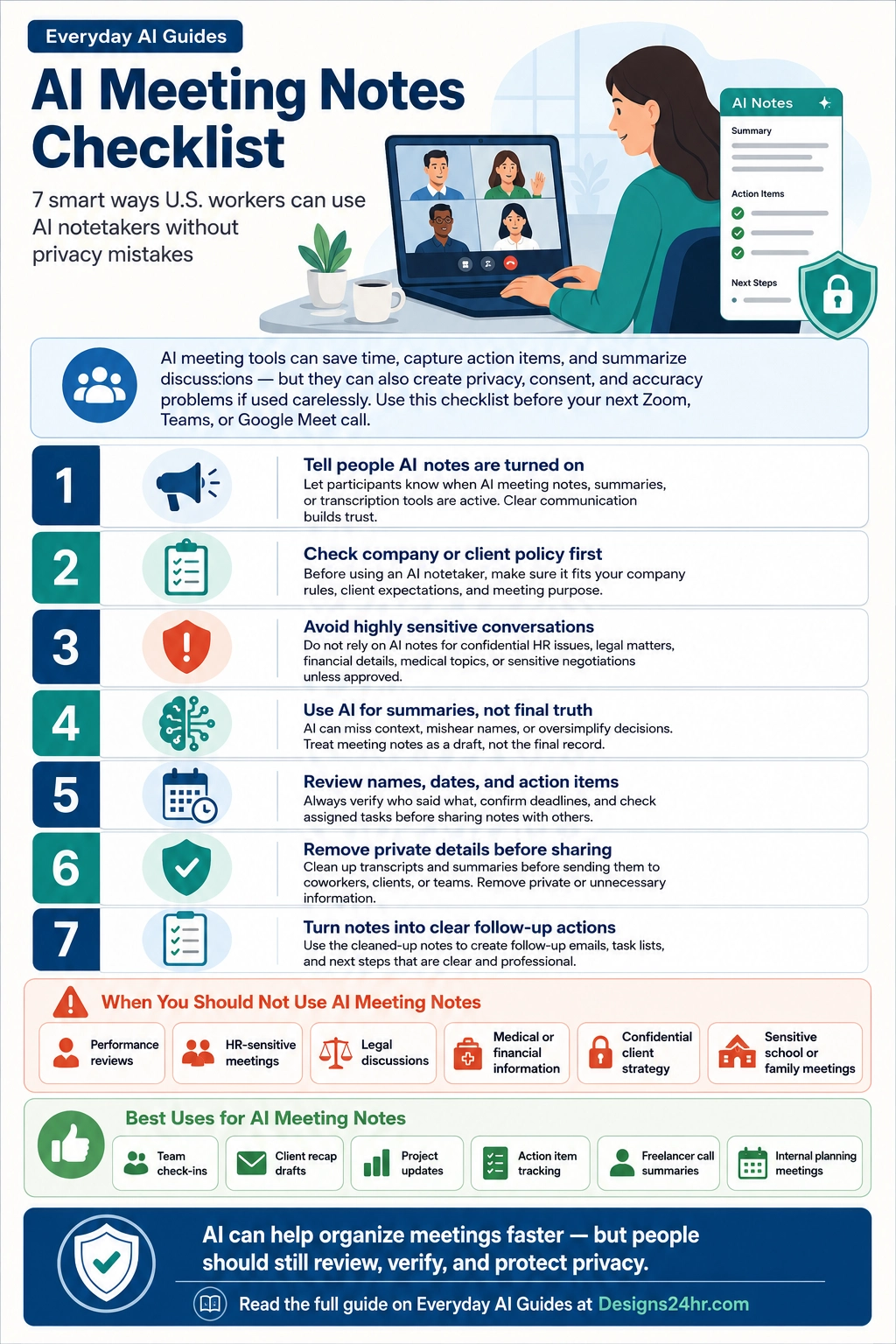
The safest way to use AI meeting notes is simple: tell people, follow policy, avoid sensitive details, review the summary, and clean it up before sharing. AI can help organize the meeting, but a person still needs to verify names, dates, decisions, deadlines, and next steps.
Trust note: This guide is not legal advice. Meeting rules, consent expectations, workplace policies, platform settings, and state-level requirements can vary. For sensitive work meetings, client calls, HR conversations, legal issues, financial details, or medical information, check your organization’s policy before using an AI notetaker.
What Are AI Meeting Notes?
AI meeting notes are summaries, transcripts, action items, decisions, follow-up tasks, or recap documents created by an AI meeting assistant. These tools may work inside platforms such as Zoom, Microsoft Teams, and Google Meet, or through a third-party AI notetaker that joins the call.
In simple terms, AI meeting notes try to answer questions like:
- What did we discuss?
- What decisions were made?
- Who owns each task?
- What deadlines were mentioned?
- What should be sent in the follow-up email?
That can be useful, especially when a meeting has many details. But AI does not always understand context, tone, private side comments, company policy, or what should stay out of the final recap.
Why AI Notetakers Are Becoming Common at Work
Many U.S. workers spend large parts of the week in meetings, email, chat, and follow-up tasks. AI meeting tools are popular because they promise to reduce the mental load after a call. Instead of trying to remember every point, workers can use AI to create a first draft of the recap.
Official tools now support this workflow in different ways. Zoom offers Meeting Summary with AI Companion. Microsoft Teams offers Copilot meeting help depending on meeting settings and transcription options. Google Meet offers “take notes for me” features that can organize meeting notes in Google Docs.
The benefit is clear: less manual note-taking and faster follow-up. The risk is also clear: if AI captures the wrong details, shares notes too broadly, or includes private information, the meeting summary can create confusion or trust problems.
Quick Answer: Should You Use AI Meeting Notes?
| Good Use | Risky Use |
|---|---|
| Team check-ins, project updates, internal planning, and routine client recaps. | HR-sensitive meetings, legal discussions, private financial details, or confidential negotiations. |
| Turning meeting notes into action items, deadlines, and follow-up emails. | Sending AI-generated summaries without checking accuracy, tone, or private details. |
| Using AI as a draft assistant after everyone understands the meeting note-taking process. | Quietly recording, transcribing, or summarizing a meeting without clear disclosure or approval. |
The 7-Step AI Meeting Notes Checklist
Use this AI meeting notes checklist before, during, and after any important work call. It is designed to help you use AI notetakers safely while keeping your meeting summary accurate, useful, and professional.
1Tell People AI Notes Are Turned On
Before using AI meeting notes, let people know that an AI notetaker, meeting summary, transcription feature, or AI assistant is active. This is especially important for client calls, interviews, team meetings, school-related meetings, coaching sessions, or any conversation where trust matters.
A simple sentence is enough for many routine meetings:
Clear disclosure helps people understand what is happening and gives them a chance to ask questions before the meeting continues.
2Check Company or Client Policy First
Some workplaces allow AI notetakers. Some limit them. Some require approval from a manager, IT team, legal department, school administrator, or client contact. Before using AI meeting notes, check whether your company, client, or organization has rules about recording, transcription, AI tools, or third-party apps.
This matters because a meeting may include internal strategy, customer information, employee details, pricing, contracts, security issues, or private business plans. Even if the AI tool is helpful, you still need permission to use it in the right setting.
- Check whether AI meeting summaries are allowed.
- Check whether third-party meeting bots can join calls.
- Check who can access the transcript or recap.
- Check whether notes are stored, shared, or attached to a calendar event.
- Check whether the meeting includes confidential information.
3Avoid Highly Sensitive Conversations
AI meeting notes are useful for normal productivity, but they are not the right fit for every conversation. Be extra careful with meetings that involve private, confidential, emotional, legal, medical, financial, or HR-related details.
In many cases, it is better to take manual notes or ask for approval before using AI. Sensitive meetings may include:
- Performance reviews
- HR complaints or workplace conflict
- Legal discussions or contract disputes
- Medical or financial information
- Confidential client strategy
- Private school or family meetings
- Internal security or access discussions
The goal is not to avoid AI forever. The goal is to know when a human-controlled note-taking process is safer.
4Use AI for Summaries, Not Final Truth
AI meeting summaries can be helpful, but they should not be treated as the final record without review. AI may mishear names, miss sarcasm, summarize a disagreement too strongly, combine two different points, or turn a casual idea into something that sounds like a final decision.
Use AI notes as a first draft. Then check the meeting summary like you would check an important email before sending it.
- Did the AI capture the real decision?
- Did it assign tasks to the right person?
- Did it confuse a deadline or meeting date?
- Did it leave out an important condition?
- Did it make a suggestion sound like a promise?
5Review Names, Dates, and Action Items
The most important part of an AI meeting notes checklist is the review step. Before sending a recap to coworkers, clients, contractors, students, parents, or vendors, verify the facts.
Check these details carefully:
- Names and roles
- Dates and time zones
- Project deadlines
- Client deliverables
- Prices, budgets, or numbers
- Assigned owners
- Decisions versus ideas
- Links, files, and attachments
For U.S. remote teams, time zones are a common mistake. A deadline discussed in Eastern Time may not mean the same thing for a teammate in Pacific Time. Do not let AI guess. Spell it out.
6Remove Private Details Before Sharing
AI meeting notes often include more detail than the final audience needs. Before sharing a summary, remove anything private, distracting, unnecessary, or not meant for the recipient.
For example, a client recap may need the final decision and next steps, but it may not need internal comments, budget concerns, side conversations, or early ideas that your team has not approved yet.
| Remove or Rewrite | Safer Final Version |
|---|---|
| “The client seemed frustrated and may cancel.” | “Follow up with the client to confirm concerns and next steps.” |
| “Internal price target is $4,800, but we may go lower.” | “Prepare revised pricing options for internal review.” |
| “Sarah missed the deadline again.” | “Confirm updated task owner and revised timeline.” |
For sensitive wording, you can use How Do I Say This? to rewrite a meeting recap in a clearer, calmer, and more professional tone.
7Turn Notes Into Clear Follow-Up Actions
The best AI meeting notes do not just summarize what happened. They help people know what to do next. After you review the summary, turn it into a clean follow-up email or task list.
A strong follow-up should include:
- A short thank-you or context line
- The main decisions
- Action items
- Task owners
- Deadlines
- Any open questions
- The next meeting or next step
For email follow-ups, start with the AI Email Reply Checklist, then use the AI Email Reply Generator to draft a professional meeting recap you can edit before sending.
When You Should Not Use an AI Notetaker
Do not use an AI notetaker just because it is available. Some meetings need extra caution, manual notes, or approval first.
- Performance reviews or employee discipline conversations
- HR complaints, workplace conflict, or private employee details
- Legal meetings, contract disputes, or attorney-client discussions
- Medical, insurance, tax, or financial conversations
- Confidential client strategy or unreleased business plans
- School meetings involving a child’s private information
- Meetings with passwords, security access, or sensitive customer records
If you are unsure whether AI notes are appropriate, pause first. You can use Decision Helper to think through whether the meeting should use AI notes, manual notes, or no notes at all.
Best Prompts for AI Meeting Notes and Follow-Ups
Use these prompts after the meeting, once you have removed private details and checked that the notes are safe to process.
Prompt 1: Turn Meeting Notes Into a Clean Summary
Prompt 2: Create a Client Follow-Up Email
Prompt 3: Check the Notes for Risky Details
Prompt 4: Simplify a Long Transcript
For long or confusing notes, use Explain This For Me to turn complicated meeting text into a clearer plain-language summary.
AI Meeting Notes Pros and Cons
| Pros | Cons and Limitations |
|---|---|
| Saves time after meetings by creating a first draft of the recap. | May summarize incorrectly or miss important context. |
| Helps capture action items, decisions, and deadlines. | May assign tasks to the wrong person if the conversation was unclear. |
| Useful for remote workers, freelancers, and busy teams. | May capture private comments or sensitive details that should not be shared. |
| Can help late joiners or absent teammates understand what happened. | May create trust concerns if participants did not know AI notes were active. |
| Makes follow-up emails and task lists easier to create. | Still requires human review before sending or storing. |
Privacy and Trust Tips for U.S. Workers
AI meeting notes work best when people know what the tool is doing and who can see the output. Before using an AI notetaker, think about the full path of the information: what the tool hears, what it summarizes, where the notes are stored, who receives them, and whether the content is appropriate for that audience.
- Disclose clearly: Let participants know when AI notes or transcription are active.
- Use approved tools: Follow company or client policy before inviting third-party notetakers.
- Limit access: Share the summary only with people who need it.
- Review before sending: Check names, dates, decisions, tone, and private details.
- Keep sensitive meetings separate: Avoid AI notes for HR, legal, medical, financial, or confidential discussions unless approved.
- Check platform settings: Understand how Zoom, Teams, Google Meet, or any AI assistant handles summaries, transcripts, storage, and sharing.
For more practical AI safety habits, explore the AI Safety, Privacy & Trust section on Designs24hr.
Helpful Designs24hr Tools After the Meeting
After your AI meeting notes are reviewed and cleaned up, these free Designs24hr tools can help you turn them into something useful.
Draft a follow-up email
Use the AI Email Reply Generator to turn confirmed meeting notes into a professional recap email.
Check your follow-up message
Use the AI Email Reply Checklist before sending important work, client, or customer replies.
Rewrite sensitive wording
Use How Do I Say This? when a recap needs to sound clear, calm, and professional.
Simplify confusing notes
Use Explain This For Me when a transcript or meeting summary feels too long or unclear.
You can also browse more AI productivity guides for U.S. workers or start from the full Everyday AI Guides hub.
Trusted Resources for AI Meeting Notes
These official resources can help you understand how major meeting platforms handle AI summaries, transcription, and AI note-taking features.
- Zoom Support: Using Meeting Summary with AI Companion
- Microsoft Support: Catch up on meetings with Microsoft 365 Copilot in Teams
- Google Meet Help: Take notes for me in Google Meet
- Google Workspace: AI note-taking in Google Meet
FAQs About AI Meeting Notes
What are AI meeting notes?
AI meeting notes are summaries, transcripts, decisions, action items, and follow-up points created by an AI meeting assistant from a call or recorded discussion.
Are AI meeting notes accurate?
AI meeting notes can be useful, but they are not always fully accurate. They may miss context, mishear names, summarize too broadly, or assign action items incorrectly. Always review them before sharing.
Should I tell people when AI notes are turned on?
Yes. For workplace trust, it is best to tell participants when AI meeting notes, transcription, or summaries are active, especially in client, HR, legal, financial, school, or sensitive conversations.
Can AI meeting notes replace human notes?
AI meeting notes can reduce manual note-taking, but they should not replace human review. Use them as a draft, then confirm decisions, deadlines, names, and private details.
When should I avoid using an AI notetaker?
Avoid AI notetakers in performance reviews, HR-sensitive meetings, legal discussions, medical or financial conversations, confidential client strategy calls, and private school or family meetings unless clearly approved.
What should I check before sharing AI meeting notes?
Check names, dates, deadlines, decisions, assigned tasks, private comments, sensitive details, and whether the summary is appropriate for everyone receiving it.
What are the best uses for AI meeting notes?
AI meeting notes work well for team check-ins, project updates, client recap drafts, freelancer calls, internal planning meetings, and action item tracking.
How can I turn AI meeting notes into a follow-up email?
First clean up the notes, remove private details, confirm action items, and then use the summary to draft a polite recap email with decisions, next steps, owners, and deadlines.
Final Thoughts
An AI meeting notes checklist helps U.S. workers get the productivity benefits of AI without treating the tool as automatic truth. AI can help summarize calls, organize action items, and draft follow-ups, but it still needs human judgment.
The best approach is simple: disclose when AI notes are active, follow company or client policy, avoid sensitive conversations when needed, review the summary carefully, remove private details, and turn only verified notes into follow-up actions.
Used carefully, AI meeting notes can help workers, freelancers, remote teams, and small business owners save time while protecting trust. Used carelessly, they can create privacy and accuracy problems. The checklist above helps keep the tool useful, professional, and safer.
Keep learning with Everyday AI Guides.
Explore more simple, USA-focused AI guides for work, school, family, productivity, online safety, and everyday digital tasks at Everyday AI Guides.