ChatGPT World Cup Updates Explained: How U.S. Fans Can Follow Matches, Teams, and What Results Mean
ChatGPT World Cup updates can help U.S. fans understand matches, teams, standings, storylines, and “what this result means” questions without getting lost in tables, time zones, or soccer jargon.
This guide explains how to use ChatGPT for World Cup 2026, what it can help with, smart prompts to try, and which live details you should still verify with official FIFA, broadcaster, ticketing, and travel sources.
Quick answer: ChatGPT World Cup updates can help fans ask about schedules, matchups, teams, players, country storylines, predictions, standings, and what different results mean. It is best used as an AI World Cup helper for explanations and context, while live scores, final results, tickets, travel rules, stadium details, and official schedule changes should still be checked with trusted official sources.
What are ChatGPT World Cup updates?
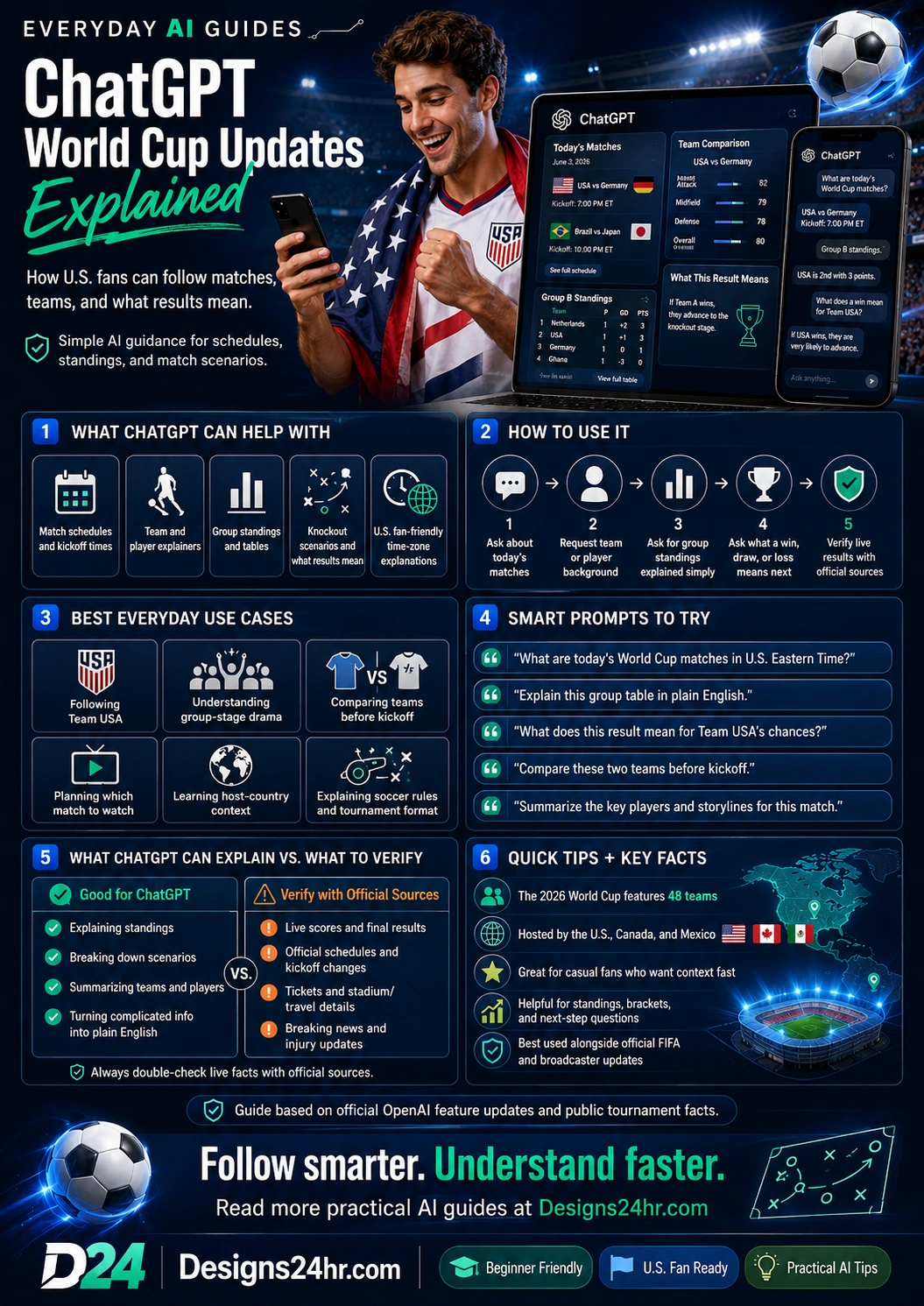
ChatGPT World Cup updates are a way to ask ChatGPT soccer questions in a more conversational format. Instead of only looking at a schedule or table, you can ask ChatGPT to explain what is happening, why a match matters, which players to watch, how a group table works, or what a win, draw, or loss could mean next.
OpenAI’s release notes say ChatGPT can help with World Cup schedules, matchups, teams, players, country storylines, predictions, and what different match outcomes mean. For casual fans, new soccer fans, and busy U.S. viewers, the biggest value is plain-English context.
Simple way to think about it
A sports app can show you the score. ChatGPT can help explain the story behind the score: what changed, why it matters, who benefits, what needs to happen next, and what to watch in the next match.
What ChatGPT can help U.S. fans understand
The 2026 World Cup is especially important for U.S. fans because the tournament is being hosted across the United States, Canada, and Mexico, with an expanded 48-team format. That creates more matches, more storylines, more group-stage scenarios, and more reasons fans may need quick explanations.
How to use ChatGPT for World Cup 2026
The best way to use ChatGPT as an AI World Cup helper is to ask specific questions. Instead of saying “Tell me about the World Cup,” ask for the exact thing you need: a match preview, standings explanation, team comparison, or result scenario.
5-step fan workflow
- Ask about today’s matches. Start with the schedule or the team you care about most.
- Request U.S.-friendly timing. Ask for kickoff times in your preferred U.S. time zone.
- Ask for simple context. Request a plain-English explanation of why the match matters.
- Ask what a result means. Use win, draw, and loss scenarios to understand the group or knockout impact.
- Verify live facts. Check official FIFA, broadcaster, stadium, ticket, or travel sources before making plans.
Copy this starter prompt:
Explain today’s World Cup matches for a casual U.S. fan. Include kickoff times in Eastern Time, why each match matters, one player to watch, and what result would change the standings.
Best everyday use cases for U.S. soccer fans
ChatGPT is most helpful when you want quick context before, during, or after a match. It can make the tournament easier to follow even if you do not watch soccer every week.
For extra help turning confusing information into plain English, use Explain This For Me. If you are deciding which match to watch or whether a plan is worth it, try the Decision Helper. For better soccer questions, the AI Prompt Generator can help you create clearer prompts.
Smart ChatGPT World Cup prompts to try
Good prompts make a big difference. Tell ChatGPT your team, your time zone, how much soccer knowledge you have, and whether you want a simple explanation or a deeper breakdown.
Daily match guide:
What are today’s World Cup matches in U.S. Eastern Time? Rank them by importance for a casual fan and explain why each one matters.
Group standings explained:
Explain this World Cup group table in plain English. Tell me who is likely to advance, what each team needs, and which match matters most next.
Team USA scenario:
What does this result mean for Team USA’s chances? Explain the win, draw, and loss scenarios in simple terms.
Team comparison:
Compare these two World Cup teams before kickoff. Give me strengths, weaknesses, key players, style of play, and what each team needs to do to win.
New fan explanation:
I am new to soccer. Explain this World Cup match like I am a casual U.S. sports fan. Keep it simple, exciting, and useful.
After-match recap:
Summarize this World Cup result in plain English. Explain what changed in the standings, who played well, and what happens next.
ChatGPT vs. official sources: what to use for what
ChatGPT can be excellent for understanding, summarizing, and explaining. But for live and official details, always check the source that controls or reports the official information.
| Need | Good for ChatGPT | Verify with official sources |
|---|---|---|
| Match preview | Team background, player storylines, style comparison, casual fan explanation. | Final lineup, injuries, suspensions, official kickoff time, broadcast schedule. |
| Group standings | Plain-English explanation of points, tiebreakers, and qualification scenarios. | Official FIFA tables and final results after each match. |
| Predictions | Context, possible outcomes, strengths, weaknesses, and what could decide the match. | Do not treat predictions as guaranteed results or betting advice. |
| Tickets and stadiums | Questions to ask, planning checklist, and what to consider before buying or traveling. | Official FIFA ticketing, stadium, hospitality, and local event information. |
| Travel planning | General planning checklist, documents to review, and questions to prepare. | U.S. Department of State, airlines, local authorities, hotels, and official event guidance. |
What to verify before trusting World Cup information
World Cup information changes quickly. Live scores, kickoff changes, injury news, ticket details, travel advisories, stadium rules, and broadcast schedules can update at any time. Use ChatGPT to understand what you are looking at, but verify action-critical details before you make plans.
Always verify these details
- Live scores and final results: Check official match centers or trusted live sports sources.
- Kickoff times and schedule changes: Confirm with FIFA, broadcasters, or official event pages.
- Tickets and hospitality: Use official FIFA ticketing and hospitality sources to avoid scams.
- Travel requirements: Review U.S. Department of State information and local guidance before travel.
- Stadium rules: Check official venue policies for bags, transportation, entry times, and prohibited items.
- Breaking injury or lineup news: Confirm with official team, FIFA, broadcaster, or trusted sports reporting sources.
Simple rule: Use ChatGPT for explanation, context, and planning questions. Use official sources for live facts, purchases, travel, tickets, stadium rules, and final decisions.
How ChatGPT can explain “what this result means”
One of the most useful World Cup questions is not just “who won?” It is “what does this result mean?” A single result can affect standings, goal difference, knockout matchups, and which teams still have a path forward.
Ask ChatGPT to explain results in this format
- Result summary: What happened in one or two sentences.
- Standings impact: How the table changed after the match.
- Qualification impact: Which team improved, which team is in danger, and who needs help.
- Next match to watch: Which upcoming match matters most because of this result.
- Plain-English takeaway: What a casual fan should remember.
If you feel overwhelmed after a surprising result, What To Do Next can help you turn the situation into a simple next-step plan, such as which match to watch next or what to check before making travel plans.
Tips for better World Cup questions in ChatGPT
ChatGPT works best when you give it context. Mention your team, your knowledge level, your time zone, and whether you want a simple summary or deeper analysis.
Better prompts get better answers
- Add your time zone: “Explain today’s matches in Pacific Time.”
- Say your fan level: “Explain this for someone new to soccer.”
- Name your team: “What does this result mean for Team USA?”
- Ask for scenarios: “What happens if they win, draw, or lose?”
- Request plain English: “Avoid jargon and explain the table simply.”
- Ask what to verify: “Which parts of this should I double-check with official sources?”
FAQs about ChatGPT World Cup updates
Can ChatGPT help with World Cup updates?
Yes. ChatGPT can help explain schedules, matchups, teams, players, country storylines, predictions, and what different match results mean. It is especially useful for turning soccer information into plain English.
How can U.S. fans use ChatGPT for World Cup 2026?
U.S. fans can ask ChatGPT for match previews, kickoff times in U.S. time zones, team comparisons, group standings explanations, knockout scenarios, player background, and simple explanations of soccer rules.
Can ChatGPT explain World Cup group standings?
Yes. You can paste or describe a group table and ask ChatGPT to explain points, goal difference, tiebreakers, who is likely to advance, and what each team needs in the next match.
Can ChatGPT predict World Cup matches?
ChatGPT can discuss possible outcomes, team strengths, weaknesses, and storylines, but predictions are not guaranteed. Do not treat AI predictions as betting advice or certain results.
Should I trust ChatGPT for live World Cup scores?
Use ChatGPT for explanation and context, but verify live scores and final results with official FIFA pages, broadcasters, or trusted live sports sources because match information changes quickly.
Can ChatGPT help me choose which World Cup match to watch?
Yes. Ask ChatGPT to rank matches by importance, star players, rivalry, group impact, knockout implications, or casual fan entertainment value.
Can ChatGPT help with World Cup travel planning?
ChatGPT can help you build a travel checklist and think through questions, but you should verify tickets, stadium rules, transportation, travel documents, safety guidance, and local requirements with official sources.
What should I verify outside ChatGPT?
Verify live scores, final results, official schedules, ticketing, hospitality, stadium rules, travel advisories, broadcast details, injuries, and lineup changes with official or trusted sources.
Helpful official sources
Use these official sources to verify current feature availability, tournament information, ticketing, and travel details.
Follow smarter. Understand faster.
ChatGPT World Cup updates can make the tournament easier to enjoy by explaining matches, teams, standings, and scenarios in plain English. Use it as your AI guide for context, then verify live and official details before acting.
For more beginner-friendly AI guides and simple free tools, visit Designs24hr.com.