ChatGPT Notes Explained: How to Turn AI Answers Into Organized Drafts and Ideas
ChatGPT notes can help you save useful AI answers, turn them into working drafts, and keep your best ideas easier to find later. Here is a simple beginner-friendly guide to using this workflow for school, work, planning, emails, and everyday productivity.
What are ChatGPT notes?
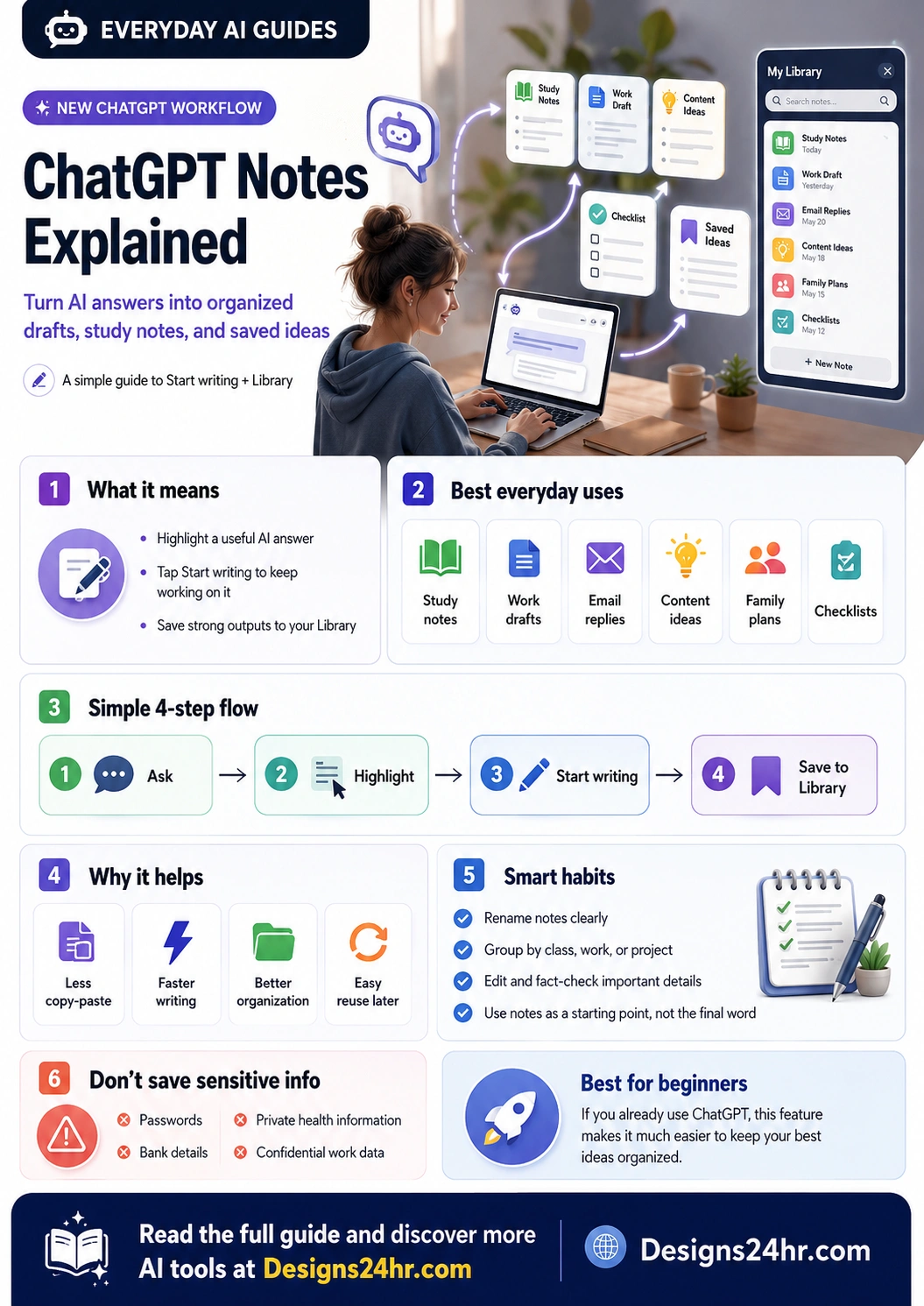
In this guide, “ChatGPT notes” means the new note workflow inside ChatGPT that lets you highlight useful text from a response and choose Start writing to keep working on it, or save it to your Library so you can return to it later. OpenAI described this as a web update that helps users create a note from a response in its official ChatGPT release notes.
That sounds small, but it solves a very real problem: ChatGPT often gives you a useful answer, but the answer can get buried in a long chat. Notes make it easier to turn a good answer into something more organized, reusable, and practical.
Best for drafts
Use ChatGPT notes when an answer is good enough to keep editing, rewriting, or turning into a polished document.
Best for saving ideas
Use the Library when you want to come back to study notes, content ideas, work plans, checklists, or useful explanations later.
Why ChatGPT notes matter for everyday users
Before this type of workflow, many people copied ChatGPT answers into Google Docs, Notes, Notion, email drafts, or random text files. That works, but it can become messy fast. You might forget where you saved the answer, lose the original context, or end up with several half-finished versions of the same idea.
ChatGPT notes can make the process smoother because they let you move from conversation to working note more naturally. Instead of treating every ChatGPT answer as temporary text, you can keep the parts that matter and build on them.
This is especially useful for:
- Students who want study notes, summaries, essay outlines, flashcard ideas, or simple explanations.
- Employees and freelancers who want to turn AI answers into reports, meeting notes, briefs, proposals, or email drafts.
- Small business owners who want reusable marketing ideas, customer reply templates, product descriptions, or weekly planning notes.
- Parents and families who want meal plans, travel checklists, school reminders, or simple explanations of confusing documents.
- Creators who want to save hooks, blog outlines, video ideas, captions, or content calendars.
How to use ChatGPT notes in a simple 4-step workflow
The exact interface can change over time, and some features may roll out gradually by account, plan, device, or region. But the basic idea is simple: ask, highlight, keep writing, and save what matters.
Ask ChatGPT for something useful
Start with a clear request. For example, ask ChatGPT to summarize a topic, draft an email, explain a confusing message, create a checklist, outline a blog post, or turn messy thoughts into a plan.
Highlight the strongest part of the answer
When ChatGPT gives a response, look for the section that is worth keeping. That might be a paragraph, list, outline, checklist, or draft you want to continue improving.
Choose Start writing
If the option appears for your account, use Start writing to keep working on the selected text. This is helpful when you want to expand a rough answer into something cleaner, longer, or more polished.
Save it to your Library
Save important outputs so you can return to them later. A saved note is more useful when you rename it clearly, group it by purpose, and edit it before relying on it.
Simple example: turning one ChatGPT answer into a useful note
Imagine you ask ChatGPT: “Help me plan a simple weekly study schedule for my biology exam.” ChatGPT gives you a full schedule, but the most useful part is a 5-day review plan. Instead of copying the whole chat, you can highlight that review plan, start writing from it, then save it as a note called “Biology Exam Study Plan.”
Later, you can return to the note, adjust the schedule, add textbook chapters, and remove anything that does not fit your class. That is the real value of ChatGPT notes: they help you turn a temporary answer into a reusable working document.
Best ways to use ChatGPT notes
ChatGPT notes are not just for writers. They are useful any time you want to save a strong answer and keep improving it.
| Use case | What to save | How to improve it later |
|---|---|---|
| Study notes | Summaries, definitions, quiz questions, essay outlines, and exam review plans. | Add class-specific terms, textbook references, teacher instructions, and your own examples. |
| Work drafts | Reports, meeting recaps, project briefs, proposal sections, and task lists. | Check details, add company context, remove anything confidential, and match your workplace tone. |
| Email replies | Professional replies, follow-ups, apology emails, customer responses, and polite decline messages. | Personalize the greeting, adjust the tone, confirm facts, and remove generic wording. |
| Content ideas | Blog outlines, YouTube hooks, caption ideas, newsletter drafts, and social post angles. | Add your brand voice, examples, sources, visuals, and a stronger call to action. |
| Family planning | Grocery lists, travel checklists, school routines, chore plans, and budget reminders. | Update names, dates, costs, locations, and real-life constraints before using it. |
How to write better prompts before saving notes
The better your original prompt is, the more useful your saved note will be. A vague prompt can create a vague note. A specific prompt can create something you can actually reuse.
Weak prompt:
“Make notes about time management.”
Better prompt:
“Create simple study notes for a busy U.S. college student who works part-time. Include a weekly planning method, a daily checklist, and mistakes to avoid. Keep it beginner-friendly.”
That second prompt gives ChatGPT a clear audience, purpose, structure, and tone. If you need help building stronger prompts, try the free AI Prompt Generator on Designs24hr before saving your final note.
Smart habits for organizing ChatGPT notes
Saving notes is only useful if you can find and understand them later. A few small habits can make your ChatGPT Library much more helpful.
1. Rename every important note clearly
A title like “Draft” or “Summary” will not help much later. Use a clear name such as “Client Follow-Up Email Draft,” “Biology Exam Chapter 4 Notes,” or “July Content Ideas for Instagram.”
2. Group notes by purpose
Think in categories: school, work, family, writing, business, personal planning, research, or content ideas. Even if the Library interface changes, clear naming makes searching easier.
3. Edit before you trust
AI-generated notes can be helpful, but they should not be treated as finished truth. Review facts, update details, remove filler, and add your own judgment before using a saved note for school, work, or public content.
4. Keep notes short enough to reuse
A saved note should be easy to scan. If a ChatGPT answer is too long, highlight only the section that matters most. You can always expand it later.
5. Add action words to titles
Titles like “Send,” “Study,” “Review,” “Rewrite,” “Plan,” or “Publish” make notes feel more actionable. For example: “Send: Follow-Up Email to Contractor” is more useful than “Email Draft.”
Important safety tip: do not save sensitive information
ChatGPT notes can make organization easier, but you should still be careful with what you save. Avoid saving passwords, bank details, private health information, Social Security numbers, confidential work files, legal documents with sensitive personal data, or anything you would not want stored in an online account.
For work or school accounts, follow your organization’s rules. If your employer, school, or client has a policy about AI tools, use that policy first.
What ChatGPT notes are good for and what they are not good for
ChatGPT notes are best for turning useful AI answers into editable, reusable working material. They are not a replacement for careful fact-checking, official records, private document storage, or professional advice.
Good uses
- Saving study summaries and checklists.
- Turning email drafts into reusable templates.
- Collecting content ideas and outlines.
- Organizing personal planning notes.
- Keeping helpful explanations for later.
Avoid using it for
- Storing passwords or financial account details.
- Saving confidential company data without permission.
- Keeping medical, legal, or tax decisions without expert review.
- Publishing AI text without checking accuracy and originality.
- Replacing your own judgment on important decisions.
ChatGPT notes for students
Students can use ChatGPT notes to turn long explanations into organized study material. For example, you can ask ChatGPT to explain a topic in plain English, highlight the best explanation, and save it as a note for review.
A good student workflow looks like this: ask for a simple explanation, ask for examples, ask for quiz questions, then save the final study version. Before using it, compare the note with your textbook, lecture slides, or teacher instructions.
If you paste a confusing paragraph from class material and want a simpler explanation first, use Explain This For Me or the Plain Language Translator to make the idea easier to understand.
ChatGPT notes for work and productivity
At work, the best use of ChatGPT notes is not to save everything. It is to save the parts that can become useful assets: meeting follow-ups, project summaries, email replies, checklists, onboarding notes, and recurring templates.
For example, if ChatGPT helps you draft a customer reply, save the useful structure but edit the details before sending. If it helps you create a task plan, save the checklist and update it with real deadlines, names, and priorities.
For fast everyday workflows, try the AI Daily Task Planner to organize your day, the AI Email Reply Generator to draft a better response, or How Do I Say This? when you need more tactful wording.
ChatGPT notes for creators and small business owners
Creators and small business owners often generate many ideas but lose the best ones in long chat threads. Notes can help you turn scattered AI answers into organized content plans, offer ideas, customer response templates, product descriptions, and campaign outlines.
A strong creator workflow is to ask ChatGPT for multiple ideas, highlight only the best few, start writing from them, then save the refined version to your Library. Later, you can use that saved note as the starting point for a blog post, video script, product page, or newsletter.
When you are deciding which idea to actually use, the Decision Helper and What To Do Next? tools can help you move from idea overload to a clearer next step.
Copy-and-use prompts for ChatGPT notes
Use these prompts when you want ChatGPT to create something worth saving as a note.
For study notes
“Explain this topic in beginner-friendly study notes. Include key terms, simple examples, common mistakes, and five quiz questions at the end.”
For work drafts
“Turn these rough notes into a clean professional draft. Keep the tone clear, organized, and practical. Add headings and a short action checklist.”
For email replies
“Draft a polite email reply based on this situation. Keep it professional, concise, and warm. Include a clear next step.”
For content ideas
“Turn these ideas into a simple content plan. Include titles, audience intent, key points, and a call to action for each idea.”
For personal planning
“Create a practical checklist for this task. Break it into steps I can complete today, this week, and later.”
Common mistakes to avoid
Saving too much
If you save every answer, your Library can become just as messy as your chats. Save only the parts you are likely to reuse.
Using generic titles
A note called “Ideas” is hard to find later. A note called “Back-to-School Newsletter Ideas for August” is much more useful.
Skipping fact-checking
AI answers can sound confident even when they need review. Fact-check names, dates, numbers, legal details, health information, and anything that affects money, safety, or public content.
Leaving private details inside notes
Before saving a note, remove passwords, account numbers, private personal details, and confidential client or company information.
Recommended Designs24hr tools to use with ChatGPT notes
These free tools can help you create better inputs before saving a note or improve the output after ChatGPT gives you a draft.
Frequently asked questions about ChatGPT notes
Are ChatGPT notes the same as saved chats?
No. A saved chat keeps the conversation. A note-style workflow is more useful when you want to pull out a specific answer, keep writing from it, or save a stronger output to return to later.
Can I use ChatGPT notes for school?
Yes, ChatGPT notes can help with study summaries, outlines, quiz questions, and review plans. Always compare the final note with your class material and follow your school’s AI policy.
Can I use ChatGPT notes for work?
Yes, but be careful with confidential information. Use notes for general drafts, checklists, summaries, and planning. Do not save private client data, passwords, financial details, or sensitive company information unless your organization allows it.
What should I save to my ChatGPT Library?
Save outputs you are likely to reuse: strong drafts, polished checklists, useful explanations, content outlines, study notes, project plans, and templates. Avoid saving random answers you will not need again.
Do I still need to edit ChatGPT notes?
Yes. Treat ChatGPT notes as a starting point, not a final answer. Review facts, improve the wording, add your own examples, and remove anything inaccurate or unnecessary.
Why do I not see the Start writing or Library option yet?
Feature availability can vary by account, device, plan, region, and rollout timing. Update your app or check ChatGPT on the web. If the option is not visible yet, you can still use the same idea manually by copying useful text into your preferred notes app.
Use ChatGPT notes to keep your best AI answers organized
ChatGPT notes are useful because they turn one good AI answer into something you can keep improving. Use them for study notes, drafts, checklists, email replies, content ideas, and planning—but always edit, fact-check, and protect sensitive information.
Explore more Everyday AI Guides