Shadow AI at Work Checklist: What U.S. Employees Should Check Before Using ChatGPT, Claude, Gemini, or Copilot
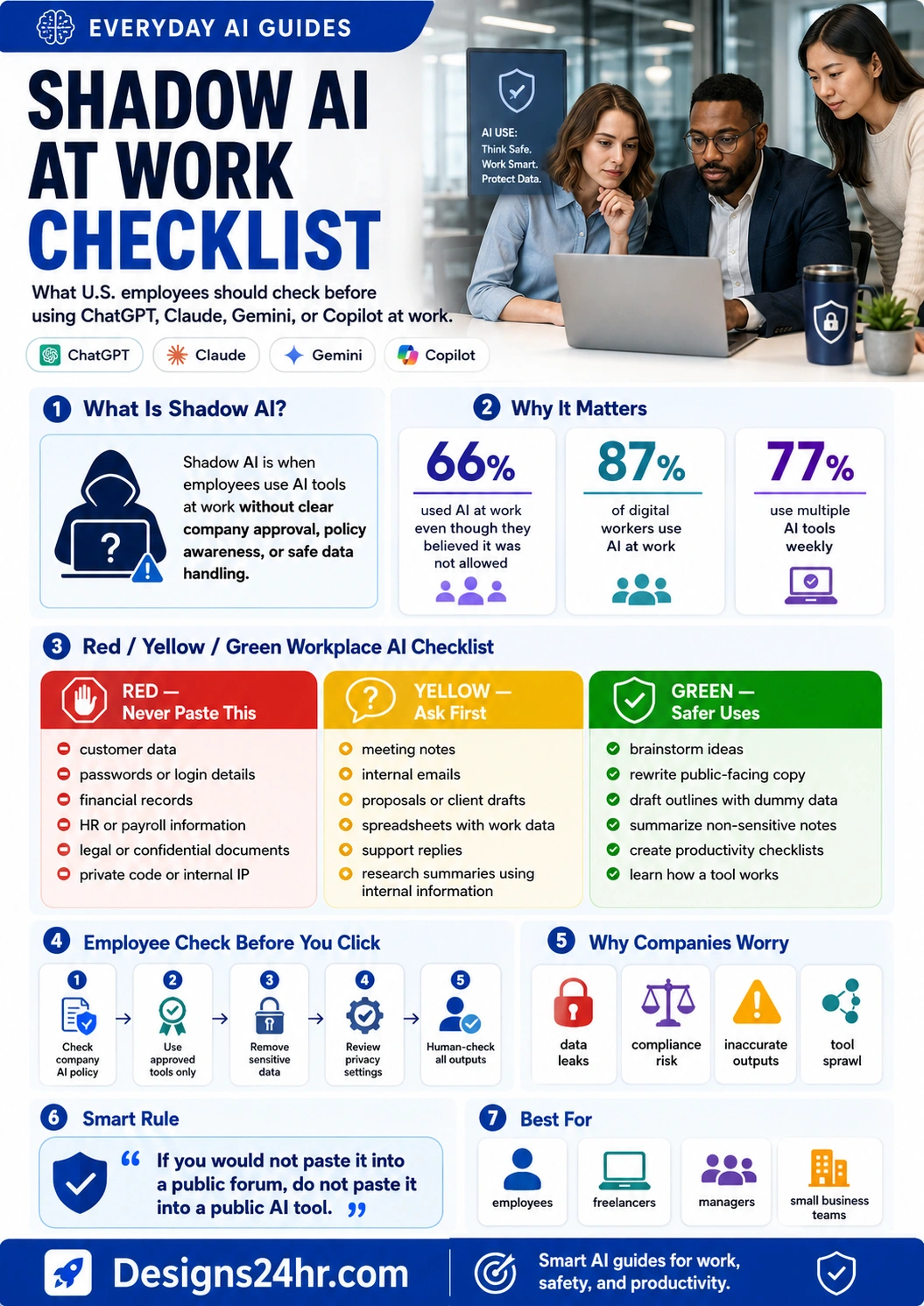
Shadow AI at work happens when employees use AI tools without clear company approval, policy guidance, or safe data handling. This checklist helps U.S. workers, freelancers, managers, and small business teams decide what is safe to use, what needs approval, and what should never be pasted into public AI tools.
Quick answer: Using AI at work is not automatically wrong, but using unapproved AI tools with company data can create privacy, security, legal, compliance, and job-policy risks. Before pasting work emails, customer data, spreadsheets, code, meeting notes, contracts, or internal files into ChatGPT, Claude, Gemini, Copilot, or another AI tool, check your company policy and remove sensitive information.
What Is Shadow AI at Work?
Shadow AI at work means employees are using AI tools without clear approval, visibility, or governance from the company. It may be as simple as an employee pasting an internal email into ChatGPT to make it sound better, uploading meeting notes into a public summarizer, or using a personal AI account to analyze customer data.
Many workers use AI because it saves time. The problem starts when the tool is not approved, the data is sensitive, the company policy is unclear, or the employee does not understand where the information may go.
Unapproved AI use
Employees use AI tools at work without clear permission, IT visibility, approved accounts, or company-approved data protections.
Sensitive data exposure
Work data may include customer details, employee records, financial numbers, confidential files, private code, or internal strategy.
Use AI with guardrails
Employees can still benefit from AI when they use approved tools, remove sensitive data, and keep humans in control of final outputs.
Why Shadow AI Is Becoming a Workplace Problem
AI tools are spreading faster than many workplace policies can keep up. Employees want speed, better writing, faster research, cleaner summaries, and less busywork. Companies want productivity too, but they also need privacy, security, compliance, and consistent work quality.
PagerDuty’s 2026 Shadow AI Survey found that 66% of office professionals have used AI tools at work even though they believed that use was not permitted under company policy. Glean’s 2026 Work AI Index also reports that 87% of digital workers use AI at work, 75% say it makes them more productive, but only 13% say AI has significantly improved their organization’s performance.
of office professionals reported using AI tools at work despite believing it was not permitted under company policy.
of digital workers use AI at work, according to Glean’s 2026 Work AI Index.
say AI has significantly improved their organization’s performance, showing a gap between personal productivity and company-wide results.
The takeaway is simple: AI at work is already here, but safer AI habits matter. The goal is not to shame workers for using useful tools. The goal is to avoid turning a productivity shortcut into a data leak, policy violation, or trust problem.
The Red-Yellow-Green Workplace AI Checklist
Use this red-yellow-green checklist before using ChatGPT, Claude, Gemini, Copilot, Perplexity, Notion AI, or any other AI tool for work. Red means do not paste it into public AI tools. Yellow means ask first. Green means the task is usually safer when no sensitive data is included and your company allows AI use.
Never Paste This
High risk unless your company explicitly approves the tool and use case.
- Customer names, contact details, account data, or support records
- Employee records, HR files, payroll details, or performance reviews
- Passwords, API keys, access tokens, private credentials, or security details
- Financial records, budgets, pricing sheets, forecasts, or revenue data
- Contracts, legal files, confidential documents, or private client emails
- Source code, internal product plans, proprietary algorithms, or trade secrets
Ask First
Potentially useful, but approval and data cleanup may be needed.
- Internal meeting notes, recordings, or transcripts
- Draft proposals, client messages, sales replies, or support responses
- Spreadsheets that include company, customer, or employee data
- Marketing plans, product roadmaps, strategy notes, or campaign ideas
- Research summaries using internal or non-public company information
- Anything that may be covered by contracts, NDAs, or compliance rules
Safer Uses
Usually safer when no sensitive data is included and your company allows AI use.
- Brainstorming general ideas without company secrets
- Rewriting public-facing copy after removing private details
- Creating outlines, checklists, templates, or task plans with dummy data
- Summarizing public information or publicly available sources
- Learning how a tool works or practicing a skill
- Drafting non-sensitive content that a human reviews before use
What Employees Should Check Before Using AI Tools
Before using AI for work, pause for a quick safety check. This takes less than a minute and can prevent serious mistakes.
Check company policy
Look for rules about approved AI tools, restricted data, disclosure, review, and allowed work use cases.
Use approved tools
If your company provides Copilot, an enterprise AI tool, or a secure internal assistant, use that instead of a personal account.
Remove sensitive data
Replace real names, emails, account numbers, pricing, code, customer details, and internal facts with dummy examples.
Review settings
Check data controls, chat history, sharing options, connected apps, file uploads, and whether the tool is approved for work.
Human-check output
AI can sound confident and still be wrong. Review facts, tone, calculations, code, legal wording, and final decisions.
What Company Data Should Never Go Into Public AI Tools
The safest rule is simple: if the information would not be safe in a public forum, it should not be pasted into a public AI tool. Even when an AI tool feels private, employees should treat work data carefully unless the company has explicitly approved that tool and workflow.
Do not paste these into public AI tools
- Customer data, client records, lead lists, account notes, or support tickets
- Employee information, HR records, medical details, payroll data, or performance reviews
- Company financials, pricing strategies, invoices, forecasts, budgets, or cost data
- Confidential emails, legal files, contracts, NDAs, or board materials
- Private source code, system architecture, product plans, or security details
- Unreleased marketing campaigns, launch plans, strategy decks, or internal research
- Anything marked confidential, restricted, internal-only, privileged, or sensitive
A practical workplace rule: When in doubt, remove the details, use a fake example, or ask your manager, security team, legal team, or IT team first.
Safer Ways to Use AI at Work
AI can still be useful at work when the task is general, non-sensitive, and reviewed by a human. Employees can use AI to save time without exposing private company data.
Safer workplace AI ideas
- Ask AI to create a checklist for a common work process.
- Use AI to rewrite a general paragraph after removing private details.
- Generate a meeting agenda template without adding real client names.
- Ask for general research questions before you do your own review.
- Create a first-draft outline for a public blog post, presentation, or training document.
- Use dummy data to test spreadsheet formulas, email structures, or project plans.
- Ask AI to explain a concept, tool, or workflow in simpler language.
ChatGPT, Claude, Gemini, and Copilot at Work: What to Check
Different AI tools can have different account types, privacy settings, enterprise versions, and data controls. The tool name alone is not enough. A personal account and an enterprise-approved account may have very different rules.
| Tool or Situation | Main Question | Safer Employee Action |
|---|---|---|
| ChatGPT | Is this a personal account or an approved company workspace? | Do not paste company data into a personal account unless your company policy clearly allows it. |
| Claude | Is this tool approved for company documents, emails, or files? | Use only non-sensitive examples unless your company has approved the workflow and data use. |
| Gemini | Is it connected to a work account, browser, email, Drive, or company files? | Check workspace settings, permissions, and company guidance before using internal content. |
| Copilot | Is this Microsoft Copilot for personal use or an approved business version? | Follow your organization’s Microsoft, security, and data-handling policies. |
| AI browser extensions | Can the extension read pages, emails, documents, or private work tabs? | Avoid unapproved extensions that can access work systems or sensitive browser content. |
| AI notetakers | Are meeting participants, recording rules, and company privacy policies being followed? | Use approved AI notetakers and disclose use when required by company or meeting rules. |
How Managers Can Reduce Shadow AI Without Blocking Productivity
Shadow AI often grows when employees see AI as useful but company rules feel unclear, unrealistic, or too slow. Managers can reduce risk by giving workers safe paths instead of only saying no.
What employees need
- A clear list of approved AI tools
- Simple examples of allowed and banned uses
- Guidance for sensitive data, client work, and file uploads
- Permission to ask questions without fear
- Training that shows safe prompts and common mistakes
What managers should provide
- Short AI policy summaries workers can actually understand
- Approved tools for common tasks like writing, summarizing, and research
- Data examples showing what must be removed before prompting
- Review rules for AI-generated work
- A feedback loop for useful AI tools employees already want
AI Sprawl: Why Too Many AI Tools Can Hurt Workflows
Shadow AI is not only a security problem. It can also become a workflow problem. When every employee uses a different AI tool, prompt style, account, extension, and workflow, teams can end up with duplicated work, inconsistent outputs, confusing approvals, and unclear data trails.
AI sprawl in simple terms
AI sprawl happens when too many disconnected AI tools spread across a company without a clear plan. Employees may feel individually faster, but teams may struggle with scattered tools, duplicated outputs, unclear standards, higher costs, and weaker collaboration.
The better approach is not “no AI.” The better approach is shared AI rules, approved tools, common workflows, safe data handling, and clear human review.
Simple Workplace AI Agreement
Use this as a basic employee mindset before using any AI tool at work. It is not a replacement for company policy, but it helps workers stay safer.
Employee Promise
- I will check company AI policy before using AI for work tasks.
- I will not paste sensitive company, customer, employee, or legal data into public AI tools.
- I will use approved tools when available.
- I will remove private details or use dummy data when possible.
- I will review AI output before sharing, sending, publishing, or making decisions.
Manager Promise
- I will explain AI rules clearly instead of assuming workers know them.
- I will help employees find safe AI workflows that improve productivity.
- I will give examples of what data is allowed, restricted, or banned.
- I will encourage questions before mistakes happen.
- I will update guidance as AI tools, risks, and company needs change.
Common Shadow AI Mistakes to Avoid
Many shadow AI mistakes happen because employees are trying to save time, not cause harm. Still, the impact can be serious if private information is copied into the wrong tool or AI-generated output is used without review.
Pasting real customer data
Use fake examples or anonymized information unless your company has clearly approved the tool and workflow.
Uploading internal files
Do not upload company documents, spreadsheets, contracts, decks, or code unless the tool is approved for that data.
Trusting AI output blindly
AI can make mistakes, invent details, or misunderstand context. Always check important claims, numbers, and decisions.
Skipping disclosure
If your company, client, teacher, editor, or manager requires AI disclosure, follow that rule clearly.
Using browser extensions without checking access
Some extensions can read page content, emails, documents, or work tabs. Ask before installing them on work devices.
Ask before risk
If the task involves private data, money, law, customers, HR, security, or contracts, pause and ask first.
Helpful Designs24hr Guides and Tools for Work
For more simple AI productivity and safety guides, explore Everyday AI Guides, especially AI for Work & Productivity, AI Safety, Privacy & Trust, and AI Tools & Beginner Guides.
For workplace meetings
Read the AI Meeting Notes Checklist to avoid privacy mistakes when using AI notetakers at work.
For AI agents
Read AI Agents Explained to understand how AI tools are moving from simple chat into multi-step work actions.
For safer drafting
Use the AI Email Reply Generator for general writing help, but avoid pasting private work data unless your company allows it.
For better prompts
Use the AI Prompt Generator to create safer, clearer prompts with dummy examples instead of sensitive data.
For content checks
Use the Title/Meta Previewer when preparing public-facing page titles and descriptions.
For AI search changes
Read Google AI Mode Explained to understand how AI search agents are changing online discovery.
Official and Reference Sources
AI policies, workplace tools, and privacy settings can change quickly. Employees should always follow their own company’s official policy first.
FAQ About Shadow AI at Work
What is shadow AI at work?
Shadow AI at work is when employees use AI tools without clear approval, visibility, policy guidance, or secure data handling from their company.
Is it wrong to use ChatGPT at work?
Not always. It depends on your company policy, the tool being used, the account type, the data involved, and whether the AI workflow is approved for work use.
What should I never paste into public AI tools at work?
Never paste customer data, employee records, passwords, API keys, financial information, confidential files, private code, legal documents, or internal strategy into public AI tools unless your company explicitly approves that use.
What work tasks are safer for AI?
Safer tasks include brainstorming public-facing ideas, rewriting non-sensitive text, summarizing public information, creating outlines with dummy data, making checklists, and learning how a tool works.
Can employees get in trouble for using unauthorized AI tools?
Yes. If company policy bans or limits certain AI tools, using them with company data can create privacy, security, legal, compliance, or disciplinary risk.
What is AI sprawl at work?
AI sprawl happens when employees and teams use too many disconnected AI tools without a clear workflow, governance plan, or shared company standard.
How can managers reduce shadow AI?
Managers can reduce shadow AI by providing clear policies, approved tools, safe examples, training, and a simple process for employees to ask questions before using AI with work data.
What is the safest rule for using AI at work?
If you would not paste the information into a public forum, do not paste it into a public AI tool. Use approved tools, remove sensitive data, and ask first when a task involves private or confidential information.