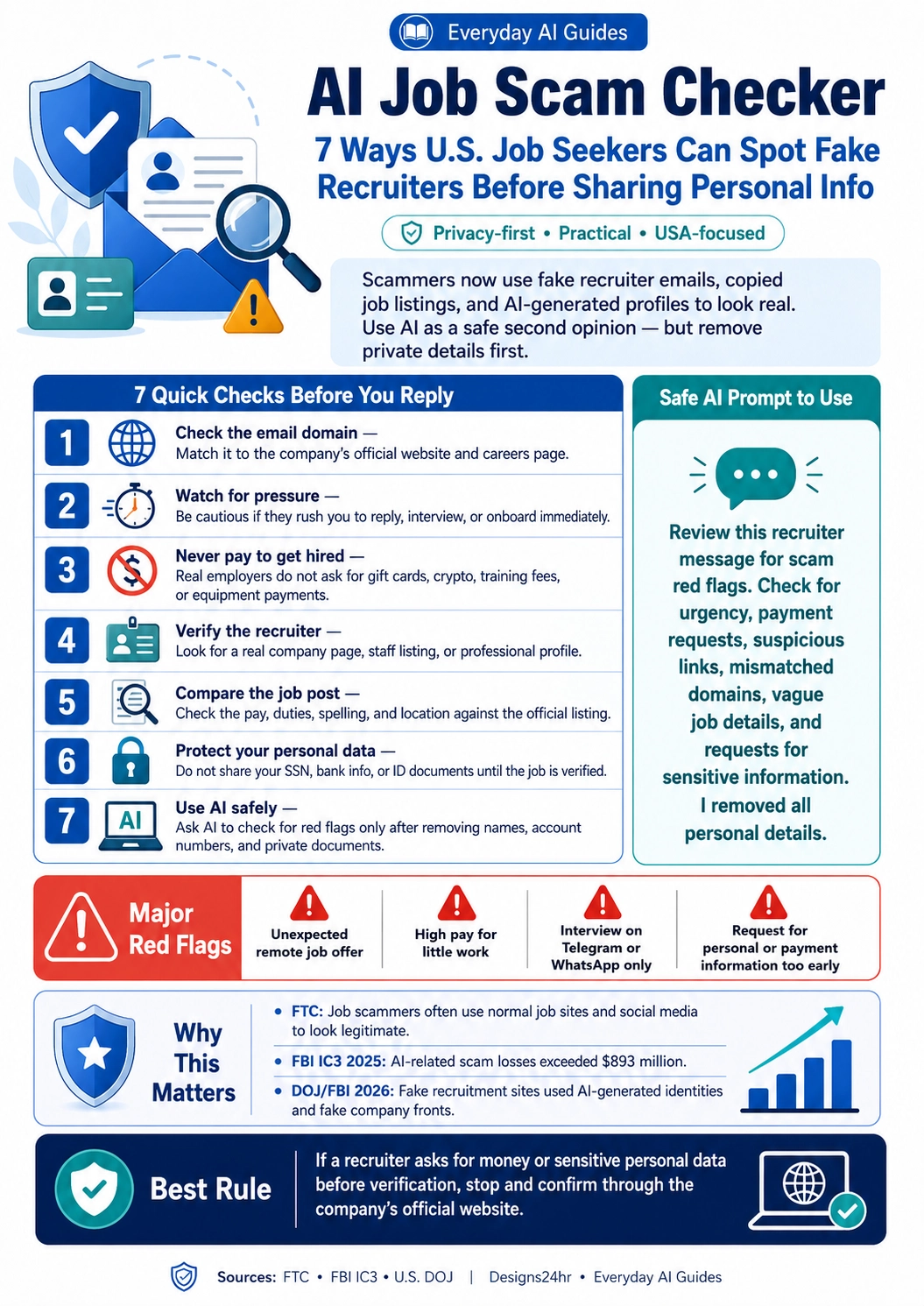
AI Job Scam Checker: 7 Ways U.S. Job Seekers Can Spot Fake Recruiters Before Sharing Personal Info
Fake recruiters are getting harder to spot. Scammers can copy real job listings, write polished emails, create convincing profiles, and pressure applicants into sharing money or private information too early. This guide shows you how to use AI as a safe second opinion while still verifying the job through official channels.
Last reviewed: June 18, 2026
Searching for work online should not feel risky, but fake job offers are now common enough that every U.S. job seeker needs a simple verification routine. Whether a recruiter contacts you by email, text, LinkedIn-style message, WhatsApp, Telegram, or a job board, the safest move is to slow down before you reply.
An AI job scam checker can help you review a message for red flags, but AI should never be your final proof. Use it to notice warning signs, then confirm the company, recruiter, email domain, job posting, and payment requests through official sources.
What Is an AI Job Scam Checker?
An AI job scam checker is a practical way to ask an AI tool to review a recruiter message, job offer, onboarding request, or remote work invite for warning signs. It can help you spot suspicious urgency, vague job details, unusual payment requests, mismatched domains, and requests for sensitive information.
The goal is not to let AI decide for you. The goal is to use AI like a careful second reader while you verify the opportunity through the company’s official website and trusted public sources.
7 Quick Checks Before You Reply to a Recruiter
Use this checklist before you send documents, complete onboarding forms, pay for anything, or share sensitive personal information.
- Check the email domain. Match the sender’s email domain to the company’s official website and careers page. Be careful with lookalike domains, extra words, misspellings, free email addresses, or links that redirect away from the company’s real site.
- Watch for pressure. Scammers often want you to reply quickly, interview immediately, complete onboarding today, or keep the opportunity secret. Real employers may move fast, but they should still give you clear details and official verification options.
- Never pay to get hired. Be extremely cautious if someone asks for gift cards, crypto, wire transfers, payment apps, training fees, background-check payments, equipment deposits, or “refundable” onboarding costs. A job that requires you to pay first is a major red flag.
- Verify the recruiter. Look for a real company profile, staff listing, official email address, or professional presence that connects the recruiter to the company. If the person cannot verify who they are through official company channels, stop.
- Compare the job post. Search the job title on the company’s official careers page. Compare the pay, duties, location, benefits, spelling, and application instructions. If the job appears only in a message but not on the company’s real site, be careful.
- Protect your personal data. Do not share your Social Security number, driver’s license, passport, bank information, direct deposit details, tax forms, or ID documents until the job is verified and you are in a legitimate hiring process.
- Use AI safely. Ask AI to check a cleaned-up version of the message for red flags. Remove names, addresses, links with tracking codes, account numbers, private documents, phone numbers, and any sensitive personal details before pasting.
Safe AI Prompt to Check a Recruiter Message
Copy this prompt only after removing your private details from the message.
Major Fake Recruiter Red Flags
One red flag does not always prove a scam, but multiple red flags together should make you pause immediately.
- Unexpected remote job offer for a role you never applied for.
- High pay for very little work or vague “task” assignments.
- Interview only through Telegram, WhatsApp, Signal, or text chat.
- Requests for gift cards, crypto, deposits, equipment payments, or “fees.”
- Email domain does not match the company’s real website.
- Job listing is missing from the official company careers page.
- Recruiter avoids video calls, phone calls, or official company email.
- They ask for your SSN, bank details, ID documents, or tax forms too early.
- They send links to unfamiliar forms or file downloads before verification.
- They pressure you to act immediately or keep the opportunity private.
How to Verify a Job Offer Online
Before you trust a recruiter message, use this quick verification process:
Fake Job Offer Examples and What to Check
| Message You Receive | Why It Might Be Risky | What to Verify First |
|---|---|---|
| “You are selected for a remote assistant job paying $45/hour. Reply today.” | High pay, vague duties, and urgency can be warning signs. | Check the company careers page and confirm the job through an official company contact. |
| “Buy this equipment first and we will reimburse you after onboarding.” | Paying money to get hired is a major scam pattern. | Do not pay. Ask for official HR verification through the company’s real website. |
| “Interview will happen only on Telegram. Do not call the company.” | Encrypted-app-only communication and secrecy are suspicious. | Confirm the recruiter through the official company domain or HR department. |
| “Send your SSN, driver’s license, and bank info before the interview.” | Sensitive personal information is being requested too early. | Stop and verify the offer. Do not share identity or banking documents before legitimacy is confirmed. |
Why This Matters for U.S. Job Seekers
Job scams are not limited to strange websites. The Federal Trade Commission warns that job scammers can appear through normal channels, including job sites and social media. The FBI’s 2025 Internet Crime Report also reported almost $13 million in losses tied to AI-involved employment scams.
In 2026, the U.S. Department of Justice and FBI announced action against fake recruitment-style websites that allegedly used job postings, fictitious personas, AI-generated photographs, encrypted apps, and payment tactics to collect sensitive information. That does not mean every recruiter message is suspicious, but it does show why job seekers should verify before trusting.
What Not to Share Before a Job Is Verified
Until you confirm that the company, recruiter, and job offer are legitimate, do not share:
- Social Security number
- Bank account or routing number
- Driver’s license, passport, or ID document scans
- Tax forms
- Home address
- Personal phone number if you are unsure who is contacting you
- Login codes, verification codes, or passwords
- Payment app details
- Private work documents from a current or former employer
If a recruiter asks for sensitive information before a verified offer and official onboarding process, treat that as a serious warning sign.
What to Do If You Already Replied
If you already responded to a suspicious recruiter, do not panic. Take the next step based on what you shared.
Helpful Designs24hr Tools for Job Seekers
After you verify that a job opportunity is real, you can use free Designs24hr tools to improve your application and communicate more clearly.
- Use the AI Resume Optimizer to improve resume bullet points for a legitimate job application.
- Use the AI Interview Coach to practice answers after the opportunity is verified.
- Use How Do I Say This? to write a polite message asking the recruiter to confirm details through an official company email.
- Use What To Say? to create a careful reply that does not reveal sensitive information.
- Use Explain This For Me to simplify a confusing recruiter message after removing private details.
Best Rule: Verify Before You Trust
If a recruiter asks for money, bank details, identity documents, or sensitive personal data before you can verify the job, stop. Confirm the opportunity through the company’s official website, official careers page, or official HR contact before taking the next step.
Frequently Asked Questions
What is an AI job scam checker?
An AI job scam checker is a safe way to use AI as a second opinion when reviewing a recruiter message, job offer, remote work invite, or onboarding request. It can help identify red flags such as urgency, payment requests, suspicious links, vague job details, and personal information risks.
Can AI tell me for sure if a job offer is fake?
No. AI can help identify suspicious patterns, but it cannot prove that a job is real. Always verify the company website, official careers page, recruiter email domain, and job listing through trusted sources.
What are the biggest fake recruiter red flags?
Major red flags include high pay for little work, interviews only through messaging apps, requests for gift cards or crypto, equipment-payment demands, mismatched email domains, and requests for Social Security numbers or bank details too early.
Is it safe to paste a recruiter email into AI?
Only paste a cleaned-up version. Remove your name, address, phone number, email, Social Security number, bank details, account numbers, private documents, and any attachments before using AI.
How do I verify a recruiter?
Check whether their email domain matches the company’s official website, search for the job on the company’s careers page, confirm the recruiter appears to be connected to the company, and contact the company through an official channel.
Should I pay for training, equipment, or onboarding?
Be extremely cautious. Real employers normally do not ask applicants to pay with gift cards, crypto, wire transfers, or personal payment apps to get hired.
What should I do if I already shared personal information?
Stop responding, save screenshots, contact your bank if payment details were shared, consider fraud alerts or credit freezes if sensitive identity details were exposed, and report the scam to the FTC or FBI IC3.
Sources and Further Reading
FTC: Job Scams
FTC: Job Scam Alerts
FBI IC3: 2025 Internet Crime Report
U.S. Department of Justice: Fake Recruitment Website Action
FBI: Cryptocurrency Job Scams