Microsoft Project Solara is Microsoft’s new platform direction for agent-first devices — a shift from “AI inside apps” to AI agent devices that could see, hear, understand context, and help people take action in real-world work environments.
Most AI tools today still live inside screens. You open an app, type a prompt, wait for an answer, copy the result, and then move to another tool to finish the job.
Microsoft Project Solara points to something different: AI agents built into purpose-made devices like desk companions, wearable badges, and workplace assistants. Instead of only helping inside an app window, these devices could support meetings, frontline work, healthcare workflows, retail tasks, field service, education, and enterprise operations.
This guide from Designs24hr explains Microsoft Project Solara in plain English: what it is, how AI agent devices work, why Microsoft is building beyond traditional apps, and what privacy, security, and human approval questions matter before agent-first devices become normal at work.
What Is Microsoft Project Solara?
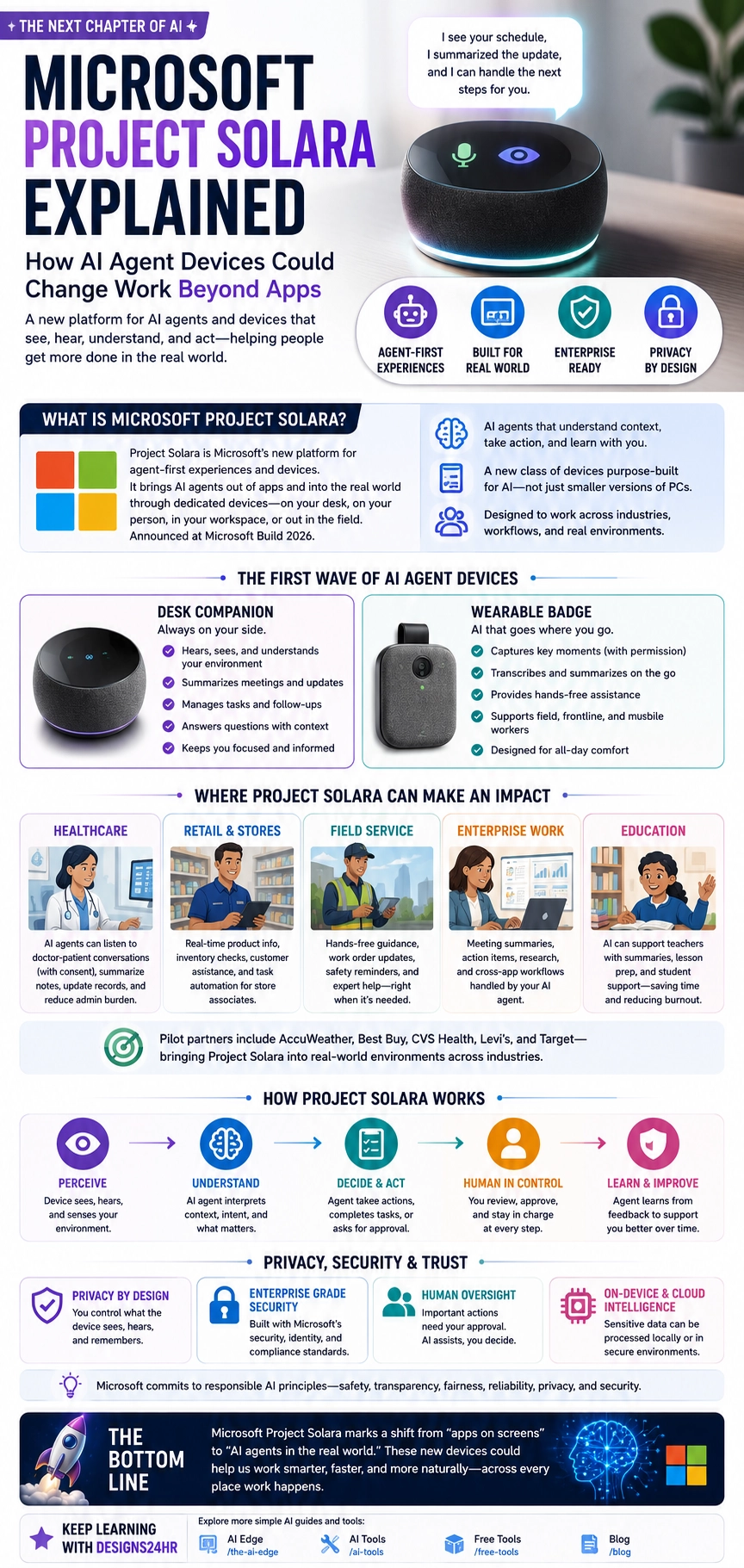
Microsoft Project Solara is a platform for agent-first experiences and devices. Microsoft describes it as a way to bring AI agents into physical devices that can support people in real-world environments, not just inside traditional software apps.
Instead of thinking about AI as a chatbot on a computer, Project Solara imagines AI as an always-available assistant inside new device formats. These devices may sit on a desk, travel with a worker as a wearable badge, or support teams in settings like hospitals, stores, factories, schools, homes, and field-work environments.
The simple idea behind Microsoft Project Solara is this: AI agents are moving from screens into spaces.
Simple example: Imagine a small desk device that can summarize your meeting updates, remind you about next steps, surface the right context, and ask for approval before taking action — without you opening five different apps.
Project Solara Explained: Why It Matters
Project Solara matters because it shows where AI work tools may go next. The first wave of workplace AI focused on chatbots, copilots, document tools, search, and productivity apps. The next wave may include Microsoft AI agent devices that live inside dedicated hardware and understand the environment around them.
That is a big shift. A normal app waits for you to open it. An agent-first device could be nearby, aware of context, and ready to help when work is happening.
This could change how teams handle meetings, customer support, store operations, healthcare conversations, logistics, field work, training, and everyday admin tasks.
What Does “Agent-First Device” Mean?
An agent-first device is a device designed around the AI agent as the main experience. Instead of running many traditional apps, the device is built so the AI agent can understand context, process input, suggest next steps, and help complete tasks.
That does not mean the device should act without permission. A strong AI agent device should keep humans in control, especially for sensitive, personal, financial, medical, workplace, or high-risk actions.
| Traditional App Device | Agent-First Device |
|---|---|
| You open apps one by one. | The AI agent helps connect tasks across the workflow. |
| You search, copy, summarize, and organize manually. | The agent can summarize, organize, and suggest next steps. |
| The device mainly responds to clicks and typing. | The device may use voice, screen context, sensors, or workplace signals. |
| Apps are the center of the experience. | The AI agent becomes the center of the experience. |
| The user switches between tools. | The agent helps reduce switching and keep work moving. |
Microsoft AI Agent Devices: Desk Companion and Wearable Badge
Microsoft has shown Project Solara through concept-style device ideas, including a desk companion and a wearable badge. These examples help explain what agent-first devices may look like in practice.
Desk companion
A desk companion could sit on a work surface and help with office tasks. It may assist with meeting summaries, schedule context, task follow-ups, workplace updates, reminders, and quick answers.
The value is not simply that it speaks. The value is that it could understand work context and help turn information into next steps.
Wearable badge
A wearable AI badge could support people who do not spend all day at a desk. That includes frontline workers, healthcare teams, field-service workers, retail associates, logistics teams, and mobile employees.
A badge-style device could help capture important moments with permission, summarize conversations, support hands-free workflows, and connect workers to the right information while they are moving.
Important distinction: These early devices are best understood as reference concepts and pilots, not normal consumer gadgets everyone can buy today. Microsoft Project Solara is more about the platform direction than a single finished product.
Where Microsoft Project Solara Could Help at Work
Microsoft has described Project Solara as useful across many real-world environments. The strongest use cases are places where people need fast context, fewer interruptions, better summaries, and safer task support.
Healthcare
In healthcare, an AI agent device could help summarize doctor-patient conversations with consent, reduce admin burden, surface relevant context, and support follow-up workflows. Human medical judgment would still remain essential.
Retail and stores
In retail, a wearable or store-based AI device could help associates check product information, inventory status, customer questions, task updates, and training guidance without leaving the customer interaction.
Field service
Field workers often need information while their hands are busy. AI devices could help summarize job notes, provide safety reminders, surface repair steps, document work, and connect workers to support.
Enterprise work
In offices, Project Solara-style devices could support meeting summaries, project updates, reminders, action items, calendar context, approvals, and workflow management.
Education
In schools or training environments, AI devices could support lesson preparation, administrative summaries, accessibility workflows, and staff coordination when used with clear policies and privacy controls.
| Environment | Possible Solara Use | Human Oversight Needed |
|---|---|---|
| Healthcare | Summaries, workflow notes, patient-context support, and documentation help. | Doctors, nurses, and staff must review all sensitive information. |
| Retail | Inventory support, product answers, task updates, and customer help. | Staff should approve customer-facing decisions and sensitive actions. |
| Field service | Repair steps, safety reminders, work summaries, and hands-free assistance. | Workers must verify instructions before acting in the real world. |
| Office work | Meeting summaries, action items, follow-ups, and schedule context. | Employees should review before sending, sharing, or approving anything. |
| Education | Staff workflows, planning help, summaries, and support tools. | Schools need clear privacy, student data, and usage policies. |
How Project Solara Works Conceptually
The easiest way to understand Microsoft Project Solara is to think of it as a five-step AI device workflow: perceive, understand, decide, ask, and act.
- Perceive. The device may use voice, screen context, sensors, or other approved inputs to understand what is happening.
- Understand. The AI agent interprets context, tasks, people, documents, schedules, or workflow signals.
- Decide. The agent suggests next steps, summaries, reminders, or task options.
- Ask for approval. For important actions, the human should review and approve before anything happens.
- Act. The agent helps complete the task, update a workflow, create a summary, or send information where it belongs.
This is why Project Solara is bigger than a voice assistant. It is not only about asking a question. It is about connecting AI agents to real work environments and giving them a device form that fits the job.
Why Microsoft Is Thinking Beyond Apps
Apps are powerful, but modern work often happens across too many apps at once. A worker may need Teams, Outlook, files, dashboards, customer records, notes, web tools, inventory systems, and task boards just to finish one workflow.
AI agents are valuable because they can help connect scattered information. Microsoft Project Solara extends that idea into hardware, where the AI agent can become a dedicated interface for work instead of another app buried in a browser tab.
That could be especially useful for workers who are not sitting at a laptop all day. Frontline workers, nurses, store associates, technicians, warehouse teams, and field-service employees need AI support that fits real movement, not just desktop screens.
Project Solara vs Smart Speakers
At first, Project Solara may sound like a smart speaker or voice assistant. But the real difference is enterprise context and workflow depth.
A normal smart speaker is built for simple questions, music, reminders, and home automation. Project Solara is designed around agent-first enterprise experiences, device management, workplace integration, and real-world business workflows.
That makes the privacy and security expectations much higher. A work device that sees, hears, summarizes, or acts needs strong controls, permissions, auditability, and governance.
Privacy, Security, and Trust Questions
AI agent devices can be helpful, but they also raise serious trust questions. A device that listens, sees, summarizes, or interprets workplace context must be designed with clear privacy and security rules.
Before any company uses AI agent devices, it should answer basic questions: What does the device capture? When is it active? Who can access the data? How long is information stored? Can people opt out? What actions require approval? How are mistakes reviewed?
Important: AI agent devices should never be treated as invisible workplace observers. People need clear notice, permissions, privacy controls, data protection, and human review before these devices become part of real work environments.
Smart safety questions to ask
- Does the device clearly show when it is listening, recording, or processing?
- What information is stored locally, and what is sent to the cloud?
- Can employees control or pause the device?
- What actions require human approval?
- Who can review summaries, transcripts, or insights?
- How are errors corrected?
- Does the system meet company compliance and security standards?
Human Approval Is the Key
The best version of Microsoft Project Solara is not an AI device that acts freely without oversight. The best version is an AI system that helps people move faster while keeping humans in control.
That means the AI can summarize a meeting, suggest next steps, draft a follow-up, or organize a task list. But before anything is sent, shared, ordered, approved, or changed in a business system, a person should review it.
This matters even more in healthcare, retail, finance, legal work, education, field safety, and enterprise operations. AI assistance can be useful, but accountability must stay with humans and organizations.
Best mindset: Project Solara should be seen as a human-support platform, not a human-replacement platform. The strongest use case is helping people understand faster, decide better, and act with more confidence.
Who Could Benefit From Microsoft Project Solara?
Microsoft Project Solara could matter most for organizations where workers need fast information in the moment and cannot afford constant app-switching.
- Frontline retail teams
- Healthcare staff
- Field-service technicians
- Warehouse and logistics teams
- Enterprise office teams
- Customer support teams
- Training and education teams
- Companies piloting AI agents in real-world operations
For everyday users, the main lesson is broader: AI is moving beyond the chat box. The next generation of AI may appear in devices around us, not only inside apps we open manually.
What Microsoft Project Solara Does Not Mean Yet
Microsoft Project Solara does not mean every office will immediately have AI agent devices on every desk. It also does not mean Microsoft is replacing Windows with AI hardware for everyone.
Right now, Project Solara should be understood as a platform direction, reference-device concept, and enterprise pilot ecosystem. The bigger point is that Microsoft is preparing for a future where AI agents need purpose-built devices, not only software windows.
That makes the topic important even if the devices are not mainstream yet. Many major tech shifts start as developer platforms, enterprise pilots, and reference designs before they become common consumer experiences.
The Bigger Shift: From Apps to Agent Ecosystems
Microsoft Project Solara is part of a bigger shift in AI: the move from individual tools to agent ecosystems. Instead of one app doing one thing, AI agents may coordinate tasks across calendars, messages, files, workflows, devices, and business systems.
When those agents move into physical devices, the experience changes again. AI is no longer only something you type into. It becomes something that can be present in the environment, support real-time work, and reduce the friction between information and action.
That future could be helpful, but only if it is built carefully. AI devices need trust, transparency, security, and human control from the start.
Keep learning with Designs24hr: For more practical AI explainers, explore our AI Tools hub. You can also read our guide to Perplexity Comet AI Browser to see how AI is changing the way people search, summarize, and act online.
Frequently Asked Questions About Microsoft Project Solara
What is Microsoft Project Solara?
Microsoft Project Solara is a platform for agent-first AI experiences and devices. It is designed to help bring AI agents into physical device formats such as desk companions, wearable badges, and workplace assistants.
Is Project Solara a normal Microsoft app?
No. Project Solara is not just another app. It is a platform direction for AI agent devices that can support real-world workflows beyond traditional screens and software windows.
What are AI agent devices?
AI agent devices are hardware products designed around AI assistants that can understand context, summarize information, suggest next steps, and help users complete tasks with human oversight.
What kinds of devices has Microsoft shown?
Microsoft has shown concept-style examples such as a desk companion and wearable badge. These examples help demonstrate how AI agents could support office, frontline, healthcare, retail, and field-work environments.
Can Project Solara devices act on their own?
AI agent devices may be able to suggest or assist with actions, but high-impact tasks should require human review and approval. Human control is essential for trust, safety, and accountability.
Who is Project Solara for?
Project Solara is mainly aimed at enterprise and real-world work environments such as healthcare, retail, field service, education, and office workflows where AI agents could reduce friction and improve support.
Is Project Solara available to consumers?
Project Solara is best understood as an enterprise platform and reference-device direction rather than a mainstream consumer product that everyone can buy today.
Why does Microsoft Project Solara matter?
Microsoft Project Solara matters because it shows AI moving beyond apps and browsers into physical devices that may support real-world work, meetings, customer service, healthcare, retail, and frontline tasks.
The Bottom Line
Microsoft Project Solara shows where AI work tools may be heading next: away from only apps on screens and toward AI agents inside purpose-built devices.
Desk companions, wearable badges, and workplace AI devices could help summarize updates, support tasks, answer questions, assist frontline workers, and reduce app overload. But this future only works if privacy, security, consent, and human approval are built into the experience from the start.
At Designs24hr, we believe the future of AI should make work smarter without making people feel watched or replaced. Microsoft Project Solara is an important signal: AI is becoming more physical, more contextual, and more connected to real work. Share your thoughts in the comments, and come back to Designs24hr whenever you want to learn something new about AI and design.
Sources: This article is based on Microsoft’s official Project Solara Build 2026 announcement, Reuters coverage of Microsoft’s AI-driven devices at Build 2026, and The Verge coverage of Project Solara as an AI agent device platform.